Start with Maestro Deck’s free, source-available local desktop runner to write and inspect your YAML end-to-end flows; choose cross browser testing tools against an explicit browser coverage matrix, not a feature list. Define each required browser environment, the user journeys it must pass, and the evidence you need before release; add optional cloud execution when your workflow needs CI or broader execution capacity.
- Maestro Deck is best for developers writing and inspecting YAML end-to-end flows locally.
- Choose cross browser testing tools against a browser coverage matrix, not an unsupported promise of universal coverage.
- Browser compatibility testing needs explicit browser, operating system, execution environment, and user-journey requirements.
- Add cloud execution for CI or scale; keep local authoring separate from hosted execution.
How do cross browser testing tools build a browser coverage matrix?
A browser coverage matrix connects a required environment to a test flow, an execution trigger, and a release decision. A tool executes part of that plan. It does not decide which combinations your application must support.
Use Maestro Deck for the local YAML authoring and inspection workflow. Then check the documented execution support for every environment your matrix requires. Support for web flows does not establish support for every browser, operating system, or physical device.
Build your 2026 matrix in this order:
- Define support. List the browser and operating-system combinations you commit to supporting.
- Select journeys. Attach release-critical user flows to those combinations.
- Choose execution. Specify local, CI, or hosted execution for each row.
- Collect evidence. Record the result and the actual environment used.
- Decide release. Give each failure an owner and a release rule.
Keep the matrix in version control beside the tests. Changes to support policy should produce changes to test coverage, not a separate spreadsheet nobody checks.
Why this matters
A passing test proves that a particular flow passed in a particular environment. It does not prove that your application works in every environment your customers use.
That distinction matters when you combine mobile and web testing. A native-app flow, a browser flow, and a flow through an embedded web view exercise different contexts. Treat them as separate coverage requirements rather than interchangeable evidence.
For your 2026 release workflow, make the scope visible before choosing another service. Otherwise, a green build can conceal an untested browser combination, while a large test suite can repeat the same journey without covering the actual gap.
Start with a matrix you can maintain
Use the table below as a template, not a claim about any tool’s browser support. Replace each descriptive row with the exact environments in your support policy.
| Coverage row | Best for | Required environment details | Run trigger | Main trade-off |
|---|---|---|---|---|
| Local development check | Debugging a changed journey | Browser, version, operating system, execution mode | Relevant code change | Fast access to debugging context, but limited to the configured environment |
| Release browser check | Enforcing supported-browser commitments | Each supported browser and operating-system combination | Release candidate | Direct release evidence, but more combinations to maintain |
| Mobile browser check | Testing the web experience on mobile | Browser, operating system, viewport, physical or simulated environment | Relevant mobile-web change and release candidate | Covers mobile-web behavior, but does not establish native-app coverage |
| Hosted CI check | Running defined journeys outside the developer desktop | Documented hosted environment and resolved version | Configured CI event | Central execution, but requires environment and artifact handling |
Do not enter only a browser family. Record enough detail to reproduce a failure: the browser version actually used, the operating system, the application build, and the execution mode.
Keep viewport size separate from the device environment. Resizing a desktop browser tests a layout condition; it does not turn that browser into a physical phone. Likewise, an emulator or simulator result is not physical-device evidence.
Leave an unsupported combination visibly uncovered. Substituting a different environment without changing the row creates false confidence.
Build the coverage workflow
Define support
Start with a written support policy and observed usage where you have it. Separate environments you promise to support from environments you are investigating.
Use product requirements to settle conflicts. A contractual browser commitment belongs in the matrix even when it is absent from a short analytics window. An exploratory environment can remain outside the release gate until the team explicitly adopts it.
For each row, assign an owner who can answer why it exists. If nobody can explain its user or business requirement, review the row before expanding the test suite around it.
Select journeys
Choose flows that represent successful user outcomes. Examples include signing in, submitting a form, changing a setting, or completing a purchase when those actions exist in your application.
Describe the outcome before the automation steps. A form-submission test should establish that the submission succeeded, not merely that the submit control accepted an interaction. Use assertions that match the product’s behavior.
Keep shared journeys separate from browser-specific regressions. The shared journey belongs across its required environments; a targeted regression belongs where the defect and support requirement justify it. This keeps the matrix readable without hiding known compatibility failures.
Choose execution
Make local authoring your first debugging loop. Run the affected flow where you can inspect the failure, correct the interaction or assertion, and repeat the test.
Then select the execution environment for each release row. Verify the browser, operating system, version controls, and available evidence against current documentation before treating a runner or hosted service as a match.
Do not infer hosted support from local support. A desktop workflow and a hosted execution service have different environment boundaries, even when they accept related test files.
Collect evidence
Attach results to the application build and the resolved environment. Preserve the failing step, assertion outcome, and relevant artifacts that your execution setup actually provides.
Avoid a report that records only pass or fail. A useful failure report lets another developer identify the tested build, repeat the setup, and distinguish an application defect from a setup failure.
Record retries separately from the initial result. A retry that passes is evidence of inconsistent execution, not a reason to erase the first failure.
Decide release
Define which matrix rows block release before the release candidate runs. Give exploratory rows a different status so investigation does not become an accidental release policy.
Assign ownership to failures. Application behavior, test implementation, environment configuration, and test-data setup require different fixes.
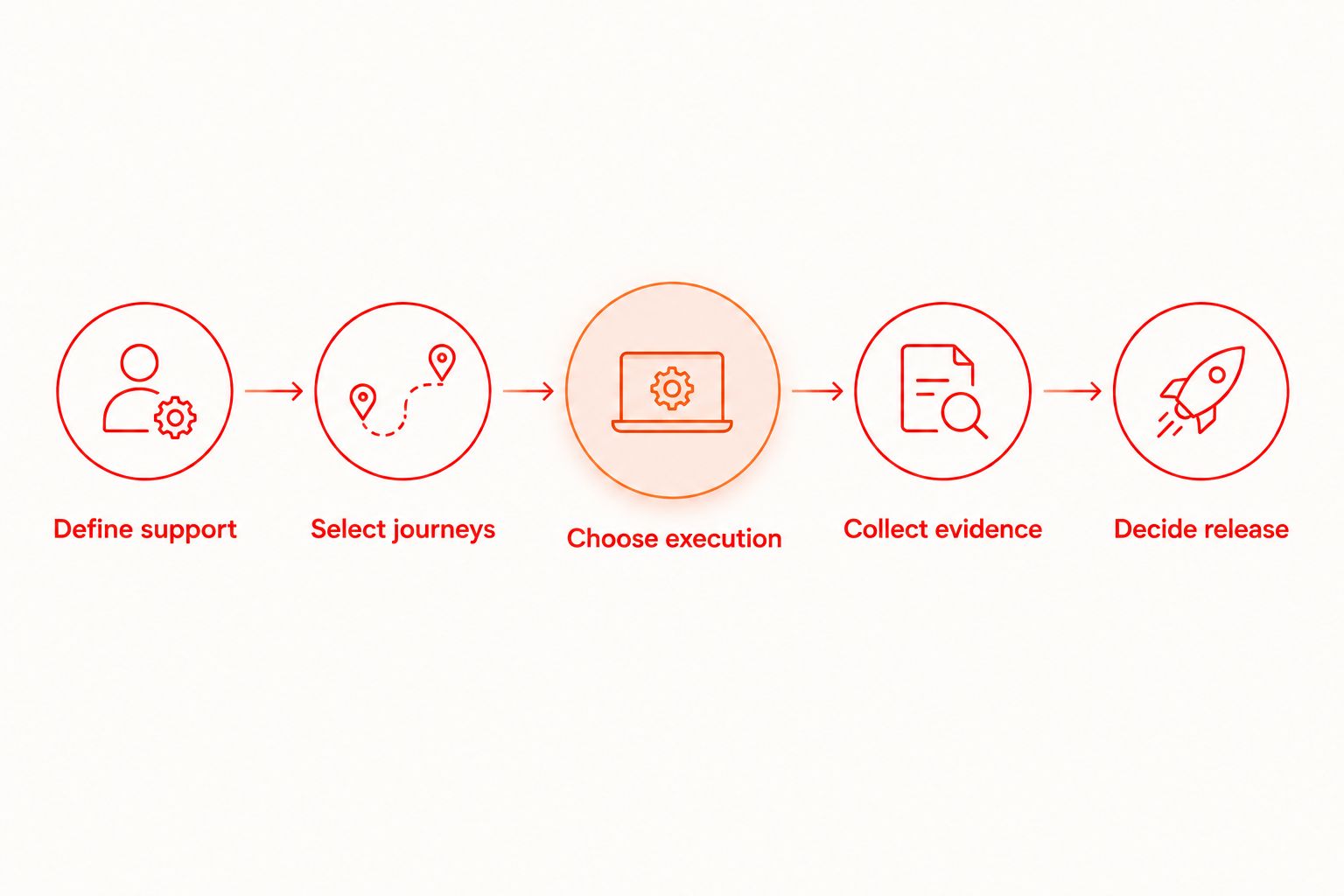
The workflow ends with a decision, not a dashboard. A release gate needs an explicit rule for a failed required row and a documented way to approve an exception.
Local execution versus hosted execution
Local and hosted execution solve different workflow problems. Compare them against your matrix instead of treating cloud execution as the automatic next step.
| Execution approach | Best for | Advantage | Limitation | What to verify |
|---|---|---|---|---|
| Local desktop execution | Writing, inspecting, and debugging flows | Keeps the editing and execution loop on your machine | Your local environment is not the entire browser matrix | Supported local targets and reproducible setup |
| Hosted execution | CI-triggered runs and execution capacity | Moves configured runs away from a developer’s desktop | Adds remote setup, credentials, and artifact handling | Exact browser environments, CI integration, and result access |
Keep local development usable independently of cloud adoption. The free desktop workflow does not require a paid cloud plan or a cloud account.
When comparing services for a 2026 rollout, separate authoring features from execution features. An inspector helps you create or debug a flow; browser-environment support determines whether an execution row is covered. Neither substitutes for the other.
The Maestro framework and Maestro Deck are distinct names. Maestro Deck provides a desktop runner and inspector for Maestro YAML flows; that description does not establish affiliation or make either name interchangeable with a hosted service.
Start with local flows
Write and inspect YAML flows locally. Add optional cloud execution when CI or scale requires it.
Why browser coverage varies
Coverage requirements vary with the application and its support policy. Keep these drivers explicit in your 2026 planning:
- Supported environments. A browser and operating-system combination needs its own documented requirement; a browser-family label is insufficient.
- Application surfaces. Native screens, browser pages, and embedded web views require different test contexts.
- Critical journeys. Authentication, navigation, forms, and other release-critical interactions determine what each row must exercise.
- State and test data. Permissions, authentication state, and account data affect whether a flow tests the intended behavior.
- Execution constraints. Local setup and hosted environment support determine where a required row can run.
- Release rules. Blocking coverage and exploratory coverage need different ownership and failure handling.
A matrix should explain these choices. Adding rows without explaining their purpose increases maintenance work without establishing a clearer release decision.
How do you handle browser versions without a stale matrix?
Use a version policy and record the version actually executed. A moving label such as the current stable browser is a policy choice, not a reproducible result by itself.
For 2026 release records, preserve the resolved version alongside the build and test outcome. When a browser update exposes a defect, that record helps distinguish the change from an application regression.
Review version policy when your support commitments change. Do not silently remove an environment because a runner stopped providing it; mark the gap and choose a replacement execution path or update the support policy explicitly.
Should every browser run every end-to-end flow?
Run each release-critical journey across the environments where your support policy requires it. Add broader coverage when a specific requirement or regression justifies the work.
Use a focused smoke suite to make the release gate understandable. The release smoke suite guide provides a related starting point for organizing mobile-app checks; keep browser-specific coverage requirements separate.
Do not confuse a smaller suite with weaker assertions. A focused flow still needs to establish its promised outcome. Repeating loosely asserted interactions across more environments does not fix the underlying test.
How do you distinguish a browser defect from a test defect?
Reproduce the failure in the same recorded environment before changing the test. Compare the expected application outcome with the failed interaction or assertion.
Check setup independently: application build, account state, permissions, and network prerequisites. Then inspect whether the application behaved incorrectly or the automation addressed the wrong element or state.
Fix the cause, not the color of the report. Increasing waits or accepting a retry without understanding the failure can leave the compatibility problem unresolved.
FAQ
What's the best way to choose cross browser testing tools?
Choose cross browser testing tools by matching documented execution support to your required browser coverage matrix. Verify each browser environment, CI requirement, and available failure evidence before adopting a tool.
Can I start testing locally without a cloud account?
Yes. Maestro Deck provides a free local desktop runner and inspector for Maestro YAML flows; local use does not require a cloud account or a paid cloud plan.
Does web testing support mean every browser is covered?
No. Web testing support does not establish support for every browser, operating system, or device environment. Verify each required matrix row against the execution environment's current documentation.
Is resizing a browser the same as testing on a phone?
No. Resizing a desktop browser checks a viewport condition, not a physical phone environment. Record viewport coverage and device-environment coverage separately.
Should I move all my tests to hosted execution?
No. Keep local execution for authoring and debugging, and add hosted execution when CI or execution capacity requires it. Verify that the hosted environment matches the rows you intend it to cover.
Is source-available software the same as open-source software?
No. Source-available describes access to source code, while open-source licensing must satisfy open-source licensing criteria. Read the actual license before assuming rights to use, modify, or redistribute the software.
What should I record when a browser test fails?
Record the application build, browser version, operating system, execution mode, failed step, and assertion outcome. Keep available artifacts and retry results attached so another developer can investigate the same failure.
One last thing
An uncovered row is more useful than a misleading green row. If an environment is required but untested, show that gap directly rather than counting a different browser, viewport, or simulator as equivalent evidence.
Before your next release, review the matrix beside the results. Ask whether each passing result proves the requirement written in its row. If the answer is no, change the test or the coverage claim before changing the tool.