
Start with Maestro Deck’s free local desktop runner to write, execute, and inspect Maestro YAML end-to-end flows; choose selectors that identify a control’s purpose rather than its position. When evaluating ui testing tools in 2026, favor selectors that remain unambiguous after a layout change, and treat paid cloud execution as an optional next step for CI or scale—not a requirement for local testing.
- Maestro Deck is best for developers and QA engineers writing and inspecting Maestro YAML end-to-end flows locally.
- Evaluate ui testing tools on selector stability, accessibility inspection, and failure diagnosis—not only successful test execution.
- Prefer stable identifiers for identity; use visible labels when wording is part of the behavior under test.
- Keep local debugging separate from the decision to add cloud execution to your release workflow.
UI testing tools: choose selectors that survive layout changes
Choose a selector that describes what a control is, not where the designer placed it. A checkout action should still mean checkout after the screen gains a banner, the keyboard opens, or the button moves into a different container.
Start your evaluation with the Maestro Deck local desktop runner. Then inspect the controls your application exposes and choose a selector strategy before expanding your test suite. A runner executes the flow; your application and test code establish the identity contract.
The following comparison applies to selector strategies, not a claim that every runner supports every strategy. Check the selected tool’s current documentation and inspect the actual application before choosing syntax.
| Selector strategy | Best for | Strength | Trade-off |
|---|---|---|---|
| Stable application identifier | Actions whose identity should outlast redesigns | Separates control identity from layout and wording | Requires application-side naming and maintenance |
| Accessible role and name | Checking user-facing semantics where supported | Connects the test to the control’s exposed purpose | Repeated names and wording changes require care |
| Visible text | Verifying labels, messages, and content | Expresses wording expectations directly | Localization and copy edits change the match |
| Parent-scoped match | Distinguishing repeated controls | Connects an action to its relevant item or section | A structural parent can become another brittle dependency |
| Position or hierarchy path | A constrained fallback without a semantic target | Can address an otherwise unidentified element | Reordering or restructuring can change the target |
| Screen coordinates | A constrained interaction without an exposed element | Addresses a location directly | Screen size, scrolling, and layout affect that location |
None of these strategies replaces an assertion. Finding and activating a button proves only that the interaction happened. Your flow must also verify the resulting state.
Why this matters
A layout change and a behavior regression are different events. Moving a working control should not break a behavioral smoke test; removing its accessible name or changing its action can deserve a failure.
That distinction matters when you add end-to-end tests to a release workflow. A failing test should direct you toward an application defect, a changed requirement, or a broken test contract—not leave you guessing which button a coordinate selected.
For your 2026 release suite, define that contract before choosing how much execution infrastructure to add. Running the same ambiguous selector in more environments does not make the selector clearer. It creates more places to investigate the ambiguity.
Stable identifiers: separate identity from presentation
A stable identifier names a control’s role in the application. Keep that identity independent of its current color, placement, surrounding container, or promotional wording.
For example, a checkout action needs an identity that survives a visual redesign. Naming it after its current appearance ties test maintenance to presentation. Naming it after its business purpose gives the application team a clearer contract to preserve.
Best for: actions whose purpose stays the same while their presentation changes. The advantage is independence from copy and layout. The cost is maintaining identifiers deliberately rather than treating them as disposable implementation details.
Use these rules when reviewing identifiers:
- Name the action or state, not the appearance.
- Keep the identifier unchanged when the same action moves.
- Give distinct actions distinct identities.
- Define how repeated instances are distinguished.
- Review identifier changes alongside the tests that use them.
An identifier is not stable simply because it exists. If a build generates a different value or a component assigns the same identifier to unrelated controls, the test still lacks a dependable target.
Also inspect the runtime application. A name present in source code is useful only if the automation system can observe the intended element with that name.
Accessible names and visible text: test the intended contract
Accessible semantics and visible text answer different questions. A semantic selector asks whether the application exposes the intended control. A text selector asks whether particular wording is present.
Best for: accessible names when the control’s exposed purpose matters; visible text when wording itself is the requirement. Both make tests readable. Both need deliberate handling when labels repeat or change.
A confirmation message is a good place to assert text because the message is part of the result you want to verify. A submit button whose wording changes across languages needs a different decision: either preserve its action identity or explicitly test the language-specific label.
Do not discard text assertions just to reduce maintenance. If approved wording is part of the acceptance criteria, a changed message should fail the test. Conversely, do not make every interaction depend on incidental copy when the test only needs to complete a transaction.
Separate these contracts in your flow:
- Use an identity-oriented selector to perform the action.
- Assert the resulting screen or application state.
- Assert exact wording where the requirement demands it.
For a 2026 localization review, inspect the same journey in the languages your release supports. Confirm that translated labels remain understandable and that the automation still targets the intended action. Do not assume a selector validated in one language covers every translation.
Repeated controls: scope by meaning, not order
Lists expose a common selector problem. Several rows can contain the same action label, and a global match does not explain which row the test intends to change.
Best for: a scoped selector tied to a meaningful item identity. Scoping preserves context, but only if the scope itself has a stable meaning. A parent selected by its current position merely moves the fragile dependency elsewhere.
Consider a list of saved addresses. Selecting the first edit action expresses an ordering assumption. Selecting the edit action associated with the intended address expresses the task.
Prefer a relationship your application owns: the relevant item, then the action inside that item. Avoid constructing a long ancestry path through layout containers solely because it matches the current screen.
Before committing a scoped selector, reorder the list or insert another item above the target. The intended action should remain attached to the same logical item. If it does not, revise the identity or scope rather than adding another positional exception.
Why selector reliability varies
Selector reliability depends on what the application exposes and what the test assumes. Use these factors to diagnose a failure before changing the runner:
- Identity changes: renaming or removing an exposed identifier breaks an identity-based contract.
- Label changes: translations and copy edits affect selectors that match wording.
- Repeated controls: duplicate names require meaningful scope to identify the intended instance.
- Hierarchy changes: adding or replacing containers affects selectors tied to structural paths.
- Viewport changes: resizing, scrolling, and keyboard visibility affect position-based interactions.
- Application state: loading, overlays, and disabled controls affect whether the intended action is available.
The last factor is not necessarily a selector defect. A correctly identified button can still be unavailable because the application has not reached the state the flow expects.
Keep identity, readiness, and outcome separate during diagnosis. Otherwise, a timing workaround can conceal a wrong target, while a selector rewrite can conceal a real application-state problem.
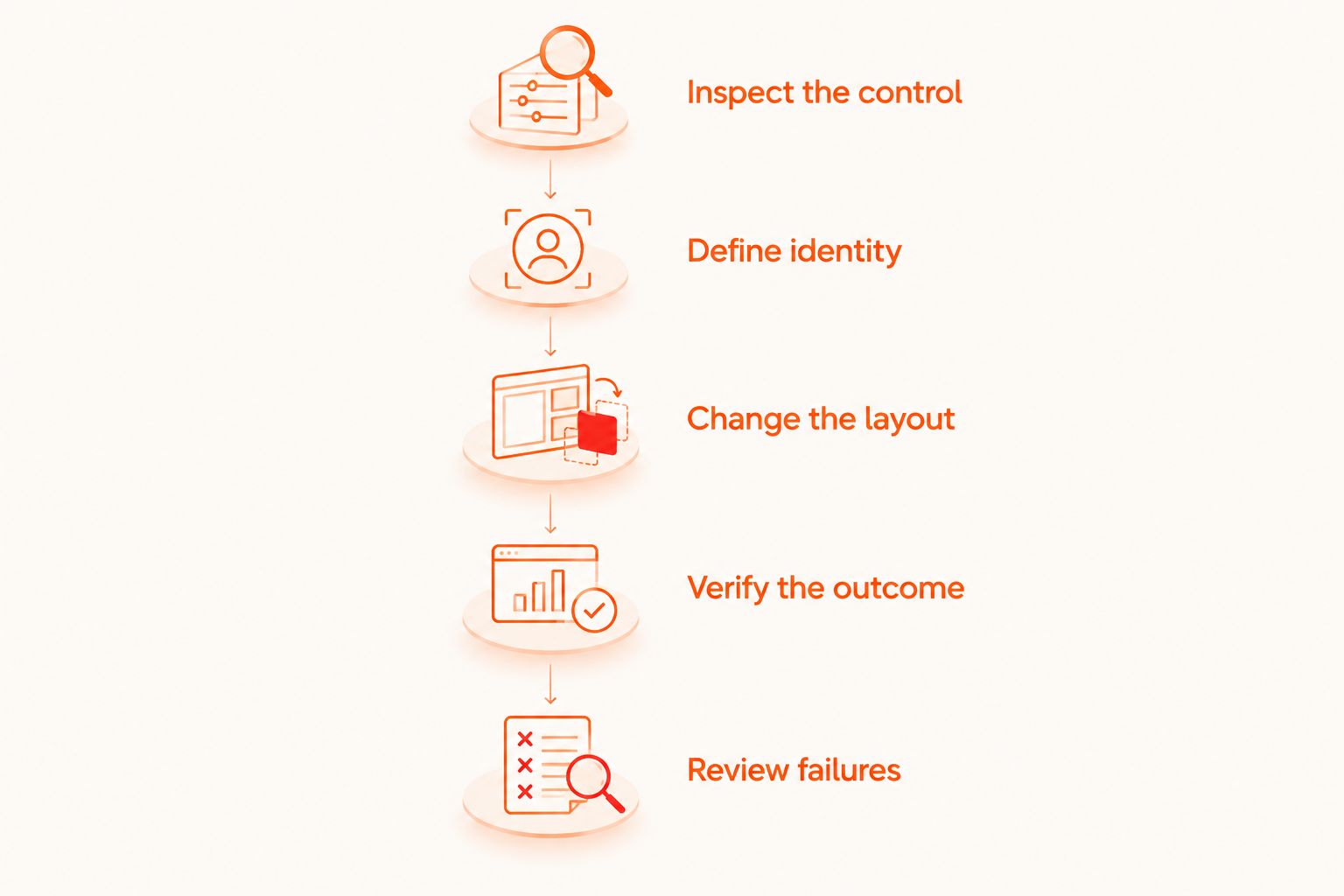
How do you check selectors before adding a release gate?
Use a small, intentional workflow. Inspect the target, establish its meaning, change the surrounding layout, and verify that the action still produces the expected result.
- Inspect the control. Observe the runtime element and the identifiers, names, or relationships the application exposes. Do not infer automation visibility from a screenshot alone.
- Define identity. Write down the action the selector represents. Make repeated instances explicit rather than relying on whichever match appears first.
- Change the layout. Move the control, add neighboring content, or reorder its containing list. Choose a change relevant to that screen.
- Verify the outcome. Run the flow and assert the resulting state. A completed tap is not a completed user journey.
- Review failures. Classify a failure as a changed requirement, an application defect, or a selector-contract problem. Fix the responsible layer.
This is a review procedure, not a claim that a tool automatically performs these checks. Apply it to the actual application build that your developers and QA engineers are testing.
For your 2026 selector review, preserve the distinction between a layout change and a requirement change. The former tests resilience; the latter can legitimately require a new assertion or selector contract.
Which UI testing workflow should you start with?
Maestro Deck is best for developers and QA engineers writing and inspecting Maestro YAML end-to-end flows locally. Its free, source-available desktop runner supports that local starting point for iOS, Android, and web apps.
Maestro Deck and the Maestro framework are distinct. Maestro YAML flows describe the tests; Maestro Deck provides the desktop runner and inspector described here. Do not treat the names as interchangeable or infer an affiliation from their similarity.
Start locally while you establish reliable selectors and useful assertions. Local use does not require a paid cloud workflow. That makes the first decision straightforward: get a meaningful flow working against your application before deciding how to schedule broader execution.
The trade-off is scope. A successful local run validates the tested journey in that execution environment; it does not establish coverage across every environment relevant to your release. Add paid cloud execution when you need CI execution or scale, and confirm the available execution targets before relying on them.
Keep device terminology precise. A simulator or emulator is not a physical device. A cloud service’s support for simulated environments does not establish physical-device availability.
Maestro Deck is source-available, not described here as open source. Source visibility and open-source licensing are different claims; consult the applicable license before deciding how you can modify or redistribute software.
Start with a local flow
Write, execute, and inspect Maestro YAML flows locally before deciding whether to add cloud execution.
Should you use coordinates when a selector is difficult?
Use coordinates as a constrained fallback, not the default identity strategy. A coordinate describes a location; it does not describe the action occupying that location.
First inspect whether the application exposes a usable identifier, name, or item relationship. If a coordinate remains necessary, isolate the interaction and assert its outcome so that a misplaced action produces a useful failure.
Does cloud execution fix brittle selectors?
Cloud execution does not change what a selector identifies. Moving a flow into CI or a hosted environment leaves its identity assumptions intact.
Resolve ambiguity locally before expanding execution. Then use additional environments to check the release conditions you actually need, rather than expecting infrastructure to repair the test’s targeting logic.
FAQ
What's the best selector strategy for ui testing tools?
Prefer stable identifiers for control identity, then use accessible semantics or visible text when those express the requirement. Confirm that the chosen tool exposes and supports the intended match.
Should I use text selectors or identifiers for buttons?
Use identifiers when the button's action should survive copy changes; use text when the wording is part of the requirement. Keep the interaction contract separate from assertions about approved labels.
How do I select a button when several buttons have the same label?
Scope the button to a meaningful item or section. Avoid selecting the first matching button unless order is explicitly part of the behavior under test.
Can a UI test survive a redesign?
A behavioral UI test can survive presentation changes when its selectors preserve action identity. Changed requirements, removed controls, or altered semantics still require review.
Do I need paid cloud execution to use Maestro Deck locally?
No. Maestro Deck provides a free local desktop runner; paid cloud execution is optional when you need CI execution or scale.
Are simulators and emulators the same as physical devices?
No. Simulators and emulators are not physical devices, and support for them does not establish physical-device availability.
What should I check after a selector succeeds?
Check the resulting application state. A successful interaction does not establish that the intended user journey completed.
One last thing
A resilient selector is allowed to fail when the application breaks its contract. Do not weaken a meaningful assertion merely to make a redesigned screen pass.
For your next 2026 release review, pick an important action and change its placement without changing its purpose. Then verify both targeting and outcome. If the flow still finds the right control but the resulting state is wrong, keep the failure: the test is doing its job.