Yes. Maestro Deck is free to use as a local desktop runner and inspector for Maestro YAML end-to-end test flows, with no account needed for local use. Paid cloud execution is optional; you do not need it to write, run, or debug flows on your own machine.
- Is Maestro Deck free to use? Yes: local desktop execution and inspection do not require an account.
- Start with local Maestro YAML flows; add cloud execution when your release workflow needs hosted runs.
- Source-available does not mean open source. Read the license before redistributing or modifying the software.
- Simulator and emulator support does not establish physical-device availability.
Why this matters
You need a working test before you need a hosted testing service. Starting locally lets you inspect your app, develop a useful flow, and investigate failures without making cloud adoption part of the setup.
Maestro Deck is best for mobile and web developers who want a free local runner and inspector for Maestro YAML flows. Its source-available licensing is a separate consideration from whether local execution requires payment.
For your 2026 testing workflow, separate three decisions: where you author tests, where you execute them, and which license terms apply. Treating those as one purchasing decision makes it harder to identify what you actually need.
Is Maestro Deck free to use?
Yes. The local desktop runner and inspector are free, and local use does not require an account. The tool supports writing and executing Maestro YAML end-to-end flows for iOS, Android, and web apps.
The useful distinction is free local execution versus optional paid cloud execution, not free testing versus a mandatory upgrade. Choose the execution environment after you have a flow worth running.
| Execution option | Best for | What you manage | Trade-off |
|---|---|---|---|
| Local desktop runner | Writing flows and investigating failures interactively | Your development machine, app build, test environment, and test data | Execution depends on your local setup |
| Optional cloud execution | Hosted runs when you need to scale or run tests from CI | Test inputs, cloud configuration, and the workflow that requests execution | Adds a hosted service and its usage terms to your workflow |
Neither option writes your test strategy for you. You still decide which user journeys matter, what a successful result looks like, and how to keep test accounts and app state predictable.
A free runner also does not eliminate engineering work. Building the app, preparing test data, maintaining selectors, and diagnosing failures remain part of end-to-end testing regardless of where a flow runs.
Free local runner: start with an inspectable workflow
Use the local desktop runner when you are building your first flow or investigating a failing interaction. The runner and inspector put test authoring and execution in a desktop workflow rather than making hosted execution the starting requirement.
Best for: developers and QA engineers who need to understand what a flow does before adding it to a release process.
The advantage is direct access to your development environment. You can work on the app and its test together, then repeat the same journey while investigating an unexpected result.
The limitation is equally concrete: your machine and local environment remain your responsibility. A flow that succeeds there has demonstrated success in that setup, not across every operating system, browser, or device configuration.
A practical first-flow checklist
Start your 2026 rollout with a deliberately narrow test. Use these as scope recommendations, not product limits:
- Choose 1 flow. Pick a user journey with a clear beginning and end, such as signing in and reaching an authenticated screen.
- Define 1 assertion. Write down the visible result that proves the journey succeeded. A completed tap is not the same as a completed business action.
- Perform 1 repeat run. Return the app to the intended starting state and execute the journey again. Investigate differences before expanding coverage.
- Inspect failures. Use the inspector to investigate the app state and the interaction that did not behave as expected.
- Keep the flow with the app. Review changes to the YAML alongside changes to the behavior it checks.
This sequence keeps the first test small enough to diagnose. If authentication fails, you should not have to work backward through an unrelated checkout journey to identify the cause.
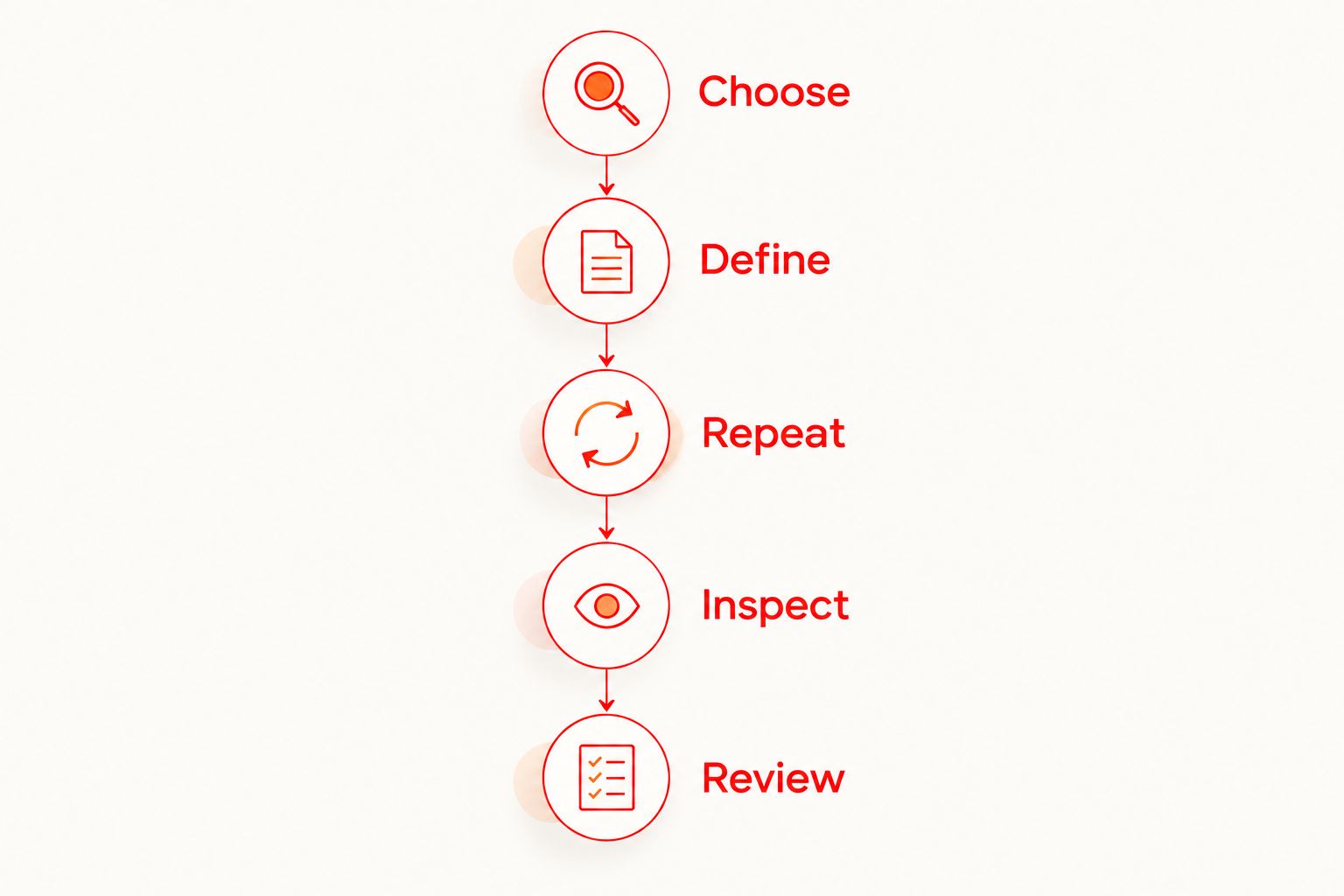
A useful first test has an observable outcome and a reproducible starting state. Add more journeys only after you can explain what a failure means and reproduce it without guessing.
Optional cloud execution: add it for an execution need
Cloud execution is an optional next step when you need hosted runs, more execution capacity, or tests initiated from CI. It is not a prerequisite for local authoring or inspection.
Best for: teams with an established flow that now needs to run as part of a shared release workflow.
The benefit is a hosted execution path. The trade-off is another environment to configure and govern, including the app build, test inputs, credentials, and the conditions under which a run starts.
Before adopting cloud execution in 2026, answer these operational questions:
- Which app build should the test exercise?
- Which event should request a run: a pull request, a release candidate, or a scheduled job?
- Which test account and starting state should the flow use?
- Who investigates a failed run?
- What evidence must a failure provide before it blocks a release?
These questions define the workflow you need. They also prevent you from treating a cloud run as a substitute for a clear assertion or stable test data.
Review the current pricing before enabling paid execution. Match the service terms to your intended usage rather than assuming that local use and hosted runs share the same terms.
Check cloud execution terms
Keep local testing free. Review the paid execution option when your CI workflow needs hosted runs.
Why your execution choice varies
The local runner being free settles the access question. It does not settle where every test should execute. Use these factors to decide which environment belongs in your release workflow:
- Authoring and debugging. Choose local execution when your immediate task is understanding an interaction or correcting a flow.
- CI execution. Evaluate hosted execution when tests need to run from your delivery process rather than an interactive desktop session.
- Execution scale. Consider cloud execution when your workload needs capacity beyond the local workflow you maintain.
- Environment coverage. Identify the actual operating systems, browsers, simulators, emulators, or physical devices your release needs to cover.
- Test-data handling. Decide which credentials, accounts, and app data can enter each environment before sending builds or inputs there.
- Maintenance ownership. Name the person responsible for local setup, hosted configuration, and failed-run investigation.
Choose the environment that solves the execution problem you have. Do not move a difficult-to-reproduce test to the cloud and expect the location change to explain its failures.
A useful decision record is short: the journey under test, its starting state, its expected outcome, and the reason it must run in a particular environment. Keep that record beside the flow so reviewers can challenge unnecessary complexity.
Does free mean open source?
No. Maestro Deck is source-available, not open source. Those terms describe licensing, not whether you need an account to run a local test.
Source-available means the source is available under the project's license. Open-source licensing carries a different set of permissions and requirements; access to source code alone does not establish those permissions.
For a 2026 adoption review, read the actual license against your intended use. Running the application internally, modifying it, redistributing it, and incorporating code into another product are distinct activities.
Do not infer redistribution rights from a free download. Equally, do not treat the source-available label as evidence that ordinary local execution requires a paid cloud account. Keep the licensing review and the execution decision separate.
Is the desktop runner the same as the Maestro framework?
No. Maestro Deck provides a desktop runner and inspector for flows written for the Maestro framework. The desktop application and the framework are distinct components in the testing workflow.
That distinction matters when you follow documentation. Framework instructions describe the flow language and framework behavior; desktop-runner instructions describe the application's own workflow and controls.
Use the documentation for the component you are configuring. Do not assume that a framework command is a desktop feature, or that a desktop capability establishes a feature in another hosted service.
The shared use of Maestro YAML also does not establish organizational affiliation. Evaluate each product's documentation, license, and service terms independently.
Does simulator support mean I get physical-device testing?
No. Simulator or emulator support does not establish physical-device availability. A simulated environment and a physical phone are different execution targets.
For your 2026 coverage plan, name the target explicitly. “Android testing” is not a precise enough requirement if the release risk depends on physical hardware, operating-system behavior, or a particular browser environment.
Check the documented execution targets before selecting a service. Do not turn a broad mobile-testing description into an assumption that a particular physical device is included.
This distinction also improves failure reports. Record the environment in which the failure occurred so another developer knows what must be reproduced, rather than reporting only that the mobile test failed.
FAQ
Is Maestro Deck free to use in 2026?
Yes. Maestro Deck's local desktop runner and inspector are free to use without an account. Paid cloud execution is optional and separate from local use.
Do I need an account to run tests locally?
No account is needed for local use. You can start with the desktop runner and inspector without making cloud sign-up part of your local testing workflow.
Do I have to use cloud execution for every flow?
No. Use local execution to write, run, and debug flows on your machine. Evaluate cloud execution when you need hosted runs, additional execution capacity, or execution from CI.
Can I test iOS, Android, and web apps locally?
The desktop runner supports writing and executing Maestro YAML end-to-end flows for iOS, Android, and web apps. Set up the app and the appropriate execution environment for the platform you are testing.
Does source-available mean the software is open source?
No. Source-available and open source are different licensing terms. Read the project's license to establish which modification, redistribution, and other uses it permits.
Should I pay for cloud testing before writing my first flow?
Start locally when your immediate goal is writing and debugging a first flow. Consider paid cloud execution after you identify a hosted-execution requirement in your release workflow.
Does a successful emulator test prove the app works on a physical phone?
No. A successful emulator test establishes success in that emulator environment, not on a physical phone. Select and verify execution targets against the behavior your release needs to cover.
One last thing
Before adding more tests, deliberately make your first assertion fail. Change the test condition or app state in a controlled development environment, then confirm that the flow reports the unsuccessful outcome.
A passing flow tells you that its assertions passed. A deliberately failing check helps you confirm that the test detects the condition you intended to guard against. Restore the expected state afterward and rerun it.
That is a more useful next step than choosing hosted execution before you know what your test protects. Start free and local. Make the result meaningful. Add cloud execution when the workflow requires it.