
Instead of manually rerunning release checks, use Maestro Deck’s free local desktop runner to validate your YAML flows, then move execution into self-hosted CI only after confirming a supported non-interactive runner. To run Maestro Deck in Docker, establish the execution command and device connection first; packaging the desktop application alone does not establish a working CI setup.
- To run Maestro Deck in Docker, first confirm a supported non-interactive execution path; do not assume desktop packaging provides one.
- Maestro Deck is best for developers who want a free local desktop runner and inspector for Maestro YAML flows.
- A Docker container, an Android emulator, and an iOS simulator have different runtime requirements.
- Start with one smoke flow, preserve failures, and add optional cloud execution when maintaining test infrastructure becomes a separate workload.
Why this matters
A container can start successfully while your application remains unreachable. That is not an end-to-end test. Your release gate needs the runner to reach the intended target, execute the intended flow, and report its result to CI.
Maestro Deck provides a free, source-available desktop runner and inspector for Maestro YAML flows across iOS, Android, and web apps. Local use does not require a cloud account. The Maestro framework and the desktop application are distinct; a framework command does not establish an equivalent desktop command or imply affiliation.
For a 2026 self-hosted CI setup, prove the execution contract before writing the Dockerfile. Source availability does not establish headless operation, container support, or unrestricted redistribution. Check the applicable license before distributing an image containing the application.
Before you start
- Prepare a locally passing flow and its application build. Use a dedicated test account, a reachable test environment, and a defined initial application state. Keep credentials outside the repository.
- Obtain control of the CI host and test target. You need permission to manage container networking, persistent output directories, and the simulator, emulator, browser, or physical device used for execution.
- Confirm the non-interactive execution contract. Identify the documented invocation, dependencies, target-selection mechanism, output behavior, and failure status. The hidden trap: a desktop application and a supported container entrypoint are not interchangeable.
Do not begin with the entire regression suite. Set an initial acceptance target of 1 smoke flow. That isolates infrastructure problems from test-suite problems.
Execution contract
Establish the runner boundary
- Identify which executable actually runs the YAML flow. Distinguish the desktop application from any separately documented framework runner.
- Confirm that the selected executable runs without a graphical session or interactive prompt. Use its documented installation and invocation instructions, not a guessed command derived from the application name.
- Record how it selects the application and target. Require an explicit selection mechanism rather than whichever device happens to connect first.
- Confirm how failed assertions reach the calling process. A readable error message is insufficient if CI receives a successful status.
- Check the license terms for your intended image build and distribution model. Source-available is not a synonym for open source.
Expected result: a recorded execution contract that another engineer can follow without opening the desktop interface. If the selected runner requires interactive desktop operation, keep it in the local workflow rather than presenting it as a headless container service.
This distinction keeps the guide honest: running Maestro YAML through a documented framework runner is not automatically running the Maestro Deck desktop application inside Docker.
Choose the execution location
Use the following comparison to assign responsibilities. These are architecture choices, not claims that every target works inside every container.
| Execution location | Best for | Advantage | Limitation |
|---|---|---|---|
| Local desktop | Writing and inspecting flows | Keeps authoring and debugging close to the developer | Does not by itself provide an unattended CI entrypoint |
| Self-hosted Docker job | Teams with a verified runner and managed targets | Makes the test job’s dependencies explicit | Your team owns connectivity, isolation, cleanup, and host compatibility |
| Optional cloud execution | Teams moving execution infrastructure out of their CI hosts | Separates hosted execution from local authoring | Requires a separate execution setup and review of supported targets and data handling |
An Android emulator is not a physical Android device. An iOS simulator is not an iPhone. Likewise, a browser test does not validate native operating-system behavior.
For your 2026 execution inventory, record the target type explicitly. Avoid a generic label such as device when the distinction affects what the test proves.
Container and target configuration
Define the job inputs
- Check out the flow revision associated with the application build. Record both identifiers in the job output so a failure can be reproduced.
- Supply the application artifact through your CI system’s artifact mechanism. Do not let the job silently select an older build from a shared directory.
- Keep flow files separate from writable runtime output. Treat committed test definitions as inputs, not scratch storage.
- Inject credentials through the CI secret mechanism. Grant the test identity access only to the environment and operations the flow requires.
- Pin the runner and container dependencies to the versions your team has validated. Update them deliberately rather than changing infrastructure during an unrelated application release.
Expected result: the job has identifiable flow files, an identifiable application build, and a controlled test identity. Nothing depends on an engineer’s desktop session or an untracked local file.
Maintain a 2026 runner manifest containing the selected runtime, target type, dependency versions, and output locations. This is a reproducibility record, not a claim that a pinned environment remains correct indefinitely.
Connect the test target
- Decide whether the target runs on the CI host, in a separate supported environment, or through a hosted execution service. Document that boundary before configuring networking.
- Check the target’s platform requirements. Apple’s iOS simulator belongs to the macOS development environment; a Linux Docker job does not turn into an iOS simulator host.
- For Android emulation, verify the host’s virtualization capabilities and the emulator’s requirements before attempting container-based execution. Container packaging does not supply missing hardware acceleration.
- Configure only the network access and device permissions the documented runner requires. Do not use broad privileges as a substitute for identifying the connection problem.
- Confirm that the target can reach the application backend and that the runner can reach the target. These are separate connections.
Expected result: the runner identifies the intended target, and the application reaches its test environment without manual intervention.
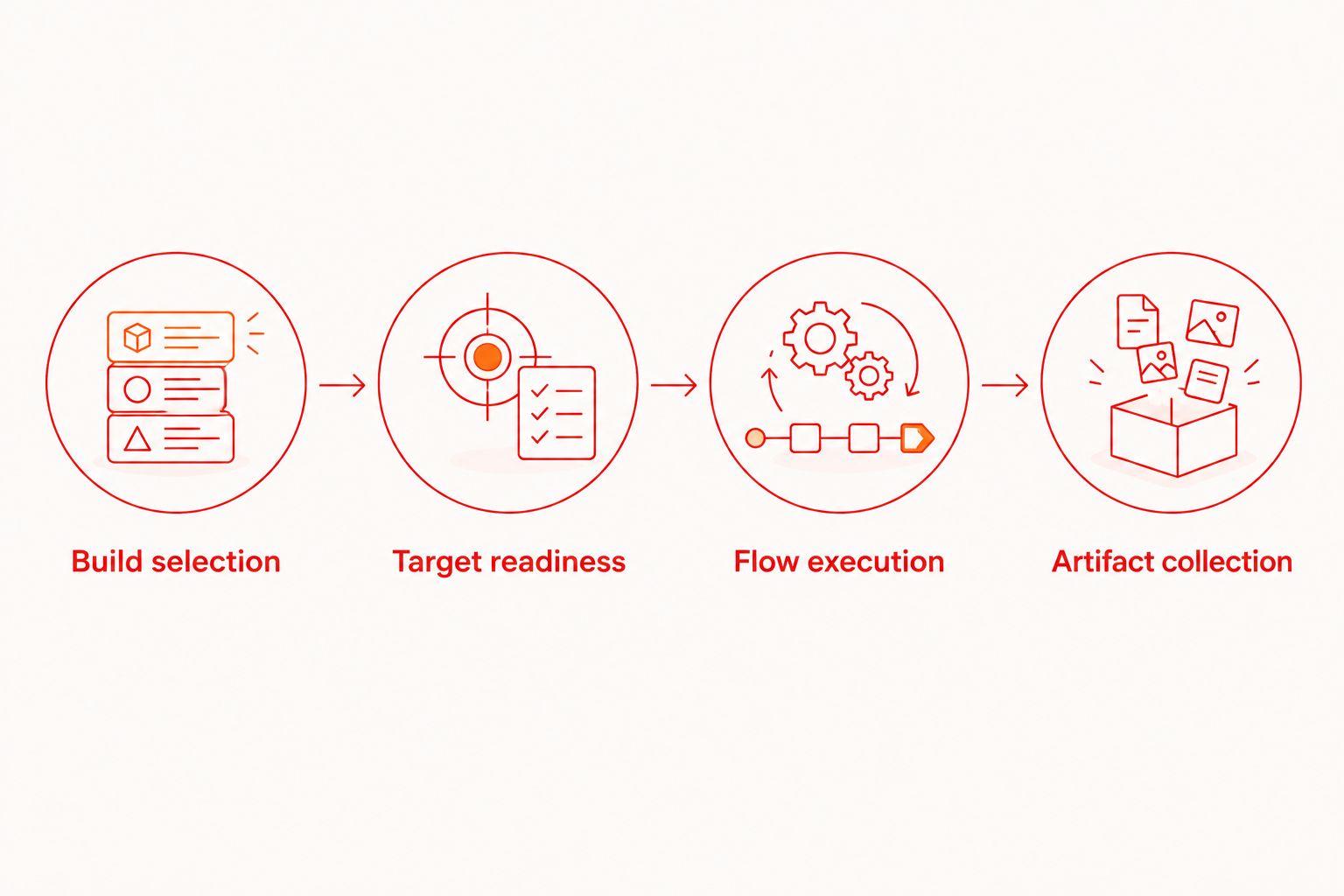
A useful execution sequence is Build selection, Target readiness, Flow execution, then Artifact collection. Each stage should expose its own failure rather than reporting every problem as a failed assertion.
Release gate configuration
Preserve the test result
- Run the smoke flow only after target readiness succeeds. A running container is not evidence that the application is ready.
- Preserve the test process’s exit status. If output passes through a logging wrapper or pipeline, check that the wrapper does not replace a failure with success.
- Collect the output the selected runner actually produces. Store logs and any supported failure artifacts in a writable location available to the CI artifact step.
- Publish artifacts even when execution fails. Keep cleanup separate from result collection so removing the container does not remove the only useful evidence.
- Trigger an intentional assertion failure in a test-only change. Confirm that the CI job fails, then restore the valid assertion.
Expected result: a passing flow passes the job, a failing flow fails it, and both outcomes leave enough evidence to identify the build and target.
Use a release smoke suite to choose a narrow first gate. Validate a release-critical journey before expanding coverage to every screen.
Verify repeatability
- Start with 1 concurrent job for the target. This is an isolation recommendation, not a runner capacity limit.
- Reset the application and backend fixtures using the mechanisms your environment supports. Document which state belongs to the application and which belongs to the service.
- Require 2 consecutive runs from the same build and declared initial state before adding more flows. Treat this as an initial setup check, not proof that the suite is free of intermittent failures.
- Cancel a trial job and check cleanup. Confirm that the next job does not inherit a locked target, abandoned session, or partially modified account.
Expected result: the same inputs produce independently inspectable runs without relying on leftovers from a previous execution.
Keep the initial 2026 acceptance check small. More assertions do not compensate for an environment whose starting state changes between jobs.
Run the smoke flow whenever a build changes
Once the manual CI job behaves correctly, connect the same execution contract to your build workflow. Change the trigger, not the meaning of a passing test.
- Trigger execution after the application build succeeds and its artifact becomes available.
- Pass the exact artifact reference into the test job. Avoid selecting an artifact through an ambiguous latest-build lookup.
- Associate the test result with the same commit or release candidate that produced the application.
- Keep scheduled regression execution separate from the release smoke gate. Both can reuse flows, but they answer different questions.
Expected result: each tested build has a traceable result, while scheduled execution can cover a broader suite without silently changing the release gate.
For pull requests, define whether superseded jobs should be canceled. For release candidates, retain the evidence associated with the candidate rather than overwriting it with a later run.
Troubleshooting
The container exits before testing starts
Check the executable, architecture, dependencies, and invocation first. A missing graphical session points to a desktop-versus-headless mismatch, not a YAML assertion problem.
Fix: return to the documented runner contract. Do not add a virtual display and describe the result as supported without verifying that execution path.
The runner cannot find the target
Separate target discovery from application behavior. Confirm that the intended target is running, selected explicitly, and reachable across the container boundary.
Fix: inspect target identifiers, network configuration, and required permissions. Avoid granting unrestricted host access before locating the failed connection.
The application opens but cannot sign in
The runner-to-target connection can work while the target-to-backend connection fails. Expired credentials, unreachable test services, and incorrect environment configuration belong to this second boundary.
Fix: verify backend reachability from the target environment. Check the test account without printing credentials into CI logs.
CI passes after a failed assertion
A wrapper, cleanup command, or logging pipeline can mask the test process’s failure status.
Fix: preserve the original status through artifact collection and cleanup. Repeat the intentional-failure check before trusting the gate.
Failures leave no useful artifacts
Output written only inside a removed container disappears with that container. Artifact collection that runs only after success also misses the failures you need to inspect.
Fix: use a persistent output location and failure-aware collection. Redact sensitive content and apply your organization’s retention policy.
Customize your workflow
Expand only after the first gate is reproducible. Add reusable flows, independent test identities, and additional target configurations as separate changes so you can identify which change introduces a failure.
Maestro Deck keeps local authoring separate from optional cloud execution. Keep the free desktop workflow for development; evaluate cloud execution when you need hosted runs or execution from CI. Check supported targets and integration requirements before moving the release gate.
For a 2026 infrastructure review, compare ownership rather than just execution location: who updates targets, investigates connection failures, controls test data, and retains evidence? Do not infer physical-device availability from simulator or emulator support.
Evaluate optional cloud execution
Check the cloud execution options before moving validated local flows into hosted CI runs.
FAQ
Can I run Maestro Deck in Docker for self-hosted CI?
Treat Docker execution as conditional on a documented non-interactive runner and supported target connection. A source-available desktop application does not by itself establish a supported headless container workflow.
Is running Maestro YAML the same as running the desktop application?
No. A Maestro framework runner and a desktop application are different execution components. Identify the executable that runs the flow before choosing its container setup.
Do I need a cloud account to run flows locally?
No. The free local desktop workflow does not require a cloud account. Cloud execution is a separate, optional choice for hosted testing or CI needs.
Can a Linux Docker container run an iOS simulator?
A Linux Docker container does not provide Apple's macOS-based iOS simulator environment. Plan the simulator host separately and verify how the selected runner connects to it.
Should I run the whole regression suite in the first CI job?
No. Start with one release-critical smoke flow, then verify failure propagation, artifact collection, and state isolation. Expand coverage after those boundaries behave correctly.
Does source-available mean I can redistribute a container image freely?
No. Source availability and open-source licensing are different concepts. Check the applicable license terms before distributing an image containing the application.
One last thing
A green container is not a green test. Before making this workflow a release requirement, deliberately break an assertion and confirm that the release is blocked. That check validates the connection between the test result and the shipping decision.


