

Instead of manually replaying release checks, use Maestro Deck’s free local desktop runner to prepare your flows, then run Maestro testing in GitHub Actions and require its status check before merging. This guide uses a prepared Android runner, preserves test failures, and keeps paid cloud execution optional.
- Maestro Deck is best for developers preparing and debugging Maestro testing flows locally before adding a CI gate.
- GitHub Actions must propagate the Maestro test command’s failure and expose a required status check.
- Build and install the candidate app before testing; a passing flow against an old build proves nothing.
- Start with a prepared Android runner; add hosted execution only when your workflow needs it.
Why this matters
A test job and a merge gate are different things. GitHub Actions can report a failed job while repository rules still allow a merge. Conversely, a required check can block every pull request if its workflow never starts.
Maestro Deck is best for developers who want a free local desktop runner for writing and debugging Maestro YAML flows. Start with Maestro Deck locally, where you can inspect a failure before making it everyone’s CI problem.
Keep the names separate. Maestro is the testing framework and CLI used by the workflow below; the desktop runner is a separate product. Source-available also does not mean open source: review the applicable license before modifying or redistributing software.
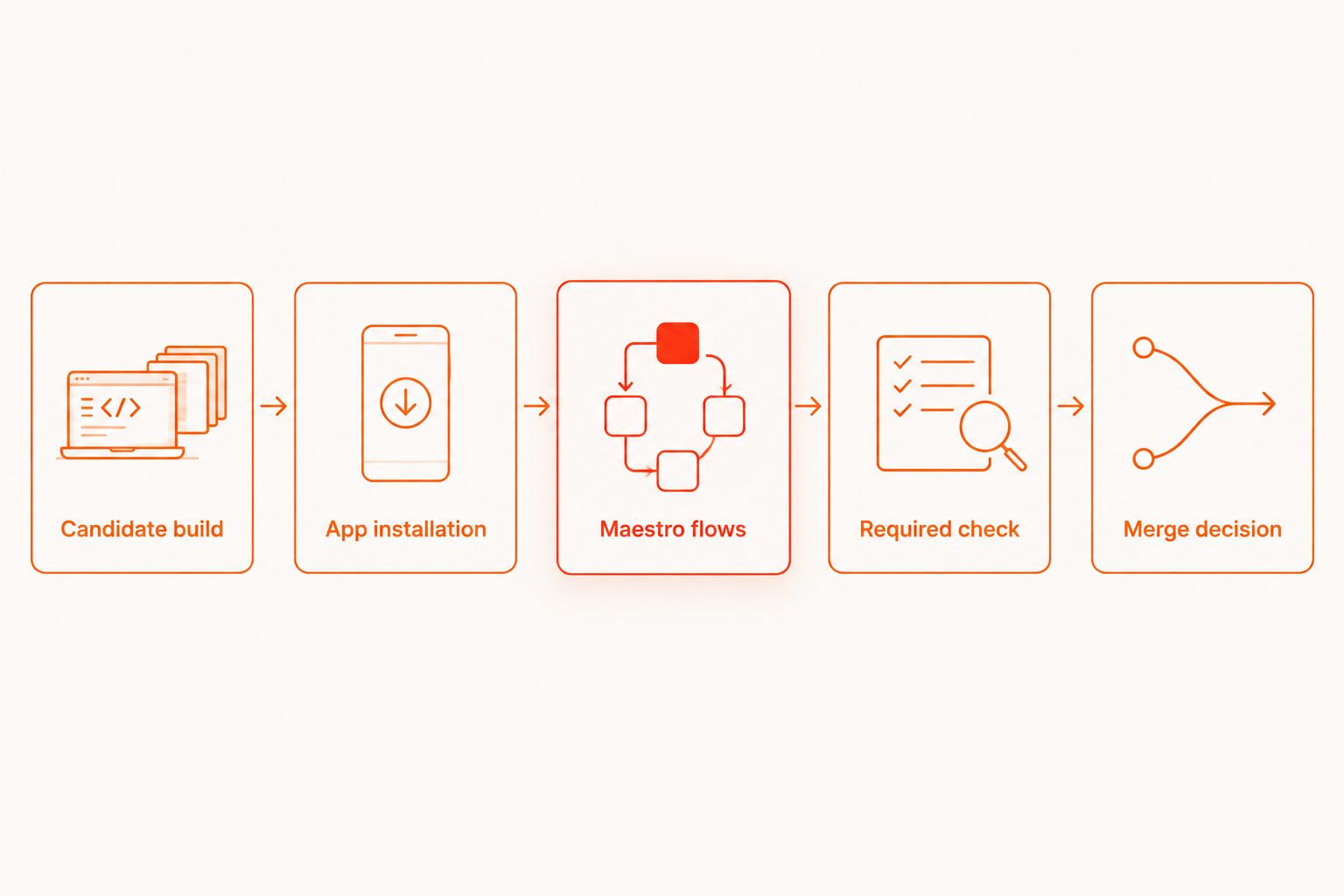
For a 2026 release workflow, define success narrowly: the candidate app is installed, the selected flows pass, and GitHub requires that result before merging.
Before you start
- Repository access: You need permission to edit GitHub Actions workflows and configure repository rules. Use a private repository with trusted contributors for the self-hosted setup below. Do not expose a persistent runner to untrusted pull-request code.
- A prepared test environment: Register a dedicated self-hosted runner with the custom label
maestro-android. Install the Maestro CLI, Android tooling, and your app’s build dependencies. Start a usable emulator and confirm that the runner account can reach it. - The candidate-build gotcha: Create a repository-owned preparation script that builds the checked-out commit, installs that exact app, and prepares test data. A device left running from a previous job can contain an old app or stale session.
This guide uses Android to keep the execution environment explicit. An iOS workflow needs its own compatible macOS environment, simulator preparation, and app build. Emulator and simulator coverage does not establish physical-device coverage.
Choose the execution boundary
Keep local authoring separate from CI enforcement. These approaches solve different parts of the workflow; none removes the need to control app state and build identity.
| Approach | Best for | Advantage | Limitation |
|---|---|---|---|
| Local desktop runner | Writing and debugging flows | Inspect failures before committing tests | A local pass is not a required GitHub check |
| Self-hosted GitHub Actions runner | Teams managing their own test environment | Control the emulator, dependencies, and preparation steps | Your team owns isolation, cleanup, and maintenance |
| Optional hosted execution | Teams moving test execution off their runners | Changes who operates the execution environment | Requires service-specific configuration and result handling |
Use the self-hosted path only when you can maintain a trustworthy runner. Do not move tests onto an unmanaged machine simply to make the workflow file shorter.
The setup below defines 1 required test job. Split platform coverage later, after the first gate reliably tests the correct app.
Configure the candidate build
The preparation script is the contract between your application and the test workflow. It must finish successfully only when the checked-out candidate is ready for testing.
- Create
ci/prepare-e2e.shin your repository. This is a file you supply, not a Maestro command or an included product feature. - Put your existing Android build command in that script. Select the application variant that your smoke flows actually target.
- Install the resulting app on the intended emulator. When multiple devices are connected, explicitly select the target in your preparation commands.
- Reset the app and seed the test account or data required by the flows. Use non-production credentials with limited permissions.
- Make the script exit unsuccessfully when building, installation, or preparation fails. Do not print an error and then return success.
- Run the script under the same operating-system account used by the GitHub runner. Confirm that the CLI can reach the prepared emulator from that account.
Expected result: A successful preparation step leaves the candidate app installed and the test environment ready. A failed preparation step stops the job before Maestro runs.
Record the checked-out commit and the app artifact’s identity in the job output using your existing build system. When investigating a regression, you need to distinguish the tested code from the latest code on a branch.
Configure the required test job
Commit your smoke flows under .maestro/. Run them locally first, and keep this directory limited to checks you intend to make blocking.
- Create
.github/workflows/maestro-e2e.ymlin your repository. - Add the workflow below. The
maestro-androidlabel must match the custom label assigned to your prepared runner. - Keep Maestro regression gate as the job name. A stable name makes repository rules easier to maintain.
- Commit the workflow and flows together. Open a trusted test pull request to exercise the complete path.
name: Maestro E2E

on:
  pull_request:
  push:
    branches:
      - main
  workflow_dispatch:

permissions:
  contents: read

jobs:
  maestro-e2e:
    name: Maestro regression gate
    runs-on: [self-hosted, maestro-android]
    steps:
      - name: Check out candidate
        uses: actions/checkout@v4

      - name: Prepare candidate app
        shell: bash
        run: bash ci/prepare-e2e.sh

      - name: Run Maestro smoke flows
        shell: bash
        run: maestro test .maestro
The checkout action’s major version is a dependency reference, not a calendar year. Apply your repository’s action-pinning policy before adopting the example; security policies can require an immutable commit reference instead.
This 2026 workflow runs for pull requests, pushes to main, and manual dispatches. Change main if your protected branch has another name. Keep the test command as a direct shell command so its unsuccessful exit fails the step.
Expected result: GitHub shows a separate preparation step and test step. A failed flow fails the test job; a failed build prevents the flow from running.
Do not add continue-on-error: true to either step. Do not append || true to the command. Both patterns defeat a blocking regression gate.
Configure repository enforcement
A failed job does not become a merge restriction automatically. Configure enforcement after the workflow has produced a status check.
- Open repository Settings, then Rules, then Rulesets. Create or edit the branch ruleset covering your protected branch.
- Enable Require status checks to pass before merging. Select the check produced by Maestro regression gate rather than a similarly named build check.
- Set the ruleset’s enforcement status to Active. Review bypass permissions so they match your release policy.
- Introduce a deliberate failing assertion on a temporary pull request. Confirm that the test job fails and the merge is blocked.
- Restore the assertion. Confirm that the check passes and the test gate no longer blocks the merge.
If your repository uses branch protection instead of rulesets, configure its required status checks there. Avoid maintaining contradictory rules in both places.
Expected result: You have verified 2 outcomes: a known failure blocks merging, and a corrected flow clears the test gate. A green run alone does not verify enforcement.
Run the same gate after a branch update
The workflow already includes a second variant: run the smoke suite whenever main receives a push. Pull-request execution protects the merge decision; branch execution checks the resulting branch state.
Keep the same preparation script and flow directory for both triggers. Separate commands create separate test definitions, making a passing pull-request run harder to compare with a failing branch run.
For 2026 repositories using a merge queue, also configure the workflow for the merge_group event before requiring its check in that queue. A pull-request trigger alone does not cover that event.
Use Run workflow from the workflow’s page under Actions for a manual diagnostic run. Select the intended branch and inspect its checked-out commit before treating the result as release evidence.
A manual green run is useful for diagnosis. It is not a substitute for the required check on the pull request or merge group being evaluated.
Troubleshooting
The flow passes locally but fails in CI
Compare the installed app, emulator configuration, account state, and backend environment first. Reproduce with the same committed flow rather than editing the test immediately.
Use Maestro Deck’s local inspector to investigate the failing interaction. The Inspector Mode debugging guide covers the next step when an element or assertion needs inspection.
The job passes even though Maestro reports a failure
Inspect the shell command and any wrapper script. Remove error suppression, and make wrappers return the test command’s unsuccessful exit status.
Avoid piping test output through another command until you have checked how that shell handles pipeline failures. A final successful command must not hide a failed test.
The required check stays pending
Check whether the workflow started at all. Branch filters, path filters, and missing event triggers can leave a required check without a result.
Then inspect the job queue. A self-hosted runner that is offline or lacks the maestro-android label cannot pick up this job. Keep required workflow triggers broad until you have validated any exclusions.
The app launches into an unexpected screen
Check for a persisted login, onboarding flag, permission prompt, or data left by a previous run. Put the required reset and data preparation into the test contract rather than relying on a developer’s device state.
Do not fix state leakage with an arbitrary delay. A longer wait does not sign out an account or install the correct build.
A rerun passes without a code change
Preserve the first failure and compare its environment with the rerun. Check shared accounts, device contention, and asynchronous app behavior before declaring the failure resolved.
For a 2026 release gate, repeated retries are not evidence that an assertion is reliable. Fix the underlying condition or remove that flow from the blocking suite while investigating.
Customize your workflow
Keep the blocking suite focused on release-critical paths. Put broader coverage in a separate job when its failures need a different response, and give each required job a distinct name.
Add failure evidence using the reporting options documented for your installed Maestro version. Preserve useful logs and reports without exposing tokens, credentials, or personal data. Treat screenshots as sensitive test artifacts too.
Maestro Deck Cloud is optional when you want hosted execution or CI-based runs without keeping all execution local. Local desktop use remains separate; it does not require a cloud account or paid runs. Before signing up for cloud execution, confirm the supported environment, artifact submission method, and how a failed run becomes a failed GitHub check.
Use the local-versus-cloud decision guide to choose that boundary. Keep your flows portable by separating application assertions from provider-specific submission steps.
FAQ
How do I make Maestro testing fail a GitHub Actions build?
Run the Maestro test command as a normal shell step and preserve its unsuccessful exit status. Do not suppress errors with continue-on-error or a successful fallback command.
Does a failed Maestro job automatically block merging?
No. Configure a required status check in a branch ruleset or branch protection rule, then verify that a deliberate test failure blocks a pull request.
Do I need a paid cloud account to use Maestro Deck locally?
No. Maestro Deck provides a free local desktop runner; cloud execution is optional and separate from local use.
Can I use the Android workflow unchanged for iOS?
No. iOS testing needs a compatible macOS environment, a prepared simulator, and an app build suitable for that environment. Replace the Android preparation path rather than only renaming the job.
Why does my required test check stay pending?
The workflow might not have been triggered, or the job might be waiting for a matching runner. Check event filters, the required check name, runner availability, and custom runner labels.
Should I run every end-to-end flow on every pull request?
Start with the flows you intend to make blocking. Keep broader coverage separate when it requires different environments or a different failure-response policy.
Can I run this workflow safely for public fork pull requests?
Do not run untrusted pull-request code on a persistent self-hosted runner. Choose an isolated execution design and review GitHub Actions security guidance before accepting external contributions.
One last thing
Test the gate, not just the app. In your 2026 release checklist, include a deliberate failing assertion whenever you change workflow triggers, job names, or repository rules. A workflow that runs successfully can still enforce nothing.


