

Use cloud based testing when your release workflow needs execution beyond a developer’s machine: CI-triggered runs, a broader environment matrix, or capacity for shared test runs. Keep flow authoring and debugging local; moving execution to the cloud does not fix weak assertions, unstable selectors, or inconsistent test data.
- Maestro Deck is best for developers who want free local authoring and inspection of Maestro YAML end-to-end tests.
- Add cloud based testing when CI execution, environment coverage, or shared execution capacity becomes a release requirement.
- Keep local debugging in your workflow; hosted execution changes where tests run, not what they prove.
- Specify simulators, emulators, browsers, and physical devices separately when planning mobile testing coverage.
Why this matters
Start with the free local desktop runner. Maestro Deck supports writing, running, and inspecting Maestro YAML end-to-end flows for iOS, Android, and web apps. Local use does not require a cloud account; paid cloud execution is an optional next step for CI or scale.
Your 2026 testing plan should identify the constraint before choosing the execution location. A difficult-to-debug flow needs investigation. A release workflow that depends on someone keeping a laptop available needs an execution plan. Those are different problems.
Choose cloud execution to meet a release requirement, not to avoid understanding a failing test. Keep a local path for reproducing failures even after hosted runs become part of your pipeline.
Cloud based testing: when are local runs not enough?
Local runs stop being enough when a release requirement depends on execution that a developer’s machine cannot reliably provide. Name that requirement explicitly: an unattended CI job, a required environment combination, or enough execution capacity to complete the selected suite before the release decision.
Use the following comparison to assign responsibility. These are workflow choices, not claims that every cloud provider offers the same capabilities.
| Execution approach | Best for | Main advantage | Main limitation |
|---|---|---|---|
| Local execution | Authoring flows and investigating failures | Keeps execution close to the app and developer | Depends on the local environment and its capacity |
| Cloud execution | Hosted release checks and planned environment coverage | Moves execution off the developer’s machine | Adds remote setup, access, and failure-investigation requirements |
| Local plus cloud | Teams that need interactive debugging and hosted release checks | Separates development feedback from release execution | Requires both environments to follow an explicit test contract |
You do not need to move every flow at once. Select a release-critical journey, make its starting conditions explicit, and determine whether a hosted run answers a question the local run cannot.
For a 2026 release workflow, write the decision in operational terms: which build runs, which environment it uses, what outcome blocks the release, and who investigates failure. A provider name is not a substitute for those decisions.
Keep local execution for authoring and diagnosis
Best for: developers changing the app and its tests together. Run locally while choosing selectors, checking assertions, and investigating unexpected screen states. Short feedback loops matter here because you are still establishing what the test should do.
Maestro Deck’s local E2E runner and inspector fit this authoring workflow. The desktop application is source-available; that term does not establish that its license is open source. Review the applicable license before making redistribution or modification decisions.
Distinguish the desktop application from the Maestro framework. The application provides the runner and inspection workflow described here; Maestro YAML is the flow format. Treat them as distinct names, and do not infer organizational affiliation from compatibility.
The limitation of local execution is its dependency on a particular machine and setup. Record application state, permissions, test accounts, and relevant environment settings rather than leaving them as developer knowledge. Otherwise, a passing local result has an unclear scope.
Keep local testing even after adding hosted execution. It remains the place to reduce a failure to a focused reproduction before changing the app or the test.
Add cloud execution for release requirements
Best for: teams that need hosted runs from CI or additional execution capacity. Add cloud execution when a named release check needs to run without relying on a developer’s desktop session. Specify the required environments before selecting a service.
Maestro Deck Cloud provides optional cloud execution for Maestro flows on simulators, emulators, and browsers from CI. Do not translate those environment types into a claim about physical-device availability. A simulator run and a physical-device run answer different coverage questions.
Hosted execution also introduces work. You need a build-delivery path, credentials appropriate for the test environment, explicit starting conditions, and a way to investigate failures. Confirm the chosen service’s current documentation for each requirement before implementing the integration.
Your 2026 cloud evaluation should separate requirements from conveniences. If CI execution is mandatory, prove that path with your application. If a particular operating-system environment is mandatory, confirm that exact environment rather than accepting a general mobile-testing label.
Do not migrate an unstable suite and call the migration a reliability improvement. Establish what a passing result proves before expanding execution.
Why your execution choice varies
The right execution location depends on the job the test performs. Use these factors to decide what stays local and what belongs in a hosted workflow:
- Feedback needs: Interactive inspection belongs close to the developer. Release checks need an execution path that does not depend on interactive work.
- Environment coverage: List the required operating systems, browsers, and environment types. Do not treat an unspecified cloud environment as coverage.
- Execution capacity: Separate the tests that must finish before a release decision from checks that can run independently. Evaluate capacity against that requirement.
- Starting state: Define accounts, permissions, app installation state, and backend fixtures. Neither execution location compensates for an undefined starting point.
- Network access: Identify whether the app needs private services, restricted endpoints, or environment-specific configuration. Verify the hosted service’s documented connection options.
- Failure evidence: Decide what information an engineer needs to distinguish an application defect from a setup problem. Confirm that the execution workflow supplies it.
Avoid selecting a service from its feature list alone. A feature matters when it satisfies a requirement in your release process. Anything else adds evaluation work without resolving the decision.
How do you move a local flow into a release workflow?
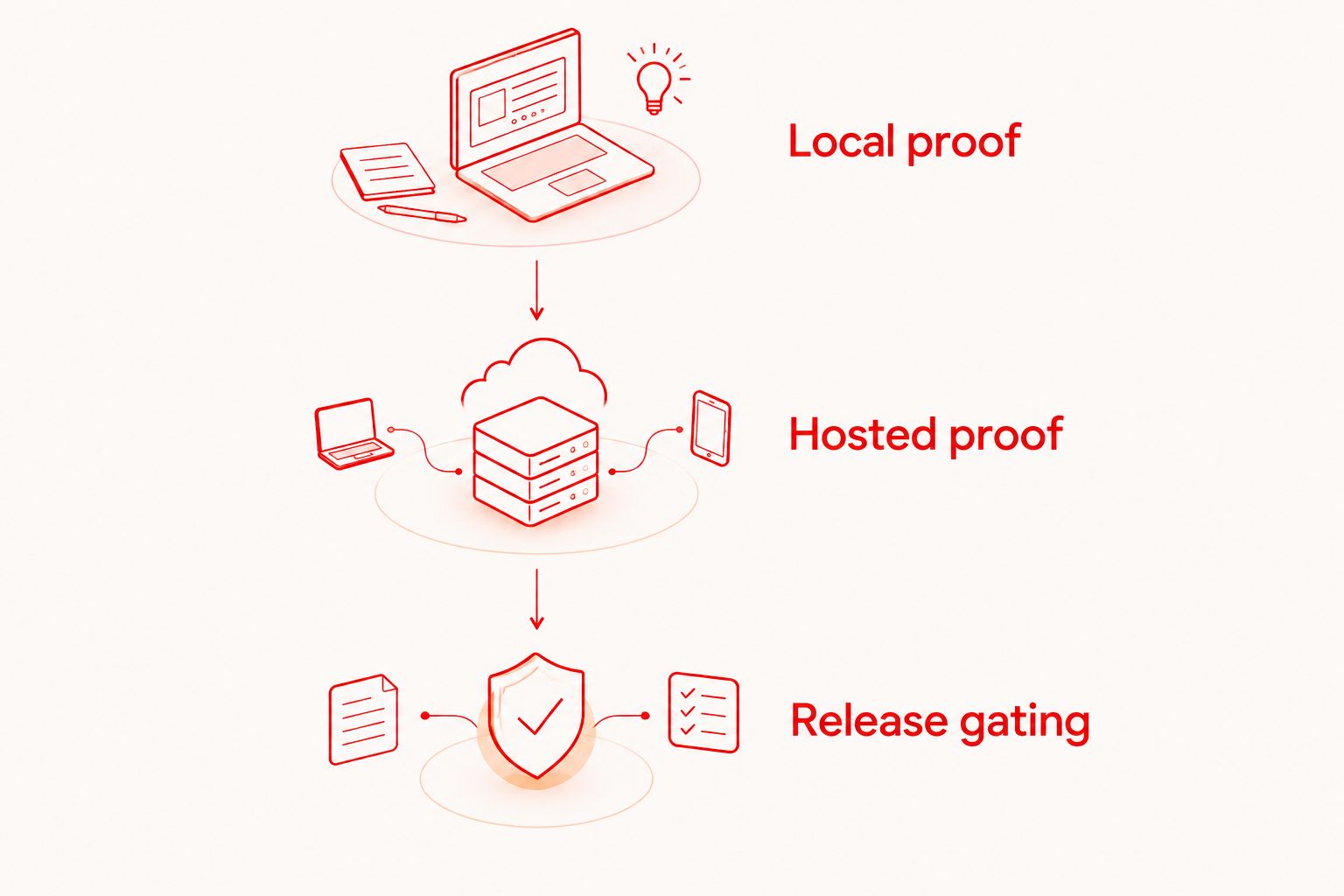
Use 3 execution stages: local proof, hosted proof, and release gating. Each stage should answer a different question. Do not make the release depend on a hosted result until you understand that result’s scope.
Local proof
Choose 1 release-critical journey. Define its starting state, the action under test, and the observable result that constitutes success. Prefer an assertion about the completed user outcome over an assertion that a button was pressed.
Run the flow locally and investigate failures before changing execution location. Check whether the problem belongs to the application, the selector, the account state, or the test environment. Keep those categories distinct in your investigation notes.
Hosted proof
Run the selected journey in the intended hosted environment using an identified application build. Record the source revision, build artifact, environment configuration, and test-data setup so the result has a traceable scope.
Compare the hosted setup with the local setup. Investigate differences rather than assuming a hosted failure proves an application regression. Use current service documentation for integration commands and YAML syntax; do not copy an unverified example into a release pipeline.
Release gating
Decide which outcome blocks the release and who owns investigation. Define how the team handles a confirmed application failure, an environment failure, and a result that lacks enough evidence to classify.
For 2026 releases, document this policy alongside the pipeline configuration. A green status should mean the required journey passed under the specified conditions, not merely that a remote job finished.
Keep the initial migration narrow. Expand the suite only after an engineer can explain a failure without guessing which build, account state, or environment produced it. That is a practical acceptance criterion, not a performance promise.
How do you compare local and hosted failures fairly?
Compare the conditions before comparing the outcomes. A local pass and a hosted failure are not contradictory if the runs used different application builds, accounts, permissions, or backend state.
Create a run record that identifies the application artifact, flow revision, target environment, and starting conditions. Include the expected user-visible result. This record gives the investigating engineer a concrete reproduction target instead of a broad instruction to check the cloud.
Do not change the flow and the application build simultaneously during diagnosis. Isolate a suspected difference, rerun the affected journey, and record what changed. Otherwise, a passing rerun leaves the original cause unresolved.
Retries also need an explicit policy. A retry can provide additional evidence, but it does not explain the first failure. Keep the failed result visible until someone classifies it and decides whether the release requirement was met.
Does cloud based testing replace local testing?
Cloud based testing does not replace local testing. Local runs support authoring and focused investigation; hosted runs support requirements such as CI execution and planned environment coverage.
Treat them as 2 execution modes for the same release strategy. Keep the test’s intended behavior consistent while documenting any environment-specific setup.
Does cloud testing mean testing on physical devices?
Cloud testing does not automatically mean testing on physical devices. Hosted services can provide different environment types, so name the required type explicitly and verify it in current documentation.
For a 2026 coverage plan, label simulator, emulator, browser, and physical-device requirements separately. Do not report a passing emulator check as evidence that a physical-device requirement was tested.
When should a cloud run block a release?
A cloud run should block a release when it checks a required user journey under defined conditions and provides enough evidence to interpret failure. Assign an investigation owner before enabling the gate.
Do not turn an unexplained intermittent failure into a release policy. First establish the starting state, expected outcome, and handling of environment errors.
FAQ
What is cloud based testing best used for?
Cloud based testing is best used for execution requirements that extend beyond a developer’s machine, such as CI-triggered checks and planned environment coverage. Keep local runs for authoring flows and investigating failures.
Can I use Maestro Deck without signing up for cloud testing?
Yes. Maestro Deck’s free local desktop runner does not require a cloud account. Paid cloud execution is optional when you need hosted runs from CI or additional execution capacity.
Should I move my entire end-to-end suite to the cloud?
Move a release-critical journey first, not the entire suite by default. Prove the hosted setup, starting conditions, and failure-investigation process before expanding execution.
Will cloud execution fix flaky end-to-end tests?
Cloud execution does not fix unstable selectors, weak assertions, or inconsistent test data. Investigate those causes directly and distinguish application failures from environment problems.
Does a cloud mobile test always run on a real phone?
No. Cloud mobile testing does not establish physical-device execution; a service can use simulators or emulators. Verify the exact environment type required by your coverage plan.
What should I check before making hosted tests a release gate?
Check the application build, flow revision, starting state, target environment, and evidence available on failure. Define which outcomes block the release and assign an investigation owner.
One last thing
Write the failure-handling policy before enabling the release gate. A test suite becomes part of release operations when someone must act on its result. Define what blocks shipment, what triggers investigation, and what evidence permits another run.
Keep that policy close to the pipeline. The useful distinction is not local versus cloud; it is a result your team can explain versus a status your team merely receives.


