

Maestro Deck is best for developers who want a free local desktop runner for Maestro YAML end-to-end tests. When you evaluate mobile app testing tools, treat source availability, permission to use or modify the code, and optional cloud execution as separate decisions; readable source does not establish unrestricted usage rights.
- Maestro Deck fits local mobile app testing workflows; evaluate optional cloud execution separately.
- Source-available licensing does not automatically grant open-source rights to modify, redistribute, or host a service.
- Evaluate mobile app testing tools against your actual E2E testing workflow, including CI and contractor access.
- Record the license, applicable terms, and software version before approving a testing dependency.
Why this matters
Your end-to-end runner becomes part of the release workflow. Developers execute it locally, automation invokes it, and other people need to reproduce failures. A license review that covers only installation misses those other uses.
Start with the free local runner at Maestro Deck. Paid cloud execution is optional when you need execution from CI or additional scale; local use does not require an account or paid cloud.
For a 2026 evaluation, separate what the software does from what its license permits. A working test proves execution. It does not prove permission to redistribute the runner, modify it for internal use, or offer it as part of another service.
How do you evaluate source-available mobile app testing tools?
Read the actual license against your intended workflow, not against a category label. Source-available describes access to source code. Open source describes software distributed under terms that satisfy the Open Source Definition, including rights concerning modification and redistribution.
Use this table to separate the decisions. These are evaluation categories, not claims about any particular vendor's terms.
| Evaluation category | Best for | What it establishes | What it does not establish |
|---|---|---|---|
| Source-available software | Teams assessing inspectable code against specific license terms | Source is available for inspection under stated terms | Unrestricted modification, redistribution, or commercial hosting rights |
| Open-source software | Teams that require rights covered by the Open Source Definition | The license must satisfy open-source criteria | An absence of attribution, notice, or other license obligations |
| Hosted execution service | Teams assessing remote test execution | Service terms govern access to hosted execution | Rights to the service's underlying implementation or permission to self-host it |
These categories can overlap. Software can have an open-source license and a separately operated hosted service. A source-available project can also offer hosted execution under separate terms.
Do not choose from the labels alone. Choose the workflow first, then check which permissions and obligations apply to each component you will use.
Separate the runner from the framework
Maestro Deck is a source-available desktop runner and inspector for writing and executing Maestro YAML flows. The Maestro framework is a separate component in that workflow. Do not treat the desktop application's licensing description as a statement about the framework's license, or vice versa.
Build a component list before approval. Include the desktop application, framework, dependencies you distribute, and any hosted execution service. Record the applicable license or terms for each component rather than assigning one license label to the entire stack.
This distinction also prevents an affiliation mistake. Supporting a framework's flow format does not, by itself, establish common ownership, endorsement, or a commercial relationship.
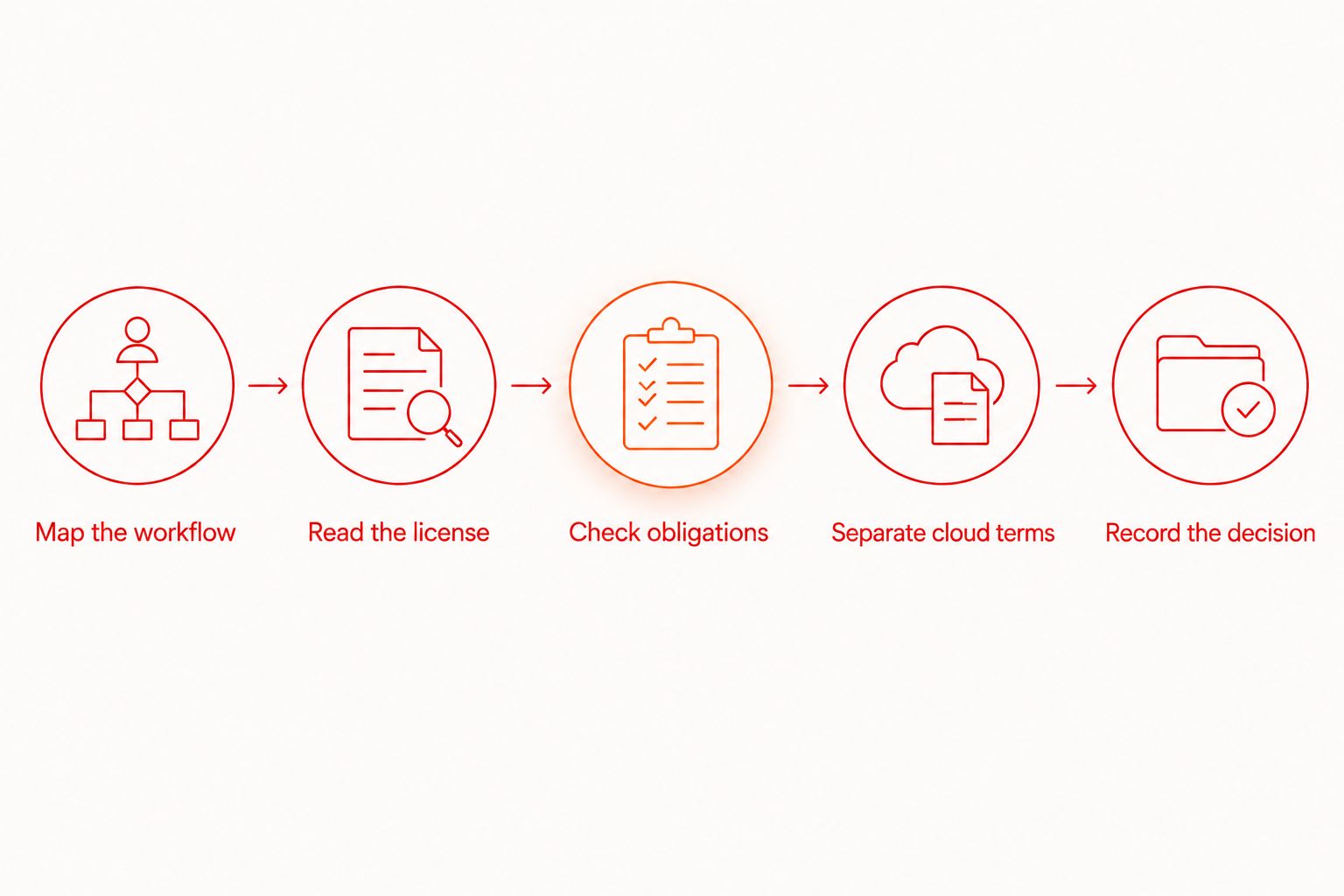
Run these 5 licensing checks before approval
The useful output is a decision tied to a specific workflow. A folder containing a license file is evidence, but it is not the decision itself.
1. Map the workflow
Write down where tests execute and who operates the runner. Include employee laptops, contractor machines, build workers, and any hosted environment you intend to use.
Describe the proposed action precisely. Running an unchanged application internally differs from distributing a modified application to customers. Do not collapse those actions into a single statement such as internal testing.
For your 2026 review, use the workflow you actually intend to deploy. Record planned cloud execution as a separate stage if the team is starting locally.
2. Read the license
Find the license text attached to the version you intend to adopt. Read definitions, grants, restrictions, conditions, and termination provisions together; a permission in one section can depend on conditions elsewhere.
Check whether the document addresses your proposed use. If it does not clearly resolve an action that matters to your team, obtain clarification before making that action part of the release process.
Do not infer permission from a public repository, a download button, or the ability to build the code. Those establish access or technical capability, not the complete legal grant.
3. Check obligations
Identify required notices, attribution, license copies, and any conditions attached to modification or distribution. These obligations depend on the actual license; do not assign them from the source-available label.
Translate applicable obligations into an owner and an action. For example, if redistribution requires notices, identify where your distribution process will retain those notices. Avoid approval notes that say only comply with the license.
4. Separate cloud terms
Review hosted execution independently from local execution. Check the service terms and relevant documentation for account access, uploaded artifacts, test data, retention, deletion, and execution environments.
A simulator or emulator is not a physical device. Confirm the documented environment needed for your test instead of interpreting cloud execution as proof of physical-device access.
5. Record the decision
Save the reviewed version, license text, applicable service terms, and the intended workflow. Record unresolved questions and the person responsible for resolving them.
For a 2026 approval record, include the review date and the exact artifact or repository revision. Revisit the decision when the software version, applicable terms, or your use changes.
Why licensing requirements vary
The important variable is what your team does with the software. Use these factors to decide which parts of the license need close review:
- Execution location: Distinguish a developer's local machine from a build worker or a hosted service. Confirm the terms relevant to each planned environment.
- Who uses it: Identify employees, contractors, customers, and other organizations involved in operating or receiving the software.
- Modification: Inspecting source and changing source are different actions. Check the permissions and conditions that apply to your proposed changes.
- Distribution: Passing along a runner, modified build, or bundled dependency introduces a different review from using an unchanged download internally.
- Service delivery: Running tests for your own application differs from offering testing functionality to other organizations. Check the actual grant and restrictions before building a service around the software.
- Hosted data handling: Uploading an application build, test flow, or execution artifact raises questions beyond code licensing. Review the relevant service documentation and your own data requirements.
None of these factors proves that a tool is unsuitable. They tell you which questions require explicit answers before adoption.
Is source-available the same as open source?
Source-available is not interchangeable with open source. The Open Source Initiative's Open Source Definition sets criteria for open-source licensing; access to readable source alone does not satisfy those criteria.
Source access helps you inspect implementation details and investigate behavior. The limitation is legal, not visual: seeing how code works does not tell you every action you are permitted to take with it.
Do not reject a source-available tool solely because it is not described as open source. Reject a licensing fit when the actual terms conflict with a required use. Conversely, do not approve an open-source dependency without checking its applicable obligations.
Does free local testing require paid cloud execution?
Free local testing does not inherently require paid cloud execution. Maestro Deck mobile app testing tools support a local-first evaluation: write and execute flows with the desktop runner, then assess optional cloud execution against a concrete need.
The advantage is a smaller initial workflow. You can assess the runner and inspector without making hosted execution a prerequisite. The limitation is equally clear: local execution does not establish that a proposed hosted workflow meets your CI, environment, or data-handling requirements.
Keep the 2026 adoption decision narrow. Approve local use on its own merits, then review hosted execution before introducing it into the release pipeline. Do not treat approval of one as approval of the other.
Can you modify a source-available testing tool?
Modification rights come from the license, not the source-available label. Read the grant and its conditions before maintaining a patch, sharing a modified build, or distributing the tool with another package.
Separate technical maintenance from legal permission. Even when a change is permitted, your team still needs to maintain it and check compatibility with the rest of the testing workflow. Prefer a documented configuration or supported workflow when it meets the same requirement without a custom patch.
Test the workflow, not just the installation
A licensing decision is incomplete without a usable testing workflow. Pair the document review with a small release-path evaluation. Keep the test focused enough that a teammate can reproduce the result.
Start with a user journey already present in your application. Choose one with a clear starting state and an observable outcome, then write down what success means before building the flow.
Use this practical sequence:
- Define the starting state. Specify the application build, environment, permissions, and test account requirements. Keep production credentials out of shared test material.
- Write the flow. Express the user journey in Maestro YAML. Check commands and syntax against the documentation for the framework version you use.
- Inspect a failure. Use the runner and inspector to investigate a failed interaction rather than treating a successful installation as sufficient evidence.
- Repeat the handoff. Ask another developer to execute the same flow from the documented setup. Resolve undocumented steps before calling the workflow ready.
- Evaluate CI separately. Identify the execution environment and required artifacts, then check the relevant technical documentation and terms before connecting hosted execution.
Do not replace this exercise with a broad feature checklist. A feature name does not establish that your application, environment, and release process work together.
For your 2026 release workflow, keep the initial acceptance criteria specific: the flow reaches its expected outcome, failures are inspectable, and another developer can reproduce execution. Add coverage after that handoff works.
Keep these 3 records together
Store the workflow description, license decision, and execution instructions where the release team can find them. Each answers a different question: what you intend to do, why that use is approved, and how to reproduce it.
Make changes visible. A switch from local execution to hosted runs changes the workflow description; distributing a modified runner changes the licensing question. Neither belongs in an undocumented setup shortcut.
FAQ
What's the first licensing check for mobile app testing tools?
Map your intended use before comparing license labels. Identify who runs the software, where it executes, and whether you will modify, redistribute, or host it.
Is source-available software automatically open source?
No. Source availability establishes access to code, while open-source licensing must satisfy the Open Source Definition; inspect the actual license before assigning either label.
Can I use Maestro Deck locally without paying for cloud execution?
Yes. Maestro Deck provides a free local desktop runner and inspector, and local use does not require an account or paid cloud execution.
Does access to source code let my team redistribute a modified runner?
Access to source code does not by itself grant redistribution rights. Check the actual license for permissions and conditions covering the modified build and its recipients.
Does a cloud testing service always run on physical devices?
No. Hosted execution can use simulators, emulators, or other environments; confirm the documented environment rather than assuming physical-device access.
Should we review the testing framework and desktop runner separately?
Yes. Record the license or terms for each component rather than treating the framework, desktop runner, and hosted execution service as one licensed product.
When should we repeat a licensing review?
Repeat the review when the software version, applicable terms, or intended use changes. Moving to hosted execution or distributing a modified build deserves a fresh check against the relevant terms.
One last thing
Approve actions, not adjectives. A useful approval says who can run which version, in which environment, under which terms. Source-available is a starting description, not that decision.
Keep local adoption and cloud adoption as separate decisions. That lets your team evaluate the desktop workflow without implying that a later hosted setup has already passed technical, licensing, or data-handling review.


