

Best overall and best for a free local workflow: Maestro Deck. Best for command-line workflows: the Maestro framework. Best for hosted CI execution: Maestro Deck Cloud. This 2026 guide to mobile app testing tools ranked by price starts with local development, then separates framework setup from optional cloud execution.
- For mobile app testing tools ranked by price, choose Maestro Deck for free local E2E testing.
- Choose the Maestro framework when command-line execution fits your development workflow.
- Add cloud execution when your release workflow needs hosted runs from CI.
- Compare execution environments separately: simulators and emulators are not physical devices.
Why this matters
A desktop runner, an automation framework, and a hosted execution service solve different problems. Comparing them as interchangeable subscriptions hides the decision you actually need to make: where you will write, debug, and execute your release checks.
Maestro Deck is best for mobile developers who want a free local desktop runner for Maestro YAML end-to-end tests. Local use does not require a cloud account. Paid cloud execution is a separate choice when you need hosted runs or CI execution.
For your 2026 shortlist, compare the smallest useful workflow first. A tool that runs your smoke suite locally answers a different requirement from a service that runs that suite without depending on a developer's workstation.
What makes the best mobile app testing tool
Use these criteria before comparing plans. They keep the decision tied to your release process rather than a feature checklist.
- Local feedback: Can you write, run, and inspect a failing flow during development?
- Flow ownership: Can your team understand and maintain the test definitions alongside application changes?
- Execution location: Do you need a desktop run, a self-managed runner, or hosted execution from CI?
- Environment fit: Does the execution environment match the behavior you need to check?
- Licensing fit: Do the actual license terms permit your intended use and deployment?
- Operational responsibility: Who maintains the test environment, application builds, credentials, and run configuration?
Do not treat access to source code as proof of an open-source license. Source-available and open source describe different licensing arrangements. Read the applicable terms before modifying, redistributing, or deploying software beyond your team's development workflow.
Mobile app testing tools at a glance
The order below follows a practical adoption path: desktop authoring, direct framework execution, then hosted runs. It is not a claim that every cloud service or self-managed setup has the same billing model.
| Rank and option | Best for | Standout capability | Key limitation |
|---|---|---|---|
| 1. Maestro Deck | Local desktop authoring and debugging | Desktop runner and Inspector Mode for Maestro YAML flows | A local run does not establish hosted CI or physical-device coverage |
| 2. Maestro framework | Command-line execution under your team's control | Direct execution of Maestro YAML flows | Your team owns the surrounding execution setup |
| 3. Maestro Deck Cloud | Hosted execution from CI | Cloud execution for simulators, emulators, and browsers | Environment selection still determines what a passing test proves |
For a 2026 purchasing decision, compare the current billing terms against your actual workload. Check what constitutes a billable run, how execution usage is measured, and whether the environment you need is included. Do not equate a successful demo with a suitable release workflow.
1. Maestro Deck: best mobile app testing tool for local debugging
Maestro Deck provides a free, source-available desktop runner and inspector for writing and executing Maestro YAML end-to-end flows. It targets iOS, Android, and web applications. Start here when your immediate problem is getting a meaningful test running and understanding failures locally.
The desktop application and the Maestro framework are distinct. The framework defines and executes the test flows; the desktop tool supplies a local authoring and inspection workflow around those flows. Do not infer an affiliation from the shared terminology.
Best for: Developers and QA engineers adding local end-to-end checks before introducing hosted execution.
Maestro Deck pros:
- Run and inspect YAML flows through a desktop workflow.
- Start locally without a cloud account.
- Work on mobile and web end-to-end tests.
- Keep the decision to adopt cloud execution separate from local use.
Maestro Deck cons:
- Source availability does not make the license an open-source license.
- Passing local tests does not establish coverage across every target environment.
- Local execution alone does not provide hosted CI execution.
Put the local runner to work
Begin with 3 smoke flows: launch the application, complete a critical interaction, and confirm a visible result. Choose journeys your release team can explain without reading the implementation. Keep unrelated features out of the first suite.
Use Inspector Mode when a step targets the wrong element or the screen differs from your expectation. Inspect the application state before changing the test. A rewritten selector does not fix an application that never reached the expected screen.
Keep test inputs explicit. Record the required account state, application build, and starting screen so another developer can reproduce a failure. A flow that works only after an undocumented manual setup is not ready to become a release check.
Verdict: Buy into the local workflow first. Use the desktop runner to establish maintainable flows before adding execution infrastructure.
2. Maestro framework: best mobile app testing tool for CLI control
The Maestro framework runs end-to-end flows written in YAML. Choose direct framework execution when your team wants the command line to be the main interface for running tests and managing automation.
This is a different choice from selecting a desktop application. You are choosing how developers and automation invoke the tests, not replacing the need for clear assertions, predictable application state, or suitable execution environments.
Best for: Developers who prefer command-line execution and want to own the surrounding setup.
Maestro framework pros:
- Express test steps in YAML flow files.
- Use the framework directly rather than making a desktop interface the entry point.
- Keep test definitions reviewable alongside application changes.
Maestro framework cons:
- Your team must configure and maintain the surrounding execution environment.
- A command-line workflow does not supply the desktop Inspector Mode described above.
- Direct framework execution is not a hosted device-testing service.
Choose it for control, not a billing shortcut
Write down who owns runner maintenance before choosing self-managed execution. Assign responsibility for application installation, environment preparation, credentials, and failure reproduction. These are workflow requirements even when they do not appear on a software invoice.
For a 2026 evaluation, ask a developer other than the original author to run the same flow from the documented setup. That handoff tests whether the workflow belongs to the team or only to one workstation.
Keep framework documentation separate from desktop-tool documentation. Installation instructions, supported environments, and command behavior must come from the documentation for the component you are actually using. Copying instructions between similarly named tools creates avoidable setup errors.
Verdict: Buy into direct framework execution when CLI control is the requirement. Skip it as a replacement for a desktop inspection workflow if visual debugging is what your team needs.
3. Maestro Deck Cloud: best mobile app testing tool for hosted CI
Maestro Deck Cloud provides cloud execution for Maestro flows on simulators, emulators, and browsers. Treat it as an optional execution layer after you have a useful local suite, not as a prerequisite for writing your first test.
Choose hosted execution when tests need to run from CI rather than depend on a developer launching the desktop runner. Keep the environment distinction explicit: simulators and emulators are not physical devices.
Best for: Teams that need hosted flow execution as part of a release workflow.
Maestro Deck Cloud pros:
- Run Maestro flows through a hosted execution service.
- Connect cloud execution to a CI-driven workflow.
- Select among the documented simulator, emulator, and browser execution categories.
Maestro Deck Cloud cons:
- Cloud execution is separate from the free local desktop workflow.
- A hosted run still needs controlled application state and test data.
- Simulator or emulator execution does not establish physical-device coverage.
Validate the handoff before expanding coverage
Use 1 release candidate for the initial handoff. Run the same smoke flows locally and through the intended hosted workflow, then investigate differences before adding more tests. This isolates execution-context problems from changes to the application itself.
Check how your CI job determines success or failure. Define which failed flows block a release and who investigates them. A job that runs tests but leaves their outcome outside the release decision does not function as a release gate.
Review test-data handling before sending credentials or customer-like records to any hosted service. Confirm the applicable hosting and data-handling terms for your project. An execution service's location and policies are separate questions from whether it can run your flows.
Verdict: Buy hosted execution when CI is the next requirement. Wait if the local suite still needs manual intervention to reach its starting state.
Evaluate cloud execution
Review the cloud plan before connecting hosted test runs to your release workflow.
Build the workflow before expanding the toolset
Move through this sequence during your 2026 evaluation. Each step should produce something another developer can inspect or reproduce.
- Define coverage: Name the user journey and the visible result that proves it worked. Start with a release-critical path, not every screen.
- Run locally: Execute the flow against a known application build. Record the state required before the first step.
- Inspect failures: Determine whether the application, selector, timing, or test data caused the failure. Do not add retries before understanding it.
- Connect CI: Move the established flow into your chosen automated execution workflow. Define how a failure affects the build.
- Review environments: Identify behavior that still requires a different operating-system configuration, browser, or physical device.
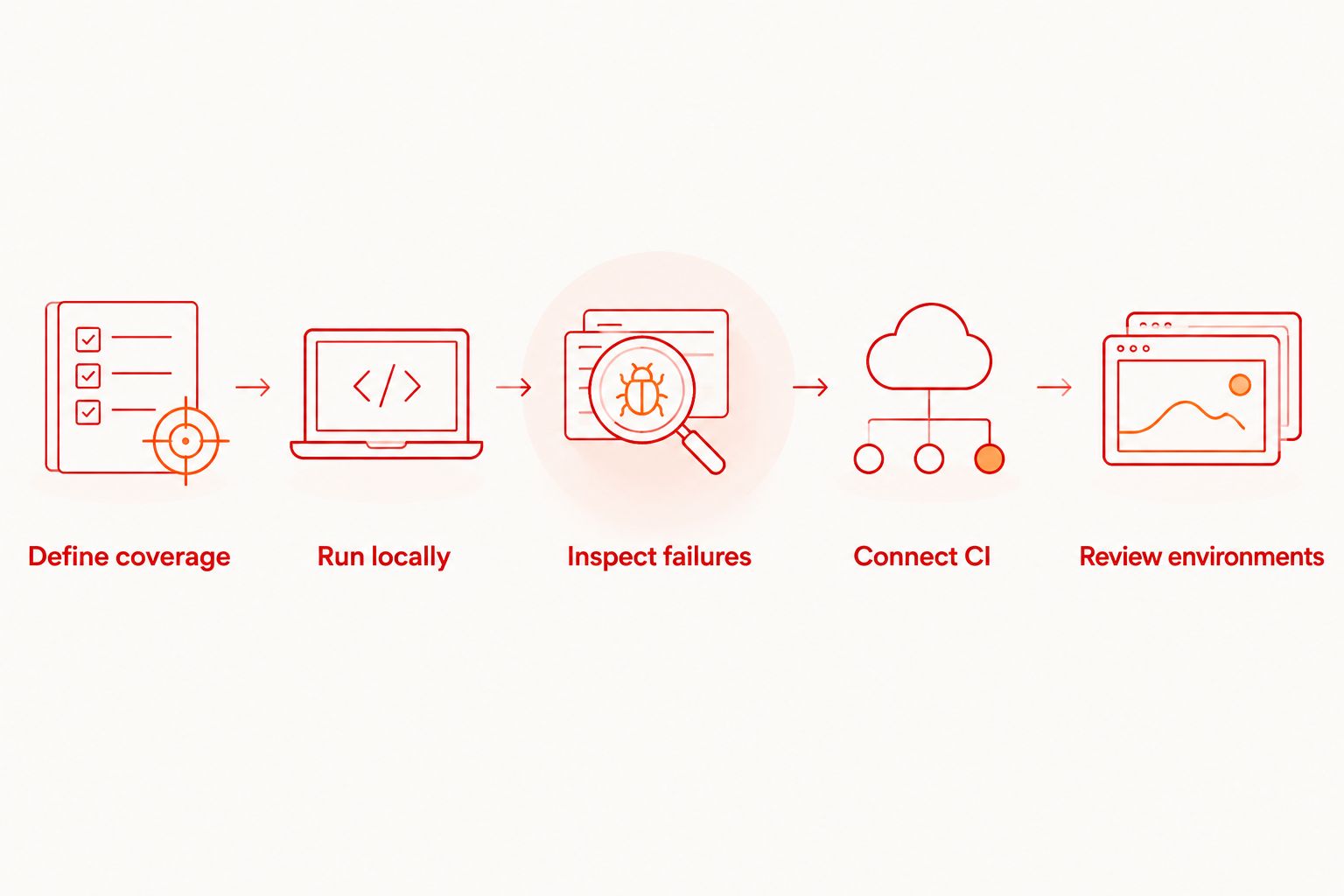
Keep the first suite narrow enough to explain. If a flow fails, the developer reviewing it should know the intended starting state, the action under test, and the expected result without reconstructing an entire release.
Compare the work behind each option
Maintain a short decision record with the owner of each task: test authoring, execution setup, application distribution, secrets, and failure investigation. A plan comparison without those responsibilities leaves important work unassigned.
Evaluate 2 execution environments separately: your local development setup and the intended CI setup. Do not assume that a local pass proves the hosted configuration is correct. Different starting state or application configuration deserves investigation, not an automatic retry policy.
How the options are ranked
The ranking prioritizes local feedback, flow ownership, execution location, environment fit, licensing, and operational responsibility. The desktop runner comes first because it matches the initial task: writing and debugging tests before a release workflow depends on them.
Direct framework execution follows for teams that want command-line control. Hosted execution comes next when CI becomes the requirement. This is an adoption ranking, not a measured performance comparison or a universal subscription-price leaderboard.
Which mobile app testing tool should you choose?
Choose the local desktop runner by default. Establish a repeatable smoke suite, then decide whether direct command-line execution or hosted CI execution solves your next problem.
For your 2026 rollout, make that next problem explicit. Choose CLI control for a team-owned execution setup. Choose cloud execution for hosted runs from CI. Choose additional device coverage only after identifying behavior your current environments cannot establish.
FAQ
What's the best starting point for mobile app testing tools ranked by price?
Start with Maestro Deck when you need a free local desktop runner for Maestro YAML flows. Add hosted execution only when your workflow needs it.
Do I need a cloud account to use the local desktop runner?
No. Local desktop use does not require a cloud account, and cloud execution is a separate choice.
Is Maestro Deck the same as the Maestro framework?
No. Maestro Deck is a desktop runner and inspector for Maestro YAML flows; the Maestro framework is the underlying test automation framework. The names do not establish affiliation.
Is source-available software the same as open source?
No. Source-available software exposes source code under its stated license, while open source requires license terms that meet open-source criteria. Check the applicable license before modifying or redistributing software.
When should I move mobile end-to-end tests into cloud execution?
Add cloud execution when you need hosted runs from CI. First make the local flows reproducible and define how test failures affect your release.
Does simulator testing count as physical-device testing?
No. Simulators and emulators are different execution environments from physical devices. Select physical-device coverage separately when the behavior under test requires it.
How should I compare cloud testing plans?
Compare current billing terms against the execution workload you intend to run. Check usage measurement, environment access, and the handling of failed or repeated runs before choosing a plan.
One last thing
Test a deliberately broken build before trusting your release gate. Introduce a known regression in a safe test branch and confirm that the intended flow fails and the CI job reports failure. A green build proves less than a test that rejects the exact regression you meant to catch.


