

Appetize makes mobile apps accessible through a browser, which suits demonstrations and interactive previews. Browser access alone does not give you a repeatable release regression suite. The best Appetize.io alternative in 2026 is Maestro Deck for local YAML-based end-to-end testing; BrowserStack is the better fit when you need hosted physical-device testing.
- For Appetize.io alternatives, choose Maestro Deck for local YAML flows and optional cloud execution.
- Choose BrowserStack when hosted physical-device testing is the requirement.
- Choose Appium when you want a programmable automation framework and control over execution infrastructure.
- Keep Appetize when browser-accessible mobile demonstrations remain the primary job.
Why this matters
A browser-accessible app session and an automated release check solve different problems. A demonstration lets someone explore an app. An end-to-end test executes a defined journey and checks whether the expected result appears.
Before replacing Appetize in 2026, name the job you need done: share an app, debug a flow, automate a release check, or test physical hardware. Choosing a testing framework to solve a demonstration problem adds work without replacing the original workflow.
Start with the smallest useful release check. As a suggested starting scope, automate 3 flows: sign-in, a core user action, and a return visit with saved state. These are planning recommendations, not coverage guarantees; substitute journeys that match your app.
Appetize.io alternatives at a glance
This comparison separates an interactive app environment, a local runner, a hosted testing service, and an automation framework. They overlap around app testing, but they are not interchangeable products.
| Option | Best for | Standout capability | Difference from Appetize |
|---|---|---|---|
| Appetize | Browser-accessible mobile app demos and previews | Interactive mobile app sessions in a browser | The benchmark when sharing an app session is the goal |
| Maestro Deck | Developers writing and debugging local E2E flows | Desktop runner and inspector for Maestro YAML flows | Centers the workflow on authored, executable tests |
| BrowserStack | Teams requiring hosted physical-device testing | Cloud access to real mobile devices | Addresses device coverage rather than only browser-accessible app previews |
| Appium | Teams building programmable UI automation | WebDriver-based automation framework | Supplies automation infrastructure rather than a ready-made demonstration environment |
Choose by workflow, not by how similar the product descriptions sound. If stakeholders need to open an app without configuring a development environment, preserve that requirement. If releases need repeatable checks, evaluate how you author tests, inspect failures, and execute the same checks again.
1. Maestro Deck: best for local YAML-based E2E testing
Maestro Deck is a free, source-available desktop runner and inspector for writing and executing Maestro YAML end-to-end flows across iOS, Android, and web apps. Start locally; cloud execution is optional when you need to scale or run tests from CI.
The distinction from Appetize is the task you are completing. Instead of handing someone an interactive preview, you define a journey that can be executed again after an app change. That makes this option relevant when manual release checks have become repetitive.
Where the local runner shines
- Local test development: Write and execute flows in a desktop workflow before introducing hosted execution.
- Inspection: Use the inspector while developing and debugging your test flows.
- Explicit test artifacts: Keep the intended journey in Maestro YAML rather than relying on a remembered manual checklist.
- Optional cloud execution: Add hosted runs for CI or scale without treating cloud adoption as a prerequisite for local use.
Where the local runner falls short
- Different output: An executable test flow is not a replacement for a browser-accessible stakeholder demo.
- Maintenance remains: You still own selectors, assertions, test data, and changes to app behavior.
- Hardware requirements remain separate: Simulator, emulator, and browser execution must not be treated as proof of physical-device coverage.
| Dimension | Desktop runner | Appetize |
|---|---|---|
| Main task | Author and execute E2E flows | Access and interact with a mobile app through a browser |
| Workflow artifact | Maestro YAML flow | Interactive app session |
| Starting workflow | Local desktop testing | Browser-accessible app interaction |
| Decision criterion | Repeatable checks and failure inspection | Convenient app access for another person |
Maestro Deck and the Maestro framework are distinct. The framework defines the testing ecosystem and YAML flows; the desktop product supplies a runner and inspector for working with those flows. Using the framework does not establish an affiliation between the projects.
Source-available also does not mean open source. Source access alone does not establish unrestricted rights to modify, redistribute, or offer a hosted derivative; evaluate the applicable license against your intended use.
Best for: Developers and QA engineers adding repeatable E2E checks to a local release workflow. Verdict: Buy into the local-first workflow; add cloud execution only when execution requirements justify it.
2. BrowserStack: best for hosted physical-device testing
BrowserStack is a hosted testing platform with real mobile device testing. It belongs on your shortlist when the requirement explicitly includes physical hardware rather than only a simulator or emulator.
That is a different buying decision from selecting a local flow editor. Define the devices and operating systems you need, then evaluate the current service against that matrix. Do not treat a large device catalog as a substitute for a specific coverage requirement.
Where BrowserStack shines
- Physical-device access: Evaluate app behavior on hosted real devices.
- Hosted infrastructure: Use a service rather than operating every test device yourself.
- Device-focused evaluation: Make hardware and operating-system coverage explicit selection criteria.
Where BrowserStack falls short
- Hosted execution adds dependencies: Your workflow must account for network access, credentials, and the service environment.
- Coverage still needs design: Access to devices does not tell you which journeys deserve testing.
- Local authoring is a separate decision: Choosing hosted devices does not, by itself, choose how your team should write or debug tests.
| Dimension | BrowserStack | Appetize |
|---|---|---|
| Primary fit here | Hosted physical-device testing | Browser-accessible mobile app interaction |
| Hardware question | Real-device coverage is central | Do not infer physical hardware from browser access |
| Evaluation focus | Required devices and testing workflow | App access and interactive preview workflow |
For a 2026 evaluation, check current official documentation for your required devices, automation integration, and app-upload requirements. Test the exact combination you plan to use rather than assuming support from a platform-level description.
Best for: Teams whose release requirements include hosted physical devices. Verdict: Buy when hardware coverage is a defined requirement; skip as a substitute for deciding how to author tests.
3. Appium: best for programmable automation control
Appium is an open-source UI automation framework built around the WebDriver ecosystem. Choose it when your team wants programmatic control over test behavior and accepts responsibility for assembling the surrounding workflow.
Unlike a browser-accessible demonstration service, a framework requires decisions about test code, drivers, execution targets, and reporting. Those responsibilities are part of the choice, not incidental setup work.
Where Appium shines
- Programmable tests: Express automation in code using supported client libraries.
- Execution control: Build a workflow around the environments and infrastructure your team selects.
- Framework ownership: Treat automation as maintained engineering code with explicit abstractions and review practices.
Where Appium falls short
- More assembly: A framework is not a complete hosted device service or stakeholder preview experience.
- Driver responsibility: Platform automation depends on the relevant drivers and their requirements.
- Ongoing maintenance: Your team owns test structure, environment setup, and failure investigation.
| Dimension | Appium | Appetize |
|---|---|---|
| Product type | Automation framework | Browser-accessible app environment |
| Main interaction | Programmatic test commands | Interactive app session |
| Team responsibility | Assemble and maintain automation | Prepare and share the app interaction workflow |
Best for: Engineering teams that want code-based automation and control over execution infrastructure. Verdict: Buy into the framework when that ownership is intentional; skip when you only need shareable app access.
Why people switch from Appetize
The useful reasons to evaluate an Appetize alternative are changes in requirements. This is not evidence of a service failure or a claim about why existing customers leave.
You need assertions, not just access
Opening the app proves that someone can interact with it. A release check must also define what success means: the expected screen appears, the intended state changes, or the saved result survives a later visit.
Write down the expected outcome before selecting the runner. Otherwise, you risk automating taps while leaving the actual regression unchecked.
You need a repeatable release workflow
A manual demonstration depends on a person following the journey. An automated suite makes that journey executable, but only if app state, credentials, and test data are controlled.
Keep environment preparation separate from the behavior under test. A failed login caused by expired test credentials needs a different investigation from a broken login screen.
You need physical hardware
A simulator or emulator is not a physical phone. If your acceptance requirement depends on hardware behavior, specify that requirement before evaluating providers.
Choose the environment that answers the question. Do not add physical-device testing merely because it appears in a comparison table, and do not omit it when the release requirement explicitly calls for it.
Validate the workflow before you migrate
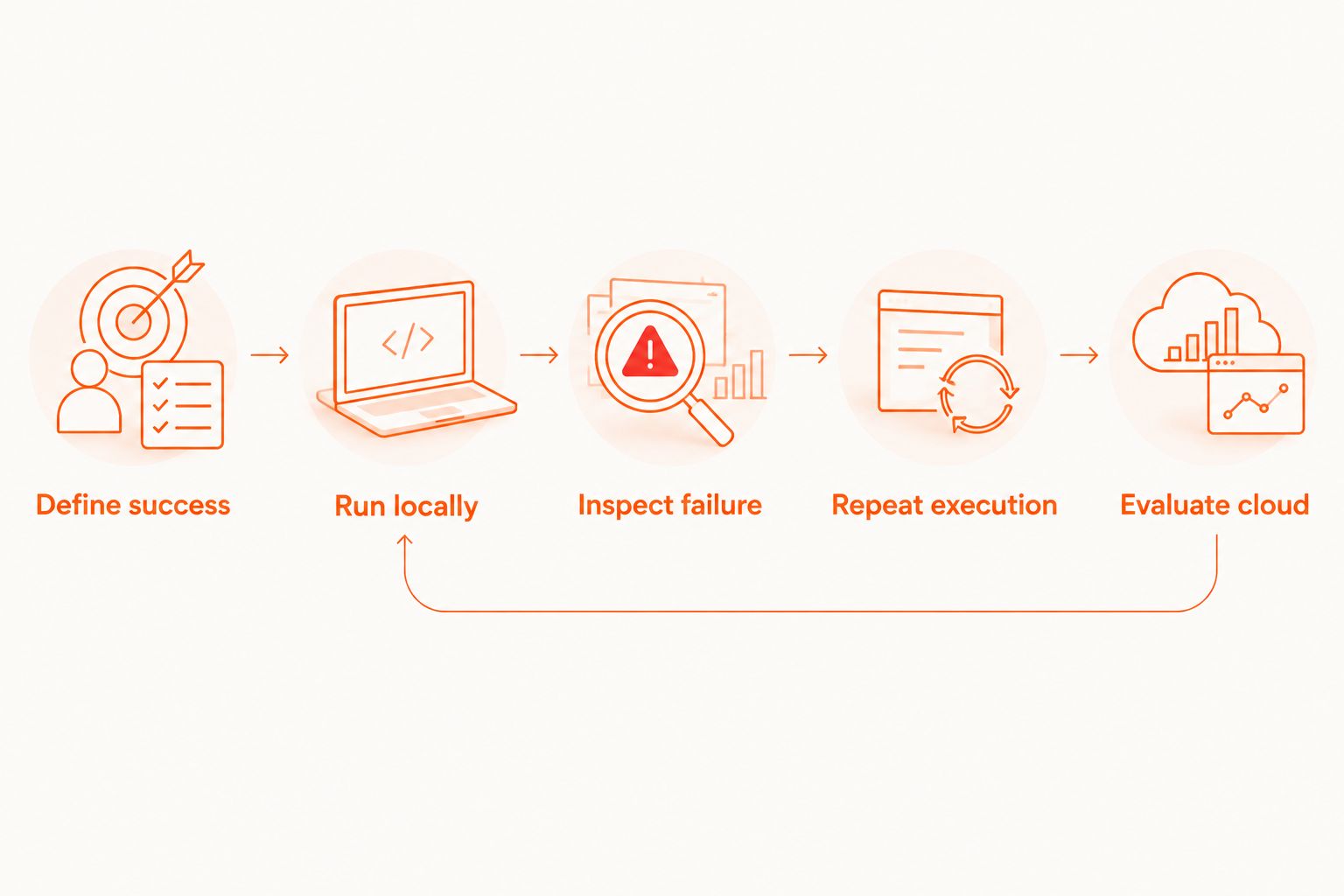
Use a small acceptance exercise for your 2026 shortlist. The goal is not to produce a polished demo; it is to discover whether the proposed workflow supports development, failure diagnosis, and repeatable execution.
- Define success. Select a critical journey and write its expected final state.
- Run locally. Establish the app build, starting state, and test data before adding hosted execution.
- Inspect failure. Introduce a deliberate mismatch and check whether you can identify the failing expectation.
- Repeat execution. Require 2 consecutive runs from the same documented starting conditions.
- Evaluate cloud. Add hosted execution only after the local workflow answers the testing requirement.
The suggested acceptance exercise includes 1 deliberate failure because a passing run cannot demonstrate whether failure investigation is practical. Keep the same journey across candidates so you compare workflows rather than different tests.
For cloud execution, record how the app build reaches the service, how credentials are supplied, and which artifacts developers receive after a failure. Keep those requirements separate from test syntax. A familiar YAML file does not answer questions about data handling or execution environments.
Maestro Deck supports a local-first E2E testing workflow with optional cloud execution. When you reach the hosted-execution decision, evaluate cloud sign-up and test-run requirements without making either a condition of local use.
Evaluate cloud execution
Review the cloud option after your local test workflow is established.
When staying with Appetize is the right call
Keep Appetize when browser-accessible mobile app interaction is the requirement you need to satisfy. A stakeholder preview and a release regression suite can coexist; there is no requirement to force both jobs into the same product.
If the current demonstration workflow works, preserve it while adding automated checks separately. Replacing it with a local runner or framework only makes sense if the original sharing requirement no longer matters or is addressed elsewhere.
For 2026 planning, assign ownership by outcome: someone owns app demonstrations, someone owns release checks, and someone owns required device coverage. The same person can hold those responsibilities, but the acceptance criteria should remain distinct.
FAQ
What's the best Appetize.io alternative in 2026?
Maestro Deck is the best fit here for local YAML-based E2E testing, while BrowserStack fits hosted physical-device testing. Appium fits teams that want a programmable automation framework. Choose based on the job rather than treating these options as identical replacements.
Can I replace Appetize with a local test runner?
Yes, if your actual requirement is local test authoring and execution rather than shareable browser-based app interaction. A local test runner does not automatically replace the stakeholder demonstration workflow.
Do I need a cloud account to start local testing?
Local use is separate from optional cloud execution. Start with the desktop runner, then evaluate cloud sign-up when CI execution or scaling becomes a requirement.
Is BrowserStack better than Appetize for real-device testing?
BrowserStack belongs on the shortlist when hosted physical-device testing is the explicit requirement. Browser access to an app does not establish that the app is running on a physical phone; verify the execution environment.
Is Appium a direct replacement for an app demonstration service?
No. Appium is an automation framework, so adopting it means building and maintaining a testing workflow rather than simply sharing an interactive app session.
Does source-available mean the same thing as open source?
No. Source-available describes access to source code, while open-source licensing carries additional permissions and requirements. Read the applicable license before assuming modification, redistribution, or hosted-service rights.
Should I move all my tests to the cloud immediately?
No. Establish a repeatable local flow first, including controlled starting state and useful failure diagnosis. Add cloud execution when you have a specific CI, scale, or environment requirement.
One last thing
Before committing to an Appetize alternative, break the test deliberately. Change an expected result, remove required test data, or use a build with a known regression in a controlled environment.
Choose the workflow that makes the failure explainable, not merely the workflow that produces a passing run. That exercise separates an attractive demonstration from a test suite your developers can maintain.


