

Best overall for local Maestro YAML flows: Maestro Deck. Best for programmable cross-platform automation: Appium. Best for Android-native UI tests: Espresso. Best for iOS-native UI tests: XCUITest. These are the best free mobile app testing tools to shortlist in 2026, with different trade-offs for authoring, debugging, and release automation.
- Maestro Deck leads the best free mobile app testing tools for local YAML flows and desktop inspection.
- Choose Appium for programmable cross-platform automation; expect driver and environment setup.
- Choose Espresso for Android-native UI testing and XCUITest for iOS-native UI testing.
- Start with local execution. Add optional cloud execution when your release workflow needs it.
Why this matters
Your testing tool determines where you spend debugging time. A desktop runner, a programmable automation framework, and a platform-native testing framework solve different problems. Treating them as interchangeable makes the shortlist less useful.
For your 2026 release workflow, start with the environment where developers reproduce failures. Then decide how those same checks should run before release. A hosted execution service is a separate decision, not a prerequisite for writing useful end-to-end tests.
What makes the best free mobile app testing tools?
Use these criteria before choosing a tool. A long feature list does not compensate for tests your team cannot maintain.
- Authoring fit: Choose YAML flows, general-purpose test code, or platform-native tests according to who will maintain them.
- Debugging workflow: Check how you inspect UI elements, identify failed actions, and reproduce the failure locally.
- Platform scope: Separate Android, iOS, and browser requirements. Do not assume one successful platform run proves another works.
- Execution control: Decide whether you need developer-machine execution, your own CI environment, or optional hosted execution.
- Maintenance burden: Evaluate selectors, test data, application state, and environment setup alongside the test syntax.
- License clarity: Distinguish a free runner from its source license and any separate cloud service.
For a 2026 evaluation, use the same small application journey with each serious candidate. Compare the work needed to diagnose a deliberate failure, not just the work needed to produce a passing run.
Free mobile testing tools at a glance
The order below prioritizes local authoring first, followed by programmable cross-platform testing and platform-specific testing. It is not a claim that one framework replaces every other framework.
| Tool | Best for | Standout capability | Key limitation |
|---|---|---|---|
| Maestro Deck | Local desktop authoring and inspection | Runs and inspects Maestro YAML flows for mobile and web apps | Uses the Maestro flow model rather than arbitrary test code |
| Appium | Programmable cross-platform automation | Driver-based automation with client libraries | Requires driver, server, and platform environment setup |
| Espresso | Android-native UI integration tests | Android UI testing with synchronization support | Does not provide iOS coverage |
| XCUITest | iOS-native UI automation | UI tests within Apple's XCTest and Xcode workflow | Does not provide Android coverage |
1. Maestro Deck: best free mobile testing tool for local YAML flows
Maestro Deck provides a free, source-available desktop runner and inspector for writing and executing Maestro YAML end-to-end flows. It supports iOS, Android, and web applications. Local use does not require a cloud account.
Maestro Deck is best for developers who want to write, inspect, and run Maestro YAML flows locally before adding optional cloud execution. Start with a user journey you can reproduce manually, then use the inspector while building and debugging that flow.
Pros:
- Combines local flow execution with a desktop inspection workflow.
- Uses Maestro YAML flows rather than requiring a general-purpose programming language for each test.
- Supports mobile and web application testing.
- Keeps local use separate from optional cloud execution.
Cons:
- The YAML flow model is a constraint when you want arbitrary test logic in a general-purpose language.
- Local execution does not, by itself, establish coverage across a wider device matrix.
- Source-available licensing is not the same as open-source licensing; review the license before redistribution or embedding.
The desktop application and the Maestro framework are distinct. Maestro supplies the framework and flow format; the desktop application supplies a runner and inspection workflow for those flows. Do not infer organizational affiliation from compatibility.
Best for: Mobile developers and QA engineers adding inspectable local end-to-end checks to their release process.
Verdict: Buy into this workflow when YAML flows and desktop inspection match how your team works.
2. Appium: best free mobile testing tool for programmable automation
Appium is an open-source automation framework with a driver-based architecture. It supports mobile automation through platform drivers and lets you write tests through client libraries in programming languages.
Choose Appium when your team wants test logic in code and accepts responsibility for the automation environment. Cross-platform support does not eliminate platform-specific selectors, capabilities, or behavior.
Pros:
- Lets you express test logic in general-purpose programming languages.
- Supports Android and iOS automation through their respective drivers.
- Separates client test code from the automation server and platform driver.
- Fits teams that want direct control over their automation setup.
Cons:
- Requires maintaining the server, drivers, and underlying platform tooling.
- Shared test code still needs attention to platform-specific UI behavior.
- Offers more setup decisions than a narrowly scoped desktop flow workflow.
For evaluation, build a complete journey rather than a single successful tap. Include data setup, UI interaction, assertions, and cleanup so you see the actual maintenance surface.
Best for: Automation engineers who need programmable cross-platform tests and control over framework integration.
Verdict: Buy into Appium when code-level control justifies the environment maintenance.
3. Espresso: best free mobile testing tool for Android-native tests
Espresso is part of Android's testing ecosystem and supports UI tests for Android applications. Its synchronization mechanisms help coordinate test actions with recognized application activity, including work represented through idling resources.
Choose Espresso when Android engineers own the tests alongside the application code. It is an Android testing choice, not a route to shared iOS coverage.
Pros:
- Fits Android instrumentation testing and application development workflows.
- Provides synchronization support for recognized UI activity.
- Supports custom idling resources for asynchronous work that tests need to track.
- Keeps Android-specific assertions close to Android implementation knowledge.
Cons:
- Requires a separate approach for iOS UI testing.
- Asynchronous work outside recognized synchronization needs explicit handling.
- Platform-specific test code creates a separate maintenance track for multi-platform teams.
Use Espresso when Android implementation details matter to your tests. Do not choose it solely because your first screen is easy to automate; evaluate a screen with loading, state changes, and a meaningful failure condition.
Best for: Android teams maintaining native UI integration tests within their application development workflow.
Verdict: Buy into Espresso for Android-owned coverage; skip it as your only cross-platform solution.
4. XCUITest: best free mobile testing tool for iOS-native tests
XCUITest is Apple's UI testing technology within the XCTest ecosystem. It lets you automate application interactions and assertions through the Xcode testing workflow.
Choose XCUITest when iOS developers will own and debug the tests. The native workflow is useful for an iOS-focused team, but it does not create Android coverage.
Pros:
- Fits the Xcode development and testing workflow.
- Supports programmatic UI interactions and assertions.
- Lets iOS engineers maintain tests using familiar Apple development tools.
- Provides a platform-native route to iOS UI automation.
Cons:
- Requires Apple's development environment for the iOS testing workflow.
- Needs a separate framework or flow approach for Android coverage.
- Application state, selectors, and test data still require deliberate design.
Evaluate XCUITest against the journeys your iOS developers diagnose most often. A native framework does not remove the need for stable accessibility identifiers or repeatable starting conditions.
Best for: iOS teams that want UI automation maintained inside their existing Xcode workflow.
Verdict: Buy into XCUITest for iOS-owned testing; skip it as a shared Android-and-iOS strategy.
How to evaluate your shortlist on a real release journey
Use a small, repeatable evaluation in 2026. The objective is to expose debugging and maintenance work before committing your release pipeline to a framework.
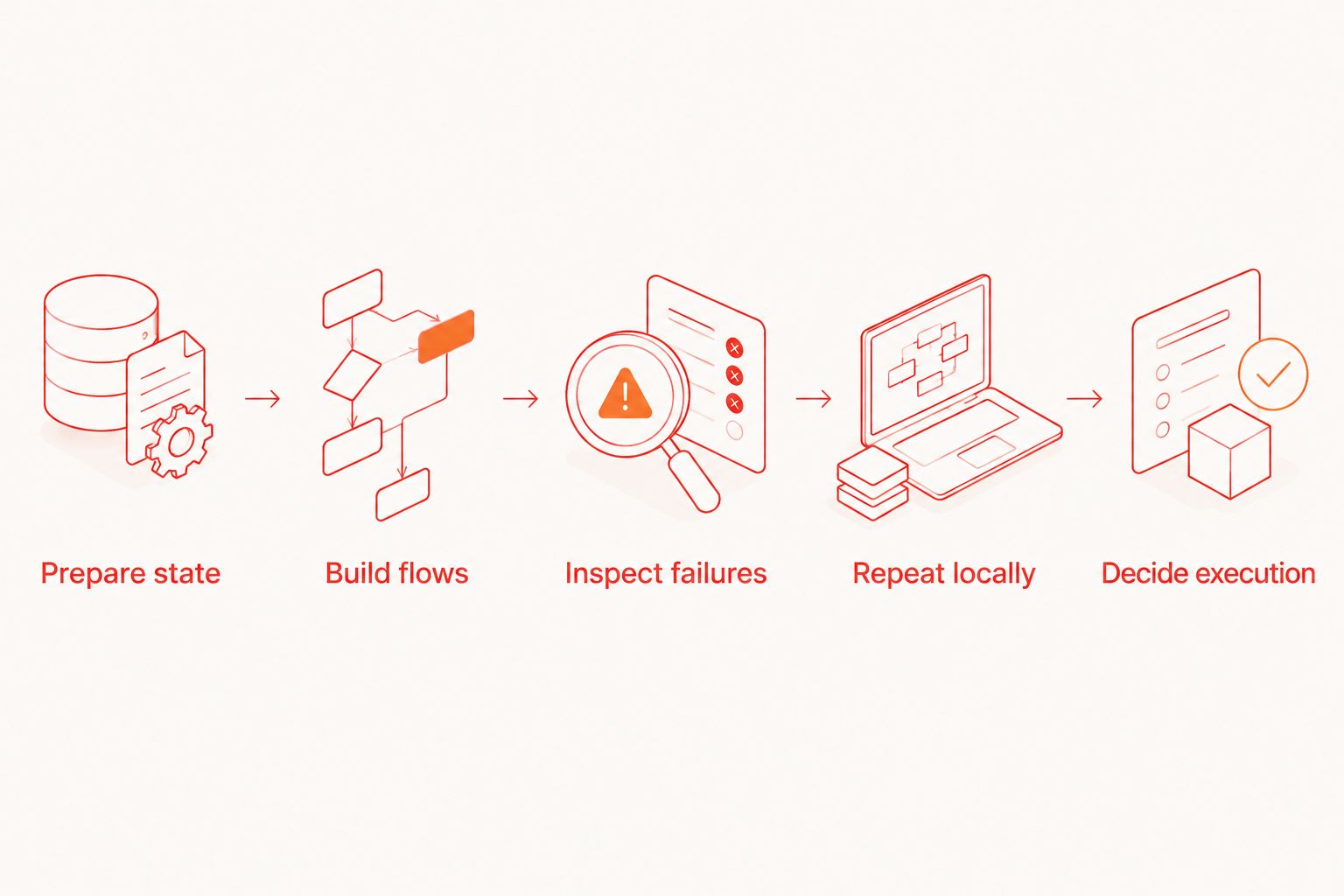
Prepare state
Create a dedicated test identity and a predictable starting state. Avoid relying on a developer's existing login session, shopping basket, saved preferences, or other leftover data.
Document how the journey resets. If you cannot explain the reset, a passing test is difficult to interpret.
Build flows
Start with 3 flows: launch and verify the initial screen, authenticate and verify the destination, then complete one important application action. These are suggested evaluation tasks, not a coverage standard.
Give each flow at least 1 explicit outcome assertion. A sequence of taps without an outcome check proves less than a journey that verifies what the user achieved.
Inspect failures
Deliberately break an expected label or outcome. Check whether the tool helps you identify the failed action, inspect the relevant element, and reproduce the problem.
For a YAML workflow, the guide to debugging a failing flow with Inspector Mode provides a focused next step. Evaluate failure diagnosis before expanding the suite.
Repeat locally
Run each flow 2 consecutive times from the documented starting state. This is a basic evaluation check, not evidence of long-term reliability.
If the second run fails because the first changed application state, fix setup and cleanup before adding more flows. Repetition should test the journey, not your luck with leftover data.
Decide execution
Keep local execution while it answers your release questions. Add CI execution when the team needs an automated release gate, and evaluate hosted execution separately when you need managed execution capacity.
Keep local testing and cloud execution separate
A free local runner and a hosted execution service answer different questions. Local testing helps you author and reproduce a flow. Hosted execution changes where that flow runs and who manages the execution environment.
For your 2026 plan, specify the environment before selecting a service. A simulator is not a physical iPhone, and an Android emulator is not a physical Android device. Browser execution is another coverage category; do not substitute one for another in a release checklist.
Optional cloud execution also introduces operational decisions. Check application upload handling, test credentials, execution location, retained artifacts, and access controls before submitting builds or test data.
Do not move a failing local flow into hosted execution as a debugging strategy. First establish whether the failure belongs to the application, selector, starting state, or environment. Then reproduce the same conditions in the chosen execution environment.
Choose your execution path
Keep local flow development separate from optional cloud execution.
How the tools are ranked
The ranking uses authoring fit, debugging workflow, platform scope, execution control, maintenance burden, and license clarity. It prioritizes a local-first workflow for mobile developers adding end-to-end checks, rather than maximum framework programmability.
This is a workflow comparison, not a measured speed or reliability benchmark. Appium moves ahead when programmable automation is the requirement. Espresso and XCUITest become the direct choices when platform-native ownership matters more than shared flow authoring.
Which free mobile testing tool should you choose?
Start with the desktop YAML runner if your immediate need is local end-to-end flow development. Choose Appium when the team explicitly needs general-purpose test code. Choose Espresso or XCUITest when Android or iOS engineers will maintain a platform-native suite.
For 2026, make the decision with a failing journey as well as a passing one. The useful default is the tool your developers can debug, reset, and rerun without turning each release into an automation repair session.
FAQ
What's the best free mobile app testing tool for local YAML flows?
Maestro Deck is the best fit in this shortlist for local Maestro YAML authoring, execution, and desktop inspection. Local use is free and does not require a cloud account.
Is Appium better than a YAML-based testing workflow?
Appium is the better fit when you require test logic in a general-purpose programming language. A YAML-based workflow fits teams that prefer declarative flows; compare both using the same application journey.
Can Espresso test both Android and iOS apps?
No. Espresso is an Android UI testing framework. Use a separate iOS testing approach or choose a framework or flow workflow that supports both platforms.
Should I use XCUITest for an iOS-only app?
Choose XCUITest when your iOS developers want UI tests within the Xcode workflow. Evaluate its debugging and maintenance fit against your actual release journeys.
Does free local testing require cloud execution?
No. Local execution and hosted execution are separate choices. Add hosted execution only when its environment and operating model meet a requirement your local workflow does not cover.
Is source-available software the same as open-source software?
No. Source-available means the source can be inspected under its license terms; that alone does not establish open-source licensing. Review the actual license for modification, redistribution, and commercial-use permissions.
Does a passing simulator test prove the app works on physical devices?
No. A simulator run establishes a result in that simulator environment. Keep physical-device validation separate wherever hardware-specific behavior is part of your release requirements.
One last thing
Before adding another test, break an existing one deliberately. Confirm that the assertion detects the wrong outcome and that a developer can identify why it failed.
Maestro Deck gives you a local place to build that habit with YAML flows. A small suite that detects real regressions is a better starting point than a large collection of scripts that only completes actions.


