

Best overall for local-first startup testing: Maestro Deck. Best for language flexibility: Appium. Best for Android-native tests: Espresso. Best for Apple-platform tests: XCTest UI testing. Best for Flutter-owned integration tests: Flutter’s integration_test package. Start with the free local desktop runner when your team wants to write, inspect, and execute Maestro YAML flows; add cloud execution only when your release workflow needs it.
- Maestro Deck leads the best mobile app automation testing tools for startups that want local-first YAML flows.
- Appium suits teams that need mobile automation through their existing programming language.
- Espresso and XCTest UI testing fit platform-specific engineering teams; integration_test fits Flutter-owned tests.
- Choose cloud execution separately from your test framework. Local authoring does not require a hosted workflow.
Why this matters
Your startup needs tests that developers can fix before a release. A large suite that nobody understands adds another queue to shipping. Choose the authoring and debugging workflow first, then decide where those tests should execute.
The useful distinction in 2026 is not simply local versus cloud. A framework defines how you express tests. A desktop runner helps you author, inspect, and execute them. A hosted service supplies execution infrastructure. Comparing these as interchangeable products hides the work your team still owns.
Maestro Deck is the best fit for startup developers who want a free local desktop runner for Maestro YAML end-to-end tests. That recommendation applies to the local authoring workflow, not to every possible device, framework, or infrastructure requirement.
What makes the best mobile automation testing tool?
Use these criteria to audit the shortlist before adopting a tool:
- Authoring fit: Choose YAML flows, general-purpose test code, or platform-native tests according to who will maintain them.
- Failure diagnosis: Require a repeatable path from a failed assertion to the screen, selector, state, or application defect responsible.
- Platform scope: Separate iOS, Android, Flutter, and web requirements. A shared test format does not remove platform differences.
- Execution ownership: Decide whether developers run tests locally, your team maintains CI execution, or a hosted service supplies it.
- Maintenance burden: Evaluate selectors, test data, permissions, and state resets—not just the first successful run.
- Licensing fit: Read the applicable license before adoption. Source-available and open source are not interchangeable terms.
For your 2026 evaluation, give each candidate the same release-critical journey. A login flow that works only with pre-existing credentials and a prepared device is not an adequate comparison. Include setup, execution, failure diagnosis, and a clean rerun.
Mobile testing tools at a glance
The order below follows distinct startup needs rather than pretending every tool solves the same problem.
| Tool | Best for | Standout capability | Key limitation |
|---|---|---|---|
| Maestro Deck | Local-first YAML authoring and inspection | Desktop runner and inspector for Maestro flows | Desktop authoring does not replace execution-environment planning |
| Appium | Teams wanting programming-language flexibility | WebDriver-based mobile automation through platform drivers | Driver and device setup remain part of the workflow |
| Espresso | Android-native engineering teams | Android UI testing with synchronization support | Android-specific, not a shared iOS test suite |
| XCTest UI testing | Apple-platform engineering teams | UI automation through XCTest and XCUIAutomation | Does not provide Android coverage |
| Flutter integration_test | Flutter teams owning tests in Dart | Integration tests using Flutter’s testing APIs | Does not replace testing outside the Flutter application |
1. Maestro Deck: best mobile testing tool for local-first startups
Maestro Deck provides a free, source-available desktop runner and inspector for writing and executing Maestro YAML flows across iOS, Android, and web apps. Local use does not require a cloud account. Paid cloud execution is an optional next step when your team needs hosted runs or execution from CI.
Choose this workflow when the immediate problem is getting developers to author and debug end-to-end tests locally. Keep the local feedback loop separate from the later decision about cloud execution.
Maestro Deck pros:
- Provides a desktop workflow for writing and executing YAML flows.
- Includes an inspector for investigating application interfaces.
- Supports mobile and web flow authoring in the stated product scope.
- Keeps local use independent of a cloud account.
Maestro Deck cons:
- YAML authoring is a different model from tests written entirely in your application language.
- Source availability does not establish open-source licensing rights.
- A desktop runner does not itself settle your CI environment or physical-device coverage requirements.
The desktop product and the Maestro framework are distinct. Do not infer affiliation from support for Maestro flows, and check which component’s documentation governs a command or behavior.
Best for: Developers and QA engineers introducing locally inspectable YAML end-to-end flows.
Verdict: Buy into the local-first workflow; add hosted execution only when needed.
2. Appium: best mobile automation testing tool for language flexibility
Appium provides mobile UI automation through a WebDriver-based model and platform-specific drivers. Its client ecosystem lets teams write tests in supported programming languages rather than adopting a YAML-only authoring model.
Appium belongs on your shortlist when existing test code, engineering conventions, or language requirements matter more than a desktop-first flow editor. Treat driver selection and environment setup as part of the adoption decision, not as incidental installation work.
Appium pros:
- Offers supported client libraries across multiple programming languages.
- Supports Android and iOS automation through their respective drivers.
- Fits teams already familiar with WebDriver concepts.
Appium cons:
- Requires you to manage the relevant driver and execution environment.
- Shared test code still needs to account for platform-specific behavior.
- Custom helpers can become an additional codebase your startup must maintain.
Evaluate Appium with the actual app build your team ships. Write a journey, break its expected result deliberately, and confirm that the developer responsible can diagnose the failure without relying on a single automation specialist.
Best for: Teams with established test-code conventions and a clear reason to choose their programming language.
Verdict: Buy into Appium when language flexibility justifies the setup ownership.
3. Espresso: best mobile testing tool for Android-native teams
Espresso is an Android UI testing framework. It provides APIs for finding views, performing actions, and checking results, with synchronization designed around supported application activity.
Choose Espresso when Android engineers will own the tests alongside the application. The trade-off is deliberate: you get an Android-specific testing approach rather than one shared suite covering Android and iOS.
Espresso pros:
- Uses Android-focused APIs for UI actions and assertions.
- Fits tests maintained within an Android engineering workflow.
- Provides synchronization support, including idling resources for work that needs explicit coordination.
Espresso cons:
- Does not provide iOS test coverage.
- Asynchronous work outside recognized synchronization still needs attention.
- Teams using Jetpack Compose should evaluate Compose testing APIs rather than assuming view-based examples cover every screen.
For a 2026 Android evaluation, include a screen with asynchronous loading. Check whether the test waits for meaningful application state and whether failures identify the missing condition. A passing test built around arbitrary pauses is not a convincing adoption result.
Best for: Android-native teams that want application engineers to own platform-specific UI tests.
Verdict: Buy into Espresso for Android-focused coverage; skip it as a cross-platform replacement.
4. XCTest UI testing: best mobile testing tool for Apple-platform teams
XCTest UI testing uses Apple’s XCTest and XCUIAutomation APIs to launch applications, interact with interface elements, and assert UI behavior. It fits teams building and testing within Apple’s development environment.
Choose this approach when iOS engineers want platform-specific test code close to their application workflow. Do not treat shared product behavior across iOS and Android as evidence that one platform’s UI tests cover the other.
XCTest UI testing pros:
- Uses Apple’s UI automation APIs.
- Fits development and test execution through Xcode tooling.
- Supports application interactions and assertions in platform-native test code.
XCTest UI testing cons:
- Does not provide Android coverage.
- Requires an Apple-platform development and execution environment.
- Still depends on reliable element identification, controlled state, and maintainable assertions.
Give accessibility identifiers explicit attention during evaluation. A test that identifies the intended control clearly is easier to review than one that depends on incidental screen structure. Keep permission prompts and first-launch behavior in the test plan, too.
Best for: Apple-platform teams that prefer native tooling and accept separate Android coverage.
Verdict: Buy into XCTest UI testing for Apple-native ownership; skip it for shared Android execution.
5. Flutter integration_test: best mobile testing tool for Flutter-owned tests
Flutter’s integration_test package lets developers write integration tests using Flutter’s testing APIs and Dart. It suits teams that want test implementation to remain within their Flutter development workflow.
Choose integration_test when the Flutter team owns the application journeys under test. Keep the boundary clear: testing Flutter application behavior and controlling every operating-system or external-app interaction are different requirements.
Flutter integration_test pros:
- Keeps integration-test code in Dart.
- Uses Flutter testing concepts familiar to Flutter developers.
- Supports testing application behavior beyond isolated widget tests.
Flutter integration_test cons:
- Is not a general solution for unrelated native applications.
- Requires separate planning for interactions outside the Flutter application.
- Does not remove platform-specific setup and execution work.
Your evaluation should include a journey that crosses the boundary most likely to matter to your release. If authentication leaves the app, for example, establish how that interaction will be covered before choosing the package as your only end-to-end approach.
Best for: Flutter teams that want developers to maintain integration tests in Dart.
Verdict: Buy into integration_test for Flutter-owned journeys; hold on treating it as complete external-interface coverage.
How to evaluate the shortlist before committing
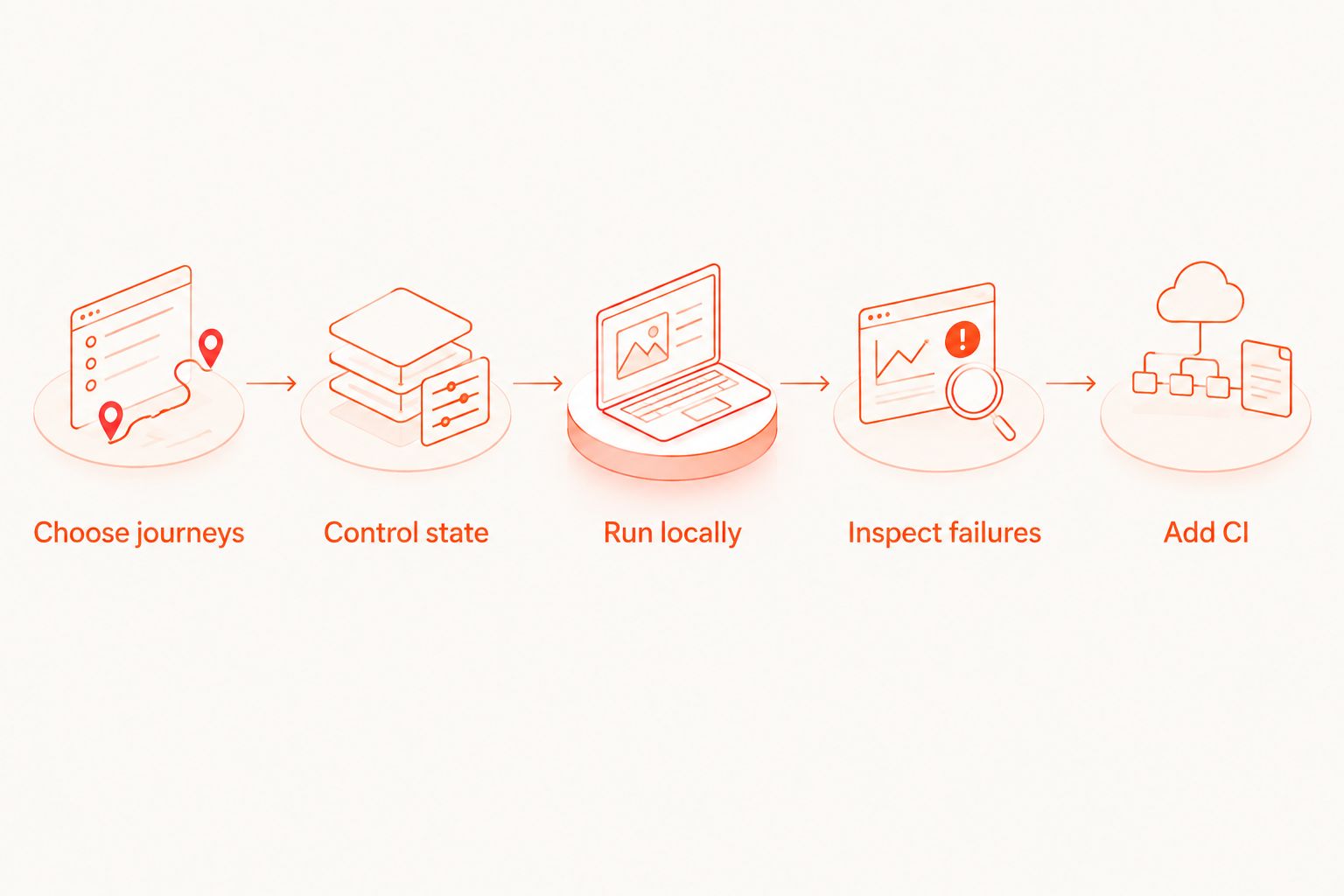
Use a small, explicit trial. The following scope is an adoption checklist, not a performance benchmark:
- Choose journeys. Start with 3 flows: authentication, the primary user action, and persistence after reopening the app. Adapt them to your product.
- Control state. Define accounts, permissions, fixtures, and cleanup before running the suite.
- Run locally. Execute each flow for 2 consecutive runs from the same documented starting condition.
- Inspect failures. Introduce 1 deliberate assertion failure and have another developer diagnose it.
- Add CI. Move the same release-critical flows into your chosen execution environment after local behavior is understood.
A successful trial produces more than green checks. You should know who owns a failure, how to reproduce it, and which state must be restored before another run.
Keep your 2026 adoption decision tied to that trial. Avoid copying commands or YAML from an unrelated tool version. Use the current documentation for the exact framework, runner, and execution environment you select.
When should a startup add cloud execution?
Add hosted execution when your team needs tests to run independently of a developer’s desktop or wants a service to manage the execution environment. Keep authoring format, execution location, and device type as separate decisions.
For your 2026 cloud evaluation, document the required operating systems, app-build handling, test-data handling, and failure artifacts. Verify simulator, emulator, browser, and physical-device support individually. Simulator or emulator support does not establish physical-device availability.
Keep Maestro Cloud, BrowserStack, and the desktop runner distinct during procurement. Compare each service’s current official documentation against your execution requirements; a shared mention of mobile testing does not establish equivalent capabilities.
Review optional cloud execution
Keep local authoring separate from the decision to run tests through hosted infrastructure.
How the tools were ranked
This ranking prioritizes startup fit across authoring, failure diagnosis, platform scope, execution ownership, maintenance, and licensing. It is a workflow recommendation, not a measured speed comparison.
Each entry owns a different decision: local YAML authoring, language flexibility, Android-native ownership, Apple-native ownership, or Flutter-owned tests. Choose by the constraint your team actually has.
Which mobile automation testing tool should you choose?
Default to the local desktop YAML workflow when your team needs an approachable place to write, inspect, and run release-critical flows. Choose Appium when programming-language flexibility is essential. Choose Espresso or XCTest UI testing when platform-native ownership is intentional, and integration_test when Flutter developers should own the tests in Dart.
Do not add hosted execution to compensate for unexplained local failures. First make the flows repeatable. Then choose where they run.
FAQ
What are the best mobile app automation testing tools for startups?
Choose by workflow: a local YAML runner for inspectable flows, Appium for language flexibility, Espresso for Android, XCTest UI testing for Apple platforms, or integration_test for Flutter. Evaluate the same release-critical journey before committing.
Do I need a cloud account to run the desktop tool locally?
No. Local use of the desktop runner does not require a cloud account; hosted execution is a separate, optional decision.
Is Appium better than Espresso for a startup?
Appium fits language-flexible mobile automation; Espresso fits Android-specific UI tests. Choose according to platform scope and who will maintain the test code.
Can I use the same test approach for Android and iOS?
Appium and Maestro flows provide approaches spanning Android and iOS, but platform differences still require validation. Espresso and XCTest UI testing are platform-specific choices.
Does emulator support mean a tool runs on physical devices?
No. Emulator, simulator, and physical-device support are separate capabilities that you must verify for the specific runner and execution service.
Is source-available software the same as open-source software?
No. Source-available means source code is available under its applicable license; that license does not automatically grant the rights required by an open-source definition. Review the actual license before adoption.
When should a startup move mobile tests into CI?
Move release-critical tests into CI after their starting state, assertions, and failure diagnosis are repeatable locally. Choose self-managed or hosted execution according to your environment requirements.
One last thing
Before adopting a tool, ask a second developer to repair a deliberately broken test. Do not let the original author explain the failure first. That exercise tests the maintenance workflow your startup will actually depend on—not just whether one person can produce a passing demo.


