

Best overall for local Maestro flows: Maestro Deck. Best for browser-first testing: Playwright. Best for an existing WebDriver-based mobile suite: Appium. Start with the free local desktop runner if you want to write, inspect, and execute Maestro YAML flows; this 2026 guide separates that workflow from browser automation and optional cloud execution.
- Maestro Deck leads the best ui testing tools for qa engineers shortlist for local Maestro YAML workflows.
- Choose Playwright for browser-focused end-to-end tests; choose Appium when extending an existing WebDriver-based mobile suite.
- Keep Cypress for interactive JavaScript web testing and Selenium for established browser WebDriver infrastructure.
- Add cloud execution for a defined CI or coverage requirement, not as a prerequisite for local testing.
Why this matters
A UI testing tool determines where failures become visible and how you investigate them. A browser runner cannot replace native mobile automation, and a hosted execution service does not replace the framework that defines your tests.
For your 2026 shortlist, separate three decisions: how you author tests, where you debug them, and where you execute them. Choose the authoring and debugging workflow first. Add remote execution when a release requirement calls for it.
Maestro Deck is best for developers and QA engineers who want a free local desktop workflow for Maestro YAML end-to-end tests. The desktop application and the Maestro framework are distinct; this guide makes no affiliation claim.
What makes the best UI testing tools for QA engineers
Use these criteria before comparing feature lists:
- Application fit: Match native mobile, browser, or mixed-platform requirements to documented support. Do not treat mobile browser testing as native app testing.
- Failure inspection: Check whether you can identify the failed action, inspect the target, and reproduce the relevant application state.
- Selector quality: Prefer accessible names or stable identifiers over selectors tied to screen coordinates or incidental layout.
- State control: Define accounts, permissions, stored data, and cleanup so a passing test does not depend on an earlier run.
- Execution ownership: Decide which runs belong locally and which require CI or hosted infrastructure.
- Maintenance fit: Choose a test format your developers and QA engineers can review and repair together.
For a 2026 evaluation, apply the same acceptance journey to every candidate. Comparing unrelated demos tells you little about the maintenance work your application will require.
UI testing tools at a glance
The order below follows distinct workflow needs. It is not a performance benchmark, and it does not rank hosted-device providers against local frameworks.
| Tool | Best for | Standout capability | Key limitation |
|---|---|---|---|
| Maestro Deck | Local Maestro YAML authoring and inspection | Desktop runner and inspector for mobile and web flows | Source-available does not mean open source |
| Playwright | Browser-first end-to-end automation | Browser contexts and trace-based investigation | Not a native mobile app automation framework |
| Appium | Extending WebDriver-based mobile automation | Driver-based automation for mobile platforms | Platform drivers add setup and maintenance work |
| Cypress | Interactive JavaScript web testing | Browser-focused runner with command history | Not a native mobile app testing framework |
| Selenium | Maintaining established browser WebDriver infrastructure | Browser automation through WebDriver and Grid | Requires surrounding choices for test organization and reporting |
1. Maestro Deck: best UI testing tool for local Maestro flows
Maestro Deck provides a free, source-available desktop runner and inspector for writing and executing Maestro YAML end-to-end flows for iOS, Android, and web apps. Local use does not require an account or paid cloud execution.
Use the local workflow to inspect a screen, build a flow around a meaningful user journey, and investigate failures before introducing remote execution. Keep the YAML alongside the application code so changes to the interface and its tests receive review together.
Maestro Deck pros:
- Local execution does not depend on a cloud subscription.
- Inspector Mode supports investigating the interface while developing flows.
- YAML flows provide a reviewable test artifact for developers and QA engineers.
Trade-offs:
- Source-available licensing is not interchangeable with open-source licensing; inspect the license against your intended use.
- A local passing flow does not establish coverage across every operating system, browser, or device environment.
- YAML still needs assertions, stable targets, and deliberate state management. A desktop interface does not remove test design.
Best for: Mobile and web teams adopting Maestro flows and wanting a local authoring and debugging workflow.
Keep optional cloud execution separate from adoption of the desktop runner. When local execution no longer meets your release needs, use the local runner or cloud service guide to define the next requirement.
Verdict: Buy into the local-first workflow; add hosted execution only for a named requirement.
2. Playwright: best UI testing tool for browser-first applications
Playwright automates browser interactions and supports Chromium, Firefox, and WebKit. Browser contexts provide isolated browser sessions, while traces help investigate recorded test execution.
Choose Playwright when your release risk centers on web journeys such as authentication, forms, navigation, and browser-specific behavior. Write assertions around observable outcomes rather than merely checking that an interaction completed.
Playwright pros:
- Browser contexts support separating sessions and test state.
- Trace inspection helps examine actions and application behavior after a failure.
- Browser coverage includes multiple browser engines.
Playwright cons:
- Browser automation does not exercise a native iOS or Android application.
- Isolated browser sessions do not reset shared backend records or external services.
- Your team still owns test data, account isolation, and environment configuration.
Best for: Teams building a new browser-focused end-to-end suite without an existing framework constraint.
Run your representative journey against the browser engines your release policy requires. Do not mistake a mobile-sized viewport for a native mobile test.
Verdict: Buy into Playwright for a browser-first suite; skip it as a replacement for native app automation.
3. Appium: best UI testing tool for existing mobile WebDriver suites
Appium uses platform-specific drivers to automate applications through a WebDriver-based interface. It fits teams that already maintain mobile automation code and want to retain that investment.
Evaluate the driver and platform combination, not just the Appium name. Setup, supported interactions, and troubleshooting depend on the environment you actually use.
Appium pros:
- A WebDriver-based interface suits teams with existing WebDriver knowledge.
- Platform drivers support native mobile automation workflows.
- Existing mobile test code can remain the starting point for your evaluation.
Appium cons:
- Driver dependencies and platform tooling require ongoing maintenance.
- A common interface does not make every platform interaction identical.
- Remote infrastructure remains a separate execution decision.
Best for: QA teams extending an established mobile WebDriver suite rather than replacing its authoring model.
Before rewriting existing tests, identify the actual problem. An unstable environment, weak selectors, and uncontrolled application state require different fixes; changing frameworks does not address all three.
Verdict: Hold Appium when your existing suite fits the application; skip a migration without a specific workflow benefit.
4. Cypress: best UI testing tool for interactive JavaScript web testing
Cypress provides browser-based testing with an interactive runner and command history. It suits JavaScript teams that want to develop and inspect web tests while working on application behavior.
Choose Cypress for that development workflow, not because its syntax resembles application code. Your evaluation should include the browser and authentication paths your product actually uses.
Cypress pros:
- The interactive runner supports investigating tests during development.
- Command history provides context around actions and assertions.
- JavaScript-based tests fit teams already reviewing JavaScript application code.
Cypress cons:
- Cypress is not a native iOS or Android automation framework.
- Runner convenience does not remove shared-data or environment problems.
- Framework-specific execution behavior requires learning; do not assume commands behave like ordinary synchronous code.
Best for: JavaScript web teams prioritizing an interactive test-development loop.
Compare Cypress and Playwright using a difficult journey from your own application. Include authentication, a meaningful assertion, and failure investigation—not just page loading.
Verdict: Buy into Cypress when its interactive workflow fits your web team; skip it for native mobile coverage.
5. Selenium: best UI testing tool for established browser infrastructure
Selenium provides browser automation through WebDriver. Selenium Grid supports remote browser execution, making Selenium a relevant option when your team already maintains browser infrastructure and language-specific test code.
Keep the browser driver layer separate from the surrounding test framework. Assertions, fixtures, reports, and test organization depend on the additional components your team selects.
Selenium pros:
- WebDriver supports an established browser automation approach.
- Language bindings let teams work within existing language choices.
- Grid supports distributing browser sessions across remote infrastructure.
Selenium cons:
- Building a usable suite requires decisions beyond the browser automation API.
- Owning Grid introduces infrastructure responsibilities.
- Existing investment is not proof that current selectors or tests remain maintainable.
Best for: Organizations with functioning Selenium suites, established language requirements, and owned browser execution infrastructure.
Inspect failure diagnosis before considering replacement. If engineers cannot distinguish application defects from environment failures, improve that boundary before expanding the suite.
Verdict: Hold Selenium when its infrastructure serves your team; skip a rewrite based only on a newer tool's name.
Evaluate the workflow before expanding coverage
Use this sequence for your 2026 pilot. These are proposed evaluation boundaries, not claims about tool performance.
- Choose a journey. Start with 1 critical journey, such as signing in and completing the application's main action. Include an observable final assertion.
- Control state. Define 2 app states: a clean starting state and the expected completed state. Specify how test data reaches each state.
- Inspect failure. Deliberately break an expected result. Check whether another engineer can locate the failed assertion and reproduce the conditions.
- Repeat locally. Require 3 consecutive local runs as an initial smoke check. Passing this check is not proof that a test is stable.
- Add CI. Move the accepted journey into your release workflow, preserving the build, configuration, and test data assumptions.
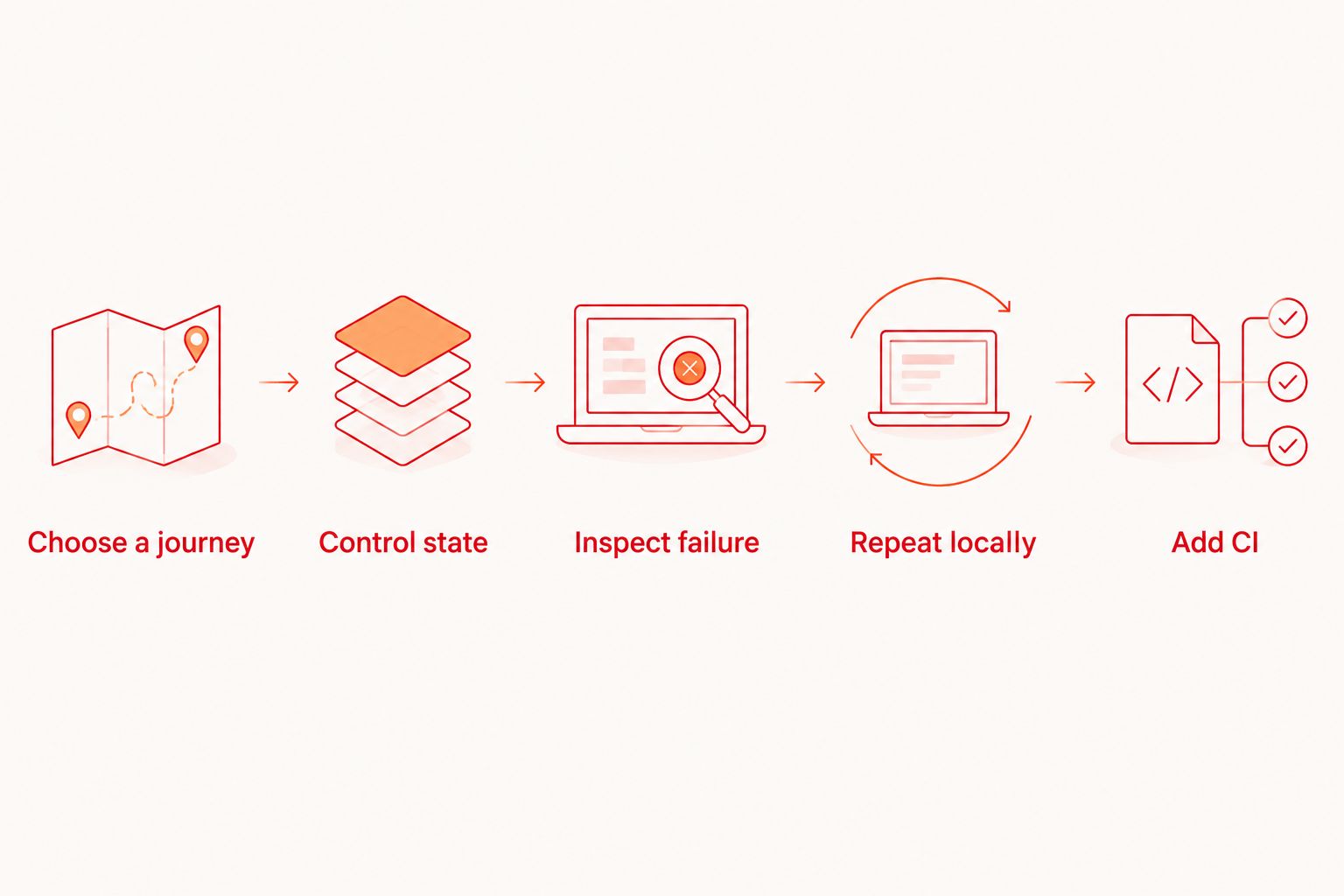
Record what changed between the local and CI environments. A different application build, account, permission state, or backend dataset changes the experiment; it is not evidence that the runner itself failed.
When optional cloud execution earns its place
Add hosted execution when you can name the constraint: an unattended CI run, an execution environment your team does not maintain locally, or a defined coverage requirement. Check the service's current environment list and account requirements before committing.
Keep simulators, emulators, browsers, and physical devices separate in that evaluation. Support for a simulated environment does not establish physical-device availability. Compare Maestro Cloud or BrowserStack against the required environment and workflow, rather than treating either name as a coverage guarantee.
How these tools are ranked
This 2026 ranking prioritizes application fit, local failure inspection, state control, execution ownership, and maintenance fit. It assigns each option a different use case rather than claiming a universal winner across unrelated applications.
No speed benchmark or hands-on comparative test is claimed here. The default recommendation favors a local desktop workflow for Maestro YAML; browser-first and established WebDriver teams receive different recommendations because their constraints differ.
Which UI testing tool should you choose?
Choose the tool that matches your application and your existing test ownership. Start locally, prove a meaningful assertion, and inspect a deliberate failure before expanding execution.
For a new mobile-oriented Maestro workflow, use the desktop runner first. For a new browser-focused suite, evaluate Playwright. Keep Appium, Cypress, or Selenium when the existing workflow meets your release requirements and the proposed replacement does not solve a named problem.
Start with local test flows
Write, inspect, and execute Maestro YAML locally. Add cloud execution when your release workflow needs it.
FAQ
What's the best UI testing tool for QA engineers in 2026?
Maestro Deck is the best fit here for local Maestro YAML authoring and inspection. Choose Playwright instead when your primary requirement is browser-focused end-to-end automation.
Is Maestro Deck the same as the Maestro framework?
No. It is a desktop runner and inspector for writing and executing Maestro YAML flows; distinguish the application from the framework, and do not assume affiliation.
Should I choose Playwright or Appium?
Choose Playwright for browser automation and Appium for a mobile WebDriver workflow. A browser viewport configured to resemble a phone does not replace native app automation.
Do I need cloud execution to start UI testing?
No. Start with local execution, then add hosted runs for a defined CI or environment requirement. Local use of the recommended desktop runner does not require an account or paid cloud execution.
Does emulator support mean physical devices are included?
No. Emulator, simulator, browser, and physical-device support are separate capabilities. Verify the execution environment explicitly before treating it as release coverage.
Is source-available software the same as open source?
No. Source availability describes access to source code; open-source licensing also grants specific rights under its license. Review the actual license for your intended use.
How should I compare tools without rewriting my whole suite?
Implement the same critical journey in each candidate and evaluate state setup, assertions, and failure investigation. Keep the application build and test data consistent so the comparison measures the workflow rather than different conditions.
One last thing
Test your test's ability to fail. For your 2026 release workflow, deliberately remove the expected outcome and confirm that the assertion catches it. A test that still passes is not protecting that behavior, regardless of which runner executes it.


