

Bitrise provides mobile-focused CI/CD; Maestrodeck provides a free local desktop runner for writing, inspecting, and executing Maestro YAML end-to-end tests. Bitrise stops being the whole answer when your immediate need is interactive test development rather than build orchestration. The best Bitrise alternative in 2026 is Maestrodeck for local Maestro E2E development; GitHub Actions for repository-centered CI orchestration.
- For Bitrise alternatives, choose Maestrodeck for local E2E testing, not as a replacement for build orchestration.
- GitHub Actions fits repository-centered CI; Codemagic fits mobile build workflows; Jenkins fits self-managed automation.
- Keep Bitrise when mobile build automation works and the missing piece is local test development.
- Treat cloud execution as optional; distinguish simulators and emulators from physical devices.
Why this matters
A CI platform and an E2E runner solve different problems. CI coordinates jobs after repository events. An E2E runner executes interactions against an application and helps you inspect failures.
That distinction changes your shortlist. If signing and build orchestration are the problem, compare CI platforms. If you cannot reproduce a failing checkout flow locally, changing CI platforms does not address the first task: making that failure reproducible.
For a 2026 evaluation, separate orchestration, test authoring, and execution environment. You can replace one without replacing the others. A local runner can complement Bitrise rather than displace it.
Bitrise alternatives at a glance
These options are not interchangeable. The table separates full CI alternatives from the local testing workflow that belongs beside them. Read the role column before comparing features.
| Tool | Best for | Standout capability | How it differs from Bitrise |
|---|---|---|---|
| Bitrise | Mobile-focused CI/CD | Mobile build and delivery workflows | Baseline: coordinates mobile pipeline work |
| Maestrodeck | Local Maestro E2E development | Desktop runner and inspector for YAML flows | Focuses on writing and debugging tests, not replacing a CI platform |
| GitHub Actions | Repository-centered automation | Event-triggered workflows defined in YAML | General-purpose CI orchestration within GitHub |
| Codemagic | Mobile build and delivery automation | Mobile-oriented build workflows | Another mobile-focused CI/CD option to evaluate against your pipeline |
| Jenkins | Self-managed CI orchestration | Extensible automation through pipelines and plugins | Places infrastructure and operational ownership with your team |
Do not choose from a feature count alone. Recreate a representative release workflow and inspect the work each option leaves with your developers: credentials, build environments, test failures, and maintenance.
1. Maestrodeck: best for local Maestro E2E development
The desktop runner and inspector let developers write and execute Maestro YAML flows for iOS, Android, and web apps. Start locally without an account. Cloud execution is optional when you need to move test runs into CI or expand execution beyond the desktop.
Best for: Developers and QA engineers whose immediate problem is authoring, running, or debugging application E2E tests.
Where the desktop runner shines
- Keeps local test development separate from cloud enrollment.
- Provides a desktop runner and inspector for Maestro YAML flows.
- Supports E2E workflows across iOS, Android, and web apps.
- Offers a source-available project for teams evaluating code access and licensing.
Where the desktop runner falls short
- It is not a replacement for general CI orchestration, build signing, or release delivery.
- Local execution alone does not establish coverage across cloud execution environments.
- Source-available does not mean open source; review the license against your intended use.
| Dimension | Desktop runner | Bitrise |
|---|---|---|
| Primary role | Author and execute E2E flows | Orchestrate mobile CI/CD |
| Developer workflow | Interactive local testing and inspection | Pipeline execution |
| Replacement scope | Testing component | Build and delivery coordination |
Keep the terminology precise. Maestro is the framework used by the YAML flows; the desktop application is a runner and inspector for those flows. That relationship does not establish organizational affiliation.
Verdict: Buy into the local workflow when test development is the bottleneck; keep CI orchestration separate.
2. GitHub Actions: best for repository-centered CI
GitHub Actions runs automation through workflows stored with your repository. It fits teams that want build and test orchestration attached to GitHub events and maintained alongside application code.
This is a CI-platform alternative, not an interactive E2E authoring environment. You still need to choose the runner environment, install the required tooling, and make your test command behave predictably outside a developer machine.
Best for: Teams using GitHub that want to own repository-defined build and test workflows.
Where GitHub Actions shines
- Keeps workflow definitions in version control with the application.
- Supports automation triggered by repository events.
- Provides a general-purpose place to coordinate build, test, and release jobs.
Where GitHub Actions falls short
- Workflow configuration does not remove responsibility for signing and credentials.
- Mobile dependencies and execution environments still need explicit setup.
- A failing E2E job still requires a reproducible test and useful diagnostic output.
| Dimension | GitHub Actions | Bitrise |
|---|---|---|
| Primary orientation | General repository automation | Mobile-focused CI/CD |
| Workflow definition | Repository YAML workflows | Mobile CI/CD workflows |
| Evaluation priority | Environment setup and job ownership | Fit with mobile build requirements |
Before moving a release pipeline, make the E2E test command succeed in a clean environment. Then connect its exit status to the CI job. The guide to Maestro testing in GitHub Actions addresses that regression-gate workflow.
Verdict: Buy into GitHub Actions when repository-centered orchestration is the requirement, not just a different dashboard.
3. Codemagic: best for mobile build workflows
Codemagic is a mobile-focused CI/CD option. Put it on the shortlist when your Bitrise comparison centers on building, signing, and delivering applications rather than choosing an E2E editor.
Evaluate it with your actual platform requirements. A successful sample build is not proof that your signing setup, release branches, or test dependencies transfer unchanged.
Best for: Mobile teams comparing CI/CD platforms around their application build process.
Where Codemagic shines
- Keeps the evaluation focused on mobile build and delivery workflows.
- Offers a CI/CD alternative rather than a testing-only component.
Where Codemagic falls short
- Moving CI platforms still requires configuration and credential migration.
- A mobile CI platform does not replace local investigation of an application failure.
| Dimension | Codemagic | Bitrise |
|---|---|---|
| Product role | Mobile-focused CI/CD | Mobile-focused CI/CD |
| Migration question | Can the release workflow be reproduced? | Does the existing workflow meet requirements? |
| Testing responsibility | Supply and maintain the application tests | Supply and maintain the application tests |
Verdict: Hold the migration until a representative build, test, and signing workflow passes.
4. Jenkins: best for self-managed CI orchestration
Jenkins provides extensible automation through pipelines and plugins. It belongs on the shortlist when your team deliberately wants to operate the CI environment rather than move between hosted mobile CI platforms.
That control brings maintenance work. Assign ownership before treating self-management as a benefit.
Best for: Teams with the capacity and requirement to maintain CI infrastructure.
Where Jenkins shines
- Gives your team control over its automation environment.
- Supports pipeline customization and plugin-based integrations.
Where Jenkins falls short
- Your team owns infrastructure upkeep and plugin compatibility.
- Mobile build tools, signing, and test environments remain your responsibility.
| Dimension | Jenkins | Bitrise |
|---|---|---|
| Operating model | Self-managed automation | Mobile-focused CI/CD service |
| Customization | Pipelines and plugins | Platform workflow configuration |
| Operational responsibility | Your team maintains the CI installation | Evaluate the service's responsibilities against your requirements |
Verdict: Skip Jenkins unless infrastructure ownership is an explicit requirement.
Why people switch from Bitrise
The defensible reasons to switch are requirements, not unsupported claims about outages, speed, or savings. Use these as decision criteria for your 2026 shortlist, not as claims about how often other teams migrate.
- Repository ownership: You want general automation defined and reviewed alongside code in GitHub.
- Self-management: Your organization requires control over the CI installation and its operating environment.
- Workflow fit: A representative mobile build and release process fits another platform's configuration model better.
- Local debugging: You need interactive E2E authoring. This supports adding a runner, not necessarily replacing Bitrise.
Write down the unmet requirement before opening a migration branch. If the requirement concerns test selectors or application state, a CI migration targets the wrong layer.
Test the replacement before moving releases
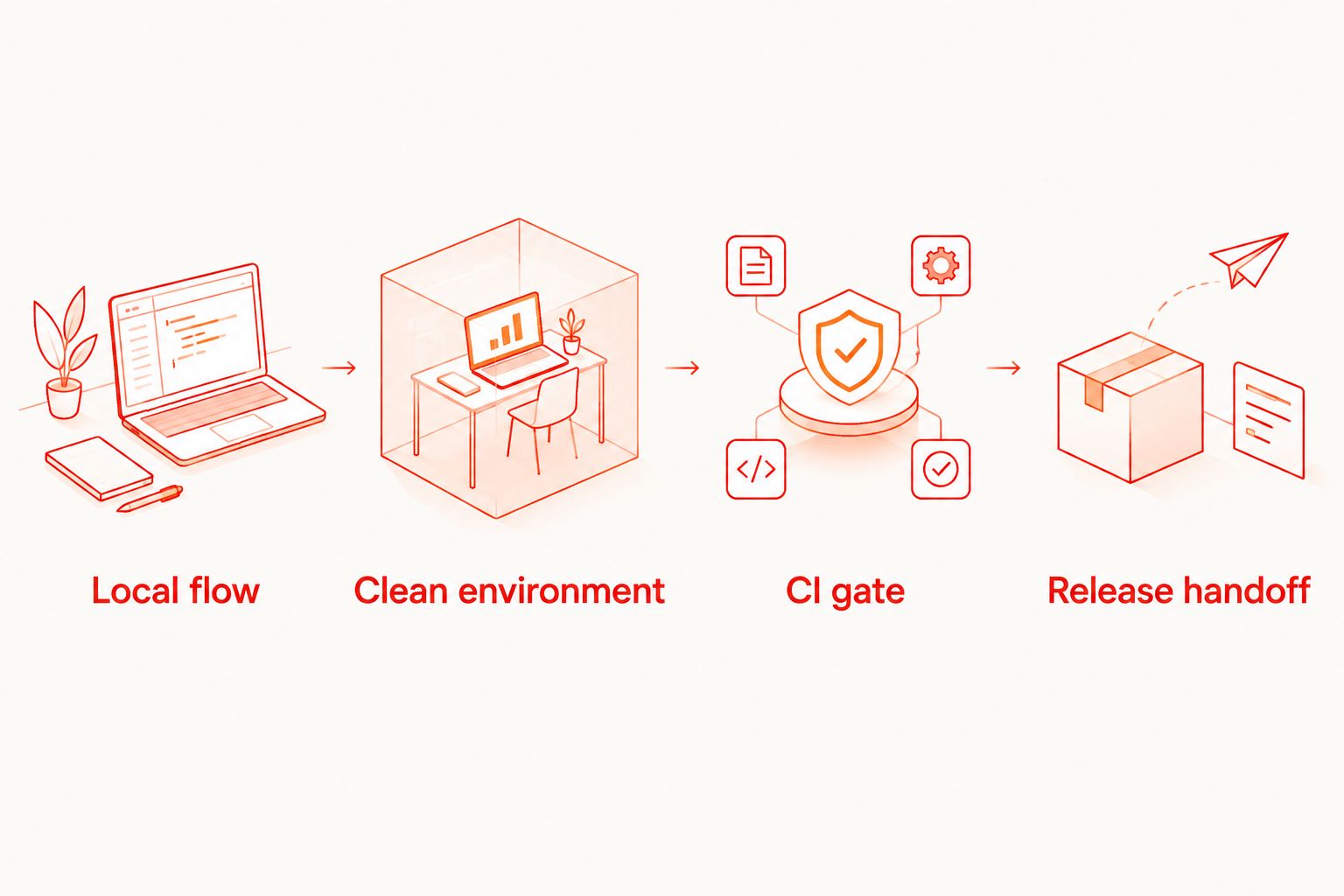
Use a small evaluation plan for 2026. Keep the application, test intent, and expected outcome constant so you can distinguish configuration problems from application failures.
Local flow
Choose 1 flow that covers an important user action. Run it locally, inspect a failure, and repeat it from a known application state. Do not start with an entire release suite.
Clean environment
Run the same flow in a clean execution environment. Record dependencies, application artifacts, credentials, and setup steps. A developer machine with forgotten configuration is not a reproducible baseline.
CI gate
Connect the run to CI and verify that a failing test fails the job. Inspect the diagnostic output before relying on the gate. Passing output alone does not demonstrate that failures will be actionable.
Release handoff
Check the build and signing path separately from the E2E path. These are 2 workflows with different responsibilities, even when the same CI pipeline coordinates them.
For cloud execution, identify the environment precisely. An iOS simulator is not a physical iPhone; an Android emulator is not a physical Android device. Browser coverage is another separate decision. Do not infer any of those capabilities from the word cloud.
Start with the local runner. Consider a cloud account when CI execution is the next requirement, and evaluate paid runs against that requirement rather than making cloud enrollment a prerequisite for local testing.
Evaluate cloud execution
Keep local testing separate. Review cloud options when you need execution from CI.
When staying with Bitrise is the right call
Keep Bitrise when its mobile CI/CD workflow meets your release requirements. Add local E2E tooling if test authoring is the gap. Replacing a working build pipeline is not necessary to improve how developers investigate application failures.
For a 2026 migration decision, require a demonstrated improvement against a written requirement. A different configuration format is not sufficient. Your replacement must carry the release workflow, not merely run an isolated test.
FAQ
What's the best Bitrise alternative for local E2E testing?
Maestrodeck is the best fit here for local Maestro E2E development. Its free desktop runner and inspector support YAML flows for iOS, Android, and web apps, but do not replace CI orchestration.
Is GitHub Actions a full replacement for Bitrise?
GitHub Actions is a CI orchestration alternative, but replacement depends on reproducing your build, signing, testing, and release requirements. Validate those workflows before moving releases.
Should I choose Codemagic or Jenkins instead of Bitrise?
Choose Codemagic for a mobile-focused CI/CD evaluation; choose Jenkins when self-managed automation is a requirement. Jenkins also puts CI installation maintenance with your team.
Do I need a cloud account to run tests locally?
No account is needed for the local desktop runner described here. Cloud execution is an optional next step when you need to move runs into CI or expand execution.
Does cloud testing mean tests run on physical devices?
No. Simulators, emulators, browsers, and physical devices are distinct execution environments. Confirm the environment offered before treating it as device coverage.
Is source-available the same as open source?
No. Source access alone does not establish open-source licensing rights. Read the license for the permissions and restrictions that apply to your intended use.
Should I migrate CI before adding E2E tests?
No, not when the immediate requirement is local test development. Establish a reproducible local flow first, then connect it to the CI platform that meets your release requirements.
One last thing
Before changing CI, deliberately break a selector in your evaluation flow. Confirm that the local run fails, the CI job fails, and the output helps you find the broken interaction. A migration is not complete until failure handling works—not just successful execution.


