Maestro Deck provides a free local desktop runner for writing, running, and inspecting Maestro YAML flows, with optional cloud execution for CI workflows that do not depend on a visible local desktop session. Cloud execution from CI is not the same as launching the desktop application headlessly. Keep those operations separate when choosing your integration.
- For maestro deck headless ci workflows, separate local desktop editing from unattended cloud execution.
- Maestro Deck suits developers who want a free local runner with optional cloud execution for CI.
- Headless orchestration does not eliminate the simulator, emulator, or browser that executes your application.
- Validate failure reporting, execution completion, and test isolation before making E2E tests a release gate.
Can Maestro Deck run headless in CI without a visible UI?
Use optional cloud execution when your requirement is unattended CI without a local desktop window. For a self-hosted approach, verify the execution interface separately; do not substitute a desktop launch command for a supported noninteractive test command.
Start with Maestro Deck for local flow development. Then choose where those flows execute during a build. The desktop application, the Maestro framework, and the execution environment serve different purposes.
| Component | Purpose | Best for | Boundary to keep clear |
|---|---|---|---|
| Local desktop runner | Write, execute, and inspect YAML flows locally | Developers building and debugging flows | Local execution does not establish a headless CI interface |
| Maestro framework | Define and execute application automation through Maestro flows | Teams maintaining YAML-based E2E tests | Framework capabilities are not automatically desktop-runner capabilities |
| Optional cloud execution | Execute flows in a hosted environment from CI | Teams separating CI orchestration from test infrastructure | Confirm the supported submission method and result handling before integration |
The useful distinction in 2026 is not whether someone watches the test. It is whether the job can start, execute, report, and terminate without human interaction.
Why this matters
A pipeline can look automated while still depending on a developer's session. An authentication prompt, an already-running emulator, or manually prepared application data can hide that dependency until the build runs on a clean worker.
Your release workflow needs a stronger contract. The job must identify the application under test, select the intended flows, wait for execution to finish, and return a result that your CI system can act on.
A successful submission is not a successful test run. If the pipeline stops checking after a remote job starts, it has not established whether the tested behavior passed.
Treat this as a release-engineering decision in 2026, not a window-management setting. Removing a visible window does not resolve application installation, test data, credentials, or failure reporting.
What does “headless” mean in this workflow?
The word covers several different requirements. State which requirement you have before selecting an integration, because each one changes what the pipeline must control.
No desktop session
Your CI worker should not need a developer to open the desktop application or interact with Inspector Mode. This is an orchestration requirement: the pipeline needs an unattended way to request execution and obtain the final result.
Optional cloud execution addresses the separation between the developer's desktop and the test environment. Local authoring remains useful; it does not need to become part of the build worker's interactive session.
No visible application window
A test environment can execute application interactions without presenting its window to a person. That does not mean the application has stopped rendering screens or that its UI no longer matters.
For mobile E2E tests, distinguish the simulator or emulator from its visible display. For web tests, distinguish browser execution from a visible browser window. Verify the relevant execution mode instead of applying one platform's assumptions to another.
No human intervention
This is the requirement that determines whether a release gate works. A job that waits for a login prompt or manual device selection is not unattended, even if no window appears on the CI dashboard.
Write down the inputs the job requires. Include application identity, flow selection, environment configuration, authentication, and the result destination. Supply those inputs through the supported integration rather than desktop state.
How should you structure unattended CI execution?
Keep flow development and pipeline execution connected through versioned files, not a shared desktop session. Use the following sequence as an integration checklist, not as a substitute for the execution interface's current documentation.
- Prepare the build. Produce the application artifact or deployment that the selected execution environment expects. Associate it with the commit under test so that a failure has a clear owner.
- Select the flows. Keep the YAML flows in version control. Choose a small release-relevant set before expanding coverage; debugging infrastructure and application behavior simultaneously makes failures harder to classify.
- Prepare test state. Establish the account, permissions, and application data required by the scenario. Do not depend on a login session left behind by a previous local run.
- Submit execution. Use the documented interface for the execution service or runner. Pass configuration explicitly and keep credentials out of committed flow files.
- Wait for completion. Distinguish an accepted request from a finished run. Ensure the pipeline observes a terminal result rather than treating submission as completion.
- Evaluate results. Fail the appropriate pipeline stage when required checks fail. Preserve the diagnostic output available through the integration so that a developer can investigate without rerunning blindly.
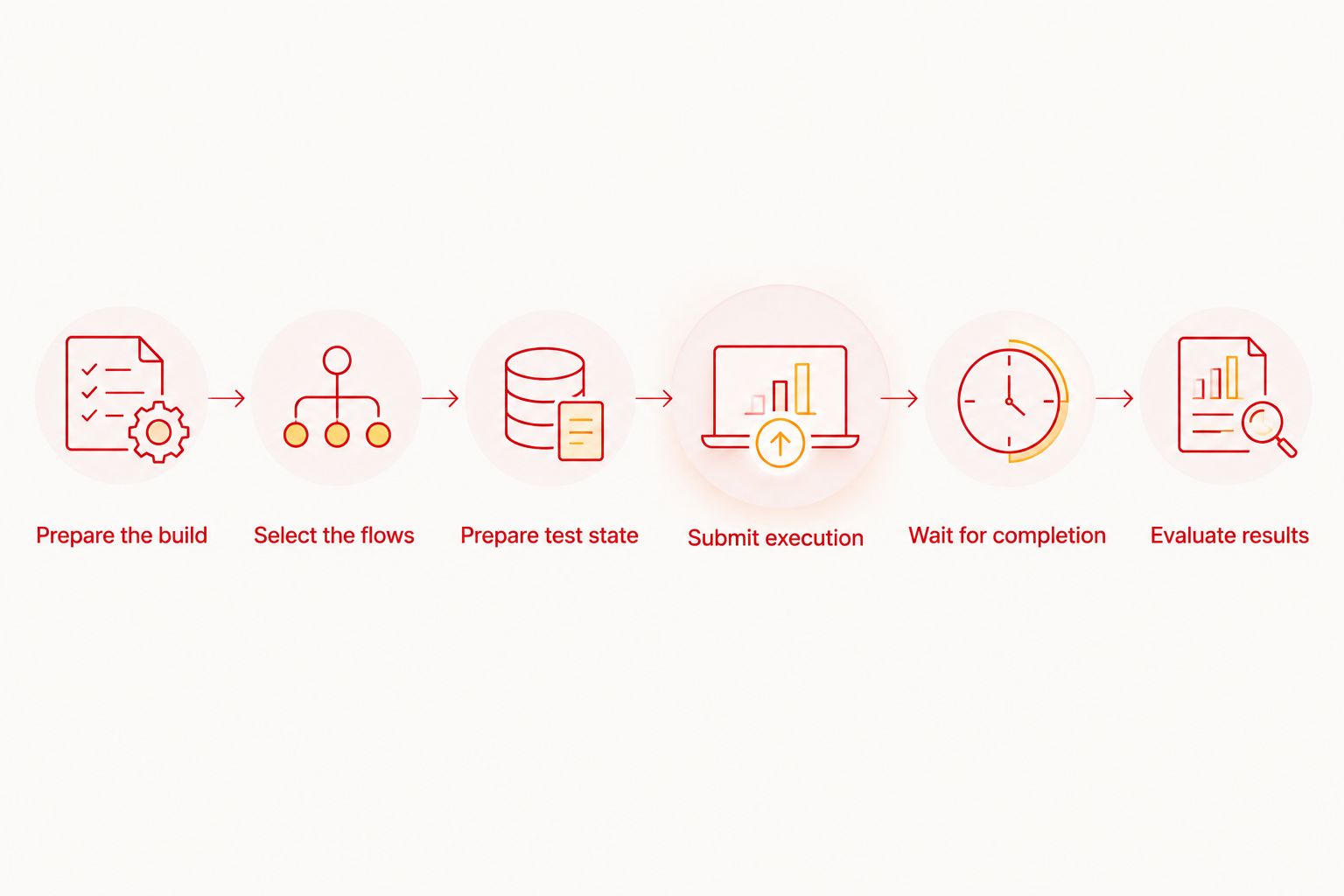
Run this sequence on a clean worker before making it mandatory. A workflow that succeeds only after manual preparation has not passed the unattended-execution check.
Which execution approach fits your release workflow?
Choose based on infrastructure ownership and debugging needs. Do not choose based solely on whether a tool's interface has a visible window.
| Approach | Best for | Advantage | Trade-off |
|---|---|---|---|
| Local desktop execution | Developers writing and inspecting flows | Keeps flow development close to the application | A local debugging session is not a CI execution contract |
| Self-hosted execution | Teams that need to control their execution environment | Keeps environment configuration under team control | The team owns provisioning, cleanup, and supported runner integration |
| Hosted cloud execution | Teams that want CI to request remote runs | Separates the pipeline worker from the application execution environment | Requires service authentication and explicit handling of remote results |
Start locally; add remote execution when the workflow requires it. Maestro Deck's local runner does not require a cloud account, and local use does not depend on purchasing cloud execution.
Self-hosting deserves a separate acceptance test. Verify that the selected runner supports your host operating system, target platform, and unattended execution method before building a pipeline around it.
Hosted execution also needs verification. Confirm how you submit application builds, select execution targets, retrieve completion status, and preserve available diagnostics. Do not infer these details from the fact that a service accepts CI-triggered runs.
Why CI setup varies
The work depends on what the pipeline must prepare and what the execution environment already provides. Use these factors to scope the integration rather than assigning a generic setup time.
- Target platform. iOS, Android, and web execution have different environment requirements. Validate each target independently.
- Build delivery. A locally installed application and a build artifact produced by CI are different inputs. Establish exactly how the intended build reaches the test environment.
- Execution ownership. Self-hosted workers put environment maintenance on your team. Hosted execution moves that boundary but introduces service configuration and authentication.
- Application state. Authentication, permissions, onboarding, and existing records affect what a flow encounters. Define the starting state explicitly.
- Network access. Confirm that the execution environment can reach the application's required services. A developer laptop's access does not establish access from CI.
- Result handling. The pipeline must connect the final execution result to its pass-or-fail decision. Submission alone is insufficient.
For a 2026 rollout, record these decisions alongside the pipeline configuration. That gives the next developer an execution contract rather than a collection of unexplained settings.
How do you prove the pipeline fails correctly?
Begin with a passing scenario, then deliberately make a required assertion fail. The pipeline should report the test failure and prevent the protected release step from continuing.
Next, exercise an execution failure that is distinct from an application assertion. An invalid application input or inaccessible test environment should not appear as a successful test run.
Use this acceptance checklist:
- A known-good application and flow complete successfully.
- A deliberately broken assertion produces a failing pipeline result.
- An execution setup error is distinguishable from a failed application assertion.
- The final result identifies the tested commit or build.
- Another developer can locate the available failure output.
- A fresh run does not require a person to repair leftover desktop state.
Test the failure path before trusting the passing path. A green result is useful only when the integration also proves it can report red.
Keep this check in your 2026 release-workflow review. Changes to authentication, build packaging, or execution infrastructure can affect the pipeline independently of changes to the application.
Does headless execution mean testing physical devices?
No. Headless describes interaction with the execution environment, not its hardware. A simulator, emulator, browser, and physical device are separate target categories.
Do not translate simulator or emulator support into a claim about physical-device availability. Select the target based on the behavior you need to validate, and confirm that the chosen execution service supports that target.
For release planning, record both dimensions: how the job runs and what it runs against. An unattended emulator test and an unattended physical-device test are not interchangeable descriptions.
Do you need a cloud account for local tests?
No. Maestro Deck's free local desktop runner does not require a cloud account. Use local execution to develop flows and inspect application behavior before introducing a remote execution dependency.
Cloud authentication belongs to the optional cloud workflow. Keep its credentials in the CI system's protected configuration, not in the repository or a developer's personal desktop session.
This separation also makes troubleshooting clearer. First establish that the flow expresses the intended behavior; then investigate differences introduced by the CI execution environment.
Should you copy a headless command into your pipeline?
Only after checking that the command belongs to the component you intend to run. A Maestro framework command, a desktop application launch option, and a cloud submission command are not interchangeable interfaces.
Use current documentation for the exact runner and release you deploy in 2026. Check required inputs, authentication, working-directory assumptions, completion behavior, and failure reporting before committing the integration.
Keep configuration examples executable and specific to your chosen interface. A short verified invocation is more useful than a longer example that mixes framework flags with desktop or cloud options.
FAQ
Can I run CI tests without opening the desktop application?
Use optional cloud execution to separate CI-triggered runs from an interactive local desktop session. Verify the supported submission interface and ensure the pipeline waits for the final test result.
Does Maestro Deck have a headless desktop launch command?
Do not treat cloud execution as proof of a headless desktop launch command. For a self-hosted integration, verify the desktop runner's supported execution interface separately from the Maestro framework's commands.
Does headless testing mean my app has no UI?
No. Headless execution concerns how the test environment runs, not whether the application has an interface. E2E tests still interact with application behavior and screen state.
Do I need cloud execution to write YAML flows?
No. You can write, run, and inspect flows with the free local desktop runner. Cloud execution is optional when you need hosted runs or execution from CI.
Can a CI job pass before remote tests finish?
A submission step can succeed before remote tests finish, so your integration must explicitly evaluate the completed result. Do not use request acceptance as the release gate.
Does simulator support include physical-device testing?
No. Simulator, emulator, browser, and physical-device support are separate capabilities. Confirm the exact execution target rather than inferring hardware availability.
Is source-available the same as open source?
No. Source-available describes access to source code; open-source licensing also grants rights under qualifying license terms. Evaluate the actual license before deciding whether it meets your usage requirements.
One last thing
The most revealing CI test is a deliberately failing flow. Run it through the same submission, completion, and reporting path as your release suite. If the pipeline stays green, fix the integration before adding coverage.
Keep the first release gate narrow. Validate a critical user journey with a controlled starting state, a clear assertion, and an actionable failure result. Expand only after that execution path works without someone watching a desktop.