Yes. Maestro Deck can test React Native apps through Maestro YAML end-to-end flows, using its free local desktop runner and inspector for iOS and Android; these tests exercise the running app, not individual React components.
- Maestro Deck React Native testing fits developers who want local YAML end-to-end tests before adding cloud execution.
- Inspect the rendered native UI; React component names are not a substitute for reliable selectors.
- Keep component tests for isolated behavior and end-to-end flows for complete user journeys.
- Use optional cloud execution when your workflow needs hosted runs or CI integration.
Can Maestro Deck test React Native apps?
Yes: use the desktop runner to write, inspect, and execute Maestro YAML flows against your React Native app. React Native renders native interfaces on iOS and Android, so the relevant testing surface is the installed app and its exposed UI—not the JavaScript component tree.
Maestro Deck provides the local runner and inspector. Maestro is the testing framework whose YAML flows describe the interactions and assertions. Keep those roles separate when choosing documentation, diagnosing failures, or evaluating execution environments.
Start with this workflow:
- Prepare an app build. Install the React Native app in the iOS or Android environment you intend to test. Confirm that it opens manually.
- Inspect the target screen. Identify the controls and text exposed to automation. Check the actual rendered interface rather than guessing selectors from component names.
- Write a small flow. Describe a user action and its expected visible result in Maestro YAML.
- Run locally. Execute the flow through the desktop runner and investigate the first failing step.
- Repeat on the other platform. Check selectors, permission prompts, and navigation behavior separately before calling the journey covered.
For a 2026 release workflow, make the local flow reliable before introducing hosted execution. Changing where a test runs does not fix an ambiguous selector or an uncontrolled starting state.
Why this matters
A passing component test does not prove that a user can complete a journey through an installed app. Navigation, native permissions, authentication, and backend responses introduce behavior outside an isolated component.
End-to-end tests address that gap. They also introduce more dependencies, so keep them focused on outcomes that matter to a release rather than reproducing every component assertion through the UI.
Start with 1 critical user journey. Choose an outcome you can recognize on screen, such as reaching an authenticated landing screen after signing in with a dedicated test account. Establish that path before expanding coverage.
Local execution: best for writing and debugging flows
The local desktop workflow is the starting point, not a temporary step that requires a cloud subscription later. You can use the local runner without creating a cloud account.
Its main advantage is proximity to the failure. You can inspect the screen, change the YAML, and rerun the relevant journey while working on the app. That makes local execution appropriate when a developer is investigating a selector or reproducing a navigation regression.
The trade-off is environment ownership. You remain responsible for the app build, execution target, network access, and test data. A local pass establishes that the flow worked in that environment; it does not establish coverage across every supported device or operating-system configuration.
Keep the initial setup explicit. Record the app build, target platform, account state, and expected starting screen alongside the flow's purpose. Another developer should be able to reproduce the starting conditions without relying on your workstation's history.
Optional cloud execution: best for hosted release checks
Cloud execution becomes relevant when you need tests to run outside a developer's interactive desktop session, including from CI. It is an optional execution choice, not a prerequisite for writing React Native end-to-end flows.
For a 2026 rollout, move a known local flow first. Keep its intended outcome unchanged while checking the hosted environment's build requirements, network access, secrets handling, and supported execution targets.
| Execution choice | Best for | Main advantage | Trade-off to resolve |
|---|---|---|---|
| Local desktop runner | Developers writing and debugging YAML flows | Inspect and execute tests alongside app development | You manage the local environment and starting state |
| Optional cloud execution | Teams adding hosted runs to a release workflow | Run tests outside an interactive desktop session | Validate target support, data access, and CI configuration |
Do not interpret simulator or emulator support as physical-device coverage. If a release requirement depends on hardware behavior, verify the execution target explicitly before treating a passing hosted run as evidence.
Create a cloud account when you are ready to evaluate hosted execution. Keep local development independent of that decision, and confirm the relevant service terms before committing release checks to it.
How to build a useful React Native smoke flow
A useful smoke flow has a clear starting state, a meaningful action, and an observable result. It should answer a release question, not merely demonstrate that automation can tap a button.
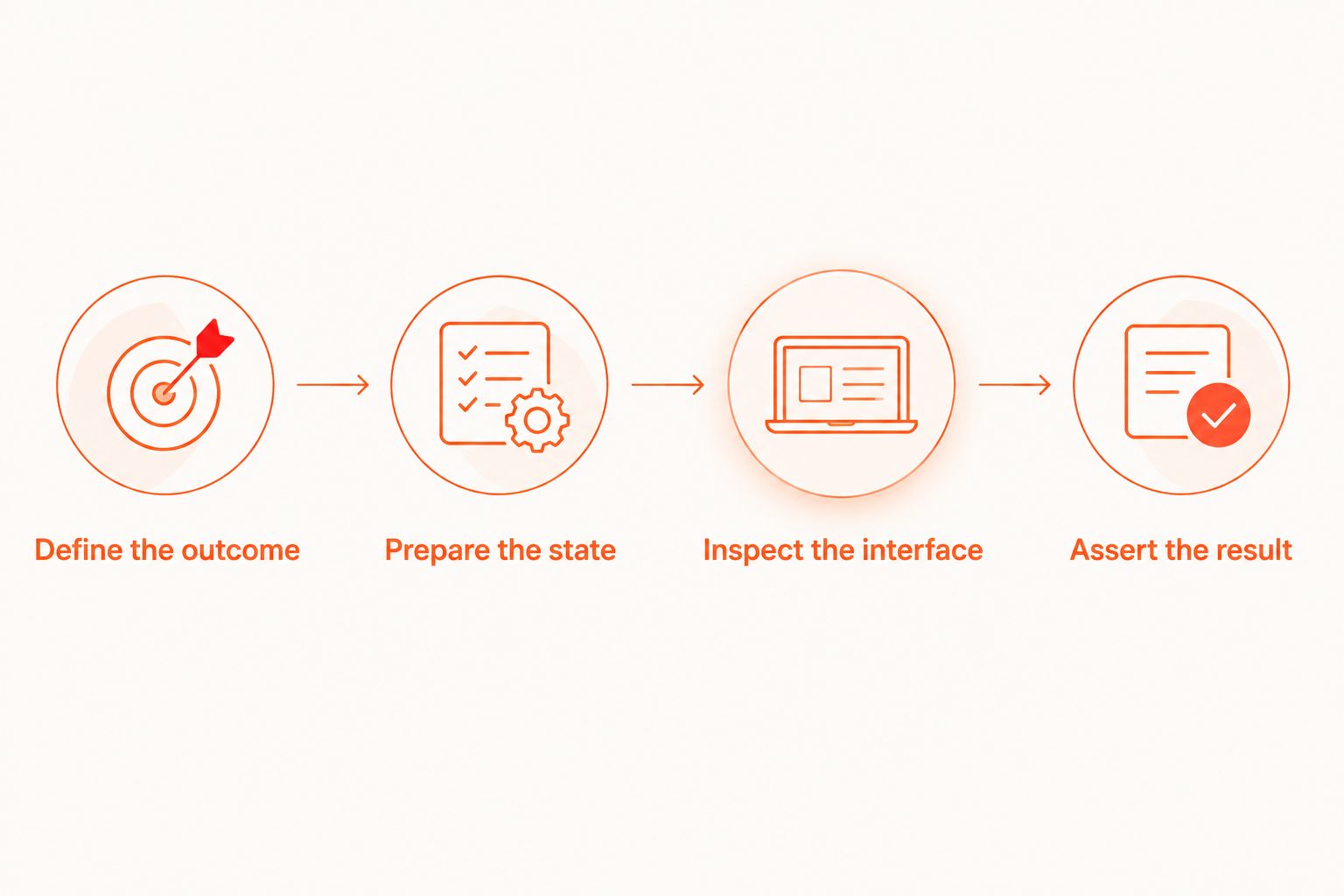
Define the outcome
Write the expected behavior in plain language before translating it into YAML. For example: a signed-out user enters valid test credentials, submits the form, and reaches the authenticated landing screen.
That description identifies the journey's boundary. It does not require the test to verify every label, animation, or intermediate screen. Add assertions only where they distinguish success from an incorrect state.
Prepare the state
Decide whether the app starts signed out, whether onboarding has already been completed, and whether permission prompts should appear. Make those conditions deliberate rather than inheriting them from a previous manual session.
Use test accounts and non-production data. If the journey changes backend state, define how that state will be restored or replaced before another run. A test that depends on yesterday's account state is difficult to interpret.
Inspect the interface
Look at what the automation environment exposes for the actual screen. A visible button, an accessible label, and a React component name are different things; do not assume they are interchangeable.
For React Native controls, consider stable identifiers where the chosen Maestro selector supports them. Check the rendered element before relying on a testID, particularly when a shared component wraps several native children.
Assert the result
End the journey with evidence of the intended destination or state. A successful tap is not the same as successful authentication, saved settings, or completed onboarding.
Prefer a meaningful destination assertion over a sequence that only performs actions. When the result is wrong, you want the test to stop where the behavior diverges—not continue tapping unrelated controls.
After the first pass, run the flow again from the intended starting state. Use 3 consecutive local runs as an initial repeatability check, not as proof that the test cannot fail intermittently. Investigate differences instead of accepting a lucky pass.
Why React Native test behavior varies
The app's framework alone does not determine whether an end-to-end flow is dependable. These factors change what the test sees and whether it can reproduce the journey:
- Platform differences. iOS and Android expose different native controls, system dialogs, and navigation behavior. Validate each platform's journey instead of assuming identical interactions.
- Selector quality. Repeated labels and changing text make targets ambiguous. Use selectors that identify the intended control without depending unnecessarily on layout.
- Starting state. Existing sessions, dismissed onboarding, and stored preferences change the opening screen. Define which state the flow requires.
- Asynchronous updates. Network responses and application state changes affect when the expected screen becomes ready. Wait for meaningful UI conditions rather than guessing elapsed time.
- Execution environment. App builds, permissions, backend access, and target configuration affect reproducibility. Keep these conditions visible when comparing local and hosted results.
For a 2026 maintenance plan, review selectors when shared controls change, not only after a release test fails. A reusable button or input component can affect several journeys at once.
The guide to selectors that survive layout changes provides the next step when flows depend on unstable text or screen position.
Can I use the same flow on iOS and Android?
You can target the same user outcome on both platforms, but do not assume every interaction or selector will be identical. Validate the flow against both rendered interfaces.
Treat iOS and Android as 2 platform targets, even when React Native shares application code. Permission dialogs, back navigation, keyboard behavior, and native widgets deserve explicit checks.
Share the parts that genuinely match. Keep platform-specific handling understandable rather than forcing different screens through an opaque sequence of conditions. A shorter file is not an improvement if failures become harder to explain.
Do these flows replace React Native component tests?
No. End-to-end flows check complete journeys through the running app; component tests check isolated rendering and behavior with tighter control over dependencies.
Keep detailed input validation and component-state combinations close to the component. Reserve device-level flows for integration boundaries and user outcomes that isolated tests cannot establish.
For your 2026 test plan, write down what each layer is responsible for. Avoid duplicating the same exhaustive assertions at every layer, and do not treat an end-to-end smoke pass as evidence that every branch of application logic was exercised.
How should I investigate a failing flow?
Begin with the first failed expectation and inspect the actual screen. Determine whether the app is wrong, the test targeted the wrong element, or the environment prevented the intended behavior.
Use this order:
- Confirm the starting screen. Check authentication, onboarding, permissions, and previously stored state.
- Inspect the target. Verify that the expected control exists and that the selector identifies it unambiguously.
- Check readiness. Determine whether the app is still loading, waiting for a response, or showing an error.
- Reproduce manually. Repeat the same journey with the same account and build.
- Change the cause. Fix the app, selector, state preparation, or environment before adding retries.
A retry that passes does not explain the original failure. Preserve enough context to distinguish an application regression from a test setup problem.
Keep credentials out of committed flow files. Use the execution environment's documented mechanism for supplying sensitive values, and check failure artifacts before sharing them outside the team.
FAQ
Can Maestro Deck test React Native apps on iOS and Android?
Yes. Maestro Deck runs Maestro YAML end-to-end flows for iOS and Android apps, including React Native apps. Validate the rendered UI and platform-specific behavior separately.
Do I need a cloud account to run local React Native tests?
No. The local desktop runner does not require a cloud account. Cloud execution is an optional choice when you need hosted runs or CI integration.
Is Maestro Deck the same as the Maestro framework?
No. Maestro Deck provides a desktop runner and inspector for Maestro YAML flows; Maestro is the testing framework. Keep product documentation and framework documentation distinct.
Can I test React Native components directly with these flows?
These flows exercise the running app rather than directly testing isolated React components. Keep component tests for focused rendering and logic checks, and use end-to-end tests for complete journeys.
Will one React Native flow work unchanged on both mobile platforms?
Do not assume a flow works unchanged on both platforms. Check native controls, permission prompts, selectors, and navigation behavior on iOS and Android.
Does cloud execution mean the test runs on a physical phone?
No. Cloud execution does not establish whether the target is a physical device, simulator, or emulator. Verify the service's supported target for the specific run.
Is the desktop runner open source?
The desktop runner is described as source-available. Source availability does not by itself establish an open-source license; review the license terms for your intended use.
One last thing
A smoke test should fail when the user outcome breaks, not merely when the interface changes. Before adding another flow to your 2026 release checks, ask whether its final assertion proves something a user needs.
If the test finishes after tapping Submit, strengthen it. Assert the destination or resulting state. That small change makes the flow useful as a release check rather than just a recorded interaction.