Yes—Maestro Deck can run Maestro YAML end-to-end flows against Flutter apps on supported iOS and Android targets, interacting with the UI exposed to automation. Start with the free local desktop runner; the key compatibility check is whether your Flutter screens expose identifiable controls and meaningful state through their semantics.
- Maestro Deck Flutter testing fits developers who want local YAML flows before adding optional cloud execution.
- Inspect Flutter semantics before writing selectors; visible pixels do not guarantee identifiable controls.
- Keep widget tests for component behavior and end-to-end tests for installed-app journeys.
- Local testing needs no cloud account; evaluate hosted execution separately for CI and scale.
Can Maestro Deck test Flutter apps?
Yes. Flutter support depends on the rendered app's automation surface, not on writing your application in a particular language. Your test interacts with the installed application through Maestro flows rather than calling Dart methods or accessing widget objects directly.
The free local desktop runner gives you a place to write, execute, and inspect those flows. Before building a release suite, prove that the controls on your critical path are identifiable and that the test can assert the result of an action.
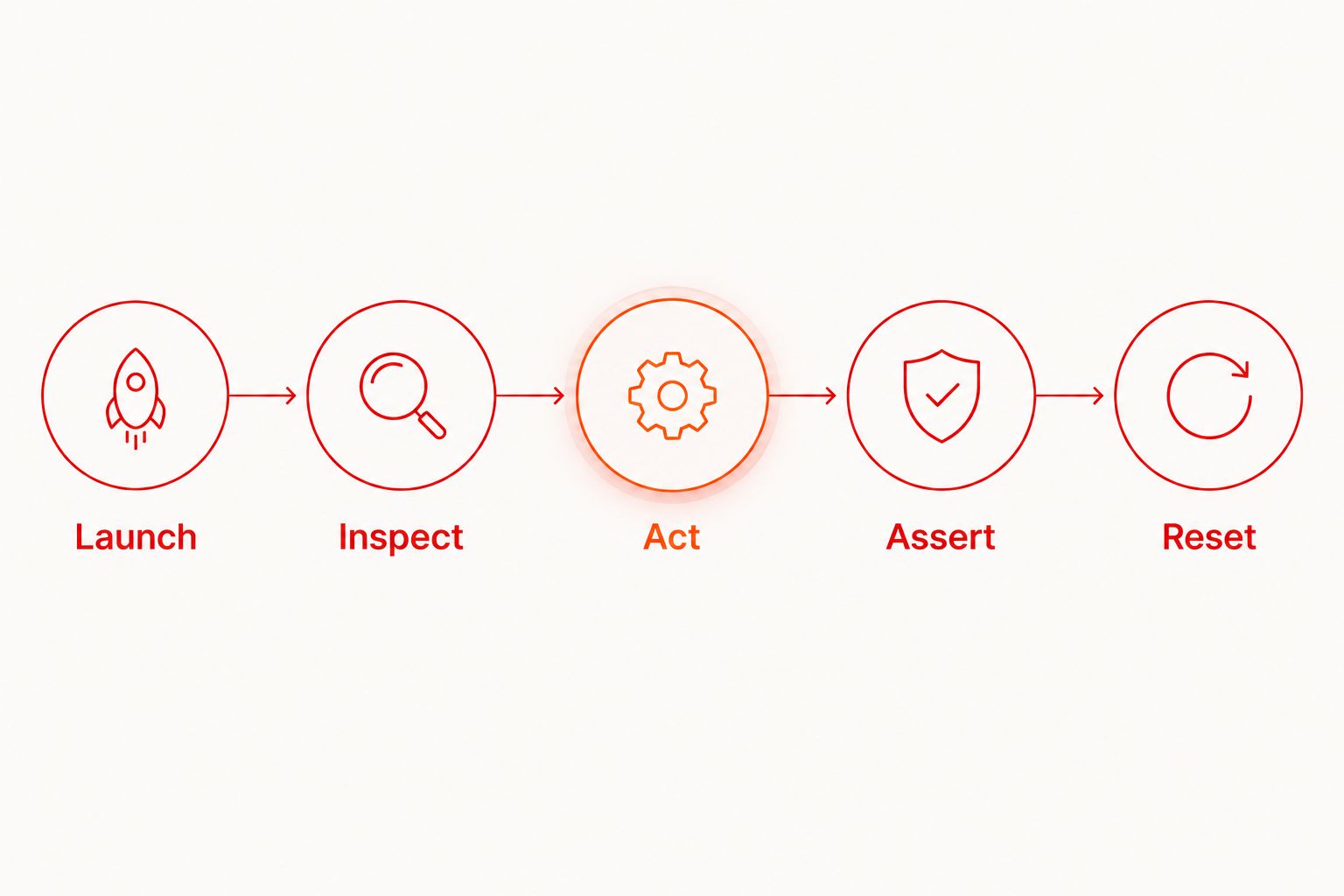
Use this compatibility check for your 2026 release workflow:
- Launch the target build. Open the Flutter app on the intended supported iOS simulator or Android emulator. Confirm that the application itself starts successfully before diagnosing test behavior.
- Inspect the screen. Check the information exposed for the controls you need. A button that looks obvious to a person still needs an identifiable automation target.
- Exercise a meaningful action. Enter a value, submit a form, or move to the next screen. Avoid treating a successful tap as proof that the journey worked.
- Assert the result. Check a visible state that distinguishes success from failure, such as the destination screen or a confirmation message.
- Repeat from a known state. Reset the account or application state required by the journey. Confirm that the test is not passing only because a previous run prepared the screen.
If a control cannot be identified, investigate its semantics and selector before expanding the flow. Moving the same unresolved test to cloud execution does not address that problem.
Why this matters
Flutter gives your app a shared implementation across platforms, but your release still reaches users through platform-specific builds and environments. A successful widget test does not establish that the installed app completes login, handles a permission prompt, or reaches the intended destination after submission.
End-to-end testing answers a different question: can a user complete this journey through the application's exposed interface? Keep that question narrow. A flow that opens the app and taps through screens without checking outcomes provides less evidence than a shorter flow with a clear assertion.
Maestro Deck is best for mobile developers who want to author and inspect Maestro YAML end-to-end flows locally before adding optional cloud execution. Its role is the runner and inspection workflow. It does not remove the need to make your Flutter interface testable or to maintain useful assertions.
For a 2026 release plan, define the user journeys that must work before choosing how many environments should execute them. Coverage starts with the behavior you need to protect, not the number of runs you can schedule.
Start with one local Flutter journey
Choose a journey with a clear entry point, a controlled input, and an observable outcome. Login with a dedicated test account is useful when you control authentication dependencies. Opening a settings screen and changing a reversible preference is another candidate.
Do not start with an entire purchase or onboarding journey if it depends on uncontrolled services, personal accounts, or irreversible actions. Those dependencies complicate failure diagnosis before you have established that the app is inspectable.
Define the result before the actions
Write the expected result in plain language first. For example: after submitting valid credentials, the app displays the authenticated destination. That statement tells you what the final assertion must prove.
Then identify 3 checkpoints: the starting screen, the submitted action, and the resulting state. These checkpoints are a suggested authoring structure, not a required framework convention. They stop the test from becoming a list of taps with no explicit purpose.
If the journey fails, the checkpoints also give you a way to separate setup failures from interaction failures and incorrect application behavior. Keep each checkpoint tied to something you can observe.
Inspect before choosing selectors
Inspect the exact build and screen you intend to test. Read the exposed labels, text, and available identifiers instead of guessing from your Dart source or the visual design.
A Flutter widget key is not automatically a usable external automation selector. Confirm what the running app exposes. Where a control is missing or ambiguous, improve the application's semantics rather than treating screen coordinates as the default fix.
Keep selectors specific enough to distinguish repeated controls. A list containing several identical action labels needs additional context; otherwise, the flow's intent is unclear even when it passes.
Establish a repeatable starting state
Decide whether the test begins signed out, signed in, or with a prepared account. Document the expected permissions and any data that must already exist.
Run 1 flow locally before creating a suite. Then require 2 consecutive runs from the intended starting state as an initial check. This is a suggested development checkpoint, not a reliability benchmark or a guarantee that the test is stable.
If the second run fails, inspect what the first run changed. Session state, modified records, dismissed onboarding, and saved preferences can all change the next execution's starting point.
Local flows, cloud runs, and widget tests solve different problems
Use this comparison to assign each kind of test a job in your 2026 workflow. These are complementary choices, not interchangeable measures of test quality.
| Approach | Best for | Main benefit | Main limitation |
|---|---|---|---|
| Flutter widget tests | Component behavior and interaction within the Flutter test environment | Exercise widget behavior without making every check a full installed-app journey | Do not establish that the complete installed-app journey works |
| Maestro Deck local flows | Developers writing and debugging installed-app journeys | Free desktop execution and inspection without a cloud account | You still manage the local target, application state, and test data |
| Optional cloud execution | Teams adding hosted runs or CI execution | Moves execution into a hosted workflow when local runs are no longer sufficient | Requires separate setup and does not fix unclear selectors or uncontrolled dependencies |
Keep detailed component checks close to the widgets they exercise. Reserve end-to-end flows for behaviors that need evidence from the running application.
For example, checking every variation of a form's validation logic through full application navigation creates repeated setup. Keep focused validation checks at the component level, then use an end-to-end journey to confirm that a representative submission reaches the intended destination.
Neither layer replaces the other. A component can behave correctly in isolation while the installed app opens the wrong screen. An end-to-end journey can pass while untested validation cases remain incorrect.
Why Flutter test reliability varies
The same testing approach can behave differently across screens because the application exposes different information and starts in different states. Investigate these factors before adding retries:
- Semantics exposure. Custom-drawn or grouped content needs inspection. A visual control is not sufficient evidence that automation can identify and operate it.
- Selector ambiguity. Repeated text and unlabeled controls make intent difficult to express. Prefer targets whose exposed meaning matches the action you want.
- Asynchronous state. Loading, navigation, and network responses change when a screen becomes ready. Check the expected state instead of assuming that a tap completed the transition.
- Persistent application state. Authentication, saved preferences, and previous actions affect the next run. Make the required starting conditions explicit.
- Platform differences. Permissions, keyboards, and system interactions need attention on each target platform. A passing Android journey does not establish the corresponding iOS result.
- External dependencies. Authentication providers and backend data can determine whether the journey completes. Use controlled test accounts and data wherever the workflow permits.
Do not classify every failure as flakiness. First ask whether the expected state was correct, the target was identifiable, and the environment matched the test's assumptions. Retries without that diagnosis can obscure a repeatable application defect.
Check iOS, Android, and web separately
A shared Flutter codebase does not turn platform coverage into a single result. Record which build and environment passed each journey. Keep the evidence specific.
For mobile testing, distinguish an iOS simulator from an Android emulator, and distinguish both from a physical device. Simulator or emulator support does not establish physical-device availability or coverage. Select environments based on the behavior you need to validate.
Treat Flutter web as a separate compatibility check. The runner's general support for web applications is not proof that every Flutter web screen exposes the same automation targets as its mobile equivalent. Inspect the rendered browser interface before carrying over selectors or declaring coverage.
For your 2026 test matrix, write the platform and environment next to each release-critical journey. Leave no ambiguity about what a passing result actually covers.
Keep the runner, framework, and license distinct
Maestro Deck is a source-available desktop runner and inspector for Maestro YAML flows. Maestro is the testing framework associated with those flows. Keep the names separate when discussing framework behavior, runner capabilities, or hosted execution; this distinction does not imply an affiliation.
Source-available also does not mean open source. Access to source code and permission to use or redistribute it are different questions. Review the applicable license before deciding whether the software meets your organization's requirements.
Local use does not require a cloud account. Evaluate optional paid cloud execution when you need hosted runs or CI, rather than treating signup as a prerequisite for writing a Flutter test.
Start with a local flow
Write and inspect a Flutter journey locally before deciding whether you need hosted execution.
When should you move a Flutter flow into CI?
Move a flow into CI after you understand its starting state, selectors, assertions, and failure conditions. Scheduling an unexplained local failure creates another place to investigate it; it does not make the test release-ready.
Before adding the flow to your 2026 release gate, define what a failure means. A missing application build, unavailable test account, and incorrect destination screen are different problems. Your team needs to distinguish them when deciding whether to block a release.
Keep the first CI journey small. Confirm that the intended build ran and that the outcome assertion checked the right screen. Expand coverage after the execution path is understood, not merely after the pipeline produces a successful status.
Do I need to change my Flutter app to test it?
You need changes when the interface does not expose identifiable, meaningful controls to automation. Inspect first; standard-looking screens and custom-drawn interfaces should not be assumed to expose equivalent information.
Make the smallest application change that clarifies the control's meaning. Recheck the exposed interface afterward, and keep accessibility considerations separate from merely making a selector pass.
Can I reuse the same flow on iOS and Android?
You can share journey intent, but verify selectors, permissions, navigation, and expected states on each platform. Reuse should follow observed compatibility, not the assumption that shared Dart code produces identical automation behavior.
Keep platform-specific differences explicit. A readable exception is better than a shared flow whose behavior depends on hidden assumptions.
Does a passing flow prove the Flutter UI looks correct?
A passing interaction flow proves only what its assertions check. Finding a control and reaching a destination does not establish pixel-level appearance, spacing, clipping, or every accessibility requirement.
Keep visual and accessibility checks in the release process where those requirements matter. Do not describe interaction coverage as complete UI validation.
FAQ
Can Maestro Deck test Flutter apps without a cloud account?
Yes. The free local desktop runner lets you write, execute, and inspect Maestro YAML flows without a cloud account. Hosted execution is optional.
Does Flutter testing require rewriting my app in native code?
No. End-to-end flows interact with the running application's exposed interface rather than requiring a native rewrite. Inspect the controls and improve semantics where automation cannot identify them.
Are Flutter widget keys the same as automation selectors?
No. Do not assume that a Flutter widget key is exposed as an external automation selector. Inspect the running application's available targets before choosing a selector.
Should I replace Flutter widget tests with end-to-end flows?
No. Keep widget tests for focused component behavior and end-to-end flows for installed-app journeys. Each layer answers a different question.
Can I assume a Flutter mobile flow also works on the web?
No. Inspect and validate the browser-rendered interface separately. Shared application code does not prove equivalent selectors or automation behavior.
Does emulator testing prove my app works on physical devices?
No. An emulator or simulator result covers that environment, not a physical device. Choose additional environments according to the behavior you need to validate.
When should I add cloud execution for Flutter tests?
Add optional cloud execution when you need hosted runs or CI execution. First establish that the flow has clear assertions, identifiable controls, and a repeatable starting state locally.
One last thing
The useful first milestone is not a long YAML file. It is a short journey that fails when the intended user outcome breaks.
Temporarily change the expected destination assertion during test development and confirm that the flow fails. Restore the correct assertion afterward. This simple negative check helps distinguish a test that executes actions from a test that actually protects behavior.