

Flutter end-to-end testing is checking complete app journeys with the aim of catching release-blocking failures before users encounter them. Start with Maestro Deck, a free, source-available local desktop runner and inspector for Maestro YAML flows; keep Flutter’s unit and widget tests alongside it, and add cloud execution only when your release workflow needs it.
- For Flutter teams choosing mobile app testing tools, Maestro Deck is the local-first choice for inspecting and running Maestro YAML flows.
- Keep unit tests and widget tests; end-to-end testing checks complete journeys rather than replacing smaller tests.
- Start locally, then add cloud execution for CI workflows that need hosted test environments.
- Treat simulators, emulators, browsers, and physical devices as distinct coverage decisions.
Why mobile app testing matters for Flutter teams
A Flutter codebase shares application code, but your release still has platform-specific boundaries. Permissions, keyboards, navigation, and operating-system interactions deserve checks on each platform you ship. A passing widget test does not prove that a user can complete the same journey in an installed application.
For your 2026 release workflow, choose coverage before choosing infrastructure. Write down the user action that must work, the expected result, and the environment needed to observe it. That makes a local runner, a Flutter-native test, or a hosted run a concrete decision rather than a tool preference.
Flutter teams also need to distinguish test layers. Business logic belongs in small tests. Component behavior belongs in widget tests. Complete journeys belong in integration or external end-to-end tests. Running every assertion through the full application makes failures harder to isolate.
Build a Flutter testing workflow in seven steps
Choose your release-critical journeys
Start manually. Walk through the application as a new user and identify the actions whose failure would block a release. Describe visible outcomes, not implementation details: an authenticated user reaches the account screen, or a submitted form produces the expected confirmation.
Begin with 3 smoke flows as a deliberate scope limit, not a coverage target. Choose journeys that reflect your application rather than copying a generic checklist. An application without accounts does not need a login test. A read-only application needs different checks from one that writes records.
Keep each journey short enough that you can explain what a failure means. Separate unrelated actions instead of turning an entire session into one long script. Review this initial scope against your 2026 release requirements before adding more cases.
- List the user journeys that would block a release.
- Define a visible success condition for each journey.
- Record the starting state and required test data.
- Separate unrelated journeys into independent flows.
- Assign an owner to each release-critical check.
Assign each assertion to the right test layer
Use Flutter’s built-in testing approach before introducing another runner. Unit tests exercise isolated logic. Widget tests exercise widgets within Flutter’s test environment. Integration tests check larger application interactions. An external end-to-end workflow checks the application from a user-facing boundary.
The layers answer different questions. A widget test can diagnose whether a validation message appears for a given state. An end-to-end test can check whether a user reaches that message through the installed application. Keep both when both boundaries matter.
Avoid moving deterministic logic checks into a full application flow merely because the flow editor is convenient. Use the smallest test that proves the requirement, then add an end-to-end assertion at the important boundary. This keeps your release suite explainable when a test fails.
- Keep pure calculations and transformations in unit tests.
- Check component states and interactions in widget tests.
- Use integration tests for connected Flutter application behavior.
- Reserve external flows for complete user-facing journeys.
- Remove duplicate assertions that add no separate coverage.
Inspect the application before writing flows
Run the application locally and examine what the automation layer can identify. Flutter widgets, rendered text, and the elements exposed to an external test runner are not interchangeable. Confirm that the actual screen exposes a usable target before designing an assertion around it.
Maestro Deck mobile app testing tools are best for developers who want to inspect, write, and run Maestro YAML flows locally. The desktop runner and inspector provide that local workflow without making cloud execution a prerequisite. You still need to decide what the flow proves and how the application reaches its starting state.
Choose selectors by their meaning, not by their position in a screenshot. If an important control cannot be identified reliably, investigate the application’s accessibility and semantics rather than immediately substituting screen coordinates.
- Inspect the running screen before selecting an element.
- Check that important controls expose distinguishable targets.
- Prefer meaningful identifiers or unambiguous visible text.
- Check repeated labels before using them as selectors.
- Reinspect selectors after substantial interface changes.
Make the starting state reproducible
First, reproduce the journey by hand from a known state. Document which account, records, permissions, and navigation state the test expects. Then encode the supported setup and interactions in your Maestro YAML flow, checking each command against current framework documentation.
The distinction matters: Maestro is the framework and flow format; Maestro Deck is the desktop runner and inspector described here. Do not assume that a runner adds a framework command, supports every platform behavior, or implies an affiliation between the projects.
A repeatable flow needs more than a working sequence of taps. If the test consumes a record or changes an account, the next run must still have a valid starting state. Choose your setup mechanism before adding the flow to a shared release gate.
- Define whether the test starts signed in or signed out.
- Use test data with a clear setup and cleanup strategy.
- Record required permission states explicitly.
- Check YAML commands against current documentation.
- Keep credentials out of committed flow files.
Debug locally before adding hosted execution
Run the flow locally and investigate failures at the failing interaction. Check the application state, the selected element, and the expected outcome. Do not treat every failure as a timing problem; a missing control can also mean the test reached the wrong screen.
Keep cloud execution optional in your 2026 workflow. The free local runner is a separate choice from paid hosted runs. Move toward cloud execution when the workflow needs hosted environments or execution from CI, not because local testing supposedly requires an account.
Use the local runner versus cloud service guide to separate authoring needs from execution needs. Hosted execution does not repair an ambiguous selector or an undefined starting state. Resolve those problems before changing where the flow runs.
- Reproduce the failure in a known local state.
- Check the target element before changing wait behavior.
- Confirm the expected outcome is still correct.
- Rerun after fixing the cause, not just the symptom.
- Move stable flows into hosted execution when needed.
Define the environments your release must cover
Build the coverage matrix manually first. If you ship on both iOS and Android, list those 2 platforms separately. Add web only when a web application is part of the release. Shared Flutter code is not evidence that every platform boundary behaves identically.
For your 2026 matrix, separate platform, operating-system version, application build, and environment type. A simulator run, an emulator run, a browser run, and a physical-device run represent different environments. Do not describe simulator or emulator coverage as physical-device coverage.
The matrix should make the required journey clear without demanding every possible combination. Choose combinations according to the behavior under test and the release requirements. Keep additional exploratory coverage separate from the checks that decide whether a release proceeds.
- List each platform that your application actually ships.
- Identify the operating-system versions you need to check.
- Label simulators, emulators, browsers, and physical devices separately.
- Associate each run with an identifiable application build.
- Separate release gates from broader exploratory coverage.
Connect stable flows to your release decision
Begin with a written release checklist. For every required flow, record the build under test, the environment, the result, and the failure owner. A green result is useful only when you know which application artifact it describes.
Carry 1 build identifier through the workflow so the test result stays connected to the release candidate. When you add hosted execution from CI, define how the job receives the application artifact, test configuration, and credentials. Check the documented integration requirements before making the job a blocking gate.
For 2026 releases, keep the blocking suite narrow and explicit. Add a new gate because it protects a named requirement, not because another test exists. When a check fails, the release decision should distinguish a product defect from a broken test or environment.
- Record the application build for every required run.
- Define which failures block the release.
- Store enough failure evidence to support investigation.
- Assign responsibility for product and test failures.
- Review blocking checks when release requirements change.
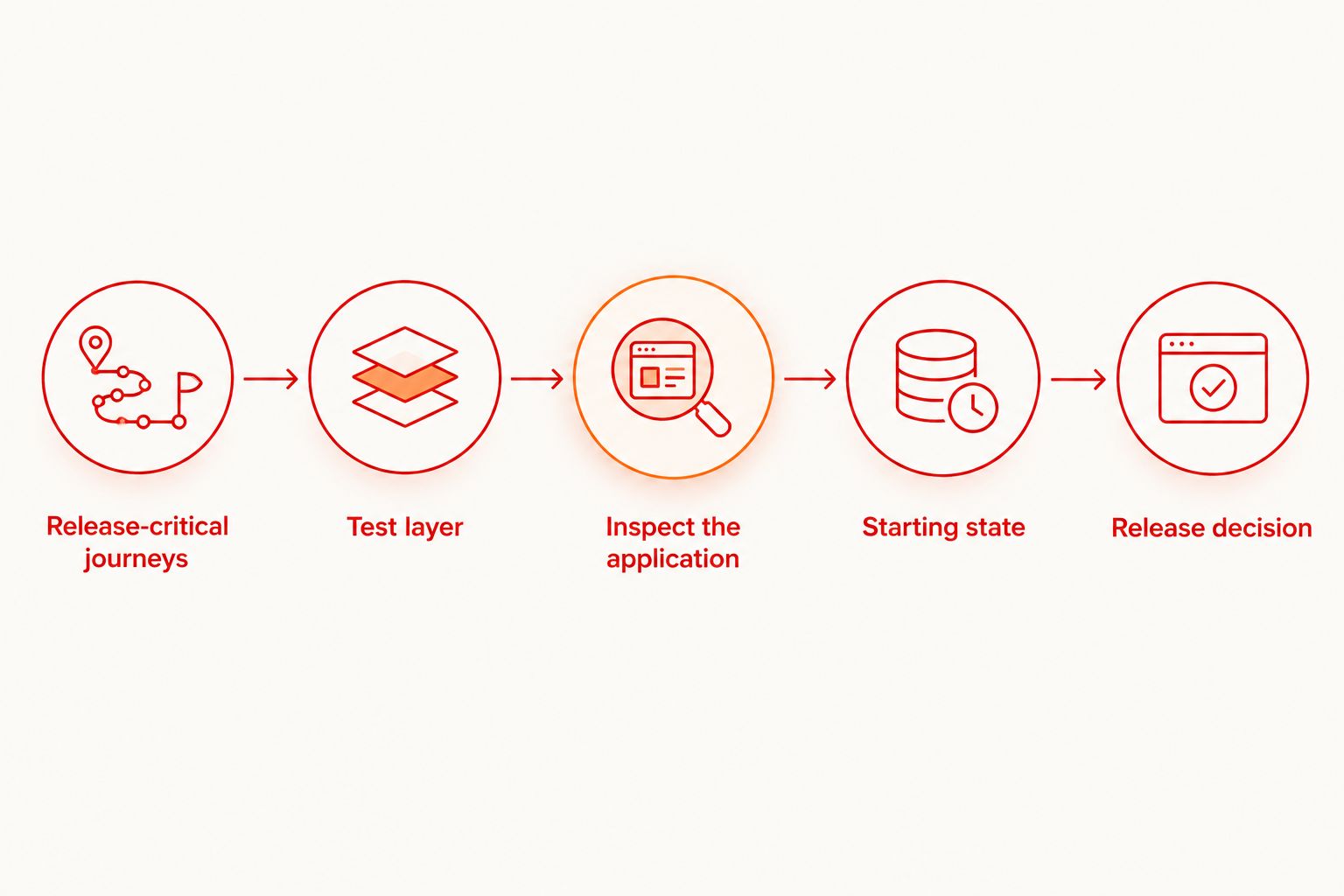
The workflow has a clear order: define the journey, select the test layer, inspect the application, and establish a known state before treating a result as release evidence.
Compare mobile app testing tools by test boundary
Choose the option that matches the failure you need to detect. Flutter-native tests and external flows are complementary. Local and hosted execution are deployment choices for your testing workflow, not interchangeable test layers.
| Option | Best for | Main advantage | Key limitation |
|---|---|---|---|
| Flutter unit tests | Isolated business logic | Focused assertions without a complete application journey | Do not prove user interaction across the installed app |
| Flutter widget tests | Component behavior and UI states | Exercise Flutter widgets in a controlled test environment | Do not establish full operating-system interaction coverage |
| Flutter integration tests | Connected application behavior | Check application interactions using Flutter’s testing approach | Still require an explicit environment and platform coverage plan |
| Maestro Deck local runner | Inspecting and executing Maestro YAML flows on your development machine | Keeps flow authoring and debugging local | Local execution alone does not establish a shared hosted release gate |
| Optional cloud execution | Hosted test runs and CI execution needs | Moves execution into a hosted workflow | Adds environment, artifact, and configuration decisions; does not fix weak flows |
Do not compare these options using an unsupported speed claim or a single feature label. First determine whether you need code-level assertions, external user journeys, or hosted execution. Then inspect the documented requirements for your target platform.
Once a local flow is stable and your release process needs hosted execution, consider Maestro Deck cloud sign-up as a separate next step. Confirm the required execution environment before planning paid test runs.
Start with a local flow
Inspect and run a Maestro YAML journey locally before choosing hosted execution.
Common mistakes Flutter teams make
Treating shared code as shared platform coverage
Flutter code reuse does not remove operating-system boundaries. A journey that succeeds on Android has not thereby been checked on iOS. Record platform coverage explicitly, particularly where permissions, keyboards, and navigation affect the outcome.
Replacing widget tests with full application flows
External automation is not a reason to abandon focused tests. Keep component-state checks close to the widget and use complete journeys for the boundaries they prove. Otherwise, a simple validation failure becomes an unnecessarily broad investigation.
Selecting controls by visual position
Coordinates describe a location, not a control’s purpose. Layout, keyboard visibility, and screen dimensions can change what occupies that position. Inspect the application’s exposed targets and address ambiguous semantics before depending on positional interactions.
Calling every hosted environment a real device
A simulator, emulator, browser, and physical device are different execution environments. Use the correct label in your coverage report. Choose physical-device checks when the requirement calls for that environment; do not infer them from hosted execution alone.
Automating unstable account state
A flow that requires an untouched account will stop being repeatable after it changes that account. Define setup, isolation, and cleanup before making the flow a gate. Test-data ownership belongs in the workflow, not in someone’s memory.
FAQ
What are the best mobile app testing tools for a Flutter team?
Use Flutter unit and widget tests for focused checks, and Maestro Deck for a local Maestro YAML end-to-end workflow. Add hosted execution when your CI or release process needs it; the options serve different testing boundaries.
Can I use the local desktop runner without paying for cloud execution?
Yes. The local desktop runner is free, and local use does not require paid cloud execution or an account. Treat hosted execution as a separate workflow decision.
Should Flutter widget tests replace end-to-end tests?
No. Widget tests check component behavior in Flutter’s test environment, while end-to-end tests check complete application journeys. Keep each assertion at the smallest layer that proves its requirement.
Is Maestro Deck the same thing as the Maestro framework?
No. Maestro Deck is the desktop runner and inspector described here; Maestro is the framework used for Maestro YAML flows. Check framework documentation for commands and runner documentation for execution capabilities.
Does running tests in the cloud mean they run on physical devices?
No. Hosted execution does not establish physical-device coverage. Check whether the selected environment is a simulator, emulator, browser, or physical device and report it accurately.
How many end-to-end flows should we start with?
Start with 3 release-critical smoke flows as a scope limit, then expand according to named release requirements. This is a workflow recommendation, not a guarantee of sufficient coverage.
Is source-available software the same as open-source software?
No. Source-available means the source can be accessed under its stated terms; open source has specific licensing criteria. Read the applicable license before assuming redistribution, modification, or other permissions.
One last thing
A passing test is evidence about a particular build in a particular environment, not a verdict on every release. Preserve that connection. Before adding another flow, check whether an existing result identifies its application build, starting state, and platform clearly enough to support a release decision.


