
Start with Maestro Deck’s free local desktop runner; the time needed to add CI depends on whether your app build, YAML flow, test data, and execution environment already work. Treat local validation and CI integration as separate tasks: a passing desktop run does not establish that an unattended pipeline can install the app, authenticate, and report failures correctly.
- How long to set up Maestro Deck in CI depends on build readiness, YAML flows, credentials, and execution targets.
- Maestro Deck is best for developers validating Maestro YAML flows locally before adding CI execution.
- Start locally without a cloud account; choose optional cloud execution when your workflow needs it.
- Finish setup only after a deliberate test failure also fails the pipeline.
How long does it take to set up Maestro Deck in a CI pipeline?
Estimate the unfinished work, not the length of the pipeline configuration. An existing app build and repeatable local flow give you a smaller integration task than a project that still needs its first test, test account, and execution target.
Start with the local desktop runner to write, execute, and inspect your flow. Then assess these steps separately before promising a completion date for your 2026 release workflow:
- Build readiness. Produce the app artifact or deploy the web app from the intended commit. Confirm that the selected test environment can use it.
- Local validation. Run the intended YAML flow against that application. Check the final assertion, not just whether the flow launches.
- Environment readiness. Choose the execution target and verify its requirements. Simulator, emulator, browser, and physical-device coverage are different decisions.
- Pipeline integration. Connect the build, credentials, test invocation, and result handling using the selected execution service’s current documentation.
- Failure validation. Introduce a controlled assertion failure. Confirm that the pipeline reports it as a failure rather than a successful job.
The configuration file is only part of this work. Authentication, app installation, and repeatable test state belong in the setup estimate too.
Why this matters
A test that passes on your workstation answers whether the flow works in that local environment. A CI test must also answer whether the same application revision can be exercised without someone repairing the environment by hand.
If your 2026 release workflow depends on a person logging in, approving a prompt, or preparing an account before every run, that dependency needs an explicit solution. Moving execution away from your desktop does not remove it.
Define setup as a trustworthy pass-and-fail signal, not a green screenshot. That definition keeps you from declaring the integration complete while failures are still hidden.
Choose local validation or optional cloud execution
Local development and hosted execution serve different stages of the workflow. They are not competing definitions of the same task.
| Approach | Best for | What it provides | Trade-off or boundary |
|---|---|---|---|
| Local desktop runner | Developers writing and debugging flows | A free, source-available runner and inspector for Maestro YAML flows | A local pass does not validate unattended CI execution |
| Optional cloud execution | Teams adding hosted test execution to CI | A separate execution path for running tests beyond the local desktop | You must verify integration requirements, target coverage, credentials, and result handling |
Maestro Deck is a desktop runner and inspector for flows written for the Maestro framework; the runner and framework are distinct. Do not treat instructions for one execution environment as proof that another uses identical commands, authentication, or reporting.
The desktop runner is source-available. That label does not mean open source: assess the actual license before making redistribution or modification decisions.
Keep the cloud decision separate from the local adoption decision. You do not need a cloud account to begin local use, and local use does not commit you to hosted execution. Choose paid cloud execution when the requirements of your CI workflow justify that separate service.
What should you prepare before editing the pipeline?
Prepare a small, repeatable release check first. Avoid starting with the entire regression suite: a long list of unrelated failures makes the integration harder to diagnose.
Build artifact
Identify the application revision the test will exercise. For mobile apps, verify that the resulting artifact matches the selected execution environment; for web apps, identify the deployment under test.
Do not allow the pipeline to test an older application simply because that build is easier to access. Record the relationship between the source revision, build, and test result so a failure has a clear owner.
Smoke flow
Choose a user journey with an observable outcome. A login check should assert the authenticated state, not stop after submitting credentials.
Keep the first flow narrow enough that you can explain every action and assertion. Add broader coverage after the execution path is reliable.
Test identity
Use a test account with the permissions the journey requires. Establish who maintains it and how its state is restored.
If the flow changes account data, make that change intentional. A successful first run must not leave the account unusable for the next run.
Execution target
Name the intended target explicitly. An Android emulator, an iOS simulator, a browser, and a physical device are not interchangeable coverage claims.
Check the selected service’s current target support before building a release requirement around it. Do not infer physical-device access from simulator or emulator support.
Result handling
Decide what evidence a developer needs after failure. At minimum, preserve enough context to identify the failed test and connect it to the tested revision.
Check which logs and artifacts the execution path actually produces. Do not design a debugging workflow around screenshots, recordings, or reports that you have not confirmed are available.
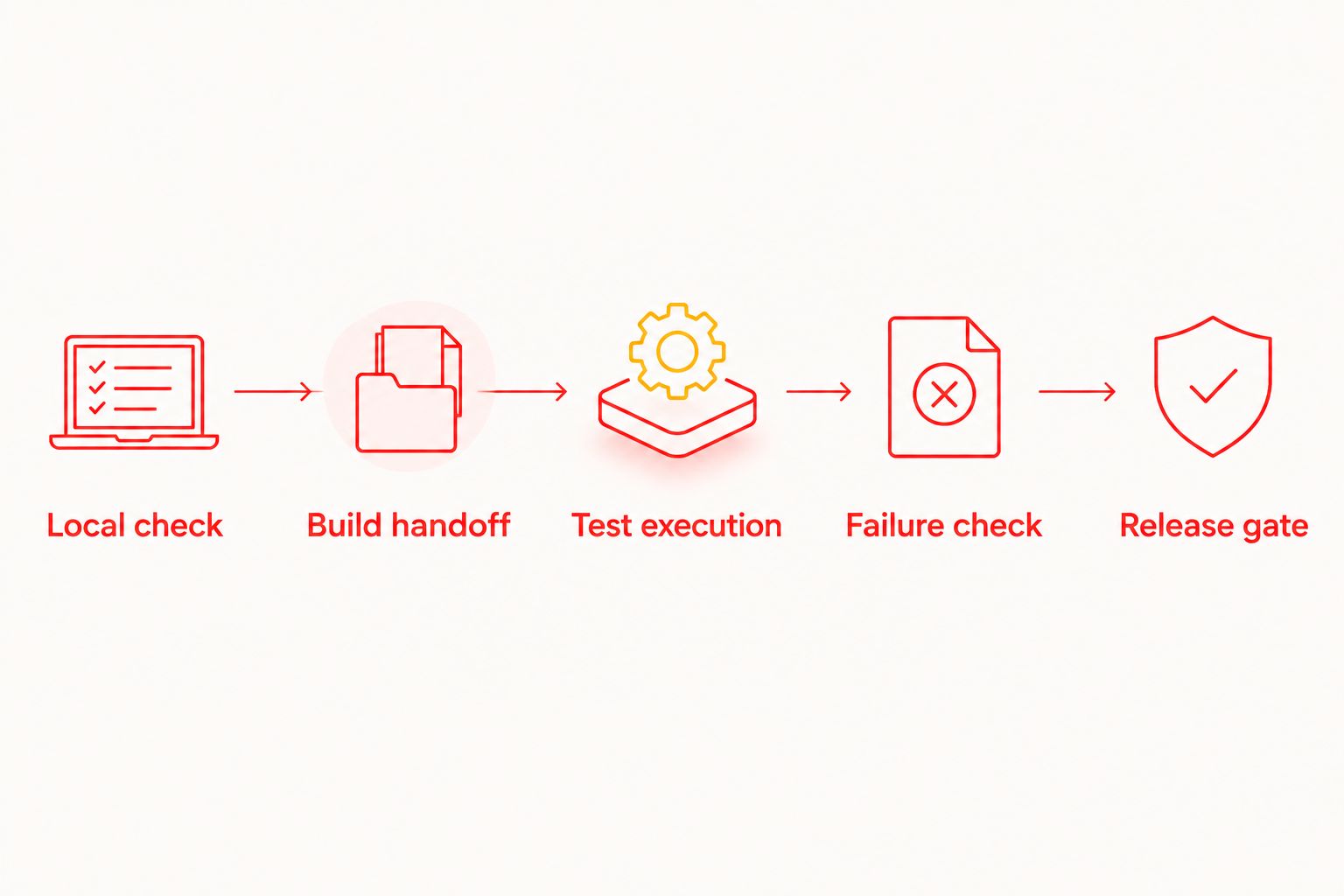
Build the first CI integration in stages
For a 2026 implementation, use the current integration documentation for your chosen execution path. Keep provider-specific commands and workflow syntax out of the pipeline until you have checked their requirements.
Local check
Run the chosen flow against the intended application state. Repeat it after restoring that state, rather than relying on a session left over from manual testing.
Use the inspector to investigate failed interactions. Fix selectors and assertions before adding CI; otherwise, environment setup and test defects become mixed together.
Build handoff
Connect the build job to the test job. Verify that the test receives the intended application artifact or deployment reference.
Make this handoff visible in the job output. A test result without a clear application revision is difficult to use as a release decision.
Test execution
Configure the documented invocation for the selected execution path. Keep credentials in the CI system’s secret-management mechanism rather than committing them alongside the flow.
Verify network access and required application configuration from the runner’s environment. A service reachable from your laptop is not automatically reachable from a CI job.
Failure check
Change an assertion so the test must fail. Run the pipeline and inspect the resulting job status.
Then restore the assertion and confirm the expected passing result. This checks the reporting path in both directions; merely seeing the flow start is not enough.
Release gate
Decide which result blocks a merge or release. Make infrastructure failure distinguishable from an application assertion failure wherever the selected tooling permits.
Document the response to each failure category. A release gate needs a debugging path, not just a red status.
The GitHub Actions regression guide is a relevant next step if GitHub Actions runs your builds. Keep the same acceptance criteria when your team uses another CI provider.
Why CI setup time varies
Your 2026 setup estimate should follow the dependencies below. Assign an owner to each unresolved dependency before scheduling the integration.
- Build readiness. A usable application build is a prerequisite for testing that build. Build failures and artifact incompatibility are separate from flow-writing work.
- Flow maturity. An existing, repeatable YAML flow leaves less test-design work than a journey whose selectors and assertions still need validation.
- Authentication. Test credentials, account permissions, and interactive login requirements determine what must happen before the journey begins.
- Test-state control. Accounts, records, sessions, and permission prompts must begin in a state the flow understands. Shared mutable state creates additional coordination work.
- Execution environment. The selected target needs the right application, network access, and configuration. Local access does not establish remote access.
- Failure reporting. The integration must expose unsuccessful execution to CI and preserve useful evidence. A job that ignores a failed test is unfinished setup.
Do not combine these into an unsupported universal duration. Instead, separate work already proven from work that still needs implementation, then estimate the latter with the people responsible.
Can I finish CI setup if my YAML flow already passes locally?
A local pass completes local validation, not CI integration. You still need to prove build handoff, unattended authentication, environment access, and failure propagation.
Reproduce the flow’s starting conditions in the pipeline. If the desktop run depends on a manually prepared session, remove that dependency before treating the test as a release check.
Do I need cloud execution to start writing tests?
You can start writing and executing flows locally without a cloud account. Use the desktop runner and inspector to establish a repeatable test before choosing where unattended execution belongs.
Cloud execution is optional. Evaluate it when your team needs hosted runs from CI, not as a prerequisite for opening the local runner.
What should count as finished setup?
Finished setup means the intended revision passes when correct and fails when deliberately broken. You should also be able to identify the tested build and investigate the failure from the retained output.
Write those acceptance criteria into the integration task. They give your team a clear stopping point without inventing a setup-time promise.
Start with a local flow
Write, run, and inspect a Maestro YAML flow locally before connecting optional cloud execution.
FAQ
How long should I schedule for the CI integration?
Schedule the unresolved work rather than relying on a universal duration. Check build readiness, flow reliability, authentication, execution targets, and failure reporting before committing to a deadline.
Can I use the desktop runner without creating a cloud account?
Yes, local desktop use does not require a cloud account. Hosted execution is a separate, optional decision for your testing workflow.
Is a passing local test enough to block releases?
No, a passing local test does not validate the CI execution path. Verify the tested revision, unattended execution, and pipeline failure status before using the result as a release gate.
Should I move the whole regression suite into CI first?
Start with a narrow smoke flow that has a clear final assertion. Expand coverage after you have validated execution, test-state preparation, and failure reporting.
Does emulator support mean I am testing physical devices?
No, emulator or simulator support does not establish physical-device coverage. Confirm the selected execution target before describing what the pipeline tests.
Should I copy an existing workflow configuration unchanged?
Use an existing configuration as a starting point, not proof of compatibility. Check current commands, credentials, artifact requirements, and result handling for your selected execution path.
What should I do if a failed test leaves the CI job green?
Treat the integration as incomplete and fix failure propagation. Repeat a controlled failure check before enabling the test as a merge or release requirement.
One last thing
Test the test pipeline before trusting it. For your 2026 rollout, the most useful acceptance check is not another successful run: it is an intentional assertion failure that reliably blocks the job.
That check exposes a dangerous integration defect: a workflow that appears to run tests but cannot stop a broken release. Keep it in your setup checklist whenever you change the execution command or result handling.