
Under five minutes is the quickstart target for running a first Maestro flow in 2026—not a measured average for writing one from scratch. Your actual writing time includes choosing a test, identifying its controls, and checking the result; installation, app setup, and debugging are separate work.
- For how long to write first maestro yaml flow, distinguish the under-five-minute quickstart target from total setup time.
- Maestro Deck suits developers starting with local YAML flows; cloud execution is optional.
- Start with one user action and one observable result, then repeat the test from the same starting state.
- A passing flow is a starting point, not proof that your release workflow is covered.
How long does it take to write your first Maestro YAML flow?
Use the under-five-minute quickstart as a narrow getting-started target, not a deadline for a dependable test. Writing YAML is only part of the task. You also need a runnable app, an identifiable control, and an outcome that proves the action worked.
Maestro Deck provides a free, source-available local desktop runner and inspector for Maestro YAML flows. Start locally. You do not need a cloud account to learn the workflow.
Follow this sequence:
- Prepare the app. Open the build you intend to test and confirm that the target screen works manually.
- Choose one action. Pick a small interaction with a visible outcome, such as opening a screen.
- Inspect the control. Identify the element the flow should target rather than guessing from its position.
- Write the flow. Express the starting action, interaction, and expected result in YAML.
- Run and inspect. Execute locally, read the failure when it fails, and correct the underlying problem.
- Repeat from the start. Return the app to the intended starting state before deciding that the flow is ready.
The finish line is not a saved YAML file. It is a test you understand well enough to explain why it passed—and why it should fail if the app breaks.
Why this matters
A short authoring session and a useful release check are different outcomes. A flow that taps a button without checking the next screen demonstrates an interaction, but it does not establish that the intended behavior worked.
For a 2026 release workflow, separate learning time from coverage work. Your first flow should teach you how to select an element, execute an interaction, and evaluate an outcome. It should not attempt to replace your entire manual release checklist.
Maestro Deck is best for mobile and web developers who want to write and inspect Maestro YAML flows locally before adding cloud execution. Its desktop runner supports iOS, Android, and web workflows. That scope does not make a passing test on one environment evidence that the others pass.
What belongs in your first flow?
Start with 1 flow, 1 user action, and 1 explicit assertion. These are recommended scope limits, not performance measurements. Keep the test small enough that a failure points to a specific interaction or result.
Choose an outcome that matters to a user. Opening a screen is useful when you check that the destination actually appeared; tapping a control without checking the result leaves the behavior unverified.
| Starting scope | Best for | Advantage | Trade-off |
|---|---|---|---|
| Open a screen and check its content | Learning targeting and assertions | Keeps the path easy to inspect | Covers little business behavior |
| Sign in and check the authenticated screen | Protecting access to the app | Tests an important user boundary | Requires controlled credentials and session state |
| Complete a longer business journey | Expanding an established suite | Connects several behaviors | Introduces more dependencies to diagnose |
Choose the smallest path with a meaningful assertion. Do not choose a long journey just because it looks more representative. You can extend coverage after the first test behaves predictably.
Define the result before writing YAML
Describe the test in plain language first: open the starting screen, perform the action, and verify the destination. Name the visible result precisely enough that another developer could check it manually.
If you cannot state what success looks like, stop before adding commands. YAML cannot repair an unclear test objective. Decide which screen, message, or state establishes that the behavior worked.
Keep the first path free of unrelated dependencies
Avoid making the first exercise depend on account creation, external approval, and a long chain of setup actions. Those dependencies need testing, but they also create separate failure causes.
Choose a path whose prerequisites you control. If authentication is unavoidable, establish the account and expected session state before you start authoring. Treat those prerequisites as part of the test setup, not invisible assumptions.
Why first-flow writing time varies
The under-five-minute quickstart target does not describe every app or starting environment. For your 2026 onboarding checklist, record these sources of work separately:
- App readiness. Installing or fixing the application is different from writing its test. Confirm the intended build opens before diagnosing the flow.
- Starting state. Existing sessions, onboarding screens, and permission prompts change the path the test encounters. State the expected starting condition.
- Element targeting. A control must be identifiable to the test, not merely obvious to a person looking at the screen. Inspect it before changing the flow repeatedly.
- Test dependencies. Accounts, data, and external services add prerequisites. Keep them explicit so a setup failure is not mistaken for a YAML problem.
- Success criteria. A vague outcome produces a vague test. Decide what the final assertion must establish before adding more steps.
- Execution scope. A local first run and a CI-triggered cloud run are separate milestones. Do not count pipeline setup as typing time.
None of these factors produces a universal authoring estimate. They explain what to investigate when a short example becomes a longer session in your application.
How do you turn a first pass into a useful test?
Run the flow again from its documented starting state. Then challenge the final assertion: would the test detect the wrong screen, an unsuccessful action, or a missing result?
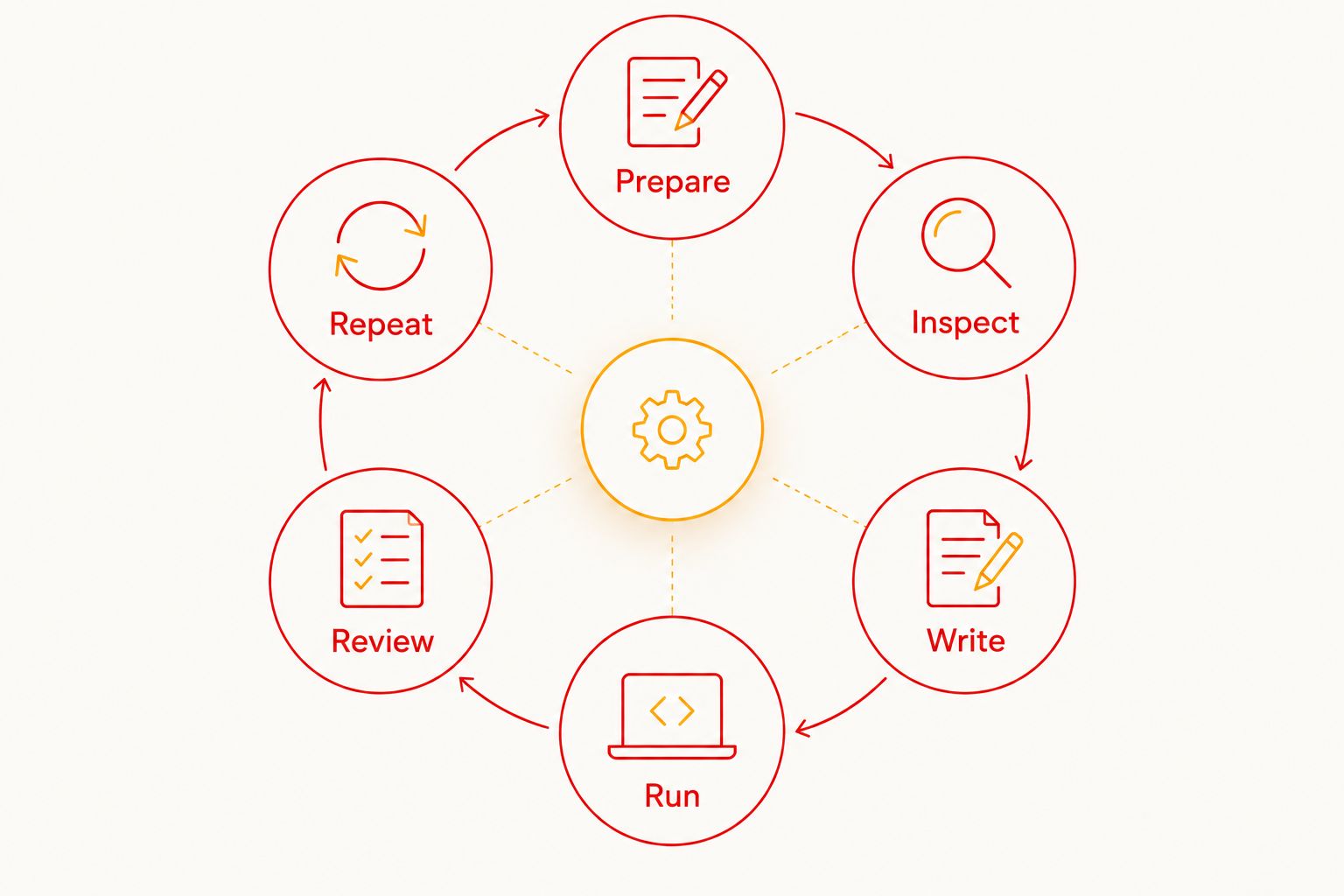
Use this local feedback loop:
- Prepare: Put the app and test data into the expected condition.
- Inspect: Check the target element and its identifying properties.
- Write: Add the interaction and the expected result.
- Run: Execute the flow against the intended app build.
- Review: Compare the observed behavior with the test's purpose.
- Repeat: Restore the starting condition and run again.
A second run is a useful check, not proof of reliability. Look for dependencies on state left behind by the first run. A flow that works only after you manually prepare an undocumented screen is not ready for unattended execution.
Debug the first failing expectation
When the flow fails, identify the earliest point where the observed app behavior differs from the intended path. Do not start by extending waits or adding retries without understanding that difference.
Inspect the screen and target. Check whether the app reached the expected state, whether the control exists, and whether the final assertion describes the right outcome. These are different problems and need different corrections.
Keep the assertion stronger than the action
A successful tap establishes that an interaction happened. Your assertion should establish the user-facing result you care about.
For example, checking that the destination screen appeared is more relevant than merely recording that a navigation control was tapped. Keep the relationship explicit: action, expected consequence, observable evidence. That relationship is the core of the test.
Should you start locally or configure cloud execution first?
Start locally for authoring and inspection. Add cloud execution when you need it for CI or broader execution needs. Treat the move as a workflow decision, not a prerequisite for writing your first YAML file.
| Workflow | Best for | Benefit | Boundary |
|---|---|---|---|
| Local desktop runner | Writing and debugging the first flow | Keeps inspection alongside local execution | Does not itself establish unattended CI coverage |
| Optional cloud execution | Running flows from a shared release workflow | Separates execution from your desktop session | Adds execution configuration and data-handling decisions |
Maestro Deck's local runner is free and does not require a cloud account. Cloud execution is optional. Before adopting it, decide which build, test data, and expected starting state the remote run should use.
For a 2026 CI rollout, first preserve a clear local baseline. Otherwise, a remote failure leaves you debugging both the flow and the execution environment at once.
Do not interpret simulator, emulator, or browser support as proof of physical-device availability. Confirm the execution environment you need rather than treating all device-testing terms as interchangeable.
Start with a local flow
Write and inspect a Maestro YAML flow locally before adding optional cloud execution.
Is Maestro Deck the same as the Maestro framework?
Maestro Deck is the desktop runner and inspector described here; Maestro is the framework whose YAML flows it runs. Keep those roles separate when choosing documentation, troubleshooting commands, or evaluating a hosted service.
The desktop tool is source-available. That term is not interchangeable with open source: source visibility alone does not establish the permissions associated with an open-source license. Read the applicable license when your team's adoption rules depend on it.
Neither a shared name nor support for a framework establishes organizational affiliation. Evaluate the tool's documented capabilities without assuming it is the framework itself.
Can you write a useful first flow in under five minutes?
Under five minutes is the quickstart target for a first run, not a guaranteed authoring time for your application. A narrow path and a ready environment keep the exercise focused; setup and debugging remain separate tasks.
Use the target to resist unnecessary scope. Do not use it to skip the final assertion or hide prerequisites that another developer will need.
Does a passing first flow mean the app is ready to ship?
One passing flow establishes only that its checked path passed in that execution. It does not establish coverage for other screens, platforms, accounts, or starting states.
Keep the first result narrow. Expand into release-critical paths deliberately, and document what each test proves before making it a release gate.
FAQ
How long should I budget for my first Maestro YAML flow in 2026?
Under five minutes is the quickstart target for running a first flow, not an average for writing a test against your app. Budget setup, authoring, and debugging as separate tasks rather than treating that target as a guarantee.
Do I need a cloud account to write my first flow?
No cloud account is required for local use of Maestro Deck's desktop runner. Optional cloud execution is a separate step when you need remote runs or CI execution.
What's the best test to automate first?
Start with a short user path that ends in a clear, observable result. Opening a screen and checking its content is a narrower learning exercise than automating a long transaction.
Why does my flow pass once and fail on the next run?
Compare the starting state of both runs before changing the YAML. Sessions, onboarding, permission prompts, and test data can change the path the app presents.
Should I add more steps before adding an assertion?
Add an assertion for the intended result before expanding the journey. More interactions do not establish that the behavior you intended actually worked.
Do I need to configure CI before learning Maestro flows?
No, CI configuration is not required to learn local flow authoring. Establish a working local test and its prerequisites before adding pipeline execution.
Is source-available the same as open source?
Source-available and open source are different licensing descriptions. Inspect the applicable license rather than assuming that access to source code grants every permission your team needs.
One last thing
Write down what should make the test fail. If you cannot name a broken behavior that the final assertion would catch, the flow needs a clearer purpose—not more steps.
Keep that sentence beside your first flow in the 2026 release checklist. It gives the next developer a practical way to judge whether a future edit preserves the test's value.