

For Maestro testing, reset the app-owned state before each independent flow, establish the required test data, and assert the starting screen before exercising the feature. Relaunching alone does not clear persistent app data, and clearing local data does not reset server-side records or guarantee that iOS Keychain credentials disappear.
- Maestro testing needs explicit starting conditions: reset local state, prepare backend fixtures, and verify the entry screen.
- Maestro Deck is best for developers writing and debugging Maestro YAML flows locally.
- Use clearState for local app data; handle iOS Keychain and backend state separately.
- Preserve state only when the scenario explicitly tests an existing session or saved data.
Why this matters
A flow that passes after another flow has signed in is not independently repeatable. Its setup lives somewhere else, and a different execution order exposes that dependency.
Start with Maestro Deck, the free, source-available local desktop runner and inspector for Maestro YAML flows. Local use does not require a cloud account. Paid cloud execution is optional when you need to scale execution or run tests from CI.
The Maestro framework defines the flow commands discussed here; Maestro Deck provides the desktop runner and inspector. Keep that distinction clear when checking command documentation and diagnosing execution problems.
How do you reset app state between Maestro testing runs?
Reset the state the scenario depends on, not merely the app process. For an independent signed-out flow, that means clearing relevant local data, handling retained credentials, preparing backend fixtures, and proving that the app reached the signed-out entry screen.
Use this sequence for your 2026 test suite:
- Choose the baseline. Specify whether the scenario starts signed out, signed in, or with existing saved data.
- Prepare backend data. Create or restore the account, permissions, and records the scenario requires.
- Reset local state. Use the Maestro framework's
clearStatecommand or theclearStateoption onlaunchAppwhen the scenario requires cleared app data. - Handle retained credentials. For iOS flows that require cleared Keychain data, review the
clearKeychainoption onlaunchAppand its documented scope. - Launch and assert. Check the intended entry screen before performing the action under test.
- Repeat independently. Run the flow twice consecutively, then run it without any preceding setup flow.
Two consecutive runs are a useful acceptance check, not proof that every dependency is isolated. Also test a changed execution order and a previously used test account.
Which reset approach fits your scenario?
| Approach | Best for | What it addresses | Trade-off |
|---|---|---|---|
| Relaunch without clearing data | Returning-user scenarios | Starting another app execution while retaining persistent state | Previous sessions and saved values remain relevant |
| Clear local app state | Independent flows requiring a clean local baseline | App-owned local data covered by the reset operation | Backend records and iOS Keychain need separate attention |
| Sign out through the UI | Testing the sign-out behavior itself | The application's sign-out path | It is not a substitute for clearing all local test state |
| Prepare backend fixtures | Scenarios depending on account or server records | Remote data required by the test | Requires an authorized test-data mechanism outside a local reset |
Do not combine every reset operation by default. A persistence test needs retained data; a first-launch test needs a clean baseline. Applying the same reset to both changes what the tests actually measure.
Local app data: use an explicit reset
The Maestro framework exposes clearState as a command and as a launchApp option. Use the documented form that fits your flow, and keep the reset next to the setup it supports.
Clearing local state is appropriate when a scenario requires the app to stop remembering local preferences, onboarding progress, or an app-managed session. It is not evidence that the corresponding server-side account has changed.
Best for: independent scenarios with a clean local baseline. The benefit is an explicit setup boundary. The trade-off is that the flow must recreate any required session and local configuration afterward.
Avoid a shared setup flow that silently signs in once for an entire collection of otherwise independent scenarios. Each scenario should declare its dependency or establish its own baseline.
For your 2026 reset policy, document the expected screen after reset. An observable assertion is more useful than a comment saying that the app should be clean.
iOS credentials: treat Keychain separately
An iOS app can store credentials in Keychain rather than ordinary app storage. Do not treat cleared app data or reinstallation as proof that those credentials are gone.
The Maestro framework's launchApp command includes a clearKeychain option. Check the current command reference before using it, including the documented scope and platform behavior; do not assume it affects only the credential your test happens to use.
Best for: iOS scenarios that specifically require an unauthenticated credential baseline. The benefit is addressing a storage boundary that an ordinary local-data reset does not cover. The trade-off is that credential clearing changes the environment beyond an ordinary relaunch.
Assert the result through the app. A sign-in screen demonstrates the expected entry state more directly than assuming a reset command removed every possible authentication path.
Backend data: restore the scenario's fixtures
A local reset does not delete an account, empty a server-side cart, reverse a completed transaction, or restore a remote permission. Those records belong to a different state boundary.
Use an authorized fixture mechanism in your test environment. That mechanism can be a test-data API, a controlled seed process, or another setup operation your application team owns; the choice depends on your system, not on the desktop runner.
Best for: scenarios whose outcome depends on remote records. The benefit is control over the actual business preconditions. The trade-off is additional setup responsibility and the need to prevent destructive fixture operations from reaching production.
For a parallel suite, start with one test account per concurrent worker when each worker modifies account-level data. If the scenario modifies a shared resource, isolate that resource too; different logins alone do not isolate shared records.
Prefer repeatable fixture setup. Running setup again should restore the intended baseline rather than create another ambiguous account or duplicate record.
Preserved state: keep it when persistence is the requirement
Do not clear state between the actions of a scenario that tests persistence. Saving a preference, restarting the app, and verifying the saved preference requires the data to survive that restart.
Separate independent scenarios from steps within a scenario. A reset belongs before the persistence test's baseline setup, not between the save action and the assertion that checks whether saving worked.
Best for: returning-user, saved-preference, and session-persistence scenarios. The benefit is testing the behavior users actually rely on. The trade-off is that setup and cleanup must distinguish intentional retained data from accidental leftovers.
Name the scenario accordingly. A test called saved preference survives relaunch communicates a different contract from a test called first launch shows onboarding.
Why reset behavior varies
Reset behavior depends on where the application stores state and what the test is trying to prove. Use these factors when reviewing a failure:
- Storage boundary. Process memory, app-owned persistent storage, Keychain, and backend records require different treatment.
- Platform. An iOS credential-reset requirement is not interchangeable with an Android app-data reset.
- Authentication path. A session restored from local credentials differs from a session recreated through a sign-in flow.
- Remote fixtures. Clearing the client leaves server-side account history and records unchanged.
- Execution overlap. Concurrent tests can modify the same account or resource while another flow is using it.
- Scenario intent. A returning-user test must retain state that a first-launch test deliberately removes.
Keep these boundaries in your 2026 test plan. A single reset flag is not a complete environment specification.
Build a reset contract your team can review
Give every independent flow a short setup contract. Record the starting identity, required records, local reset behavior, and entry-screen assertion beside the flow's implementation.
Use these checkpoints in order:
- Baseline: name the user state and expected entry screen.
- Fixtures: prepare the remote records the scenario needs.
- Local reset: clear only the local state the scenario excludes.
- Entry assertion: verify setup before feature interactions begin.
- Feature check: perform the action and verify its outcome.
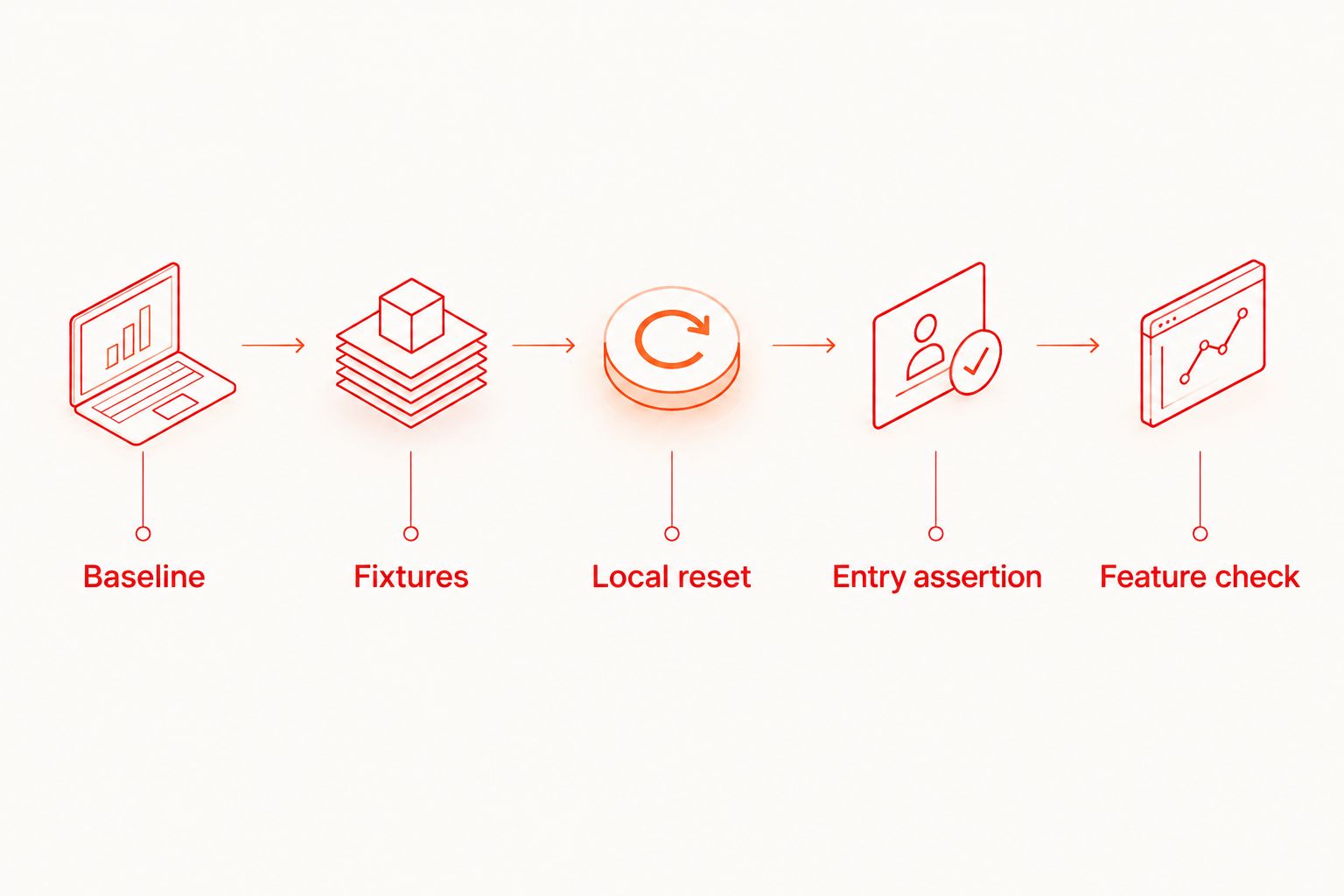
In Maestro Deck, use the local runner and inspector to examine the screen reached after setup. Inspect that boundary before rewriting selectors farther down the flow.
Do not mask a wrong entry screen with a fixed delay. A delay does not clear a session, restore a backend record, or undo an earlier test's changes. For timing-specific failures after the baseline is correct, see the guide to handling asynchronous screens without fixed waits.
How do you know the reset actually worked?
Assert the baseline before asserting the feature. Check for the expected signed-out screen, onboarding step, empty state, or prepared record that defines the scenario.
Then execute the flow from a previously used environment. A reset that works only on an untouched installation does not satisfy a repeat-run requirement.
Record setup failures separately from feature failures in your team's investigation notes. If the flow never reached the required baseline, the feature assertion has not yet been tested under its stated conditions.
Should you reset state before or after each test?
Establish the required state before each independent test. Cleanup after a successful run does not protect the next run when the previous execution stops early.
Use post-test cleanup for resource hygiene, not as the only guarantee of a clean start. Keep setup safe to repeat so an interrupted run does not require manual repair before another attempt.
Does cloud execution replace local reset logic?
Cloud execution does not replace explicit test preconditions. The flow still needs the correct identity, fixtures, and starting screen, regardless of where execution happens.
Debug that contract locally first. Use optional cloud execution when your workflow needs hosted runs or CI execution, and confirm the selected environment rather than assuming simulator or emulator support means physical-device availability.
Start with a local flow
Use the free local runner first. Add optional cloud execution when your workflow needs it.
FAQ
Does restarting an app reset its data in Maestro testing?
Restarting an app does not by itself clear persistent app data. Use an explicit local reset when the scenario requires one, and prepare server-side records separately.
What's the difference between clearState and clearing Keychain?
clearState addresses app data, while the launchApp clearKeychain option addresses iOS Keychain state. Check the current Maestro command reference for each operation's scope before using it.
Should every Maestro flow start with cleared app data?
No. Independent clean-start scenarios need their declared reset, but persistence scenarios must preserve the data whose survival they test.
Why does my flow pass alone but fail after another flow?
A different starting state is a concrete dependency to investigate. Compare the account, local data, retained credentials, and remote fixtures before changing the failing interaction.
Can a local reset empty a server-side cart?
A local reset does not reset server-side cart records. Prepare or clear the cart through an authorized test-data mechanism in the test environment.
Do I need a cloud account to run flows with Maestro Deck?
Maestro Deck provides a free local desktop runner without requiring a cloud account for local use. Paid cloud execution is optional when you need to scale execution or run tests from CI.
One last thing
Add a dirty-start check to your 2026 release workflow: sign in, change a saved value, then run an independent signed-out flow. Require the flow to reach its declared baseline without manual intervention.
A reset is complete when the required starting state is observable, not when a reset command finishes. Keep that rule attached to the test, whether execution stays local or moves into CI.


