Maestro Deck provides a free local desktop runner and inspector for Maestro YAML flows; its stated cloud execution targets are iOS simulators, Android emulators, and browsers. Those targets do not establish physical-device support, so treat hardware testing as a separate requirement rather than assuming that cloud execution means real phones.
- Maestro Deck real devices or simulators: stated cloud targets are simulators, emulators, and browsers—not confirmed physical phones.
- Start with the free local desktop runner to write, execute, and inspect Maestro YAML flows.
- Use optional cloud execution when your workflow needs hosted runs or CI execution.
- Require physical-device evidence before treating a passing virtual-device test as hardware validation.
Why this matters
Maestro Deck is best for developers and QA engineers who want a free local runner and inspector for Maestro YAML end-to-end flows. Start with the desktop runner when your immediate task is to write a flow, execute it, and inspect a failure. Cloud execution is optional, not a prerequisite for local testing.
For a 2026 release checklist, record the execution target alongside the result. A passing checkout flow on an Android emulator demonstrates that the flow passed in that environment. It does not demonstrate the same result on a physical Android phone.
That distinction changes what you can approve for release. UI navigation, business outcomes, and physical hardware behavior need evidence that matches the claim you intend to make.
Does Maestro Deck test real devices or only simulators and emulators?
The stated cloud targets are iOS simulators, Android emulators, and browsers. Physical phones are not established by those descriptions. The local desktop product is a runner and inspector for writing and executing Maestro YAML flows across iOS, Android, and web apps; that platform coverage is not a physical-device compatibility list.
Separate the execution location from the execution target:
| Testing option | Best for | What it establishes | Limit or trade-off |
|---|---|---|---|
| Local desktop runner | Writing and inspecting YAML flows during development | Execution and inspection of your flow in the configured local environment | Local execution alone does not establish physical-device support |
| Hosted simulators and emulators | Moving mobile flow execution into a hosted workflow | Results on the virtual mobile targets used for the run | Virtual-device results are not physical-phone results |
| Hosted browsers | Exercising web app journeys | Results in the browser environment used for the run | Browser coverage is separate from native mobile and physical-device coverage |
| Physical-device testing | Checking behavior that depends on actual hardware | Evidence from the specific physical device tested | Requires a separately verified execution method and device setup |
The right conclusion is narrower than either blanket claim: do not promise physical-device testing, but do not turn an unverified capability into a categorical statement that no local hardware configuration can work. Use the stated virtual targets for planning, and verify any physical-device requirement separately.
Local desktop execution: start with the flow
The local runner is the starting point for authoring and debugging. You can work on Maestro YAML flows without making optional cloud execution part of the initial setup. Local use does not require a cloud account.
Use the runner and inspector to answer practical questions: does the flow reach the intended screen, perform the intended action, and check the intended outcome? Resolve those questions before changing where the flow runs.
A successful local test still needs a precise description. Record the app build, target environment, starting state, and expected outcome. Otherwise, the next developer inherits a green result without enough context to reproduce it.
The trade-off is scope. A local run supports conclusions about the environment used for that run, not every device or operating-system configuration your users have. Keep that boundary visible in code review and release notes.
Cloud execution: move the run, not the claim
Cloud execution is optional when you need hosted runs or execution from CI. The stated cloud environments include simulators, emulators, and browsers. Moving a test into a hosted environment changes where execution happens; it does not, by itself, change a virtual target into physical hardware.
For your 2026 CI plan, define the target before defining the release gate. A gate that requires a passing Android emulator flow should say exactly that. Avoid naming the gate physical-device validation unless its runs actually use verified physical devices.
Cloud execution also introduces environment questions that local execution does not answer automatically. Decide which app build reaches the runner, which test account it uses, and how the run obtains its starting state. Treat those as workflow requirements, not assumed service features.
Choose hosted execution to meet an execution need, not to make the coverage description sound broader. A correctly labeled simulator result is more useful than a vague claim that mobile testing passed.
Physical devices: require a separate coverage decision
Physical-device testing matters when your acceptance criteria depend on physical hardware or device-specific behavior. Examples include camera capture, Bluetooth interactions, and behavior under actual device resource constraints. These are category-level reasons to test hardware, not claims that this runner automates those capabilities.
Before choosing a physical-device workflow, verify the exact platform, operating-system version, connection method, and interaction you need. Support for a framework, a platform, and a particular hardware interaction are separate questions.
Keep the scope narrow enough to prove. A successful camera journey on a named phone supports that journey on that phone under the tested conditions. It does not certify every camera, every permission state, or every handset.
Use the simulators-or-physical-devices guide to structure the coverage decision around the behavior you need to validate. The decision starts with the risk, not with a preference for local or hosted execution.
Why the right test environment varies
Choose the environment from the acceptance criterion. These factors determine what a result can establish:
- Platform: iOS, Android, and web journeys have different execution targets. A browser result does not stand in for a native app result.
- Hardware dependency: A test involving physical sensors or accessories needs evidence appropriate to that hardware interaction.
- Starting state: Authentication, permissions, stored data, and prior app activity affect what the flow encounters.
- Execution location: Local and hosted runs need clearly defined builds, credentials, and environment configuration.
- Release claim: A claim about navigation needs different evidence from a claim about behavior on a named physical phone.
In a 2026 coverage matrix, give execution location and target type separate columns. That prevents cloud, mobile, and real device from becoming interchangeable labels.
How should you build a local-to-CI workflow?
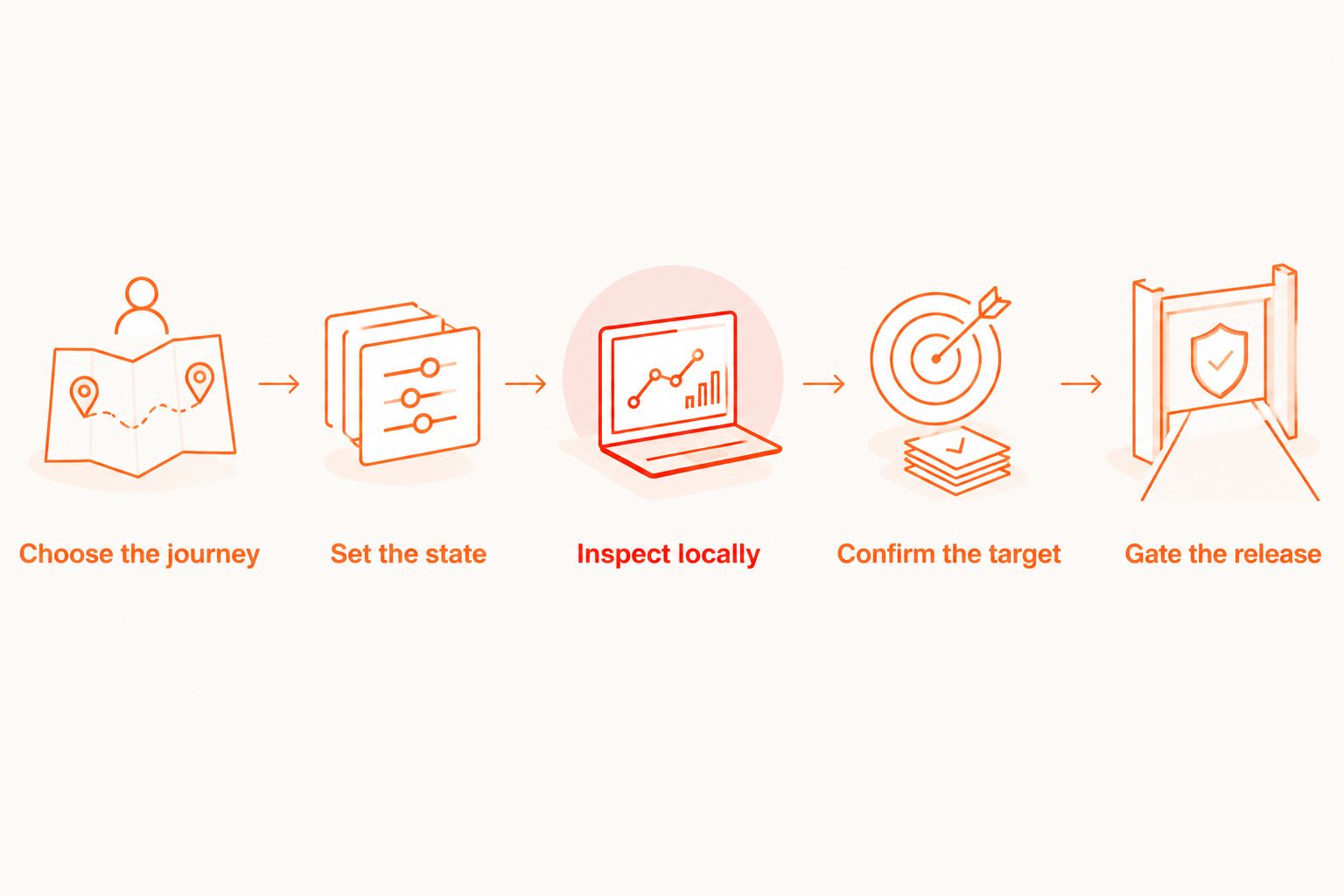
Use this sequence to keep the flow understandable as you change execution environments. The sequence describes a development workflow, not an undocumented command or integration contract.
- Choose the journey. Pick an outcome that matters to the release, such as signing in and reaching the account screen. State what passing means before editing the flow.
- Set the state. Specify the account, app data, and permission conditions the journey requires. Do not let an accidentally prepared device become an invisible dependency.
- Inspect locally. Write and execute the YAML flow with the local runner and inspector. Diagnose the first meaningful failure rather than assuming that another environment will fix it.
- Confirm the target. Identify whether the intended hosted run uses an iOS simulator, Android emulator, or browser. Verify compatibility with the exact build and workflow you plan to run.
- Gate the release. Connect the result to a clearly named release requirement. Keep any separate physical-device acceptance check visible rather than hiding it behind the virtual run.
The key handoff is between local debugging and hosted execution. Preserve the intended journey and assertions, then check the environment differences deliberately. Do not assume that a shared YAML file guarantees equivalent starting conditions.
What evidence should a passing run carry?
For a 2026 release, attach enough context to distinguish an application failure from an environment mismatch. At minimum, keep the app build identity, platform, target type, test intent, and starting-state assumptions with the result. These are evidence requirements for your process, not a claim about automatically collected artifacts.
Record the observed failure as well as the final status. A failed assertion, an unavailable backend, and an incorrectly prepared account are different problems. Grouping them under a generic mobile test failure makes the next investigation harder.
The discipline applies when testing across multiple environments: a result remains interpretable only when its environment and acceptance criterion travel with it. Without that context, identical pass labels can conceal materially different coverage.
Use precise result names in your release record:
- iOS simulator: The named journey passed on the recorded simulator configuration.
- Android emulator: The named journey passed on the recorded emulator configuration.
- Browser: The named web journey passed in the recorded browser environment.
- Physical phone: The named journey passed on the recorded physical device using the verified testing method.
Do not add the physical-phone label merely because a remote service executed the test. Location is not hardware evidence.
Is the Maestro framework the same as Maestro Deck?
No. Maestro Deck is the desktop runner and inspector described here; Maestro is the framework whose YAML flows it runs. A claim about the framework does not automatically establish the same capability in a desktop application or hosted service.
Keep the names separate when evaluating documentation. Check whether a statement concerns YAML syntax, the framework's execution support, the desktop workflow, or the hosted execution environment. Each answers a different engineering question.
Do not infer affiliation from the shared name or flow format. Likewise, do not transfer a device-support statement from another service into your coverage plan without checking the service you will actually use.
Should you move every local test into the cloud?
No. Move a flow when hosted execution solves a concrete workflow requirement, such as running it from CI. Keep local execution as the place to develop and inspect flows rather than making a cloud dependency part of every edit.
Before adopting hosted runs, confirm the execution targets, build requirements, test-data handling, and result evidence your team needs. Separate that evaluation from physical-device coverage. They are related decisions, but neither answers the other.
For a 2026 rollout, begin with a clearly scoped release journey and an explicit target. Expand coverage only when you can explain what additional risk the next environment addresses.
Evaluate hosted execution
Review cloud options after defining your target environment and CI requirements.
FAQ
Does running a test in the cloud mean it uses a real phone?
No. Cloud describes where execution is hosted, not whether the target is physical hardware. Simulators, emulators, and browsers are also cloud execution targets.
Can I start testing locally without a cloud account?
Yes. The free local desktop runner is separate from optional cloud execution, so local use does not require a cloud account.
Does an Android emulator result prove my app works on physical Android phones?
No. An Android emulator result establishes the outcome in the emulator environment used for the run. Validate hardware-dependent acceptance criteria through a separately verified physical-device workflow.
Can an iOS simulator replace every physical iPhone check?
No. An iOS simulator result does not establish behavior on physical iPhone hardware. Choose separate hardware checks when the acceptance criterion depends on the device itself.
Is Maestro Deck open source?
Maestro Deck is source-available, not described here as open source. Source availability and open-source licensing are different terms; inspect the applicable license before making redistribution or modification decisions.
Should I use local execution or hosted execution for debugging?
Start with local execution to write, run, and inspect the flow. Add hosted execution when your workflow needs it, then investigate any differences in build, state, and target configuration.
What should I record before calling a test physical-device coverage?
Record the physical device, operating-system version, app build, testing method, starting conditions, and observed outcome. A remote execution location or a mobile platform label is not enough.
One last thing
Name the target in the release gate. Replace mobile tests passed with the specific journey, environment, and result. That small change prevents a simulator success from becoming an unsupported hardware claim as the result moves between engineering, QA, and release approval.