Yes. Maestro Deck is a free, source-available desktop runner and inspector for Maestro YAML end-to-end test flows; the Maestro testing framework is the underlying framework those flows use. Local desktop use does not require a cloud account, and paid cloud execution is optional when you need hosted runs or CI execution.
- Maestro Deck vs Maestro framework is a workflow-layer comparison, not a choice between incompatible test formats.
- Use the free desktop runner to write, execute, and inspect Maestro YAML flows locally.
- Keep framework behavior, desktop tooling, and hosted execution separate when evaluating your release workflow.
- Source-available does not mean open source; read the license before assuming permissions.
Why this matters
Choosing a framework and choosing where to run tests are different decisions. Confusing them makes a desktop workflow look like a framework migration, or makes cloud execution look mandatory before your first local test.
Start with Maestro Deck if you want a desktop runner and inspector for Maestro YAML flows. For your 2026 release workflow, first establish a local test you understand; then decide whether CI or hosted execution solves a separate problem.
Is Maestro Deck different from the Maestro testing framework?
Yes: the desktop application and the testing framework occupy different layers. The framework supplies the test-flow model and command semantics. The desktop application provides a place to write, execute, and inspect those flows.
The comparison below separates the framework, the local application, and optional hosted execution. These are roles in a testing workflow, not mutually exclusive replacements.
| Layer | What it does | Best for | Trade-off |
|---|---|---|---|
| Maestro testing framework | Defines the YAML flow structure and testing commands | Developers choosing how to express app interactions and checks | Understanding the framework does not choose your editing, inspection, or execution environment |
| Maestro Deck desktop runner | Provides local execution and inspection for Maestro YAML flows across iOS, Android, and web apps | Developers and QA engineers writing and debugging flows locally | A local pass does not establish coverage across other environments |
| Optional cloud execution | Moves test execution into a hosted workflow | Teams that need hosted runs or execution from CI | Requires a separate decision about execution environments, data handling, and operational setup |
For a 2026 evaluation, ask what changes in your workflow. Adding a desktop runner changes how you work with flows. Adding cloud execution changes where runs happen. Neither distinction justifies assuming that every framework command works identically across every runtime version and target environment.
What stays with the framework?
The YAML flow remains the test definition. Your intended app interactions, checks, and sequence belong in that flow rather than in a description of the desktop application's interface.
Keep the distinction concrete. If a command's meaning is unclear, consult the framework documentation for the version you use. If you need to understand how to select a target or inspect an execution inside the desktop application, consult the desktop documentation.
This separation also helps when reviewing a failed run. An incorrect assertion is a test-definition problem. An unexpected application state is a test-precondition problem. A runner that cannot reach the intended target is an execution-setup problem.
Do not rewrite the whole suite because these problems appeared together. Classify the failure first, then change the layer responsible for it. That keeps a tooling decision from becoming an unnecessary test rewrite.
What does the desktop runner add?
The desktop runner adds an application for writing, running, and inspecting Maestro YAML flows. Inspector Mode belongs to that local authoring and debugging workflow; it is not a separate testing language.
Maestro Deck is best for mobile and web developers who want a free local desktop runner and inspector for Maestro YAML end-to-end tests. Use it to work through a specific user journey before expanding the suite.
The benefit is a local place to examine your test while you develop it. The limitation is scope: a successful local execution proves that the selected flow passed under that run's conditions, not that every supported platform or release configuration has passed.
You still own the test design. Choose meaningful assertions, establish the starting state, and decide which environments matter to your app. A runner executes your checks; it does not decide whether those checks represent release readiness.
How should you try the local workflow?
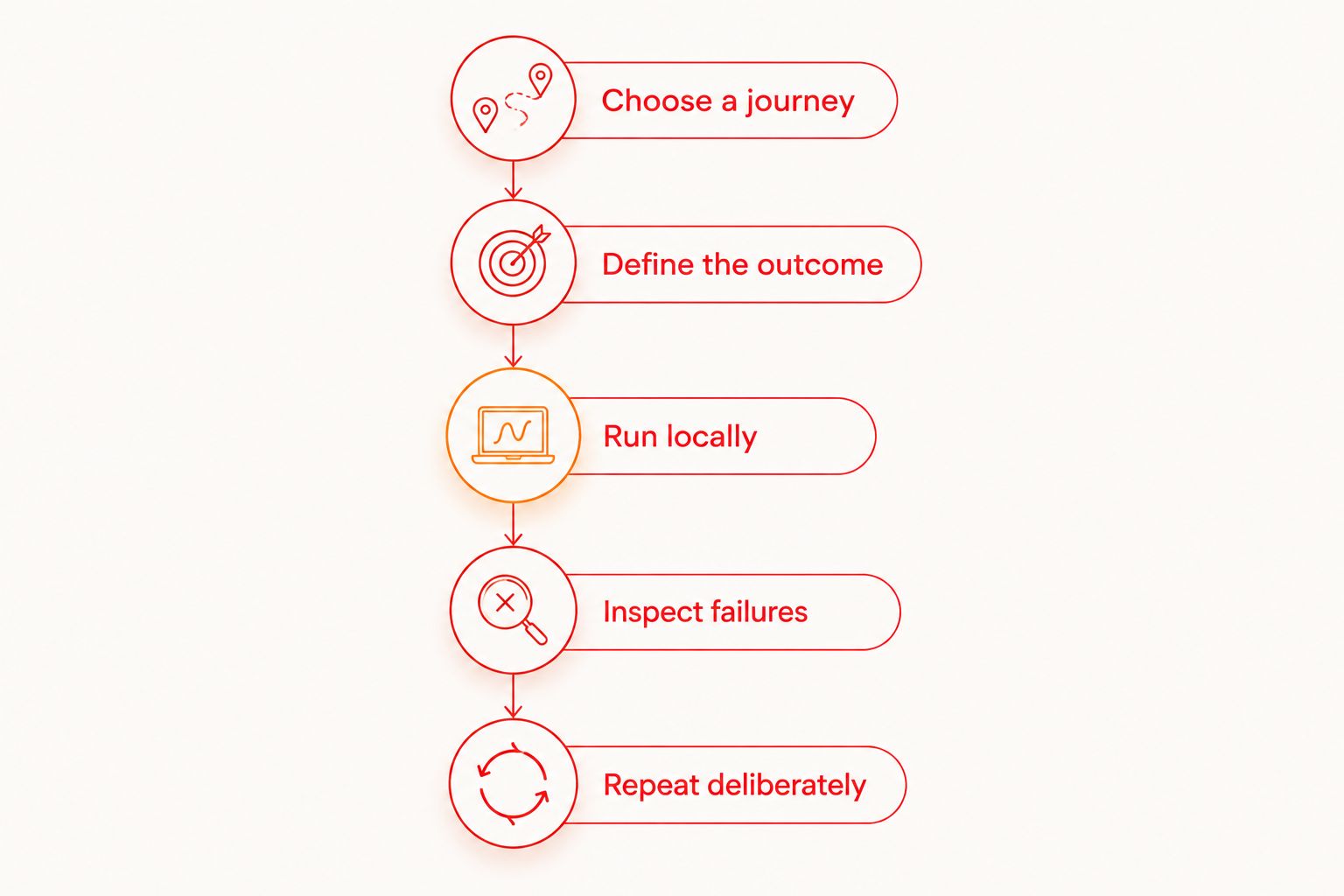
Use a small release-relevant journey rather than importing every test into a new workflow at once. The following sequence gives you a way to evaluate the desktop experience without making cloud execution a prerequisite.
Choose a journey
Start with 1 flow that exercises a user action you need to protect. Login, onboarding, or saving an account change are possible choices; select the action that matters to your application.
Write down the starting condition and the expected outcome before editing the flow. For example, distinguish an authenticated session from a fresh installation. Those conditions describe different tests, even when both eventually reach the same screen.
Define the outcome
Include at least 1 assertion that checks the result of the journey. Reaching the end of a sequence of taps is not the same as verifying the intended application state.
Make the expected result specific enough to diagnose. A successful navigation check answers a different question from a check that submitted data appears correctly. Choose the assertion that matches the regression you intend to catch.
Run locally
Execute the flow against the intended local target. Record which app build and environment you used so that a later result has a meaningful comparison point.
Do not treat a passing Android run as an iOS result, or a browser run as a native-app result. The shared flow format does not remove differences between applications, target environments, or test data.
Inspect failures
Use the inspector to investigate where the flow diverged from the expected journey. Check the visible state, the intended interaction, and the assertion before adding more actions.
Change the smallest relevant part and rerun. Editing several unrelated steps at once makes it harder to identify which change corrected the failure. Keep the debugging loop focused on the observed problem.
Repeat deliberately
Complete at least 1 repeat run from the intended starting state. This is a practical check for a flow that only passes because the previous execution left the application in a convenient condition.
A repeat pass is not a reliability benchmark. It is an initial validation step before you invest in broader coverage or automated execution. Keep the flow small enough that you can explain what each action and assertion contributes.
When should you add cloud execution?
Add cloud execution when you have a clear requirement for hosted runs or execution from CI. Keep local authoring available for debugging; a hosted execution decision does not make the local workflow obsolete.
For a 2026 rollout, define the operational requirement before selecting a service. Specify what starts the run, which build gets tested, which environment it targets, and how someone investigates a failure. Treat these as acceptance criteria, not assumed product features.
Cloud execution is optional, not an activation step for local testing. The local desktop runner is free to use without a cloud account. Evaluate cloud sign-up when hosted execution addresses a requirement you have already identified.
A hosted run also introduces questions beyond test syntax. Determine what application files, credentials, test data, and diagnostic output leave your development environment. Check the service's current documentation and terms rather than inferring those answers from its support for Maestro flows.
Do not equate simulators or emulators with physical devices. If your release criteria require physical-device testing, verify that exact capability for the service and execution configuration you intend to use.
Evaluate optional cloud execution
Keep local testing independent. Review cloud plans when hosted execution becomes a requirement.
Why does the right setup vary?
The framework-versus-runner distinction stays the same. Your preferred workflow depends on the work you need to do around each test.
- Authoring needs: Choose a desktop workflow when writing and inspecting flows locally is the immediate task. Do not add hosted execution simply to begin authoring.
- Execution location: Separate a developer's local run from a run initiated by CI. Define the target environment for each.
- Platform coverage: iOS, Android, and web support does not make a single run evidence for all platforms. Plan coverage explicitly.
- Debugging needs: Decide how you will inspect a failure before expanding automated execution. A failed job needs an investigation path.
- Licensing requirements: Read the applicable license before approving redistribution, modification, or organizational use. Source visibility alone does not answer those questions.
- Data-handling requirements: Decide which builds, credentials, and test records are appropriate for local and hosted execution. Use deliberate test data rather than assuming the execution location is irrelevant.
For a 2026 tooling review, write these requirements beside your existing release process. Select the smallest change that addresses an actual gap; avoid replacing a working layer because another layer has a similar name.
Is source-available the same as open source?
Source-available and open source are different licensing descriptions. Access to source code does not by itself establish the permissions associated with an open-source license.
Use the source-available licensing guide to frame the distinction, then read the actual license for the version you adopt. Do not assume that local use, modification, redistribution, and offering a hosted service all carry the same permissions.
Keep licensing separate from execution location. Running software on your own machine answers where it executes; the license answers what you are permitted to do with it.
Does using the desktop runner mean rewriting your tests?
Using a desktop runner for Maestro YAML flows is not, by itself, a change to a different testing language. Evaluate an existing flow before planning a suite-wide migration.
Check the commands it uses, its app identifiers, its starting-state assumptions, and its dependencies on environment variables or external data. These are validation tasks, not evidence that a rewrite is required.
Keep the original flow under version control while you evaluate it. Change only what the documented setup requires, then confirm that the assertions still check the same user outcome.
Does a local pass mean the app is ready to release?
A local pass means the flow's assertions passed in that execution environment. It does not establish complete release coverage.
Separate test execution from the release decision. Your release criteria should identify the journeys, platforms, builds, and environment conditions that need evidence. Add coverage because of those requirements, not because a runner can execute more flows.
FAQ
Is Maestro Deck a different testing framework from Maestro?
Maestro Deck is a desktop runner and inspector for Maestro YAML end-to-end test flows, not a replacement test language. The Maestro framework supplies the flow model and command semantics.
Do I need a cloud account to run tests locally?
You do not need a cloud account for local desktop use. Paid cloud execution is an optional step when you need hosted runs or execution from CI.
Can I use the desktop runner for iOS, Android, and web tests?
The desktop runner supports writing and executing Maestro YAML end-to-end flows for iOS, Android, and web apps. Validate the target environment and flow requirements for each platform separately.
Does source-available mean I can use the code without restrictions?
Source-available does not mean unrestricted use or automatically mean open source. Read the applicable license before assuming permissions to modify, redistribute, or provide a hosted service.
Should I start with local testing or cloud execution?
Start locally when your immediate task is writing and debugging a flow. Add cloud execution when a defined hosted-run or CI requirement justifies it.
Does emulator support mean physical devices are included?
Emulator or simulator support does not establish physical-device support. Verify physical-device capability separately for the exact service and configuration you plan to use.
Does using Maestro flows prove that two products are affiliated?
Using the same flow format does not establish product ownership, endorsement, or affiliation. Treat compatibility and organizational relationships as separate questions.
One last thing
A test that passes without checking the outcome can still miss the regression you care about. Before expanding your 2026 test setup, review the final assertion in your first flow. Ask whether the app could be wrong while that assertion still passes.
If the answer is yes, improve the assertion before changing runners or adding cloud execution. Better execution infrastructure cannot compensate for a test that checks the wrong result. Keep the framework decision, the desktop workflow, and the release evidence separate.