
Yes. You can run Maestro Deck without a cloud account: the free local desktop runner lets you write, execute, and inspect Maestro YAML end-to-end flows for iOS, Android, and web apps. Maestro Deck is best for developers and QA engineers who want local YAML test execution without a cloud sign-up; hosted execution is a separate, optional choice when you need cloud runs or CI execution.
- You can run maestro deck without cloud account registration; local YAML test execution does not require hosted execution.
- Start with the free desktop runner and Inspector Mode to write, run, and debug flows.
- Choose optional cloud execution when your release workflow needs hosted runs or CI integration.
- No cloud account does not mean your application, backend, or test environment works offline.
Why this matters
Adding an end-to-end test should start with an app behavior you need to verify, not an account you need to create. A local runner lets you work on that behavior before deciding how the team will schedule or host its tests.
The Maestro Deck desktop runner separates those decisions. You can start with a YAML flow on your development machine and evaluate cloud execution later. That distinction matters when your immediate task is reproducing a broken login, checking onboarding, or verifying a release candidate—not designing a shared testing service.
For your 2026 release workflow, define the first milestone as a repeatable local result. A cloud account is not part of that milestone.
Can Maestro Deck run tests without a cloud account?
Yes. Local desktop execution does not require a cloud account. Write a Maestro YAML flow, run it locally, and use the inspector to examine the interface while developing or debugging the test.
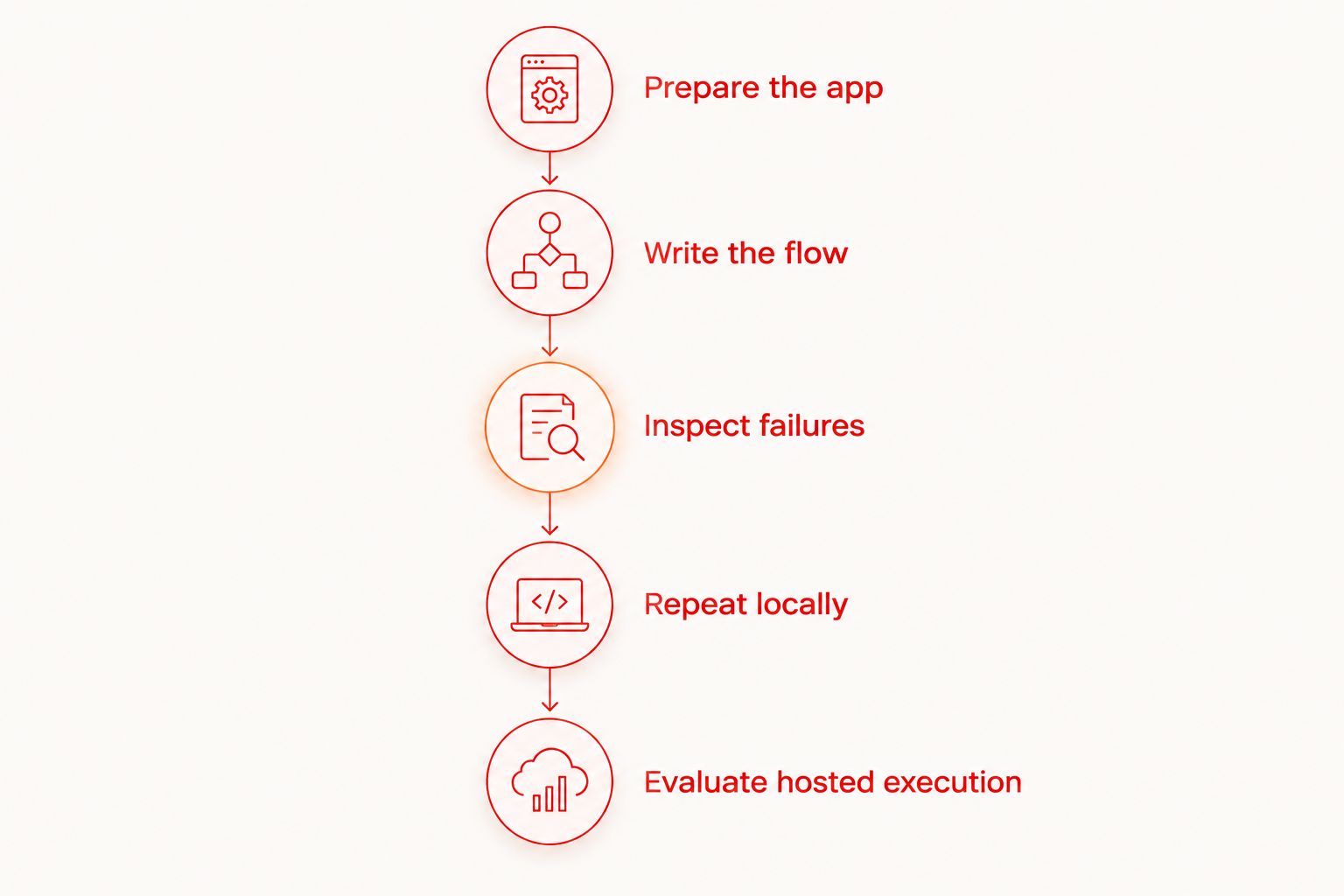
Use this sequence to keep the setup focused:
- Choose a behavior. Pick a user journey with a clear starting condition and a visible result.
- Prepare the application. Make the intended app build and its required services accessible from your test environment.
- Write the flow. Describe the interactions and checks in Maestro YAML.
- Run locally. Execute the flow through the desktop runner without signing up for hosted execution.
- Inspect failures. Examine the interface and the failing interaction before changing the test.
- Repeat from the starting condition. Check that the flow succeeds because the application behaves correctly, not because an earlier run left helpful state behind.
Your application can still require credentials. A test that signs into your app needs an appropriate application account; that is different from needing an account with a cloud testing service.
The same distinction applies to infrastructure. If the app depends on a remote API, local test execution does not remove that dependency. The runner's account requirement and the application's network requirements are separate questions.
Local execution: best for writing and debugging flows
Start locally when you are still deciding what a test should do. You need to see the application, understand its state, and correct the flow when an interaction targets the wrong element or an assertion checks the wrong outcome.
The local desktop runner supports that development loop. Its purpose is not just to produce a pass or failure; it also gives you a place to write and inspect the YAML flow before making it part of a release process.
Best for: developers and QA engineers building or diagnosing individual end-to-end flows.
The advantage is direct access to the test environment you are working on. The trade-off is responsibility: you still prepare the app, establish test data, and maintain the environment used for execution. Removing cloud registration does not remove test setup.
Keep the initial scope narrow. A login flow should establish that the intended user reaches the intended authenticated screen. It should not silently become a checkout test, a permissions test, and a session-expiry test in the same debugging task.
For a new 2026 test suite, make the first flow small enough that a failure points to a specific behavior. Expand coverage after the starting state and expected result are explicit.
Optional cloud execution: best for hosted release runs
Choose cloud execution when you need hosted runs or want test execution connected to CI. It is an additional execution choice, not an activation requirement for the local desktop runner.
Best for: teams moving beyond interactive local testing into hosted execution as part of a release workflow.
The benefit is placing execution in a hosted workflow rather than treating every run as a developer's desktop task. The trade-off is another environment to configure and validate. Your app build, test credentials, backend access, and starting state still need to work where the flow executes.
Do not treat a cloud migration as a fix for an unclear test. A flow with an ambiguous assertion remains ambiguous when executed elsewhere. Resolve the test's meaning locally before changing its execution environment.
| Decision | Local desktop execution | Optional cloud execution |
|---|---|---|
| Best for | Writing, inspecting, and debugging flows | Hosted runs and CI-connected workflows |
| Cloud account needed for local use | No | Separate hosted-service decision |
| Where execution happens | Your prepared local environment | The selected hosted environment |
| Main benefit | Direct development and inspection loop | Execution outside an individual desktop workflow |
| Main responsibility | Prepare and maintain the local test environment | Validate the hosted environment and its dependencies |
| Main limitation | A local pass does not establish hosted compatibility | Hosted execution does not repair incorrect test logic |
Before selecting hosted execution, specify what you need it to change. Examples include triggering a test from a build pipeline or making execution independent of a developer manually starting a desktop run. Choose against that requirement, not against a vague expectation that cloud execution makes every test better.
Why account and environment requirements vary
The local runner's account requirement is straightforward. The surrounding test setup depends on the application and execution environment.
Separate these factors when planning your 2026 workflow:
- Execution location. Local desktop execution and a hosted run are different execution choices. Decide where the test needs to run before configuring a hosted service.
- Application authentication. A login test needs application credentials when the behavior under test requires them. Those credentials are not cloud-runner credentials.
- Backend access. An app using a remote service still needs access to that service, even when the test runner operates locally.
- Test state. Existing sessions, permissions, and saved data affect the starting condition. Define the state instead of inheriting whatever the previous run left behind.
- Execution target. A simulator, emulator, browser, and physical device are not interchangeable. Confirm the target you need rather than inferring physical-device support from another target type.
- Automation context. An interactive desktop session and a CI job have different operational requirements. Validate the actual execution path before making it a release gate.
These factors explain why a test can need preparation without needing a cloud account. Keep those two statements separate in setup instructions so a teammate does not mistake application configuration for a hosted-service requirement.
Build a local-first workflow before adding CI
Use a sequence that isolates problems. Change the test, the application build, or the execution environment deliberately—not all at once.
Prepare the app
Identify the build you intend to test and the backend it uses. Establish whether the journey needs a signed-in user, an empty account, an existing record, or a permission prompt.
Write the starting condition beside the test's purpose. For example, a login test and a returning-user test begin from different states. Treating them as the same flow makes failures harder to interpret.
Write the flow
Express a single user journey in YAML. Choose interactions that represent what the user must accomplish, then check the visible result that proves the journey succeeded.
Do not copy an unverified command or selector into a release test. Check the current framework documentation for the syntax you use, and inspect the actual interface before choosing a target. A plausible-looking YAML file is not evidence of a valid test.
Inspect failures
When execution fails, identify the first point where observed behavior differs from the flow's expectation. Check whether the app is on the expected screen before changing selectors or adding waits.
Use the guide to debugging a failing flow with Inspector Mode for that investigation. Diagnose the interaction before broadening the test or moving it into another environment.
Repeat locally
Restore the intended starting condition and run the flow again. A successful run after manual interaction is not equivalent to a repeatable run from the documented state.
Keep evidence of what changed when you fix a failure. The useful explanation is specific: the flow expected an authenticated screen while the app was signed out. A vague explanation such as environment issue does not help the next developer reproduce the result.
Evaluate hosted execution
Move to a hosted workflow only after you can explain the local test's inputs and expected output. Then check those same conditions in the new execution environment.
For a 2026 CI rollout, review the app build, environment access, credentials, and failure handling before requiring the test to pass for every release. The local flow is the starting artifact; the CI job is a separate integration task.
Does no cloud account mean tests work offline?
No cloud account means no hosted-service registration requirement for local execution; it does not establish offline operation. Your application can still need a network connection for authentication, APIs, or other services.
Check the full path exercised by the test. If a user journey requires a remote backend, running its UI interactions locally does not make that backend local.
Can you add cloud execution after writing local flows?
Yes. Start by developing Maestro YAML flows locally, then evaluate optional hosted execution when the workflow requires it. Validate the target environment and integration rather than assuming a local pass proves the hosted setup is ready.
Keep the test's behavior unchanged during that validation where practical. If you change the flow and the environment together, a new failure has more possible causes.
Is the desktop runner the same as the Maestro framework?
No. Maestro Deck is the desktop runner and inspector described here; Maestro is the framework whose YAML flows it runs. Keep the product, flow format, and execution service distinct when choosing documentation or troubleshooting a problem.
Do not infer affiliation from compatible workflows or similar naming. Likewise, a hosted service's account requirements do not establish the local desktop runner's requirements.
Source-available is not the same as open source
Maestro Deck is source-available. Use that term when describing its licensing model rather than substituting open source.
Source access and permission to use, modify, or redistribute software are separate licensing questions. Check the applicable license against your intended use, especially before adopting software inside a redistributed product or a shared internal service.
Account requirements are another separate question. Neither a source-available label nor an open-source label, by itself, tells you whether a particular hosted service requires registration. For the local runner covered here, a cloud account is not required.
FAQ
Can I run Maestro Deck without a cloud account?
Yes. The free local desktop runner executes Maestro YAML flows without cloud account registration. Hosted execution is optional.
Do I need to sign up before writing my first YAML flow?
No cloud sign-up is required for local use. Prepare your application and test environment, then write and execute the flow locally.
Does local execution mean my app can run without internet access?
No. Your app still needs any network services required by the journey under test, including remote authentication or backend APIs.
Can I use application login credentials without a cloud account?
Yes. Application credentials and a cloud testing account serve different purposes. A local login test needs the application's credentials when authentication is part of the journey.
Should I start with local tests or hosted CI runs?
Start locally when you are writing or debugging a flow. Evaluate hosted CI execution after the test has an explicit starting condition and a repeatable expected result.
Does emulator or simulator support prove physical-device support?
No. Emulators, simulators, and physical devices are distinct execution targets. Confirm the target required by your test rather than assuming support transfers between them.
Is source-available software automatically open source?
No. Source-available and open source are different licensing descriptions. Read the applicable license to determine the permissions and restrictions for your intended use.
One last thing
A passing flow can still be the wrong test. If it begins with an existing signed-in session, it has not necessarily verified the login behavior you intended to cover.
Before adding that flow to your 2026 release checks, write down its starting state and the visible result that proves success. Then rerun from that state. This is a more useful next step than creating a cloud account before the local test has a clear purpose.