
Yes. You can use Maestro Deck without writing YAML by hand, starting with its free local desktop runner and inspector for mobile and web end-to-end tests. The flows still use Maestro YAML, so avoiding manual authoring does not remove the need to understand what a test does or check its assertions.
- Use Maestro Deck without writing YAML by hand; start with the free local desktop runner.
- YAML flows still define the test. Review actions, selectors, and assertions before trusting a passing run.
- Local end-to-end testing does not require a cloud account. Cloud execution is optional for CI and scale.
- Inspect the failing step before changing the flow. A completed interaction is not proof of the expected result.
Can I use Maestro Deck without writing YAML by hand?
Yes: manual YAML authoring is not a prerequisite for starting local end-to-end tests. The desktop runner and inspector support working with Maestro YAML flows for iOS, Android, and web apps. Your responsibility is to define the journey, inspect the resulting flow, and verify that it checks the right outcome.
Separate the authoring experience from the test format. A workflow that avoids typing YAML still produces or works with instructions that the test runner must execute. Those instructions need review, just as application code does.
Maestro Deck is best for developers and QA engineers who want a free local runner and inspector for Maestro YAML end-to-end tests. Its useful starting point is local execution; cloud execution is a separate decision, not an entry requirement.
For a 2026 release workflow, begin with a small journey you understand completely. Do not begin by trying to automate every screen or by treating an unfamiliar flow as a finished regression test.
Why this matters
Avoiding handwritten YAML removes an authoring task. It does not remove test design.
You still decide which account to use, what state the app starts in, which interaction matters, and what proves success. A flow that reaches the final screen without checking its contents can miss the regression you wanted to catch.
Keep these responsibilities separate:
- Authoring: Express the actions and checks in the flow.
- Execution: Run the flow against the intended application and environment.
- Validation: Confirm that passing and failing results mean what you expect.
The practical benefit is a shorter path into local testing, not permission to ignore the test definition. Read the flow before adding it to a release gate.
Start locally; add cloud execution for a specific need
Local and cloud execution solve different workflow problems. Neither changes the need for a meaningful assertion, controlled test data, or an understandable failure.
Choose the execution environment after you have a useful test. Do not make cloud setup a dependency for learning how your first flow behaves.
| Option | Best for | Benefit | Trade-off |
|---|---|---|---|
| Free local desktop runner | Developers writing and debugging a flow | Start with the runner and inspector without a cloud account | A local result covers the environment you actually exercised, not every release target |
| Optional cloud execution | Teams adding hosted runs to CI or expanding execution | Move execution into a hosted testing workflow | You must evaluate environment coverage, test-data handling, and the execution model separately |
Start locally when your immediate problem is understanding or fixing a flow. Add cloud execution when you have a concrete requirement, such as running tests from CI rather than relying on someone to launch them manually.
Cloud execution is not evidence of physical-device coverage. Simulators, emulators, browsers, and physical devices are different test environments. Match the environment to the behavior you need to verify.
For a 2026 evaluation, record the target environment beside each important test. That makes the coverage boundary visible when someone reads a passing result.
Build a useful flow before expanding the suite
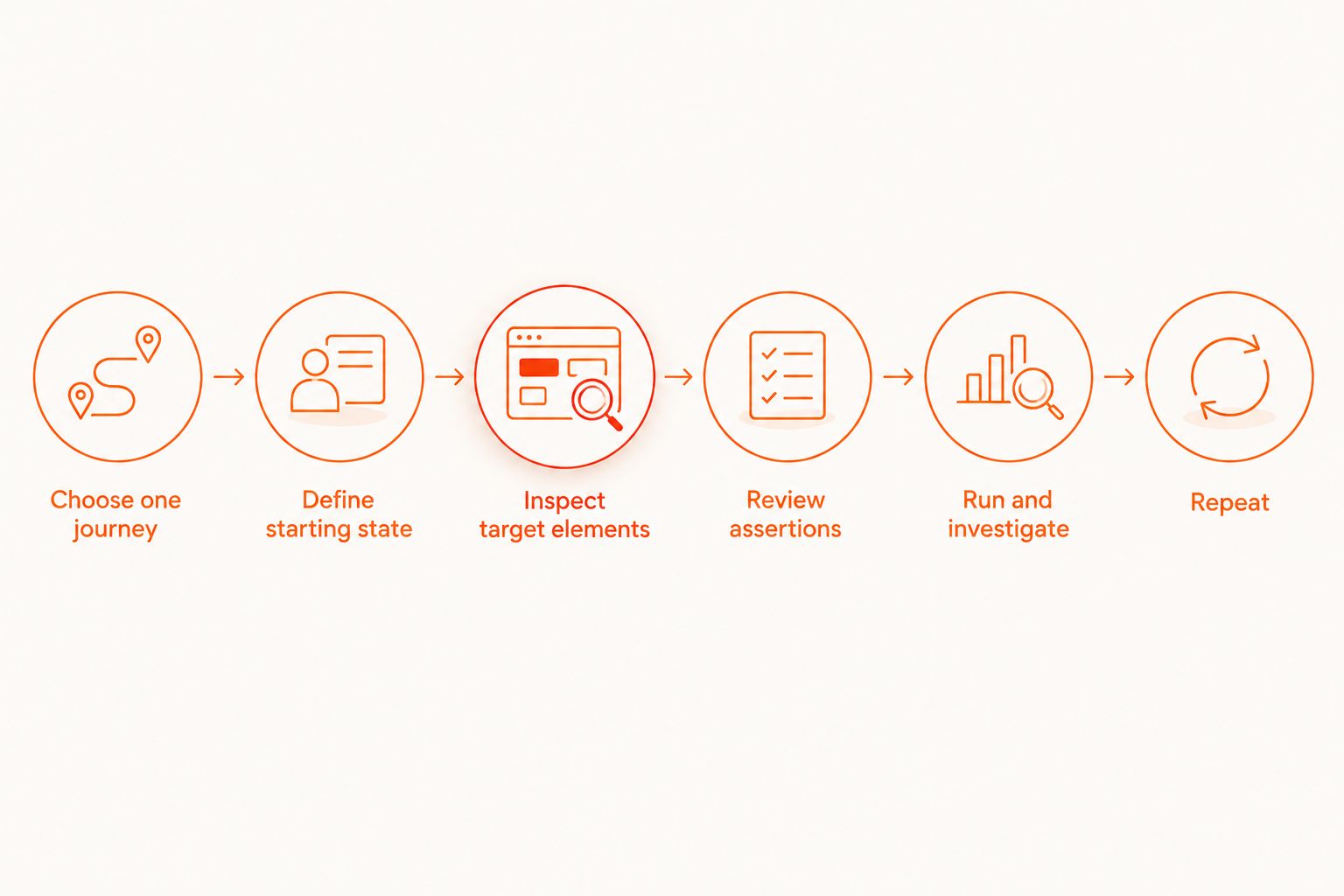
Use the following sequence as a working checklist. These are test-design steps, not claims about particular buttons, menus, or automatic generation features in the desktop application.
1. Choose one journey
Start with 1 flow for a journey whose success you can describe without referencing the test tool. For example: a test user signs in and reaches the expected account screen.
Write down the starting condition and the expected outcome in plain language. If either is ambiguous, resolve that ambiguity before adding interactions.
Keep the first journey narrow. Combining onboarding, authentication, profile editing, and checkout makes a failure harder to locate and increases the amount of state you must control.
2. Define the starting state
Decide whether the user begins signed out, signed in, or partway through a task. Specify which test account and application build belong to the run.
An end-to-end test needs repeatable conditions. A flow that succeeds only because a previous manual session left the application on the right screen is not ready for unattended execution.
Avoid using a personal account as an undocumented dependency. Write down how the required test data is prepared and what the flow changes.
3. Inspect the target elements
Use the inspector to examine the interface involved in the journey. Check that the intended target is distinguishable from other elements on the screen.
Do not assume a visible label uniquely identifies an action. Repeated labels, translated text, and changing content deserve deliberate review when you select a target.
The goal is not to collect the shortest possible flow. It is to make each interaction point to the element the test actually intends to exercise.
4. Review actions and assertions
Separate an action from evidence that the action worked. Tapping a sign-in control is an action; checking the authenticated destination is an assertion.
As a starting exercise, define 2 assertions: one that confirms the expected destination and another that checks a meaningful result there. This is a suggested review exercise, not a required test size or a product limit.
Choose assertions that would fail for the regression you care about. A check for a navigation bar is weak evidence if the release risk concerns an incorrect account balance or a missing saved item.
5. Run and investigate
Run the flow locally, then examine any failure at the step where the expected behavior diverges. Distinguish an application defect from a target-selection problem or an invalid starting state.
Do not immediately add retries or longer pauses. First identify what the test expected to observe and whether that expectation was valid.
For a focused debugging workflow, use the guide to debugging a failing flow with Inspector Mode. Keep the failure investigation tied to the exact interaction and assertion involved.
6. Repeat from the intended starting state
Try 3 local runs from the same documented starting condition before expanding the journey. Treat this as a small practice check, not a reliability benchmark or proof that the test cannot fail intermittently.
Compare what happened across those runs. If the outcome changes, investigate the difference in app state, account data, environment, or target selection.
A stable result under one condition remains evidence about that condition only. Expand coverage deliberately rather than assuming repetition creates broader coverage.
Why the amount of YAML review varies
The amount you need to understand depends on the test you are building. Avoiding manual authoring does not make every flow equally simple to maintain.
- Journey scope: A short sign-in check has fewer decisions to review than a journey crossing several application features.
- Starting state: Authentication, permissions, and existing account data affect what the flow encounters.
- Target selection: Repeated labels and dynamic content require attention to which element an interaction identifies.
- Assertions: Checking that a screen opened is different from checking that the application saved the correct result.
- Execution environment: A local desktop workflow and a CI-triggered run need their own environment and data preparation.
- Shared behavior: Repeated setup across flows creates maintenance work unless the suite has a deliberate organization strategy.
Review these factors during your 2026 test planning. They explain maintenance effort more directly than whether someone originally typed the YAML.
Do I need to learn YAML before running a test?
No: you do not need to master YAML before starting. You do need enough understanding to recognize the sequence of actions, identify assertions, and notice when a flow no longer represents the intended journey.
Learn from the flow you are actually using. Connect each instruction to an observed action or check, rather than treating the file as an opaque artifact that only the tool understands.
When you edit YAML directly, check the syntax and command behavior against the current Maestro documentation. Copying an example from an unrelated environment without checking its assumptions creates a separate debugging problem.
Is the desktop runner the same as the Maestro framework?
No: the desktop product and the framework are distinct. Maestro is the framework whose YAML flows are being used; the desktop runner and inspector provide a way to work with those flows.
Do not infer framework ownership, official endorsement, or affiliation from the shared name. Evaluate each product on its documented role.
The licensing language also matters. The desktop product is source-available, which is not interchangeable with open source. Inspect the applicable license before deciding how your organization can modify, redistribute, or deploy the software.
When should I move a working flow into CI?
Move a flow into CI when its starting conditions, expected outcome, and failure response are clear. Automating execution before those details are settled turns a local debugging problem into a shared pipeline problem.
For a 2026 release gate, answer these questions first:
- Which application build does the run test?
- How does the run obtain suitable test data?
- What result blocks the release?
- Who investigates a failure?
- How is the execution environment identified?
Keep the initial gate narrow. A small set of understood checks gives reviewers a clearer signal than a larger suite whose failures are routinely ignored.
Optional cloud execution belongs here when hosted runs fit your CI requirements. Evaluate the cloud service separately; local authoring does not require a cloud account or a paid execution commitment.
Start with a local flow
Use the free desktop runner and inspector before deciding whether you need cloud execution.
FAQ
Can I use Maestro Deck without writing YAML by hand?
Yes. You can start with the free local desktop runner and inspector without hand-authoring YAML, but the tests still use Maestro YAML flows. Review the actions and assertions before relying on the result.
Do I need a cloud account to run tests locally?
No. Local use does not require a cloud account. Cloud execution is optional when you need hosted runs or a CI workflow.
Does avoiding handwritten YAML mean I never need to read a flow?
No. Read the flow to understand its actions, target elements, and assertions. You remain responsible for checking that the test proves the intended behavior.
Does a passing interaction prove my app works?
No. A completed interaction proves less than an assertion about the expected application result. Check the destination and the behavior relevant to your release risk.
Is Maestro Deck open source?
Maestro Deck is source-available, not described here as open source. Review its license before making decisions about modification, redistribution, or deployment.
Does cloud testing automatically mean physical-device testing?
No. Hosted simulators, emulators, browsers, and physical devices are distinct environments. Verify the execution target before counting a run as physical-device coverage.
Should I add retries when my first flow fails?
Investigate the failing step before adding retries. Check the starting state, target selection, application behavior, and assertion so that a retry does not conceal the original problem.
One last thing
Test the test, not just the app. Deliberately give an assertion an incorrect expected result in a safe test environment and confirm that the flow fails for the reason you intended.
This is a useful 2026 release-readiness check because it examines the meaning of the result. A green run is valuable only when the test would reject the behavior you are trying to prevent.