Yes, for mobile E2E journeys that you can express and validate as Maestro YAML flows; no, not as an automatic replacement for every Appium test. Start with the free local desktop runner, prove that each migrated journey preserves its assertions and environment coverage, and keep Appium wherever that proof fails.
- For a maestro deck appium replacement decision, validate representative YAML flows before rewriting your suite.
- Maestro Deck provides a free, source-available local runner and inspector; local use does not require a cloud account.
- Keep Appium tests until replacement flows preserve their assertions, setup, and required execution environments.
- Cloud execution is optional when you need hosted runs or CI execution.
Why this matters
Replacing a test runner is not the same as replacing test coverage. A flow that reaches the final screen does not necessarily check the same behavior as the original test. Lost assertions create a coverage gap even when the replacement run passes.
Maestro Deck provides a local desktop runner and inspector for Maestro YAML flows across iOS, Android, and web apps. That makes local authoring and execution the starting point, not a cloud subscription.
For your 2026 release workflow, define success as preserved release checks with a workflow your team can maintain. Do not define success as deleting every Appium file. A smaller migration that retains important checks is better than a complete rewrite that drops them.
Can Maestro Deck replace Appium for mobile E2E testing?
Replacement is justified when the new flows reproduce the behavior your release process depends on. Evaluate authoring, setup, assertions, execution targets, and failure investigation separately. Passing a demonstration flow answers only part of the question.
| Option | Best for | What you work with | Advantage | Trade-off |
|---|---|---|---|---|
| Maestro Deck | Developers authoring and inspecting Maestro YAML flows locally | A source-available desktop runner and inspector | Local execution without a cloud account | Existing Appium tests still need to be re-expressed and validated |
| Appium | Teams retaining programmatic tests and driver-specific integrations | WebDriver-based automation with client libraries and platform drivers | Preserves existing test code and integrations | Your team continues maintaining the code, drivers, and execution setup |
| Mixed suite | Teams migrating while preserving release checks | YAML flows alongside retained Appium tests | Lets you move compatible journeys without discarding other coverage | Requires an explicit boundary between suites |
Use this sequence to make the decision:
- Inventory the existing checks. Record the behavior, setup, assertions, and execution environment for each candidate test.
- Choose a representative journey. Include a meaningful assertion and the setup that makes the result trustworthy.
- Rebuild the journey locally. Express the intended behavior as a Maestro YAML flow, rather than translating code line by line.
- Compare the evidence. Confirm that the new flow catches the failure the original test was designed to catch.
- Retire only equivalent coverage. Remove the old test after the replacement works in its intended release workflow.
Do not turn a successful local pilot into a claim about every device or CI environment. Each required execution target needs its own validation.
Start locally: prove the workflow before migrating the suite
Maestro Deck is best for developers who want to write, run, and inspect Maestro YAML E2E flows locally. Its free local desktop runner is the appropriate place to evaluate whether that workflow fits your app and your team.
Choose a journey with a clear beginning and end. For example, use a test account to sign in, open an account screen, change a harmless preference, and verify that the updated value appears. Treat this as a proposed test design, not evidence that any particular app or integration is supported.
Write down what the original Appium test actually establishes. Does it check that a control is visible, that a submitted value persists, or that a session remains valid after reopening the app? Those are different assertions. Preserve the intended behavior, not just the taps.
Use Inspector Mode while developing and investigating the flow. Keep the YAML in version control so reviewers can inspect changes alongside application changes. A passing local run is your starting evidence; reviewable test intent is what makes the migration maintainable.
The limitation is scope. A local result does not establish hosted execution coverage, physical-device support, or equivalence with every helper in your existing suite.
Keep Appium where existing integrations still matter
Appium uses a WebDriver-based model with language clients and platform drivers. Existing suites can also contain application-specific setup, shared helpers, backend calls, and reporting integrations. Assess those pieces before deciding that the visible test steps are the whole migration.
For each helper, identify its purpose. A helper that creates an account is test-data setup. A helper that finds a control is part of UI interaction. A helper that checks a server response is a separate assertion. Do not assume all of them belong inside a YAML flow.
Keep an Appium test when its replacement has not demonstrated equivalent coverage. This is a coverage decision, not a claim that either framework is universally more capable.
Retaining Appium also has a trade-off: you retain responsibility for its test code and execution setup. For a 2026 migration, make that responsibility visible. Give retained tests an owner and a reason to remain, rather than leaving an unexplained second suite in the repository.
Use a mixed suite when migration boundaries are clear
A mixed suite works when you can explain which runner owns each release check. Move suitable user journeys into YAML flows, and retain existing tests for checks that have not passed the replacement evaluation.
Avoid maintaining duplicate tests indefinitely without a reason. Temporary overlap helps establish equivalence. Permanent overlap needs a defined purpose, such as validating a distinct execution environment or a different failure condition.
Record a boundary for each journey:
- Test intent: The user-visible behavior the check protects.
- Setup owner: The process responsible for accounts, application state, and fixtures.
- Execution owner: The runner responsible for the release check.
- Failure owner: The person or team responsible for investigating a failed result.
- Retirement condition: The evidence required before removing the old test.
These boundaries prevent a migration from becoming an additional maintenance burden with unclear coverage. The drawback remains real: until the migration finishes, contributors need to understand both workflows.
Why replacement effort varies
The size of your Appium repository does not describe all of the migration work. A short test with extensive setup can require more investigation than a longer sequence of straightforward UI interactions.
Evaluate these factors before expanding the pilot:
- Test representation. YAML flows and programmatic tests express behavior differently. Review intent before rewriting implementation details.
- Setup dependencies. Account creation, fixtures, permissions, and application state need an explicit setup process.
- Assertions. Confirm that the replacement checks the same outcome, including relevant failure states.
- Execution targets. iOS simulators, Android emulators, browsers, and physical devices are distinct targets. Do not treat them as interchangeable.
- Release integration. Determine how the intended pipeline starts execution, receives a result, and blocks a release when necessary.
- License requirements. Source availability and open-source licensing are not equivalent. Review the actual terms against your organization's requirements.
The source-available licensing guide addresses that last distinction. Visible source code alone does not establish unrestricted rights to modify, redistribute, or offer a hosted version.
Build a migration pilot that can reject the replacement
A useful pilot needs an exit condition for failure, not just a demonstration that ends successfully. Select a journey important enough that losing its coverage would change your release decision.
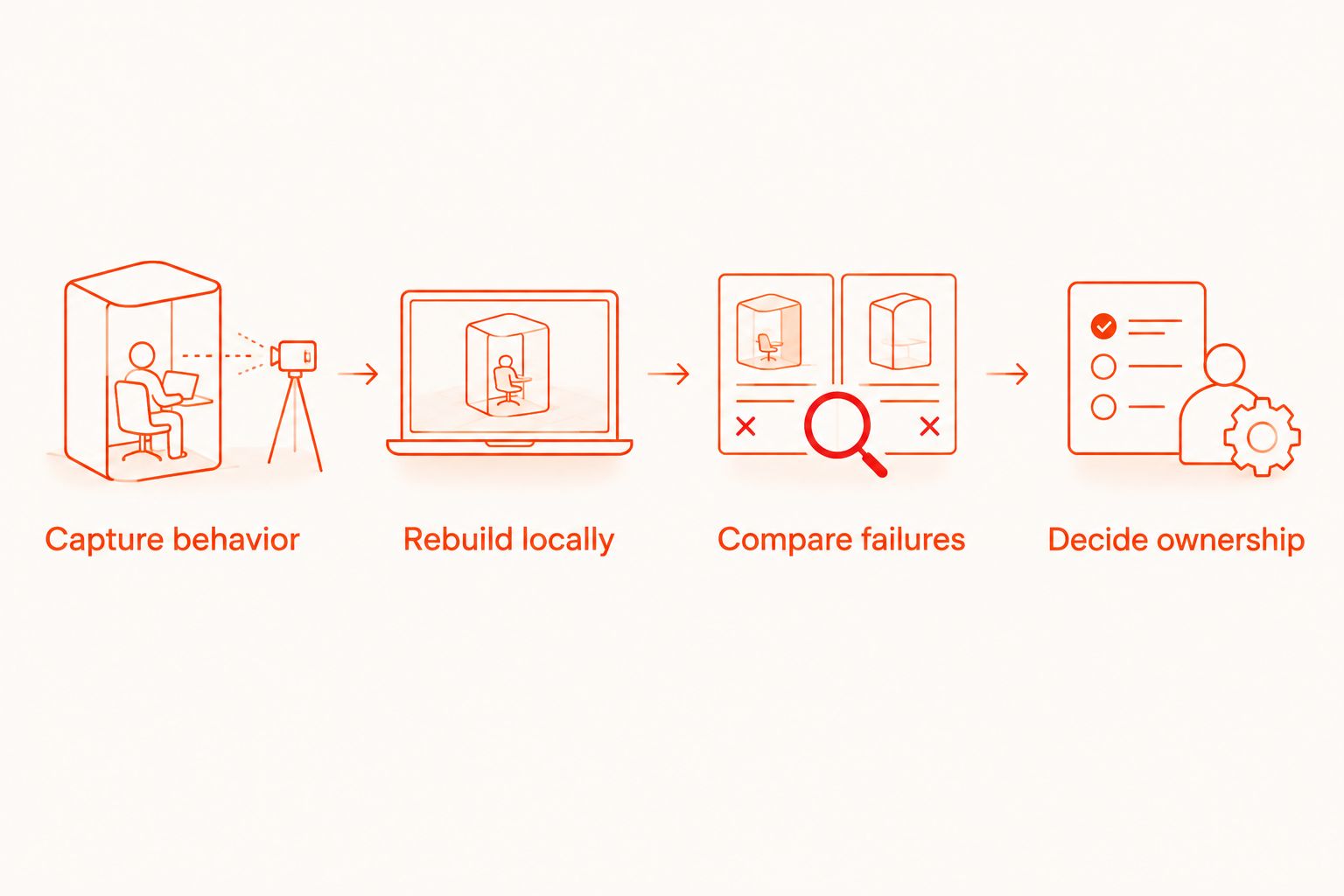
Capture behavior
Describe the starting state, user action, and expected result in plain language. Include prerequisites such as an authenticated account or a known data record. Keep implementation details separate so the review compares behavior rather than syntax.
Rebuild locally
Create the YAML flow and run it against the intended app build. Inspect the interaction points and check that assertions refer to the outcome you care about. Avoid treating an intermediate screen as proof that the final operation succeeded.
Compare failures
Introduce a controlled failure in a safe test environment, such as an intentionally incorrect expected value. Confirm that the replacement reports failure rather than passing through the journey. Also distinguish a failed product assertion from missing setup or an unavailable test environment.
Decide ownership
Record whether the journey moves, stays, or needs more investigation. Preserve the original test until the replacement has demonstrated its intended role. Use the same acceptance criteria for the rest of your 2026 migration instead of relaxing them after the first successful flow.
Add cloud execution only when the release workflow needs it
Local authoring and hosted execution solve different problems. Start locally to establish test behavior. Evaluate optional paid cloud execution when you need hosted runs or want execution connected to CI.
The documented cloud scope includes iOS simulators, Android emulators, and browsers. Simulator or emulator support is not evidence of physical-device availability. Match your required environment to the documented execution target before changing a release gate.
Before adopting cloud execution in 2026, check application upload requirements, test-data handling, credentials, result reporting, and the pipeline's failure behavior. Treat these as evaluation questions, not assumed product capabilities. Decide what happens when the test fails and what happens when the execution environment cannot start.
Do not equate a cloud sign-up with a completed migration. A hosted run still needs the same behavioral assertions and controlled setup as a local run. Keep local use independent of the decision to adopt paid execution.
Evaluate optional cloud execution
Review cloud options after validating your YAML flows locally.
Is this the same as replacing Appium with the Maestro framework?
No. Maestro Deck is a desktop runner and inspector for Maestro YAML flows; the Maestro framework is the underlying testing framework whose flows it works with. Keep the application, framework, and execution service separate in your evaluation.
That distinction matters when assigning a limitation or checking documentation. A framework capability does not automatically establish how a particular runner exposes it, and a runner's cloud offering does not establish a relationship with another service. Do not infer affiliation from shared terminology.
Can I retire Appium after a local flow passes?
No. A passing local flow establishes that the tested journey passed in that local environment, not that the entire Appium suite has been replaced. Compare assertions, setup, target environments, and release integration before removing coverage.
Should I move every test during the same release cycle?
No. Move tests according to demonstrated equivalence, not a deadline for deleting the old framework. Keep a migration record so your team knows which checks protect the release and which still need investigation.
FAQ
Can Maestro Deck replace my entire Appium suite?
Only after every required check has a validated replacement. Evaluate assertions, setup dependencies, execution targets, and release integration before retiring the original tests.
Do I need a cloud account to run flows locally?
No. The free local desktop runner does not require a cloud account; paid cloud execution is optional.
Can I reuse Appium test files as Maestro YAML flows?
Do not treat the files as interchangeable. Re-express the intended behavior as Maestro YAML flows and validate equivalent assertions rather than assuming direct execution of Appium code.
Should I keep Appium during the migration?
Yes, keep Appium tests until their replacements preserve the required checks. Give any continuing overlap a specific purpose and retirement condition.
Does emulator support mean I can test physical devices?
No. Emulator and simulator support does not establish physical-device availability. Verify support for the exact execution target your release process requires.
Is source-available the same as open source?
No. Source-available means source code is available under its stated terms; open-source licensing requires permissions that source visibility alone does not establish.
What should I validate before adding cloud runs to CI?
Validate the execution target, application handling, test-data setup, credentials, result reporting, and failure behavior. A passing local flow does not establish those pipeline properties.
One last thing
The most useful migration test is a deliberate failure. A replacement that reaches the final screen but misses an incorrect outcome has not preserved the old test's value.
Before retiring a release check in 2026, make its expected result fail in a controlled environment. Confirm that the replacement rejects it. Then restore the correct expectation and record why the new flow is equivalent.