
Yes. Non-developers can write Maestro YAML test flows when they understand the app journey, can identify the controls involved, and know what result to check. Start with Maestro Deck’s free local desktop runner and inspector; keep developer support available for app setup, inaccessible controls, and test-data problems.
- Can non developers write maestro yaml? Yes—start with one familiar journey and an explicit pass condition.
- Maestro Deck suits non-developer QA engineers who want a local runner and inspector for Maestro YAML flows.
- Writing steps is only part of the work; repeatable app state and meaningful assertions determine test quality.
- Local use needs no cloud account. Treat paid cloud execution as a separate decision for CI or scale.
Why this matters
A manual tester already knows information an automated flow needs: where a journey begins, which actions matter, and what success looks like. The missing skill is translating that knowledge into instructions a runner can execute without interpretation.
Maestro Deck is best for QA engineers and developers who want a free local desktop workflow for Maestro YAML testing. Its inspector supports writing and investigating flows, but it does not remove the need to understand the application. Start with Maestro Deck locally rather than making hosted execution a prerequisite for learning.
For your 2026 release workflow, separate authoring from infrastructure. First establish that someone can write and explain a useful test; then decide where that test should run.
Can non-developers write Maestro YAML test flows?
Yes—non-developers can author straightforward Maestro flows without becoming application developers. They still need to learn YAML structure, element targeting, assertions, and how the app’s starting state affects a run.
Maestro is the testing framework associated with the YAML flows. The desktop runner and inspector are a separate product; do not treat the two names as interchangeable or infer an affiliation from their compatibility.
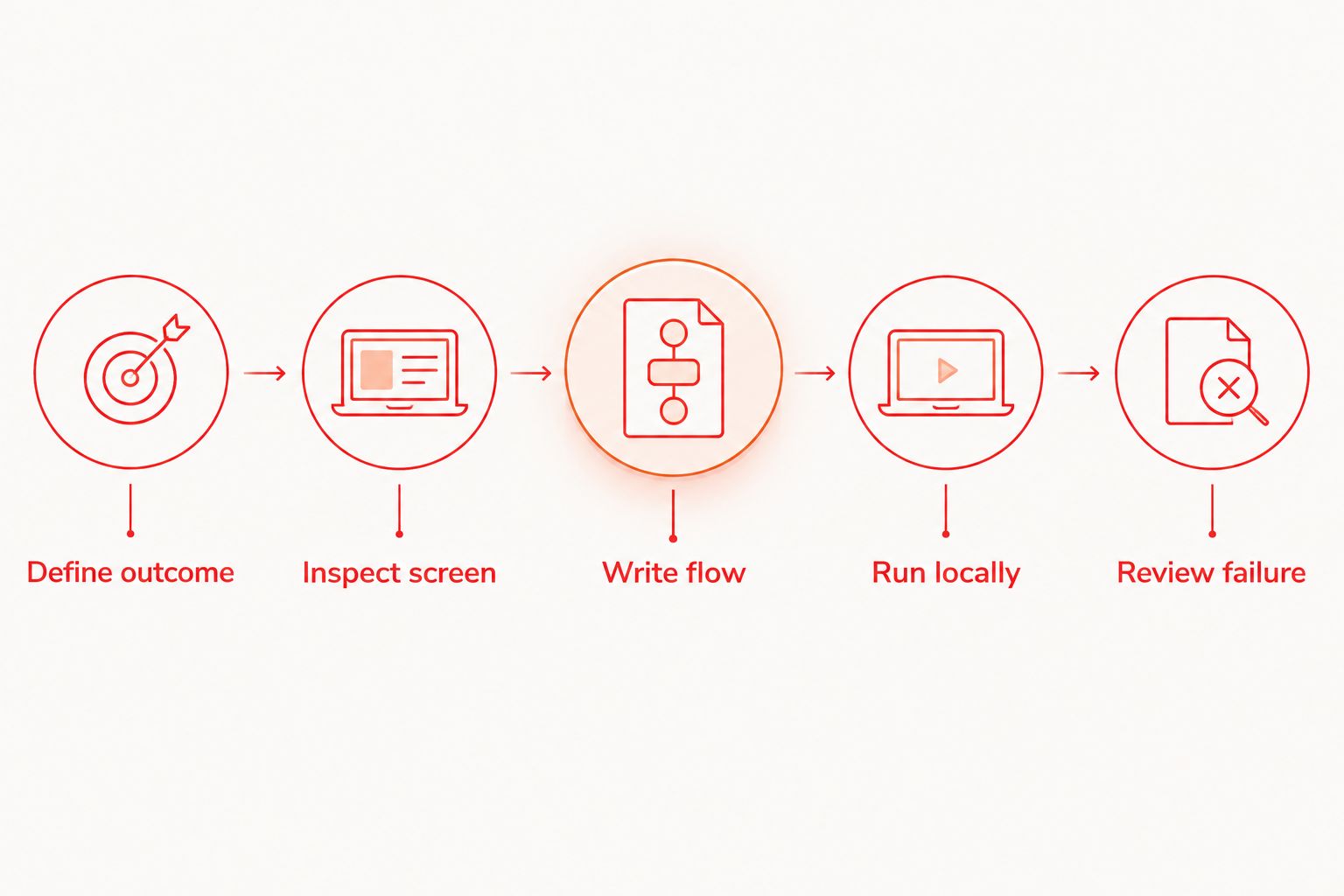
Use this sequence for a first flow:
- Define outcome. Pick one journey and describe its observable result before listing actions. For example, submitting valid test credentials should lead to an authenticated screen, not merely dismiss the login form.
- Inspect screen. Find the controls the journey uses. Establish how the test will distinguish the intended element from other elements with similar text.
- Write flow. Translate the journey into ordered actions and checks. Keep the first version focused on the selected outcome rather than adding unrelated screens.
- Run locally. Execute against a known app build and a defined starting state. Watch where actual behavior stops matching the written expectation.
- Review failure. Decide whether the failure belongs to the app, the test instructions, or the environment. Fix the cause rather than changing the expectation until the test passes.
These are authoring steps, not a promise that every application exposes usable controls. If the inspector cannot distinguish a required element, involve a developer before building more flows around the same problem.
What should a non-developer learn first?
Learn the parts that make a test readable and repeatable. You do not need to start with application architecture, but you do need to explain why each action exists.
YAML structure
YAML uses indentation and structured values to represent data. A misplaced indentation level can change the structure or make the file invalid; readable text alone does not guarantee a valid flow.
Keep formatting changes separate from behavior changes when possible. That makes review easier: a teammate can distinguish a structural correction from a new test expectation.
Element targeting
A human can infer that the lower of two identical buttons is the intended target. An automated test needs an explicit way to make that distinction.
Inspect the screen rather than guessing from its appearance. Ask a developer for a stable identifier when the available target is ambiguous, especially on repeated cards, translated screens, or lists.
Assertions
An action says what the test does. An assertion says what must be true afterward.
A flow that taps through screens without checking the outcome is not enough evidence for a release decision. Check something that distinguishes success from a plausible failure, such as the expected destination or a visible saved result.
Starting state
Write down whether the user begins signed out, signed in, newly registered, or partway through onboarding. Those conditions change which screens appear.
Use test accounts and controlled records. Do not depend on whichever session happens to remain on the machine from yesterday’s manual testing.
Which authoring workflow should your team use?
Choose ownership according to the work, not the author’s job title. A non-developer can own a test’s intended behavior while an engineer owns app instrumentation or execution infrastructure.
| Workflow | Best for | Advantage | Trade-off |
|---|---|---|---|
| Non-developer authors | Familiar, stable user journeys | Keeps domain knowledge close to the expected behavior | Requires support when setup or element targeting becomes technical |
| Developer authors | Journeys involving technical setup | Keeps test implementation close to app changes | Product expectations still need review from someone who knows the workflow |
| Paired authoring | A team’s first shared flows | Combines behavior knowledge with implementation support | Requires coordination and explicit ownership afterward |
Use paired authoring for the first shared flow. Let the person who understands the journey describe the expected result, and let the person who understands the app resolve setup and targeting questions.
For a 2026 onboarding checklist, assign ownership before expanding coverage. Someone must maintain the flow when a screen changes; otherwise, a shared test becomes an unowned file.
Why the difficulty of writing Maestro YAML varies
The length of a flow is not a reliable measure of difficulty. A short login test can depend on more setup than a longer journey through static screens.
Five factors deserve attention:
- Starting state: Existing sessions, permission decisions, and onboarding progress affect the next visible screen. Define the intended starting condition explicitly.
- Element identity: Distinct controls are easier to target than repeated labels or elements that lack usable identifiers. Resolve ambiguity before adding more actions.
- Test data: A reusable test needs records and accounts that support its assumptions. Shared mutable data creates dependencies between runs.
- Asynchronous behavior: Network responses and screen transitions do not necessarily finish when an action is issued. Distinguish readiness from the passage of time.
- Failure ownership: A tester needs a clear route for reporting an application defect, a targeting problem, or an environment failure. These require different fixes.
These factors also explain why typing YAML is not the entire learning curve. Teach diagnosis alongside authoring. A teammate who can edit a file but cannot explain a failed run still needs support before owning release checks.
How do you turn a manual test into a useful flow?
Start with a short written scenario rather than copying every action from an exploratory session. Exploration contains detours; a regression test needs a defined purpose.
For example, consider a profile-editing journey. Its purpose is to establish that a permitted change persists, not merely that the settings screen opens.
Separate the scenario into three parts:
- Precondition: A designated test account can open its profile.
- Action: The user changes an allowed field and saves it.
- Expected result: The updated value appears when the profile is opened again.
This is a test design outline, not executable Maestro YAML. Translate it into framework commands only after inspecting the actual application and confirming the current command syntax.
Before calling the flow ready, perform 2 local runs from the same defined starting condition. Treat this as an initial authoring check, not proof that the flow is reliable across every environment.
Then change the expected result deliberately during review. Confirm that an incorrect expectation produces a failure; otherwise, the flow might execute without checking what you think it checks. Restore the correct expectation before committing the file.
Can you turn ticket descriptions into Maestro flows?
Yes, but a ticket is a description of intended behavior, not a complete execution specification. It often leaves the app build, starting session, account permissions, and observable pass condition implicit.
The same distinction applies to AI-generated test cases: a generated scenario still needs app-specific targets, controlled data, and an executable assertion before it becomes a dependable regression check. Review the behavior first, then translate it into a flow.
For your 2026 test backlog, keep acceptance criteria and execution details separate. The acceptance criterion explains what users should experience; the flow explains how the test establishes that behavior in a particular environment.
Ask the ticket owner to resolve ambiguity before authoring. If a requirement says that a change saves successfully, specify what visible evidence demonstrates persistence and whether that evidence must survive reopening the screen.
A non-developer is well placed to challenge vague requirements. That contribution matters more than producing a longer YAML file.
What should you do when a flow fails?
Read the failure against the original expectation. Do not begin by adding retries or removing the assertion.
Use 3 review checks:
- Check the starting state. Confirm the expected account, screen, permissions, and test records were present.
- Check the target. Confirm the flow acted on the intended element rather than another matching control.
- Check the outcome. Confirm whether the app violated the requirement or the test encoded the wrong expectation.
Use the Inspector Mode debugging workflow when you need to investigate the screen and its elements. Keep the intended assertion intact while diagnosing the mismatch.
Escalate with the app build, the failing step, the expected behavior, and the observed behavior. That gives a developer a concrete problem to investigate instead of an unexplained failing file.
When should a developer take over?
Bring in a developer when completing the test requires changes to the app, privileged setup, or infrastructure. Non-developer authors should not have to reverse-engineer those dependencies.
Examples include adding identifiers to otherwise ambiguous controls, preparing accounts with specific permissions, or connecting test execution to a release pipeline. The tester can retain ownership of the expected behavior while the developer handles those implementation details.
Escalation is a division of work, not a failure to learn YAML. Keep that distinction explicit in your 2026 release process so authors report blockers instead of weakening tests to avoid them.
Do you need cloud execution to learn Maestro YAML?
No. Maestro Deck supports a free local authoring and execution workflow without requiring a cloud account. Use that workflow to establish the scenario, investigate failures, and review the test before introducing hosted execution.
Paid cloud execution is optional when your team needs scale or execution from CI. Treat cloud sign-up as a separate operational decision, not an onboarding requirement for someone learning to write a flow.
Before moving a test, document the app build, account preparation, starting state, and expected outcome. Also distinguish simulator, emulator, browser, and physical-device coverage; support for one does not establish support for another.
FAQ
Can I write Maestro YAML if I have never programmed?
Yes, you can start with a familiar journey and learn YAML structure, element targeting, and assertions. Get developer help for app setup or controls that cannot be targeted clearly.
Do I need to write every Maestro YAML line by hand?
Hand-writing every line is not the learning goal; understanding each action and assertion is. Review the resulting flow regardless of how you created or edited it.
Is Maestro Deck the same as the Maestro framework?
No. Maestro Deck is a desktop runner and inspector for Maestro YAML flows; Maestro is the testing framework. Do not infer organizational affiliation from that compatibility.
Can I run local tests without a cloud account?
Yes, local use does not require a cloud account. Hosted execution is a separate choice when you need cloud-based runs.
What is the best first flow for a non-developer?
Start with one familiar journey that has a clear starting condition and observable result. Avoid combining unrelated behaviors into the first test.
Can a passing flow prove an app is ready to release?
No, a passing flow establishes only that its encoded checks passed in that run. Review the assertions and maintain coverage for other relevant behaviors.
Is source-available software the same as open source?
No, source availability and open-source licensing are different. Access to source code does not by itself establish the permissions granted by an open-source license.
One last thing
Ask a teammate to explain what your flow proves without running it. If they can describe only the taps, rewrite the assertion or clarify the purpose.
For your 2026 release checks, prefer one test with an explicit failure condition over a long journey whose success means only that execution reached the end.