

Start with Maestro Deck's free local desktop runner; add cloud based testing when you need hosted execution from CI or additional test capacity. Compare per-run and subscription billing by the execution each plan includes, then account for retries, platform coverage, concurrency, and unused capacity before choosing.
- Maestro Deck is best for developers who want a free local runner before adding optional cloud execution.
- Compare cloud based testing plans using the same YAML flows, platform coverage, and CI trigger policy.
- Per-run billing ties spending to a defined execution unit; subscription value depends on included capacity and actual usage.
- Check retry billing, concurrency limits, and artifact retention before committing to a hosted E2E testing plan.
How do per-run and subscription costs compare for cloud based testing?
Per-run billing favors a workload you can count; a subscription makes sense when its included capacity matches work you actually execute. Neither label establishes the better deal. A run, a minute, a parallel session, and a reserved device slot describe different things.
For a 2026 plan comparison, normalize the work before comparing the bill. Use the same flows, application builds, execution targets, and retry policy for every option. Otherwise, you are comparing different test coverage rather than different billing models.
| Approach | Best for | Main advantage | Main limitation | What to verify |
|---|---|---|---|---|
| Local execution | Developers writing and debugging flows | Keeps flow development separate from hosted execution | Does not replace a requirement for hosted CI execution | Supported environment and local setup |
| Per-run billing | Teams evaluating intermittent hosted execution | Connects the bill to a defined execution unit | Retries and broader coverage can add billable executions | Exact run definition and failed-run treatment |
| Subscription billing | Teams with a repeatable hosted workload | Provides a stated entitlement for a billing period | Unused entitlement does not improve coverage | Included usage, overages, concurrency, and commitment |
These are evaluation categories, not claims about a particular vendor's current plans. Apply them to the actual terms offered to your team.
Why this matters
A billing model should support your release workflow, not determine which regressions you bother to check. Start by deciding which journeys must pass before a change ships. Then decide where those tests should run.
A local flow-development loop and a hosted release check solve different problems. You need fast access to a failing screen while editing a flow; CI needs a repeatable execution environment and an actionable result. Buying hosted capacity does not remove the work of making tests repeatable.
Keep that separation in your 2026 evaluation. Treat hosted execution as an operational decision, not a prerequisite for writing your first end-to-end test.
Per-run billing: define the execution unit
A per-run offer is only comparable after you understand what counts as a run. Ask whether the unit is a flow, a suite, an application build, or an execution against a particular target. Do not assume those definitions are interchangeable.
Use a short purchasing worksheet:
- Execution boundary: Record what starts and ends a billable unit.
- Coverage expansion: Establish whether additional platforms or targets create separate units.
- Failure handling: Check the treatment of failed, canceled, and infrastructure-interrupted executions.
- Retry handling: Establish whether a retry creates another billable unit.
- Included output: Identify which logs and artifacts belong to that execution.
The advantage is a direct relationship between a defined unit and usage. The trade-off is that an execution policy can change the bill without changing the application: adding triggers, targets, or retries changes how much work you submit.
Best for intermittent hosted execution: consider per-run billing when you can describe the events that should trigger hosted tests. Keep exploratory flow editing local rather than treating every edit as a reason to submit hosted work.
Subscription billing: match entitlement to actual work
A subscription is not automatically unlimited execution. Read the entitlement as a technical specification: included usage, access rules, concurrency, supported environments, and any restrictions on how the allowance is consumed.
Distinguish execution allowance from simultaneous execution. A plan can meet your total workload requirement while failing your scheduling requirement. Check both before selecting a tier.
Ask these questions before accepting a commitment:
- Does unused allowance expire or carry over?
- What happens when the included allowance is exhausted?
- Is concurrency included, limited, or separately purchased?
- Which execution environments are included?
- What changes when you add collaborators or CI projects?
- What cancellation or renewal terms apply?
These are contract questions, not assumed subscription features. Get answers from the current plan terms.
Best for a repeatable hosted workload: consider a subscription when your observed execution pattern fits the entitlement. Its limitation is commitment: capacity you do not use still fails to advance your release checks.
Why cloud testing spend varies
For a 2026 comparison, keep the workload assumptions beside the plan terms. A lower headline commitment tells you little if the execution definition or coverage differs.
The factors to inspect are:
- CI triggers: Decide whether hosted tests run on every change, selected branches, a schedule, or release candidates.
- Execution targets: Specify iOS, Android, or web coverage and the environments required for each.
- Suite scope: Separate a release smoke suite from broader regression coverage.
- Retries: Record the retry policy instead of hiding repeated executions inside successful results.
- Concurrency: Define which jobs need to overlap and which can wait.
- Artifacts: Check the output and retention terms your debugging process requires.
Each factor describes work or a service requirement you can verify. Do not attach an assumed surcharge to any factor; inspect how the provider handles it.
A simulator, an emulator, a browser, and a physical device are not interchangeable coverage. Compare like with like. Never infer physical-device access from a plan that documents simulator or emulator execution.
Build a workload comparison before choosing a plan
Use your existing release process as the input. Do not create an imaginary busy month to justify a subscription, or ignore routine CI activity to make usage billing look smaller.
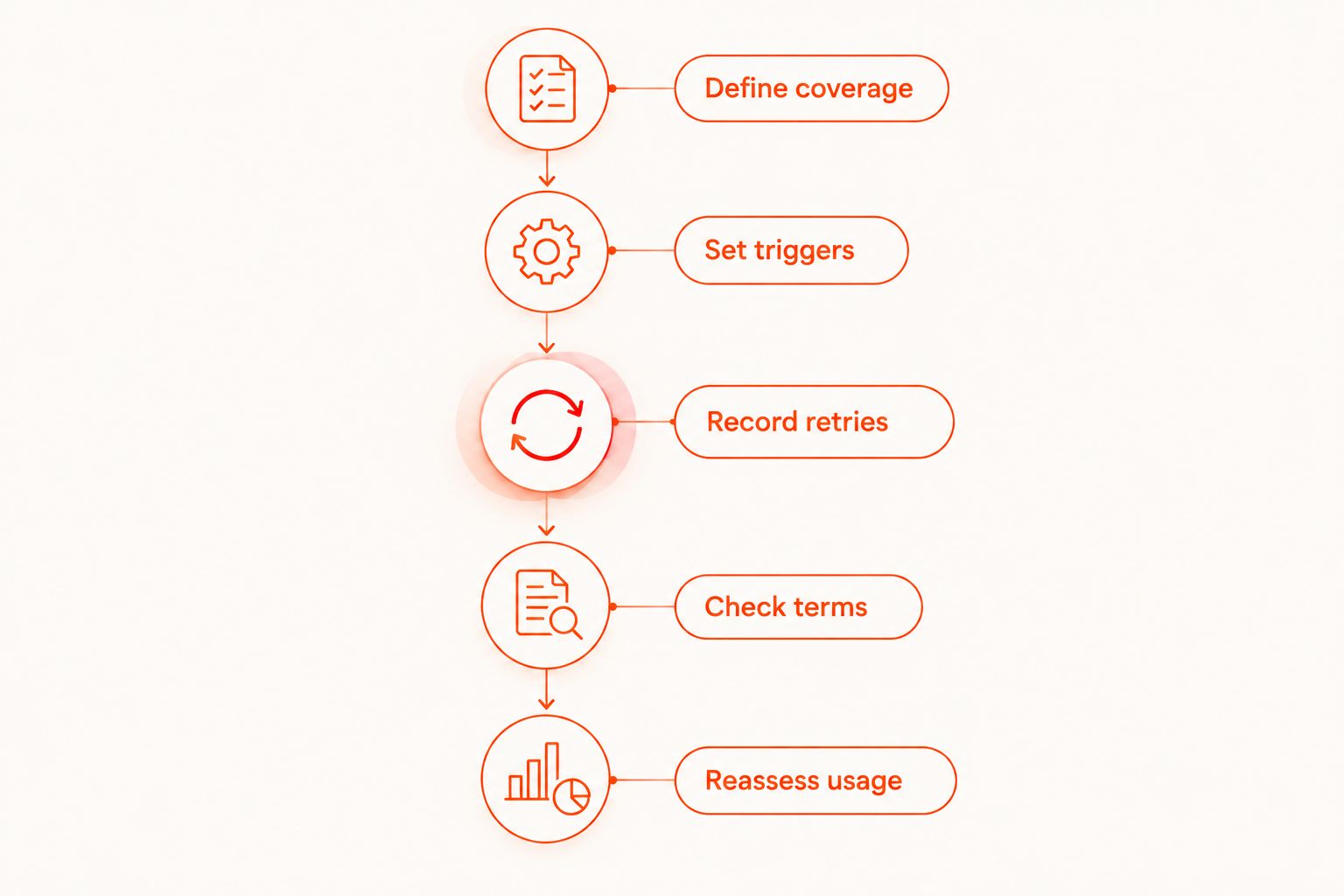
Define coverage
List the user journeys that must pass and the execution targets they require. Keep the release gate explicit: authentication, a core application action, or another journey your team identifies as essential.
Separate required coverage from exploratory checks. This prevents a billing comparison from quietly dropping important tests or including work nobody intends to run.
Set triggers
Write down exactly when CI should submit hosted work. Include branch rules, scheduled checks, and release-candidate execution where applicable.
Avoid a vague instruction such as running tests regularly. An explicit trigger policy gives developers something they can implement and reviewers something they can audit.
Record retries
Treat the original execution and subsequent attempts as separate observations. Record why the retry happened and whether it changed the result.
A passing retry is useful diagnostic evidence, but it does not explain the original failure. Investigate application behavior, test state, and execution setup before increasing retry allowances.
Check terms
Map the workload onto each provider's documented billing unit. Keep unsupported assumptions out of the comparison, especially around cancellations, interrupted runs, and concurrency.
Use the pricing page to check current terms rather than copying figures into a long-lived evaluation document. Date your plan notes so a later reviewer can distinguish current terms from an older quote.
Reassess usage
Compare actual submitted work with the assumptions after your evaluation period. Keep the same coverage and trigger policy when comparing models.
If the workload changes, repeat the comparison. A decision made for release-candidate testing does not automatically apply to a workflow that submits tests throughout development.
Where local execution fits
Maestro Deck is best for mobile and web developers who want a free local desktop runner before adding optional cloud execution. Its desktop runner and inspector support writing and executing Maestro YAML end-to-end flows for iOS, Android, and web apps.
Use the local workflow to develop and inspect flows before deciding which checks belong in hosted execution. Local use does not require a paid cloud plan. Optional cloud execution addresses a different requirement: submitting hosted test work when your workflow needs it.
Keep the product distinction explicit. Maestro Deck is a desktop runner and inspector for Maestro YAML flows; the Maestro framework is not the same product. Do not treat documentation, licensing, or account requirements for one as proof of the other's terms.
Maestro Deck is source-available, not described here as open source. Those licensing labels are not interchangeable. Inspect the applicable license before making redistribution or modification decisions.
The trade-off is straightforward: local execution supports development, but it does not by itself satisfy a requirement for hosted CI runs. Choose the execution environment that meets the release requirement rather than expecting a local desktop workflow to replace every hosted task.
Should you choose per-run billing for occasional CI tests?
Per-run billing is a sensible model to evaluate for occasional CI execution, provided the billable unit matches the work you intend to submit. Confirm failed-run, cancellation, and retry treatment before comparing it with a subscription.
For your 2026 evaluation, define occasional through actual triggers rather than a label. Release-only execution and change-triggered execution are different workloads even when both belong to a small team.
Is a subscription better for testing every change?
A subscription is worth evaluating when its entitlement fits your change-triggered workload. Test frequency alone is not enough: target coverage, suite scope, concurrency, and retry behavior also shape the required capacity.
Check whether the plan supports the feedback schedule you need. Included execution allowance does not establish how quickly concurrent jobs can start or finish.
Should you compare Maestro Cloud and BrowserStack too?
Compare Maestro Cloud and BrowserStack when they are candidates for your hosted execution requirement. Use current official documentation for supported environments, workflow compatibility, billing units, and plan limits; do not infer current capabilities from either product's name.
Keep Maestro Deck's local workflow separate from that vendor comparison. A local runner decision and a hosted provider decision do not need to be the same purchasing decision.
FAQ
What's the best way to compare cloud based testing plans?
Compare cloud based testing plans against the same workload: flows, execution targets, CI triggers, and retry policy. Then check how each plan bills that work and limits concurrency.
Does per-run billing mean each YAML file is billed separately?
Per-run billing does not establish whether each YAML file is billed separately. Check the provider's definition of an execution unit before estimating usage.
Is a cloud testing subscription unlimited?
A subscription label does not establish unlimited execution. Read the included usage, concurrency rules, supported environments, and overage terms.
Do failed tests count toward cloud testing usage?
Failed-test billing depends on the provider's current terms. Check application failures, infrastructure interruptions, cancellations, and retries separately.
Do I need paid cloud execution to use the local desktop runner?
Paid cloud execution is not required to use the free local desktop runner. Add hosted execution when your CI or capacity requirements call for it.
Does simulator support mean physical devices are included?
Simulator support does not establish physical-device availability. Verify the execution environment explicitly before treating a plan as physical-device coverage.
What should I check before selecting a testing plan in 2026?
For a 2026 testing plan, check execution units, included usage, retry treatment, concurrency, artifact retention, and commitment terms. Match those terms to your actual release workflow.
One last thing
A successful retry does not explain a failed first attempt. Keep the first failure visible when reviewing hosted usage; otherwise, the bill records repeated work while your release report hides the reason for it.
Before committing to cloud capacity, write down the release gate and run policy. A clear policy gives you a useful comparison even when provider plans change.


