
Choose Maestro Deck if you need a free local desktop runner and inspector for repeatable Maestro YAML tests; choose Appetize.io if you need people to interact with an iOS or Android app through a browser. The difference is the job: automate release checks on your development machine, or give someone browser-based access to a running mobile app.
- Maestro Deck vs Appetize.io is a choice between local YAML test workflows and browser-based mobile app access.
- Choose the local runner for writing, executing, and inspecting repeatable end-to-end tests.
- Choose Appetize.io when reviewers need to interact with a mobile app through a browser.
- Treat cloud execution, physical-device coverage, and licensing as separate decisions.
Why this matters
A running app is not the same thing as a passing test. Browser access lets someone explore a screen; an automated flow defines actions and checks an expected result. Both help a release, but they answer different questions.
For your 2026 testing workflow, start with the output you need. If the output is a repeatable regression check, prioritize flow authoring and failure diagnosis. If the output is a review session, prioritize access for the person reviewing the app.
Maestro Deck is best for developers who want to write and inspect Maestro YAML end-to-end tests locally. Appetize.io serves a different primary need: browser-based interaction with mobile apps. Neither choice removes the need to define what a successful release looks like.
At a glance
| Dimension | Maestro Deck | Appetize.io |
|---|---|---|
| Best for | Developers and QA engineers building local E2E flows | Reviewers, demonstrators, and testers accessing mobile apps in a browser |
| Standout capability | Desktop runner and inspector for Maestro YAML flows | Interactive browser access to iOS and Android apps |
| Repeatable regression work | Direct fit for authoring and executing YAML test flows | Evaluate automation separately from interactive app access |
| Browser-based app review | Local test authoring is the starting point | Direct fit for browser-based mobile app interaction |
| Local development loop | Run and inspect flows on your development machine | Hosted browser sessions solve a different access problem |
| Collaboration | Share test intent through maintained flows | Share an interactive app experience with reviewers |
| Test state | Requires deliberate accounts, data, and reset conditions | Requires deliberate accounts, data, and reset conditions |
| Device evidence | Simulator or emulator results do not establish physical-device behavior | Virtual-device results do not establish physical-device behavior |
| Pricing model | Free local use; paid cloud execution is optional | Evaluate hosted access against the current plan and usage terms |
Local E2E development and browser review have different winners
Choose the local runner when your task is to maintain test behavior alongside application changes. You need to express an action, identify its target, and check the result. A desktop runner and inspector put those tasks in the development workflow.
Choose Appetize.io when the immediate task is letting another person use the mobile app through a browser. A product reviewer exploring navigation does not necessarily need to edit a test flow. Their useful output is feedback on what they experienced.
The trade-off is explicit. A maintained flow requires engineering work: selectors, test accounts, expected outcomes, and updates when behavior changes. An exploratory session requires human attention and does not, by itself, become a repeatable release check.
Use these selection questions:
- Best for regression ownership: Who will maintain the expected behavior after the feature changes?
- Best for review access: Who needs to interact with the app without joining the local test-authoring workflow?
- Best for release evidence: Does the decision require a recorded test outcome or a person's observations?
Choose against that output, not against the length of either feature list.
YAML inspection wins for flows; browser interaction wins for access
Maestro Deck combines a desktop runner with an inspector for writing and executing Maestro YAML flows. The practical advantage is proximity: flow authoring, execution, and investigation belong to the same local testing task.
Keep the naming precise. Maestro is the framework whose YAML flows you write. The desktop product discussed here is a runner and inspector for those flows. Using the same flow format does not establish an organizational affiliation between products.
Appetize.io's distinguishing capability is browser-based interaction with mobile apps. That makes it a direct fit when the next action is to open the app and inspect its behavior, rather than work on a YAML test definition.
For a 2026 evaluation, separate the two acceptance tasks. Ask a developer to diagnose a failing flow. Ask a reviewer to complete an app walkthrough. Judge each tool on the task it is meant to support, rather than forcing both into an identical demo.
Repeatable regression checks favor the YAML workflow
A regression test needs an expected outcome. Opening a screen is an action; checking that the correct screen or state appears is the test. Keep that distinction visible when selecting your runner.
Start with 1 smoke flow covering a release-critical journey. Choose a journey you can reset and inspect, such as signing in with a dedicated test account and reaching the expected destination. Do not include production credentials or sensitive customer records.
Define 3 checkpoints before expanding coverage:
- Starting state: The account and app are ready for the journey.
- User action: The flow performs the interaction under test.
- Expected result: The flow checks an observable outcome.
Run the same flow for 2 consecutive runs after restoring its starting conditions. This is a practical evaluation exercise, not proof of long-term reliability. It exposes whether the second run depends on state accidentally left by the first.
Browser-based interaction remains useful for investigating the behavior. It does not replace the work of defining assertions, resets, and failure conditions. If Appetize.io automation is part of your proposed setup, evaluate that workflow explicitly instead of treating interactive access as evidence of automated coverage.
Appetize.io wins when a reviewer needs browser access
Appetize.io is the better fit when your acceptance criterion is straightforward: another person needs to interact with an iOS or Android app through a browser. That is an access problem, not primarily a flow-authoring problem.
Consider a design review. The reviewer needs to move between screens, inspect wording, and describe an unexpected interaction. A browser session fits that task more directly than asking the reviewer to become responsible for local YAML tests.
The limitation is the output. A reviewer can miss a branch, stop early, or interpret the expected behavior differently. Give them a short review brief naming the journey, starting account, and feedback you need.
For browser review in 2026, distinguish access success from test success. Opening the app proves the session works. It does not prove that a purchase, sign-in, or account update behaves correctly.
Keep the useful feedback. Convert repeatable defects and agreed expectations into maintained regression checks rather than relying on the next reviewer to remember them.
Local debugging favors a desktop runner
Local authoring suits the developer who is already changing application code and investigating a failing journey. Keep the app, flow, and expected state close enough to examine together.
Use the inspector to investigate the interaction target. Then check whether the failure comes from the target, the app's state, or the expected outcome. Do not rewrite the assertion merely to make a run pass.
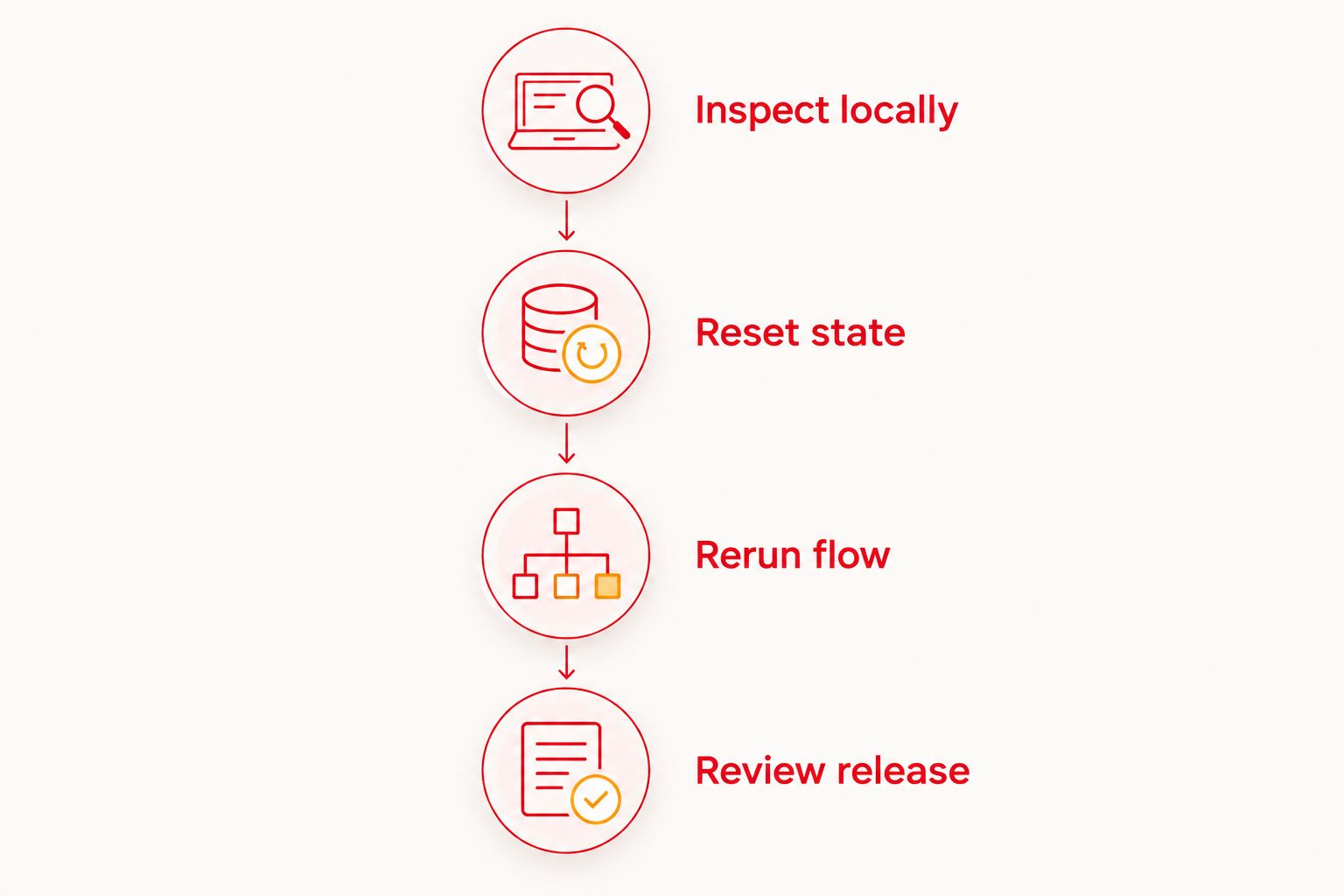
A useful debugging sequence is:
- Inspect locally: Identify the failing interaction and its intended target.
- Reset state: Restore the account and application conditions.
- Rerun flow: Confirm the behavior against the same expectation.
- Review release: Share behavior that still needs human judgment.
The desktop approach still has responsibilities. You must maintain the local environment and keep test data usable. Browser-hosted access moves the interaction elsewhere; it does not automatically resolve a poorly defined starting state or assertion.
Collaboration is a tie because the deliverables differ
Both approaches support collaboration, but they give colleagues different things to work with. A test flow communicates repeatable actions and expected results. A browser session lets a person explore the application directly.
For engineering review, ask whether another developer can understand why the flow exists and what failure means. A long sequence of actions without a clear expectation is difficult to maintain, regardless of where it runs.
For product review, ask whether the reviewer knows what to inspect and where to report an issue. Access alone is not a review process. Include the application build identity and the journey being reviewed in your handoff.
There is no universal collaboration winner. Choose maintained flows for shared test intent; choose browser interaction for shared app exploration. Use both only when both deliverables serve a real release decision.
Neither option removes test-state or hardware decisions
State management is a tie. Both automated runs and human review depend on the account, backend data, permissions, and application state presented at the start.
Keep a written reset rule. State whether the journey expects a new account, an existing account, or an account with prepared data. Avoid tests whose success depends on an unspecified previous session.
Hardware evidence is also a tie at this level of comparison. A simulator or emulator is not a physical device. Browser access to a virtual mobile environment does not change that distinction.
For your 2026 release plan, separate these questions:
- Does the user journey produce the expected application state?
- Does the behavior require evidence from physical hardware?
- Does a permission, sensor, network condition, or operating-system behavior need a separate test?
Do not label the entire release “device tested” because a virtual-device journey passed. Name the environment and limit the conclusion to what the run actually demonstrated.
Pricing: separate local use from hosted execution
Maestro Deck provides a free local desktop runner. Local use does not require a paid cloud commitment or a cloud account. Paid cloud execution is optional when you need hosted runs or execution from CI.
That separation matters for adoption. You can establish whether the flows are useful before making hosted execution part of your release infrastructure. Source-available describes the product; it is not interchangeable with open source. Review the license against your intended use rather than inferring permissions from either label.
For Appetize.io, evaluate the current hosted-service terms against the browser access you need. Check the applicable session limits, concurrency, usage accounting, and access controls before making it a recurring review dependency. Do not assume that interactive review and automated execution have identical commercial terms.
Compare predictability with flexibility: which limits are fixed, which depend on consumption, and what happens when demand changes? Use the pricing page for the local runner's optional cloud path rather than treating cloud execution as a prerequisite.
Final verdict: choose by the person doing the work
Choose Maestro Deck if you own automated release checks
Best for: mobile developers and QA engineers maintaining Maestro YAML flows. Start locally. Define a small smoke suite, inspect failures, and add optional cloud execution when the workflow needs it.
The trade-off is maintenance. Your team owns the test intent, selectors, starting data, and expected results. The runner executes that work; it does not decide what your release must guarantee.
Choose Appetize.io if you own interactive app review
Best for: product reviewers, demonstrators, and testers who need browser-based mobile app access. Choose it when direct interaction is the deliverable and local test authoring is not the reviewer's job.
The trade-off is repeatability. Human exploration produces observations, not automatically a maintained regression suite. Preserve important findings as explicit test cases.
For 2026, keep the decision narrow: automated release checks and interactive review are complementary jobs, not interchangeable proof.
| Dimension | Winner |
|---|---|
| Best for | Local E2E authors: desktop runner; browser reviewers: Appetize.io |
| Standout capability | YAML inspection: desktop runner; browser interaction: Appetize.io |
| Repeatable regression work | Local YAML workflow |
| Browser-based app review | Appetize.io |
| Local development loop | Desktop runner |
| Collaboration | Tie: different deliverables |
| Test state | Tie: explicit setup required |
| Device evidence | Tie: identify the actual environment |
| Pricing model | Free local entry for development; evaluate hosted terms separately |
FAQ
Is Maestro Deck better than Appetize.io for mobile E2E testing?
Maestro Deck is the better fit for developers writing, executing, and inspecting Maestro YAML flows locally. Appetize.io is the better fit when the immediate requirement is interactive mobile app access through a browser.
Can I use the local desktop runner without a cloud account?
Yes. Local use is free and does not require a cloud account; paid cloud execution is a separate, optional step.
Does Appetize.io browser access replace regression tests?
No. Interactive access lets someone use the app, while a regression test needs defined actions, expected results, and controlled starting conditions. Evaluate any proposed automation workflow separately.
Are Maestro and the desktop runner the same product?
No. Maestro is the framework whose YAML flows the desktop runner supports. Support for those flows does not establish an organizational affiliation.
Does source-available mean open source?
No. Source-available and open source are different licensing descriptions. Read the applicable license before deciding whether your intended use is permitted.
Do browser-based mobile sessions prove physical-device compatibility?
No. A simulator or emulator result is evidence about that environment, not a physical device. Test hardware-dependent behavior separately on the required hardware.
When should I add cloud execution to local tests?
Add cloud execution when your release workflow requires hosted runs or execution from CI. First establish clear assertions, repeatable starting conditions, and a useful local smoke suite.
One last thing
Before comparing another feature, deliberately break an expected result in your evaluation flow. Confirm that the run fails for the reason you intended, then restore the correct behavior.
A test that passes is useful only if it also detects the regression it was written to catch. Keep interactive review for discovering questions; keep automated checks for enforcing agreed answers.


