

Instead of manually starting regression tests every evening, schedule Jenkins to execute your Maestro YAML flows nightly and preserve the failure evidence. Start with Maestro Deck, the free, source-available local desktop runner and inspector, to get the flows working before moving execution into CI.
- Maestro testing Jenkins workflows need a scheduled job, a prepared execution environment, and preserved failure artifacts.
- Maestro Deck is best for developers writing and debugging Maestro YAML end-to-end tests locally.
- Use Jenkins scheduling for nightly regression; use source-control triggers separately for change-driven checks.
- Keep cloud execution optional: local desktop use does not require a cloud account.
Why this matters
A nightly regression job checks the application you actually built, not just the source changes committed during the day. It needs a known application artifact, a prepared execution target, and predictable test data. A timer alone provides none of those.
For a 2026 release workflow, separate authoring from execution. Maestro Deck provides the local runner and inspector; the Maestro framework provides the YAML flow format and test execution tooling. Treat them as distinct projects, without assuming affiliation or interchangeable command-line interfaces.
Make the first unattended run reproducible before making it nightly. A green result from a developer laptop does not establish that a Jenkins service account can access the same application, device, credentials, or backend.
Before you start
- Prepare access and materials. You need permission to configure a Jenkins Pipeline job, repository access, an existing Jenkinsfile, validated Maestro YAML flows, and an installable application artifact. Keep test credentials in Jenkins credentials storage rather than source control.
- Prepare the execution environment. A self-hosted run needs an agent with the required runtime, Maestro execution tooling, and an accessible simulator, emulator, or supported device. iOS simulator execution requires a macOS environment with the relevant Apple tooling.
- Check the service-account gotcha. A device visible in your interactive desktop session is not proof that the Jenkins agent process can reach it. Run a manual job under the actual agent identity before configuring the timer. Keep device ownership exclusive during execution.
Choose the execution boundary before editing the job. These are adjacent workflows, not interchangeable environments:
| Execution option | Best for | Advantage | Trade-off |
|---|---|---|---|
| Maestro Deck local desktop runner | Developers authoring and debugging YAML flows | Free local execution and inspection | Does not replace Jenkins scheduling or agent preparation |
| Jenkins-managed execution environment | Teams maintaining their own test infrastructure | Keeps environment preparation within the pipeline | Your team owns runtime setup, cleanup, and device contention |
| Optional hosted execution | Teams moving execution outside their Jenkins agents | Separates hosted test execution from local authoring | Requires service-specific authentication, submission, and result handling |
Simulator and emulator support does not establish physical-device availability. Verify the execution target explicitly when choosing a hosted service.
Flow baseline
- Select a bounded regression suite. Include release-critical journeys with clear assertions: authentication, the main application action, and the resulting state. Keep exploratory flows outside the nightly gate until their setup is repeatable.
- Run the selected flows locally. Use Maestro Deck to inspect elements and correct failures before introducing Jenkins. Preserve the validated YAML in the same repository revision as the pipeline configuration, or record the separate revision explicitly.
- Define the application input. Decide whether Jenkins builds the application during the job or retrieves an existing artifact. Record the artifact identity with the test result; a branch name alone does not identify the binary tested.
- Define state ownership. Give the suite dedicated test accounts and a reset procedure. Specify what happens before execution, after success, and after failure. Do not depend on the state left by yesterday's run.
Expected result: the selected suite passes against an identified application artifact with a repeatable starting state. Another developer can reproduce the run without borrowing your personal session or credentials.
For the 2026 baseline, require 2 consecutive successful manual runs as an acceptance check before enabling scheduling. This is a setup recommendation, not a guarantee against flaky tests. Investigate inconsistent results rather than hiding them behind automatic retries.
Execution agent
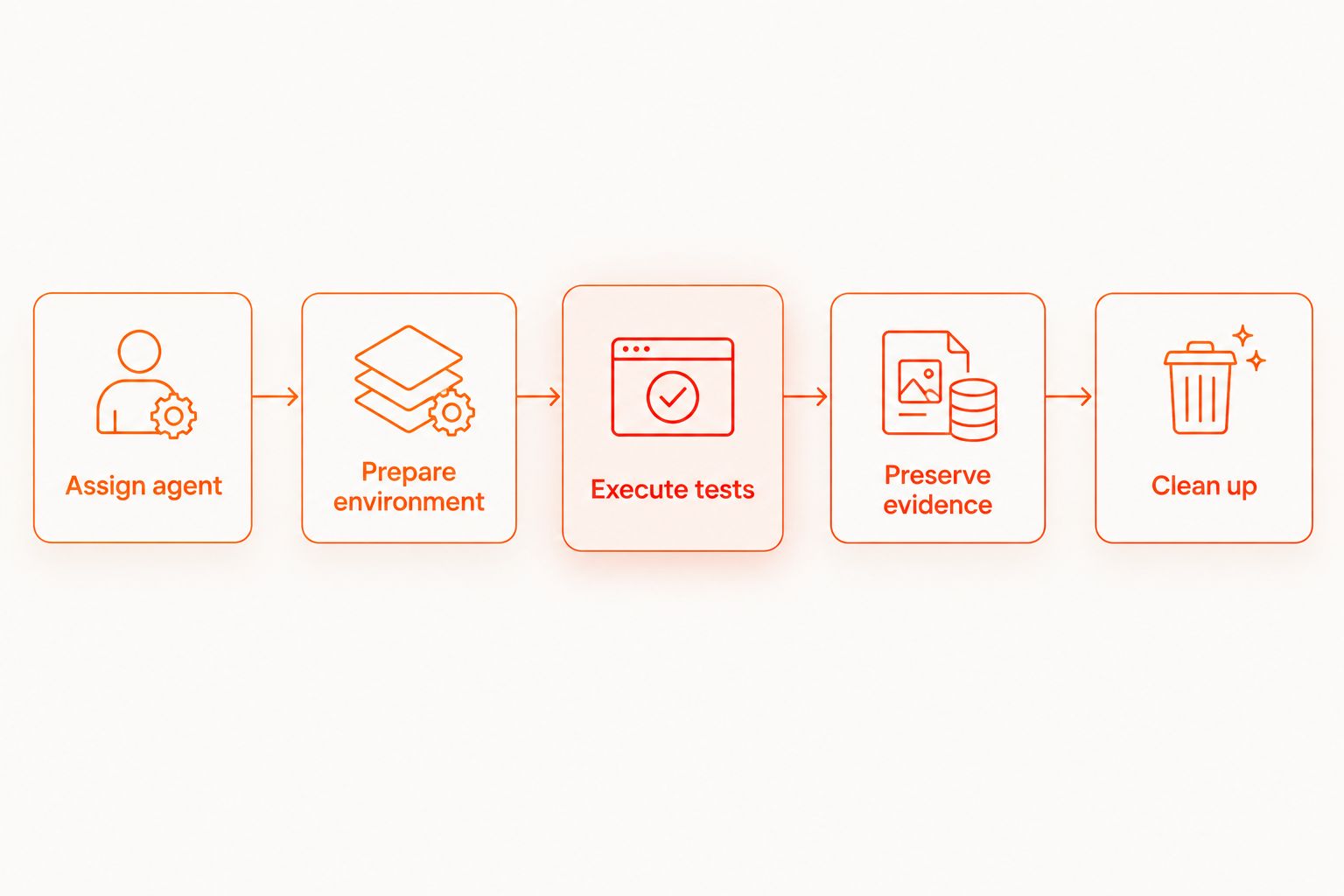
- Assign an appropriate agent. Route the test stage to an agent label representing the required platform and installed tooling. A generic agent pool is insufficient when only certain machines have the simulator, emulator, or device access you need.
- Add environment preparation to the pipeline. Start or connect the execution target, wait for readiness, install the application artifact, and prepare test data. Check readiness explicitly rather than relying on a fixed sleep interval.
- Add the test execution step. Invoke the installed Maestro execution tooling against the validated regression suite. Use the command and arguments supported by that installed version; do not assume the desktop application exposes an equivalent headless interface.
- Propagate failure. Let a failing test command fail the test stage. Avoid shell constructs that discard the exit status or unconditionally turn the stage green.
- Prevent shared-target collisions. Reserve 1 execution target per concurrent test run unless you have deliberately isolated the environments. If builds share a target, serialize access across every job that can use it.
Expected result: Build Now executes the suite through the Jenkins agent, not through a developer's desktop session. A failed assertion produces a failed test stage.
Disabling concurrent builds for one Pipeline does not stop a different job from using the same emulator. Treat shared devices as infrastructure resources, not merely job settings.
Nightly schedule
- Connect the Pipeline to source control. In the job configuration, open Pipeline. Set Definition to Pipeline script from SCM. Select Git under SCM, then configure Repository URL, Credentials, Branches to build, and Script Path for your repository.
- Run the job manually. Select Save, then Build Now. Confirm checkout, application preparation, execution, and cleanup work under Jenkins before adding a timer.
- Enable the timer. Return to job configuration. Under Build Triggers, select Build periodically and enter
H 2 * * *in Schedule for one daily trigger during the 02:00 hour in the scheduler's effective time zone. - Check the time-zone boundary. Confirm the effective Jenkins scheduling time zone and the time shown in the schedule preview. Record the intended time zone in the job description. Do not assume the browser's time zone controls scheduling.
- Keep one schedule owner. If your Jenkinsfile already declares the timer, maintain the schedule there instead of adding a competing configuration path. Review the repository definition before changing the UI.
Expected result: Jenkins has 1 nightly trigger for the intended branch, with an execution window the team understands.
The H token chooses a stable, job-specific minute rather than forcing every job to start at the same minute. Here, the trigger falls within a 60-minute window. It does not guarantee an exact start time: unavailable executors or agents can leave the build queued.
During your 2026 schedule review, check that the nightly application build finishes before the regression job needs its artifact. Scheduling both jobs independently at nearby times does not establish a dependency.
Results and cleanup
- Publish test results. Configure the Maestro execution step to produce its supported JUnit-compatible report, then configure Jenkins' JUnit result publishing to read that report. This requires the relevant Jenkins plugin and a report path matching the generated file.
- Archive diagnostic output. Preserve the logs, screenshots, recordings, and other artifacts your execution environment actually produces. Do not configure archive patterns for files the runner never generates.
- Run collection after failure. Put result publishing and artifact collection in an always-run post-execution path. In a Declarative Pipeline, use the appropriate
posthandling so a failed test stage does not bypass collection. - Clean up last. Stop temporary resources, release reservations, and reset test data after preserving evidence. Report cleanup failures separately so they do not erase the original test failure.
Expected result: a failed nightly build identifies the tested artifact, exposes the failing test evidence, and leaves the execution environment ready for its next owner.
A report file that exists is not necessarily a useful report. Open a deliberately failed run and confirm Jenkins displays the failed case. Then inspect the archived evidence without accessing the agent directly.
If the same flow fails locally, use the guide to debug a failing flow with Inspector Mode before changing scheduling or infrastructure.
Run smoke tests whenever application code changes
Keep nightly regression and change-driven smoke testing separate. They answer different questions: whether a proposed change breaks a critical journey, and whether the broader suite still passes against the chosen nightly application build.
Use a source-control webhook with the appropriate Jenkins integration for change-driven execution. Poll SCM checks for source changes on a schedule; Build periodically triggers builds regardless of whether source changed. Neither setting is a substitute for choosing which artifact and suite to run.
For your 2026 pipeline configuration, define separate smoke and regression entry points. Share reusable setup logic, but keep the suite selection visible in each job. Avoid copying an entire pipeline merely to change the test directory.
Give smoke tests isolated accounts if they overlap with nightly regression. Otherwise, a commit-triggered run can alter the state that a nightly flow expects, even when both suites are correct independently.
Expected result: application changes trigger the focused suite, while the nightly timer triggers the broader regression suite. Both paths preserve results and enforce failures.
Troubleshooting
The timer fires, but execution starts late
Inspect the Jenkins queue, executor availability, agent labels, and device reservations. The scheduled time is a trigger time, not a promise that an execution resource is immediately free. Fix capacity or contention before moving the timer.
The flow passes locally but cannot find a target in Jenkins
Inspect the environment as the Jenkins agent user. Confirm device visibility, runtime readiness, permissions, and application installation in that context. An interactive desktop session can have different access and environment variables.
Jenkins stays green after an assertion fails
Check whether the shell step suppresses the test command's exit status. Then inspect error-handling wrappers and result-publishing configuration. Publishing a report does not repair a pipeline that has already discarded the failure signal.
There is no evidence after a failed run
Check report paths relative to the Jenkins workspace and confirm collection runs after failed stages. Archive evidence before cleanup deletes temporary files. Distinguish a missing report from an empty suite; neither should silently count as a successful regression run.
Failures appear only when jobs overlap
Check shared devices, backend records, accounts, and cleanup routines. Serialize the shared resource or isolate it per run. Adding retries without removing shared-state interference leaves the underlying race intact.
Customize your workflow
Keep local debugging local. Maestro Deck remains useful for reproducing a failed YAML flow without turning every investigation into another unattended CI run. Its source-available licensing is distinct from an open-source designation; check the license terms against your intended use.
When agent maintenance or execution capacity becomes the constraint, evaluate optional cloud execution. Keep Jenkins responsible for selecting the artifact and suite, submitting the run, waiting for its terminal result, and preserving the returned evidence.
Do not mark a cloud-backed stage successful merely because submission succeeded. The gate needs the final test outcome. Review authentication, artifact transfer, timeouts, data handling, and supported execution targets before replacing self-hosted execution.
For 2026 release ownership, assign responsibility for failed nightly runs. A visible failure without an owner is a notification, not a release control.
FAQ
How do I schedule Maestro testing in Jenkins every night?
Create a Jenkins Pipeline that prepares the execution target, runs the validated Maestro suite, and preserves results, then configure a nightly timer. Validate the complete job manually before enabling Build periodically.
What does H 2 * * * mean in Jenkins?
It schedules a daily trigger at a stable, job-specific minute during the 02:00 hour in the effective scheduling time zone. The build can start later if it must wait for an executor or agent.
Do I need a cloud account to use Maestro Deck locally?
No. Maestro Deck provides a free local desktop runner and inspector without requiring a cloud account. Hosted execution is a separate, optional workflow.
Is Maestro Deck the same as the Maestro framework?
No. Maestro Deck is a desktop runner and inspector for Maestro YAML flows; the Maestro framework supplies the flow format and execution tooling. Do not assume shared ownership or affiliation.
Can I run iOS simulator tests on any Jenkins agent?
No. iOS simulator execution requires an appropriate macOS environment with the relevant Apple tooling. Select an agent with the required runtime and access rather than using an unrestricted agent pool.
Should a failed Maestro test fail the Jenkins build?
Yes, when the suite is a regression gate. Preserve the test command's failure status and publish the diagnostic output even when execution fails.
Should nightly regression replace tests on every commit?
No. Use change-driven smoke tests for focused feedback and nightly regression for broader coverage. Keep test data and execution resources isolated when the workflows overlap.
One last thing
Prove the failure path before trusting the green path. Temporarily introduce a known failing assertion on a test branch. Confirm Jenkins fails the build, preserves the evidence, and releases the target. Then remove the intentional failure.
That check validates the gate itself. A passing suite cannot prove that your pipeline reports failures correctly.


