

Use assertions as the foundation of your UI testing tools, then add visual snapshots where appearance is part of the requirement. Assertions check observable behavior and state; visual comparisons check rendered appearance against an approved baseline. Neither replaces the other: a screen can look correct while its controls fail, and a working flow can still contain a broken layout.
- For UI testing tools, use assertions for behavior and visual snapshots for appearance; keep both tied to explicit requirements.
- Maestro Deck suits developers who want a free local runner and inspector for Maestro YAML end-to-end flows.
- Treat visual baseline updates as review decisions, not routine fixes for failing tests.
- Add cloud execution when your release workflow needs it; local testing does not require paid cloud use.
Start locally with Maestrodeck, the free, source-available desktop runner and inspector for Maestro YAML flows. Use the local feedback loop to write, run, and debug end-to-end tests before deciding whether your workflow needs optional paid cloud execution.
UI testing tools: assertions or visual snapshots?
Choose assertions for behavioral requirements. Choose visual snapshots for appearance requirements. Use both when the same screen carries both risks.
The useful distinction is not whether a tool takes screenshots. It is what evidence makes a test pass or fail. A screenshot saved for debugging is an artifact; a visual comparison evaluates that image against a baseline under defined comparison rules.
| Approach | Best for | Evidence it evaluates | Main advantage | Main limitation |
|---|---|---|---|---|
| Assertions | Confirming user-visible behavior and state | Expected text, element state, or another explicit condition | States exactly what must be true | Checks only the conditions you specify |
| Visual snapshots | Detecting unintended appearance changes | Rendered output compared with an approved baseline | Covers appearance beyond individually written checks | Differences need interpretation and baseline review |
| Combined coverage | Flows where behavior and appearance both matter | Explicit conditions plus selected visual checkpoints | Separates functional acceptance from visual acceptance | Requires maintaining both checks and baselines |
For your 2026 release suite, start with the requirement rather than a tool category. If the requirement says a confirmation must appear after submission, write an assertion. If it says that confirmation must remain readable without overlapping another control, add an appearance check.
Do not infer coverage from the presence of a screenshot. Ask whether the test evaluates it, what it compares, and who approves a change.
Why this matters
UI failures need different evidence. A submission can leave the user on the wrong screen without producing an obvious visual defect. A translated label can obscure a control even when the expected text exists in the interface.
A passing assertion is evidence for that assertion, not a certificate for the entire screen. The same boundary applies to snapshots: matching an approved image does not establish that an untested interaction works.
For a 2026 test plan, keep the acceptance rule next to each check. That makes failures actionable and prevents screenshot collection from becoming a substitute for testing.
Assertions: best for behavior and state
Use assertions to describe an observable outcome. After the user performs an action, specify what must become true. Prefer outcomes the user depends on over implementation details that happen to exist today.
A submission flow illustrates the difference. Checking that a button exists establishes its presence. Checking that a confirmation appears after submission establishes a later UI state. Neither alone proves that every downstream system processed the submission correctly.
Write the test boundary explicitly:
- Presence: The expected control or message is visible.
- State: The interface exposes the expected enabled, selected, or other relevant state.
- Transition: An action leads to the intended screen or result.
- Recovery: An invalid action produces the intended error and leaves a usable recovery path.
These are test-design categories, not promises that every runner supports every check. Select a supported assertion that expresses your requirement without silently weakening it.
Where assertions fall short
Assertions do not automatically inspect spacing, clipping, typography, or every arrangement of nearby elements. A test that finds expected text has not necessarily established that the text is readable in the intended layout.
Selector quality also affects maintenance. A check tied to an incidental layout detail can fail after an acceptable redesign. Use selectors that survive layout changes to keep behavioral intent separate from screen arrangement.
Recommendation: make assertions your default for release-blocking user outcomes. Add appearance coverage where an explicit assertion would leave a meaningful visual requirement unchecked.
Visual snapshots: best for appearance changes
Use visual snapshots when the rendered arrangement is itself part of acceptance. Examples include a dialog that must not cover its primary action, a label that must fit its container, or an error message that must remain readable beside other content.
A baseline represents approved output for a defined environment and state. It is not automatically correct because it was captured first. Review the initial image against the requirement before accepting it.
Keep a visual checkpoint's purpose narrow. A checkout summary might need review because its totals and primary action must remain visible together. That is a clearer reason than capturing every screen simply because the runner can save images.
Where visual snapshots fall short
A visual difference identifies changed output, not its cause or acceptability. An intended redesign and an unintended layout regression can both produce differences. Someone still needs to decide which occurred.
Visual comparisons also do not establish the behavior of controls that were never exercised. A correctly rendered submit button is not proof that submission works.
Before selecting a visual-testing system in 2026, inspect its documented comparison behavior and baseline workflow. Distinguish screenshot capture, image comparison, and approval management. Do not assume that support for one includes the others.
Recommendation: add visual checkpoints to named appearance risks, not to every reachable screen. Keep the baseline review small enough that reviewers can explain each accepted change.
Why the right testing mix varies
The balance between assertions and snapshots depends on the requirement and the environment you intend to support. Use these factors to decide where each check belongs:
- Behavioral consequence: Add explicit assertions when an incorrect transition or state prevents a user from completing the flow.
- Appearance requirement: Add visual coverage when clipping, overlap, or arrangement would violate acceptance criteria.
- Content variability: Define how changing text, dates, and user content will be controlled or handled during comparisons.
- Environment coverage: Decide which platform, viewport, language, and display settings a checkpoint represents.
- Review ownership: Assign someone to distinguish an intended visual update from a regression before accepting a baseline change.
These factors determine coverage, not a universal assertion-to-snapshot ratio. More screenshots do not resolve an unclear acceptance rule. More assertions do not automatically cover visual defects.
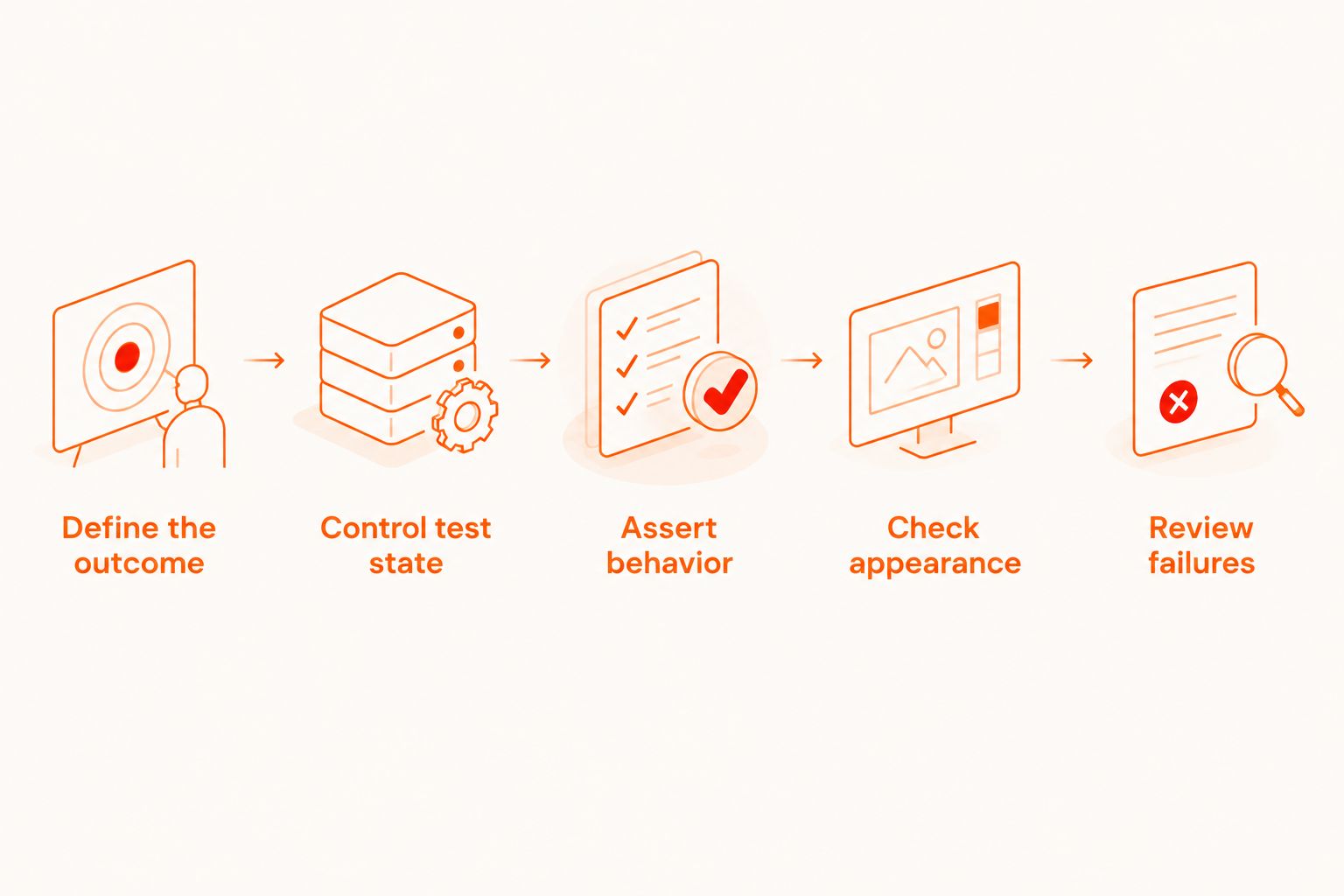
Build a focused release check in 5 steps
Use this sequence to turn a screen requirement into maintainable end-to-end coverage. Start with a local run so you can inspect the flow while it is still small.
1. Define the outcome
Write the user-visible result in plain language before writing the test. For example: submitting valid information shows a confirmation, while invalid information shows an actionable error.
Define what is outside the test boundary too. If the test checks only the UI confirmation, do not describe it as proof of downstream delivery or persistence without additional evidence.
2. Control test state
Specify the starting account, application state, and test data. Avoid having the expected result depend on a previous test's unfinished work.
For a visual checkpoint, also specify the environment and content that make the approved image meaningful. Compare equivalent states rather than treating every difference as an application defect.
3. Assert behavior
Exercise the user action and check its intended result. Keep the check attached to the requirement, not to an arbitrary pause or an incidental screen detail.
For an initial submission-flow review, define 3 checks: the required control is present, successful input reaches the intended confirmation, and invalid input exposes the intended recovery path. This is a starting checklist, not a coverage guarantee.
4. Check appearance
Add a visual comparison only if the flow has an appearance requirement. Select a stable checkpoint where a reviewer can judge the relevant layout without reconstructing the entire interaction.
Begin with 1 baseline per defined checkpoint and environment. If you add another environment, decide whether it needs its own approved output rather than treating unlike renderings as interchangeable.
5. Review failures
Read the failure against the requirement before changing the test. Classify the result as an application defect, an intended change, an environment difference, or a test-design problem.
Do not update the baseline merely to restore a passing run. An approval should explain why the new appearance is acceptable.
Where Maestrodeck fits in this workflow
Maestrodeck is best for developers who want a free local runner and inspector for Maestro YAML end-to-end flows. Its stated scope covers writing and executing flows for iOS, Android, and web apps. Start there when you need a local place to develop and inspect your tests.
Keep the naming clear: Maestro is the framework whose YAML flows you write; Maestrodeck is the desktop runner and inspector described here. Do not treat the names as interchangeable or infer affiliation from compatibility.
The local workflow and optional paid cloud execution answer different needs. Local execution supports hands-on test development. Evaluate cloud execution when you need runs from CI or need to scale beyond your local workflow.
The trade-off is that a local runner alone is not a complete CI execution plan. Separately define scheduling, environment coverage, credentials, failure ownership, and the artifacts your reviewers need.
For your 2026 evaluation, verify visual comparison separately from flow execution. Do not assume that a runner and inspector also provide baseline storage, image-difference rules, or visual approval management.
The licensing distinction matters too. Source-available means you can access source under the applicable license; it is not a substitute for checking whether that license meets open-source criteria or your organization's usage requirements.
Evaluate optional cloud execution
Keep local test development separate from the decision to add cloud runs to your release workflow.
Can assertions replace visual snapshots?
Assertions replace visual snapshots only when they cover the actual acceptance requirement. If the requirement is an observable state or transition, a suitable assertion provides direct evidence. If the requirement concerns appearance, checking text or presence alone leaves that requirement unresolved.
Should every screen have a visual baseline?
No. Give a screen a visual baseline when there is a specific appearance requirement worth reviewing. Record the reason for that checkpoint and its environment. Remove snapshots that generate review work without supporting a named requirement.
Should visual differences fail a release build?
Use visual differences as release-blocking signals only with a defined review and approval process. A difference is evidence of changed rendering, not automatically evidence of a defect. Assign ownership before making that signal a release gate.
FAQ
What's the best starting point for UI testing tools?
Start with assertions for the user-visible outcomes your release depends on. Add visual snapshots where appearance is an explicit requirement, rather than treating either approach as complete coverage.
Is a screenshot the same as a visual regression test?
No. A screenshot records rendered output; a visual regression test compares output against an approved reference using defined rules. Saving an image for debugging does not by itself evaluate it.
Can a test pass while the screen layout is broken?
Yes. A test can satisfy its explicit assertions while leaving a layout defect unchecked. Add an appearance check when clipping, overlap, or arrangement is part of acceptance.
How many visual snapshots should a release suite include?
Include snapshots for named appearance requirements, not a fixed screen quota. Start with a defined checkpoint and environment, then expand only when another requirement needs distinct evidence.
Does Maestrodeck require paid cloud execution for local tests?
No. Maestrodeck provides a free local desktop runner and inspector for Maestro YAML flows. Paid cloud execution is optional when your workflow needs cloud runs or CI execution.
Should I accept a new baseline whenever a visual test fails?
No. Accept a new baseline only after reviewing the change against the intended appearance requirement. Otherwise, a baseline update can approve the defect the test was meant to expose.
One last thing
Before adding another check to your 2026 suite, write the defect it should catch and the evidence that would expose it. If you cannot name either, tighten the requirement first.
A baseline update changes what your test considers correct. Review it as an acceptance decision, not housekeeping. Keep functional outcomes and visual approval as 2 evidence layers with clear owners.


