

Best for mobile teams starting with Maestro YAML: Maestro Deck, with its free local desktop runner. Best overall for browser-engine coverage: Playwright. Best for existing WebDriver suites: Selenium Grid. Best for interactive JavaScript debugging: Cypress. Best for hosted browser infrastructure: BrowserStack.
- Playwright leads the best cross browser testing tools for CI pipelines when browser-engine coverage is the main requirement.
- Maestro Deck is best for mobile teams developing Maestro YAML flows locally before adding optional cloud execution.
- Selenium Grid fits existing WebDriver suites; Cypress fits JavaScript teams prioritizing interactive test development.
- BrowserStack fits teams choosing hosted browser infrastructure instead of maintaining their own grid.
Why this matters
A cross-browser pipeline needs more than a successful test run. It needs an explicit coverage contract: which browsers execute, what failures block a merge, and what evidence developers receive when something breaks.
For your 2026 shortlist, separate the test framework, the local editing environment, and the execution infrastructure. These solve different problems. Adding hosted execution does not automatically expand the browser coverage of an existing test suite.
Maestro Deck is best for mobile developers who want to write and inspect Maestro YAML flows locally. It is not a substitute for proving coverage across the browser engines your web application supports.
What makes the best cross-browser testing tools?
Use these criteria before comparing features:
- Coverage fit: Match the browser, operating system, and device combinations your product promises to support. An engine name alone is not a complete coverage matrix.
- CI control: Require a clear pass-or-fail result and a defined response to execution errors. A job that cannot start is not a passing test.
- Failure evidence: Keep the failing assertion, relevant logs, and supported diagnostic artifacts together. Developers need a reproducible failure, not just a red badge.
- Local reproduction: Choose a workflow developers can inspect before pushing another commit. Separate application defects from environment setup failures.
- Operational ownership: Decide who maintains runners, browser installations, test data, and concurrency. Hosted infrastructure changes that responsibility; it does not remove test maintenance.
- Test portability: Check how much existing test code survives the move. Replacing infrastructure and rewriting a suite are different projects.
Build your browser coverage matrix before expanding the suite. For a 2026 release workflow, each required combination should have an owner, a trigger, and a failure policy.
Cross-browser testing tools at a glance
These options occupy different layers of the testing stack. Choose the missing layer rather than treating every entry as a direct replacement.
| Tool | Best for | Standout capability | Key limitation |
|---|---|---|---|
| Playwright | Browser-engine coverage in code-based CI suites | Chromium, Firefox, and WebKit automation | Engine coverage does not prove every branded-browser and device combination |
| Maestro Deck | Local Maestro YAML development for mobile and web workflows | Desktop runner and inspector | Exact browser coverage still needs separate validation |
| Selenium Grid | Existing WebDriver suites needing distributed execution | Routing WebDriver sessions to remote browser instances | You own grid setup and maintenance when self-hosting |
| Cypress | JavaScript teams prioritizing interactive test debugging | Interactive runner and command-level feedback | Its execution model differs from WebDriver-based suites |
| BrowserStack | Teams outsourcing browser execution infrastructure | Hosted browser testing infrastructure | Hosted execution adds external access and data-handling decisions |
1. Playwright: best for browser-engine coverage in CI
Playwright automates Chromium, Firefox, and WebKit through a code-based testing workflow. Its test runner supports browser projects, making it a strong default when you want the same application checks to execute across 3 browser engines.
That is an engine-level statement, not a guarantee about every shipping browser. A WebKit run does not establish coverage for every Safari version, operating system, or physical Apple device.
Playwright pros:
- Browser projects make the intended execution matrix explicit in configuration.
- Traces and other supported artifacts help developers investigate failed runs.
- Local execution and CI execution can share the same test definitions.
Playwright cons:
- Your team still maintains selectors, fixtures, test accounts, and runner dependencies.
- Device emulation does not replace testing on physical devices when those devices are required.
Best for: Web teams building a code-based regression suite around browser-engine coverage.
Start with a critical user journey and make its assertions specific. Check the resulting page state, not merely whether a button accepted a click. Then expand browser projects without silently changing the journey being tested.
Verdict: Buy into Playwright as the default web-first shortlist choice. Confirm the exact browser and operating-system requirements before making it your only release gate.
2. Maestro Deck: best for local Maestro YAML development
Maestro Deck provides a free, source-available desktop runner and inspector for writing and executing Maestro YAML end-to-end flows for iOS, Android, and web apps. Start locally; paid cloud execution is optional when you need execution from CI or additional execution capacity.
The desktop application and the Maestro framework are distinct. Maestro YAML defines the test flows; choosing a runner does not establish ownership of, or affiliation with, the framework.
Maestro Deck pros:
- The desktop runner gives developers a local starting point for flow development.
- The inspector supports investigating application interactions while working on flows.
- The stated workflow covers iOS, Android, and web applications.
- Local use does not require purchasing cloud execution.
Maestro Deck cons:
- Web support alone does not establish parity with a dedicated cross-browser matrix.
- Source-available licensing is not the same as open-source licensing; review the license against your intended use.
Best for: Mobile developers and QA engineers adopting Maestro YAML while keeping local development separate from optional cloud execution.
For a 2026 evaluation, write down the exact environments you need before choosing hosted runs. Simulator, emulator, browser, and physical-device execution are distinct requirements. Do not substitute one for another in your acceptance criteria.
Verdict: Buy into the local workflow for Maestro YAML; hold the cross-browser decision until the required environments are confirmed.
3. Selenium Grid: best for existing WebDriver suites
Selenium Grid routes WebDriver commands to remote browser instances. It fits teams that already have Selenium tests and need distributed execution without replacing their existing automation approach.
Grid is execution infrastructure, not a finished regression suite. You still choose the language bindings, test runner, assertions, reporting, and browser-node configuration.
Selenium Grid pros:
- Existing WebDriver suites can use remote browser execution.
- Language choices follow Selenium's supported bindings rather than a single test language.
- A self-hosted deployment gives your team control over its browser infrastructure.
Selenium Grid cons:
- Self-hosting includes browser lifecycle, node health, capacity, and upgrade work.
- Diagnostic quality depends on the reporting and artifact collection you configure around the suite.
Best for: Teams with substantial WebDriver investment and a clear owner for execution infrastructure.
Do not rewrite stable tests merely to change where browsers run. First identify whether the actual problem is test design, insufficient execution capacity, or unreliable infrastructure. A new framework does not automatically fix shared test data or weak assertions.
Verdict: Hold a working WebDriver suite and use Selenium Grid when distributed execution is the missing capability.
4. Cypress: best for interactive JavaScript test debugging
Cypress provides a JavaScript-oriented testing workflow with an interactive runner and command-level feedback. It fits teams that want test development close to their frontend application work.
Its execution model differs from Selenium's remote WebDriver model. Evaluate your application's navigation, origin boundaries, and browser requirements against current Cypress documentation before committing the suite.
Cypress pros:
- The interactive runner helps developers inspect test execution during authoring.
- Command-level feedback supports investigating where a test stopped matching expectations.
- JavaScript-based tests fit naturally into JavaScript application repositories.
Cypress cons:
- Teams maintaining tests in other languages must adopt its JavaScript-oriented workflow.
- Browser support and execution constraints need checking against the exact application journeys you intend to automate.
Best for: Frontend teams that prioritize interactive debugging and want tests maintained alongside JavaScript application code.
Use a representative workflow during evaluation, not a demonstration page. Include the authentication and navigation boundaries your application actually uses. A successful isolated form test does not prove the release journey fits the runner.
Verdict: Buy into Cypress when its debugging workflow and execution model fit your application; skip a migration based only on runner appearance.
5. BrowserStack: best for hosted browser infrastructure
BrowserStack provides hosted browser testing infrastructure, including automated testing workflows. It belongs on the shortlist when your team wants remote execution rather than maintaining its own browser grid.
Treat the service as an infrastructure decision first. Your selected automation framework, required browser combinations, application access, and diagnostic requirements still determine whether the workflow fits.
BrowserStack pros:
- Hosted execution shifts browser infrastructure operation away from your own grid.
- Remote testing can support workflows where local browser access is insufficient.
- Teams can evaluate hosted infrastructure without assuming they must replace every existing test.
BrowserStack cons:
- Private application access and test credentials require an explicit security review.
- Supported environments and framework integrations must match your selected service and configuration.
Best for: Teams that need hosted execution and prefer an external infrastructure provider over operating browser nodes themselves.
For a 2026 procurement decision, evaluate the exact environment list rather than the service name. Check whether each required run uses a desktop browser, simulator, emulator, or physical device, and confirm how your test reaches the application.
Verdict: Buy into hosted infrastructure when infrastructure ownership is the problem; hold until access and data-handling requirements are resolved.
Build the CI workflow before expanding coverage
Keep your initial pipeline deliberately narrow. Use 2 CI jobs as a starting design: a smoke job that gates routine changes and a matrix job that exercises the wider required coverage.
- Local inspection: Reproduce the critical journey and inspect failures before pushing changes.
- Smoke job: Run the smallest meaningful release check against a defined application build.
- Matrix job: Execute that journey across the required browser environments.
- Failure review: Preserve evidence and assign ownership before adding retries or more coverage.
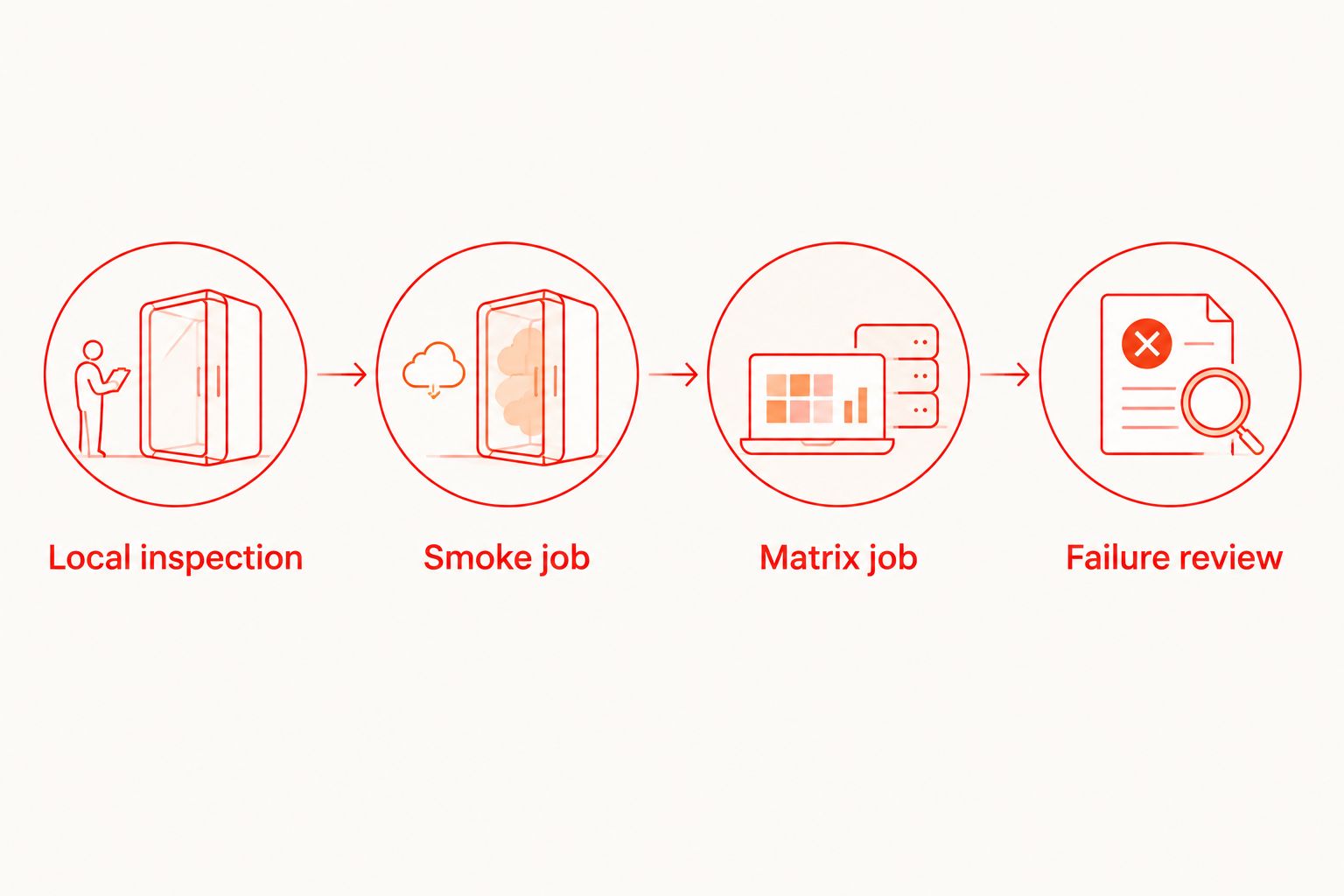
Start with 1 smoke flow that proves a meaningful user outcome. Add explicit preconditions, isolated test data, and an assertion on the final application state. These are proposed pipeline boundaries, not performance benchmarks.
For your 2026 release policy, define what happens when infrastructure fails separately from what happens when an assertion fails. Neither condition should disappear into an unconditional retry loop.
How these tools are ranked
The ranking prioritizes coverage fit, local reproduction, CI control, failure evidence, operational ownership, and test portability. Playwright leads for browser-engine automation; the other entries win distinct workflow decisions rather than competing for the same default.
This is a capability-based shortlist, not a measured speed benchmark. Select tools by the requirement they satisfy, then validate them against your own application and release checks.
Which cross-browser testing tool should you choose?
Choose Playwright if you are starting a web-first, code-based cross-browser suite. Keep an existing Selenium suite when it already matches your requirements, choose Cypress for its interactive JavaScript workflow, and evaluate BrowserStack when hosted execution solves an infrastructure problem.
For Maestro YAML development, start with Maestro Deck's local runner and inspector. Add optional cloud execution when your workflow requires hosted runs or execution from CI—not as a prerequisite for writing your first flow.
Start with a local flow
Use the free desktop runner first. Add optional cloud execution when your release workflow needs it.
FAQ
What's the best cross-browser testing tool for a new CI pipeline?
Playwright is the default shortlist choice for a new code-based suite requiring Chromium, Firefox, and WebKit coverage. Confirm your exact browser, operating-system, and device requirements before treating engine coverage as complete release coverage.
Can I use Maestro Deck without buying cloud execution?
Yes. Maestro Deck provides a free local desktop runner and inspector; paid cloud execution is optional. Start locally and evaluate cloud execution when your CI workflow requires it.
Is Maestro Deck the same thing as the Maestro framework?
No. Maestro Deck is a desktop runner and inspector for Maestro YAML flows, while Maestro is the framework those flows target. The relationship does not establish an affiliation.
Should I replace Selenium with Playwright?
Keep Selenium when your existing WebDriver suite meets your coverage and maintenance requirements. Consider Playwright when its browser projects and development workflow solve a specific problem that justifies migration.
Does browser emulation replace physical-device testing?
No. Browser emulation, simulators, emulators, and physical devices provide different execution environments. Use physical-device testing when your release requirements depend on behavior on physical hardware.
Is source-available software the same as open-source software?
No. Source-available means source code is accessible under its stated license; open-source licensing carries separate requirements. Review the actual license before assuming rights to modify, redistribute, or offer hosted services.
What should happen when a browser test fails in CI?
Preserve the failed assertion and available diagnostic artifacts, then identify whether the failure comes from the application, test, or execution environment. Apply an explicit merge policy rather than allowing retries to hide unresolved failures.
One last thing
A green pipeline proves only what its assertions checked. Before adding another browser, remove the final assertion from a critical test and ask whether the remaining steps still claim to prove the user outcome. If they do, tighten the test's definition of success before expanding execution.


