

Best overall: Playwright. Best for local Maestro YAML workflows: Maestro Deck. Best for an existing WebDriver suite: Selenium. This 2026 guide compares the best cross browser testing tools for QA teams by browser coverage, debugging workflow, and execution environment—not by a single feature count.
- Playwright leads the best cross browser testing tools for QA teams building a new browser automation suite.
- Maestro Deck is best for developers running Maestro YAML flows locally across mobile and web apps.
- Selenium suits existing WebDriver suites; BrowserStack supplies hosted browser and device environments.
- Cypress suits frontend-focused testing; confirm browser requirements before adopting any runner.
Why this matters
Cross-browser testing involves two separate decisions: how you write tests and where you execute them. A framework defines commands, assertions, and debugging behavior. An execution service supplies environments. Buying the second does not replace choosing the first.
Start with the free local desktop runner if your release workflow already uses Maestro YAML flows. Use optional paid cloud execution when you need hosted runs or CI execution. Local use does not require a cloud account.
Maestro Deck is best for developers who want a local desktop runner and inspector for Maestro YAML end-to-end tests. That is a different job from proving compatibility across every required desktop browser. Keep those requirements separate when choosing your 2026 stack.
What makes the best cross-browser testing tools?
Use these criteria before comparing names:
- Browser coverage: Match the required browser, version, operating system, and device—not just the engine name.
- Debugging workflow: Prefer a runner that makes failed actions, selectors, and assertions understandable on your development machine.
- Test ownership: Choose a language and test format your developers and QA engineers can maintain together.
- Execution environment: Distinguish local browsers, hosted browsers, simulators, emulators, and physical devices.
- Release integration: Require a repeatable command, controlled test state, and a clear failure policy before blocking releases.
- Maintenance burden: Evaluate test code, environment setup, and failure investigation as separate responsibilities.
Write a browser coverage matrix before evaluating providers. Each required environment needs an owner and an execution path. A tool that covers several engines still needs checking against the actual environments in that matrix.
For a focused 2026 evaluation, select 1 critical journey and run the same business outcome through each candidate. Keep the account state and expected result consistent. This is an evaluation method, not a claim that one journey provides adequate release coverage.
Best cross-browser testing tools at a glance
| Tool | Best for | Standout capability | Key limitation |
|---|---|---|---|
| Playwright | New code-first browser suites | Chromium, Firefox, and WebKit automation | Engine coverage does not equal every branded browser and device |
| Maestro Deck | Local mobile and web YAML workflows | Desktop runner and inspector for Maestro flows | Not a substitute for a verified browser coverage matrix |
| Selenium | Existing WebDriver automation | Browser automation through WebDriver | Requires decisions about runner, assertions, and infrastructure |
| BrowserStack | Hosted browser and device execution | Remote browser environments and real mobile devices | Hosted infrastructure does not replace test design or maintenance |
| Cypress | Frontend-focused browser testing | Interactive browser testing and debugging | Confirm required browser support and workflow constraints |
These options occupy different layers. Playwright, Selenium, and Cypress provide browser automation approaches. The local desktop option centers on Maestro flows. BrowserStack supplies hosted environments and related testing services, so it can complement a framework rather than replace one.
1. Playwright: best for new code-first browser suites
Playwright automates Chromium, Firefox, and WebKit. Its test runner supports browser projects, assertions, and tracing, giving a new browser automation suite a defined starting structure.
Best for: QA teams and developers starting a code-first web end-to-end suite without an existing framework commitment.
Playwright's 3 browser engines make it useful for checking behavior across different rendering engines. Do not report a WebKit run as proof that a particular Safari version passed on a particular Apple device. Engine-level testing and product-specific compatibility checks answer different questions.
Playwright pros:
- Covers Chromium, Firefox, and WebKit in one automation framework.
- Provides browser contexts for separating session state.
- Offers traces that support failure investigation.
Playwright cons:
- Requires developers to maintain test code and fixtures.
- Does not establish physical-device coverage by itself.
- Still needs a plan for required browser and operating-system combinations.
For a 2026 pilot, automate a business-critical journey and inspect an intentional failure. The debugging experience matters as much as the passing run. Check whether another engineer can identify the failed action without reproducing the entire sequence manually.
Verdict: Buy into Playwright for a new browser-focused suite; verify environment gaps separately.
2. Maestro Deck: best for local mobile and web YAML flows
Maestro Deck provides a free, source-available desktop runner and inspector for writing and executing Maestro YAML end-to-end flows for iOS, Android, and web apps. Use the local workflow to develop and investigate flows before deciding whether hosted execution belongs in your release process.
Best for: Mobile and web developers who want a desktop workflow around Maestro YAML tests.
The desktop runner and the Maestro framework are distinct. Selecting a runner does not make the two projects interchangeable, and this comparison makes no affiliation claim. Also, source-available means the source can be inspected under its license; it does not automatically mean an open-source license.
Local runner pros:
- Keeps flow authoring and execution in a desktop workflow.
- Includes an inspector for working with test flows.
- Supports local use without requiring a paid cloud account.
Local runner cons:
- Does not, by itself, establish coverage of your required browser matrix.
- YAML flows still require assertions, stable test data, and maintenance.
- Source availability does not establish unrestricted reuse rights.
Keep cloud execution optional. Add it when the workflow needs hosted execution or CI, not as a prerequisite for editing a local test. Verify the selected environment before claiming simulator, emulator, browser, or physical-device coverage.
Verdict: Buy into the local runner for Maestro YAML workflows; hold on cloud adoption until execution needs justify it.
3. Selenium: best for existing WebDriver automation
Selenium automates browsers through WebDriver. It supports multiple programming languages and remains a practical choice when your team already maintains WebDriver tests, shared libraries, and execution infrastructure.
Best for: QA teams extending an established Selenium suite rather than replacing it solely to change frameworks.
Selenium gives you browser automation primitives. Your team still chooses the test runner, assertions, reporting, and environment provisioning. That separation gives you control, but it also creates integration work that a more opinionated runner handles differently.
Selenium pros:
- Fits existing WebDriver test code and team knowledge.
- Supports browser automation across multiple programming languages.
- Can execute through local drivers or remote infrastructure.
Selenium cons:
- Requires supporting choices beyond the browser automation library.
- Leaves environment maintenance with your team unless you use a hosted service.
- Does not eliminate synchronization or test-data problems.
Before migrating in 2026, isolate the problem you need to fix. A failing environment, brittle selector, and slow investigation process are different issues. Replacing the framework without identifying the cause can leave the underlying failure pattern unchanged.
Keep existing tests when they provide useful release evidence. Evaluate a replacement on a representative journey, including failure diagnosis and maintenance—not just on whether its first test is shorter.
Verdict: Hold Selenium when existing coverage works; replace it only against a specific unmet requirement.
4. BrowserStack: best for hosted browser and device execution
BrowserStack provides hosted browser testing environments and real mobile device testing. Evaluate it when maintaining the required environments locally is the problem you need to solve.
Best for: QA teams that need access to browser, operating-system, or physical-device combinations beyond their local setup.
BrowserStack and Playwright are not equivalent purchases. A browser automation framework defines tests; hosted infrastructure supplies places to run them. Confirm the service, framework integration, browser version, and device requirements together before committing your suite.
BrowserStack pros:
- Provides hosted browser testing environments.
- Offers real mobile device testing.
- Reduces the need to provision every target environment locally.
BrowserStack cons:
- Does not remove the need to write and maintain assertions.
- Adds a remote execution environment to investigate when failures occur.
- Requires a separate review of test data and network access.
Use the evaluation to answer an infrastructure question: can your chosen tests reach the application and produce useful evidence in the required environment? Check authentication, staging access, and artifacts using your own workflow.
Do not treat physical-device access as proof that every browser requirement is covered. Device model, operating system, browser version, and automation support remain separate checks.
Verdict: Buy hosted execution when environment coverage is the gap; skip it as a remedy for poorly designed tests.
5. Cypress: best for frontend-focused browser testing
Cypress provides browser-based end-to-end and component testing with an interactive development workflow. It fits teams that want frontend developers to inspect tests while working on application behavior.
Best for: Frontend teams prioritizing interactive web test development and component-level feedback.
Check the required browsers before standardizing. A comfortable authoring workflow is useful, but it cannot compensate for a missing environment in your release requirements. Evaluate authentication, navigation, and external integrations against the application's actual behavior.
Cypress pros:
- Supports end-to-end and component testing.
- Gives developers an interactive environment for investigating tests.
- Fits JavaScript and TypeScript frontend workflows.
Cypress cons:
- Requires checking browser support against the release matrix.
- Does not replace native mobile application testing.
- Requires learning its command and execution model.
Include a difficult workflow in the pilot rather than only a static page assertion. A login redirect or stateful checkout reveals more about framework fit than checking that a heading exists.
Verdict: Buy into Cypress for frontend-focused testing when its browser and workflow support match your requirements.
How these tools are ranked
This ranking prioritizes workflow fit, browser coverage, debugging, and execution responsibilities. It is not a speed benchmark or a claim that every listed combination has been tested side by side.
Playwright takes the default slot for a new browser suite because it combines multiple browser engines with a defined test runner. The other recommendations address distinct needs: local YAML authoring, existing WebDriver investment, hosted environments, and frontend-focused testing.
For your 2026 decision, score missing requirements before attractive extras. An unsupported release environment disqualifies a candidate for that job, even when its editor or reporting experience suits the team.
Build a release workflow before expanding coverage
Keep 2 execution layers separate: local development and release validation. Local development should help you inspect and repair a flow. Release validation should execute agreed checks against controlled builds and environments.
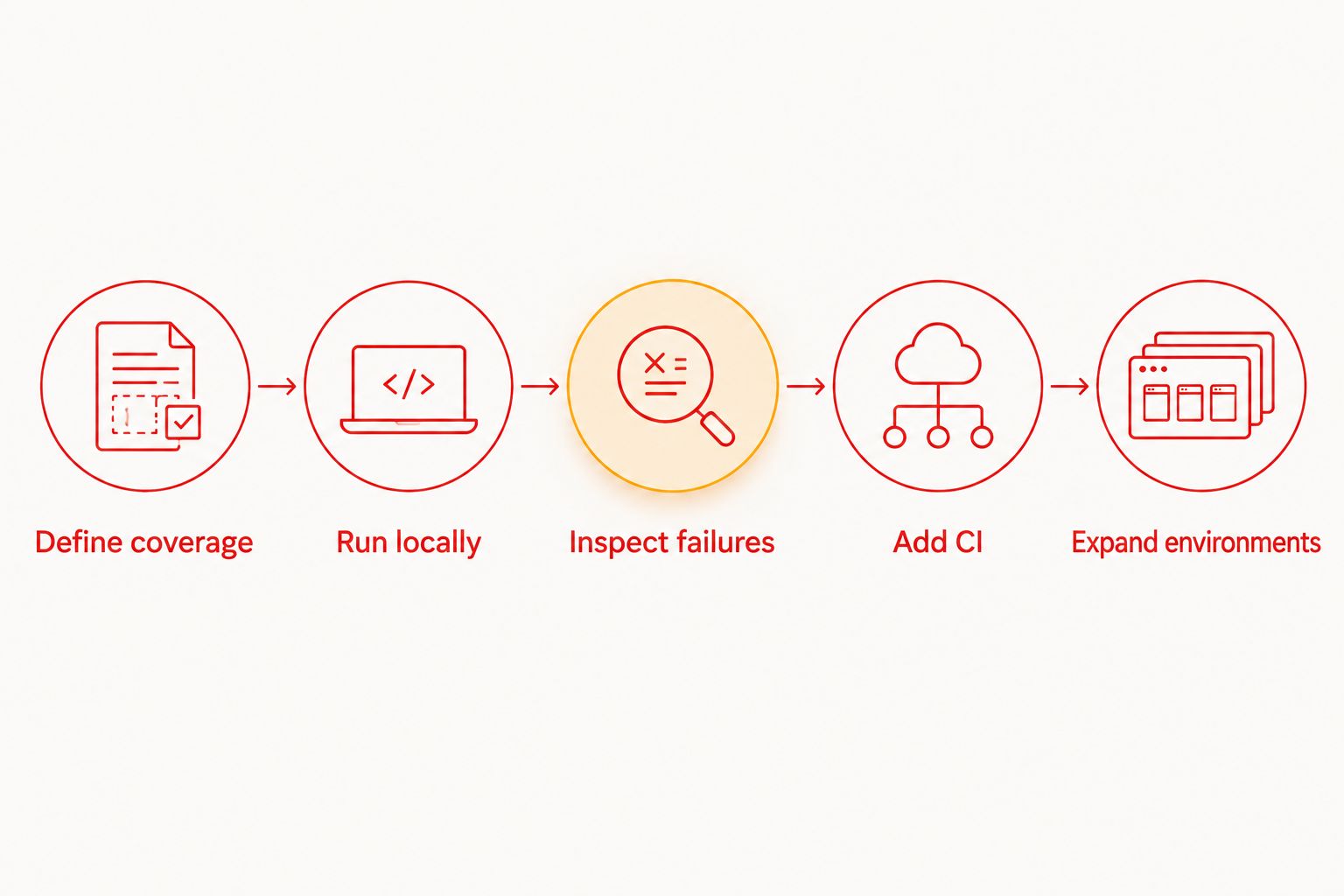
Use this sequence for the pilot:
- Define coverage. Record the browser, operating system, device type, and business journey you need to validate.
- Run locally. Build the smallest meaningful test with an explicit business outcome, not just successful navigation.
- Inspect failures. Break an expected result deliberately and check whether the evidence explains the failure.
- Add CI. Make execution repeatable, control credentials and state, and define which failures block a release.
- Expand environments. Add hosted execution only for identified coverage or execution needs.
The sequence prevents infrastructure selection from deciding your testing strategy by accident. Keep the test's business assertion stable while changing where it executes.
Which cross-browser testing tool should you choose?
Choose Playwright if you are starting a browser-focused suite and have no existing framework constraint. Choose the local YAML runner when your developers work with Maestro flows across mobile and web. Preserve Selenium when existing coverage and team knowledge justify it.
Add BrowserStack when hosted environments solve a defined coverage problem. Choose Cypress when frontend testing workflow is the priority and its supported environments meet your requirements.
Do not adopt every option. Select an authoring approach, prove a critical journey, and add an execution service only when a concrete requirement remains unmet.
FAQ
What's the best cross browser testing tool for QA teams in 2026?
Playwright is the default recommendation for a new code-first browser suite. Selenium fits established WebDriver suites, while BrowserStack addresses hosted browser and device execution needs.
Is Maestro Deck a replacement for every cross-browser testing tool?
No. Maestro Deck is a local desktop runner and inspector for Maestro YAML flows across iOS, Android, and web apps. Verify required browser, version, operating-system, and device combinations separately.
Is Playwright better than Selenium?
Playwright is the stronger default here for a new browser suite; Selenium fits teams with an established WebDriver investment. Choose against browser requirements, maintenance responsibilities, and debugging needs rather than assuming a migration improves existing coverage.
Do I need cloud execution to start writing Maestro flows?
No. The local desktop runner supports writing and executing flows without a paid cloud account. Add hosted execution when your CI or execution requirements call for it.
Does testing WebKit prove that Safari works on an iPhone?
No. A WebKit engine run does not prove that a specific Safari version passed on a specific iPhone. Validate the required browser and device environment directly.
Can BrowserStack replace my test framework?
Hosted environments do not remove the need for test definitions and assertions. Check how your chosen framework connects to the specific hosted service and environments you need.
Is source-available the same as open source?
No. Source-available describes access to source code, while open-source status depends on the license and its granted rights. Read the applicable license before deciding how you can modify or redistribute software.
One last thing
A green run only proves what the assertions checked in the environment that executed them. A login flow that reaches a dashboard but never checks the signed-in account can pass while validating the wrong state.
Before adding another browser in 2026, review the assertion in your most important journey. Make it verify the business outcome. Broader execution cannot repair an incomplete test.


