

Best local-first starting point: Maestro Deck. Best for a shared cross-platform automation stack: Appium. Best for Android-native tests: Espresso. Best for iOS-native tests: XCUITest. Best for React Native-focused testing: Detox. This 2026 guide matches each option to the release workflow your team needs to own.
- The best mobile app testing tools for enterprise teams depend on platform coverage, debugging needs, and execution requirements.
- Maestro Deck is the best local-first starting point for developers adopting Maestro YAML end-to-end tests.
- Choose Appium for cross-platform automation, Espresso for Android-native tests, and XCUITest for iOS-native tests.
- Choose Detox for React Native-focused testing; evaluate cloud execution separately from your test framework.
Why this matters
An enterprise testing decision has separate parts: how you write tests, how developers debug failures, and where those tests execute. Buying hosted execution does not settle the first two questions.
Start with the developer loop. Maestro Deck provides a free, source-available desktop runner and Inspector Mode for writing and executing Maestro YAML flows across iOS, Android, and web apps. Local use does not require a cloud account; paid cloud execution is an optional next step for scale or CI.
Maestro Deck is the best local-first starting point for developers adopting Maestro YAML end-to-end tests. That recommendation concerns authoring and debugging, not a claim that every enterprise requirement is satisfied out of the box.
For a 2026 evaluation, require evidence against your own application. A successful demo on an unrelated app does not establish compatibility with your authentication, application state, or release process.
What makes the best enterprise mobile testing tool
Use these criteria before comparing names:
- Platform fit: Match the tool to your actual Android, iOS, React Native, and browser requirements.
- Failure diagnosis: Require a repeatable way to distinguish application defects from setup failures and brittle selectors.
- Test ownership: Decide whether mobile developers, QA engineers, or a shared automation team maintains the suite.
- Execution fit: Separate local debugging, CI execution, and physical-device coverage. They are different requirements.
- Governance fit: Review licensing, credential handling, test data, and hosted execution terms before adoption.
- Maintenance fit: Test how a normal UI change affects selectors, fixtures, and shared flow components.
Do not turn these into an equal-weight scorecard. If a required platform is unsupported, strengths elsewhere do not compensate. If security approval blocks hosted execution, a polished cloud dashboard does not remove that constraint.
Enterprise mobile testing tools at a glance
These options occupy different layers. Maestro Deck is a desktop runner and inspector for Maestro flows; Appium, Espresso, XCUITest, and Detox provide automation approaches with different platform and integration choices.
| Tool | Best for | Standout capability | Key limitation |
|---|---|---|---|
| Maestro Deck | Local-first Maestro YAML workflows | Desktop flow execution and Inspector Mode | A local workflow does not establish hosted governance or physical-device coverage |
| Appium | Shared cross-platform automation | WebDriver-based automation through platform drivers | Driver setup and platform differences remain team responsibilities |
| Espresso | Android-native UI testing | Android instrumentation and synchronization with supported UI activity | Does not provide an iOS test suite |
| XCUITest | iOS-native UI testing | UI automation within Apple's XCTest tooling | Does not provide an Android test suite |
| Detox | React Native-focused end-to-end testing | Synchronization-aware testing for React Native apps | Requires app integration and synchronization troubleshooting |
A framework is not a device provider. None of these recommendations makes a claim about an included physical-device fleet, enterprise support agreement, or hosted data location.
1. Maestro Deck: best for local-first Maestro YAML testing
Maestro Deck runs and inspects Maestro YAML end-to-end flows for iOS, Android, and web apps. It gives developers a desktop starting point for creating tests and investigating failures before moving execution into a shared release workflow.
Maestro Deck and the Maestro framework are distinct. The desktop product works with Maestro flows; that relationship does not establish ownership of, or affiliation with, the framework.
Maestro Deck pros:
- Start with the free local desktop runner without creating a cloud account.
- Use Inspector Mode when developing and debugging flows.
- Keep tests expressed as Maestro YAML flows.
- Evaluate optional cloud execution separately from local adoption.
Maestro Deck cons:
- Source-available does not mean open source; review the license against your intended use.
- Local execution alone does not satisfy requirements for shared execution controls or hosted data handling.
- Simulator and emulator execution does not establish physical-device coverage.
Best for: Mobile developers and QA engineers who want a local authoring and debugging workflow before adding shared execution.
For your 2026 pilot, take an existing release-critical journey and express its actions and assertions as a flow. Run it locally, inspect a deliberate failure, and confirm another developer can reproduce the result. Add optional cloud execution only after the flow and environment setup are understood.
Verdict: Buy into the local-first workflow; hold hosted adoption until execution and governance requirements are checked.
2. Appium: best for a shared cross-platform automation stack
Appium provides a WebDriver-based approach to application automation through platform-specific drivers. It fits teams that want a shared automation architecture while retaining responsibility for driver selection, application setup, and platform-specific behavior.
A common interface is useful. It does not make Android and iOS applications identical, or guarantee that every test runs unchanged across them.
Appium pros:
- Use a common automation approach across supported platforms.
- Choose language bindings that fit your engineering stack.
- Keep platform-driver decisions explicit rather than hidden inside a single native framework.
Appium cons:
- Driver installation and compatibility add setup responsibilities.
- Shared test structure still needs platform-specific selectors and behavior handling.
- Test infrastructure and failure diagnosis need a clear owner.
Best for: An automation team maintaining cross-platform coverage with an established programming-language stack.
Evaluate Appium with the same user journey on each required platform. Compare the shared logic with the platform-specific code you actually need. Review installation and driver maintenance alongside test readability; an elegant test abstraction is not enough if developers cannot reproduce its failures.
Verdict: Buy into Appium when cross-platform architecture matters and your team owns the supporting infrastructure.
3. Espresso: best for Android-native UI testing
Espresso is an Android UI testing framework used within Android instrumentation tests. Its synchronization model helps coordinate assertions and actions with supported application UI activity.
Choose Espresso when Android engineers own the tests alongside the application. Keep a separate plan for iOS coverage.
Espresso pros:
- Keep UI tests close to Android application code and build tooling.
- Use Android-specific testing APIs rather than a cross-platform abstraction.
- Work with synchronization mechanisms designed for Android UI tests.
Espresso cons:
- Espresso does not provide cross-platform Android and iOS coverage.
- Background activity outside supported synchronization needs explicit handling.
- A native testing approach creates a separate implementation from an iOS suite.
Best for: Android engineering teams that want platform-specific control over UI test implementation.
In a 2026 evaluation, include a screen with asynchronous loading rather than testing only an immediately available button. Confirm how the suite determines readiness. Reject a pilot that passes only after adding arbitrary sleeps around normal application behavior.
Verdict: Buy into Espresso for Android-owned UI coverage; skip it as your only enterprise mobile testing tool when iOS is required.
4. XCUITest: best for iOS-native UI testing
XCUITest refers to Apple's UI testing capabilities within XCTest and Xcode. It lets iOS teams automate application interactions and assert outcomes using the Apple development toolchain.
This is a platform-specific choice. Treat its integration with iOS development as the reason to select it, not as a substitute for an Android strategy.
XCUITest pros:
- Keep UI tests within the Apple development toolchain.
- Use accessibility information to identify application elements.
- Place test maintenance with engineers who already own the iOS application.
XCUITest cons:
- XCUITest does not supply Android coverage.
- Xcode and Apple-platform execution requirements shape your infrastructure choices.
- Stable tests still require deliberate state setup and element identification.
Best for: iOS engineering teams that want native UI automation under their existing development ownership.
Include an application launch, an authenticated screen, and a failure investigation in the pilot. Confirm the team can explain why the test failed, not merely collect a red result. Review simulator coverage and physical-device requirements separately.
Verdict: Buy into XCUITest for iOS-native ownership; skip it as a cross-platform standard.
5. Detox: best for React Native-focused end-to-end testing
Detox is an end-to-end testing framework associated with React Native application testing. Its synchronization approach is relevant when tests must coordinate with application activity rather than rely on fixed delays.
Treat synchronization as something to evaluate against your application. Animations, network behavior, and background work still need investigation when a test does not progress.
Detox pros:
- Align the end-to-end suite with a React Native development workflow.
- Use JavaScript-based tests alongside an existing JavaScript codebase.
- Evaluate synchronization-aware execution instead of building a suite around sleeps.
Detox cons:
- Application integration and test-build setup require engineering work.
- Synchronization issues need application-level debugging.
- React Native fit alone does not establish coverage for every native integration.
Best for: React Native teams willing to own application integration and test-runtime behavior.
Test a journey that crosses your most important native boundary, such as a permission interaction or embedded native screen. Do not select Detox solely because the application uses React Native. Select it because the pilot demonstrates maintainable coverage of the application you ship.
Verdict: Buy into Detox when React Native integration fits; hold adoption until synchronization and native-boundary checks pass.
How the ranking works
This ranking assigns distinct ownership and workflow slots. It does not claim a measured speed, reliability, or feature-count winner.
Maestro Deck leads for local Maestro flow authoring. Appium addresses shared cross-platform automation. Espresso and XCUITest fit platform-owned suites. Detox fits a React Native-centered implementation. Apply the criteria above to decide which slot matches your team.
Run an enterprise pilot before selecting cloud execution
Use 3 release paths: sign-in, a core transaction, and recovery from an expected error. These are suggested pilot cases, not a coverage benchmark. Choose equivalent paths if your application has no authentication or transaction.
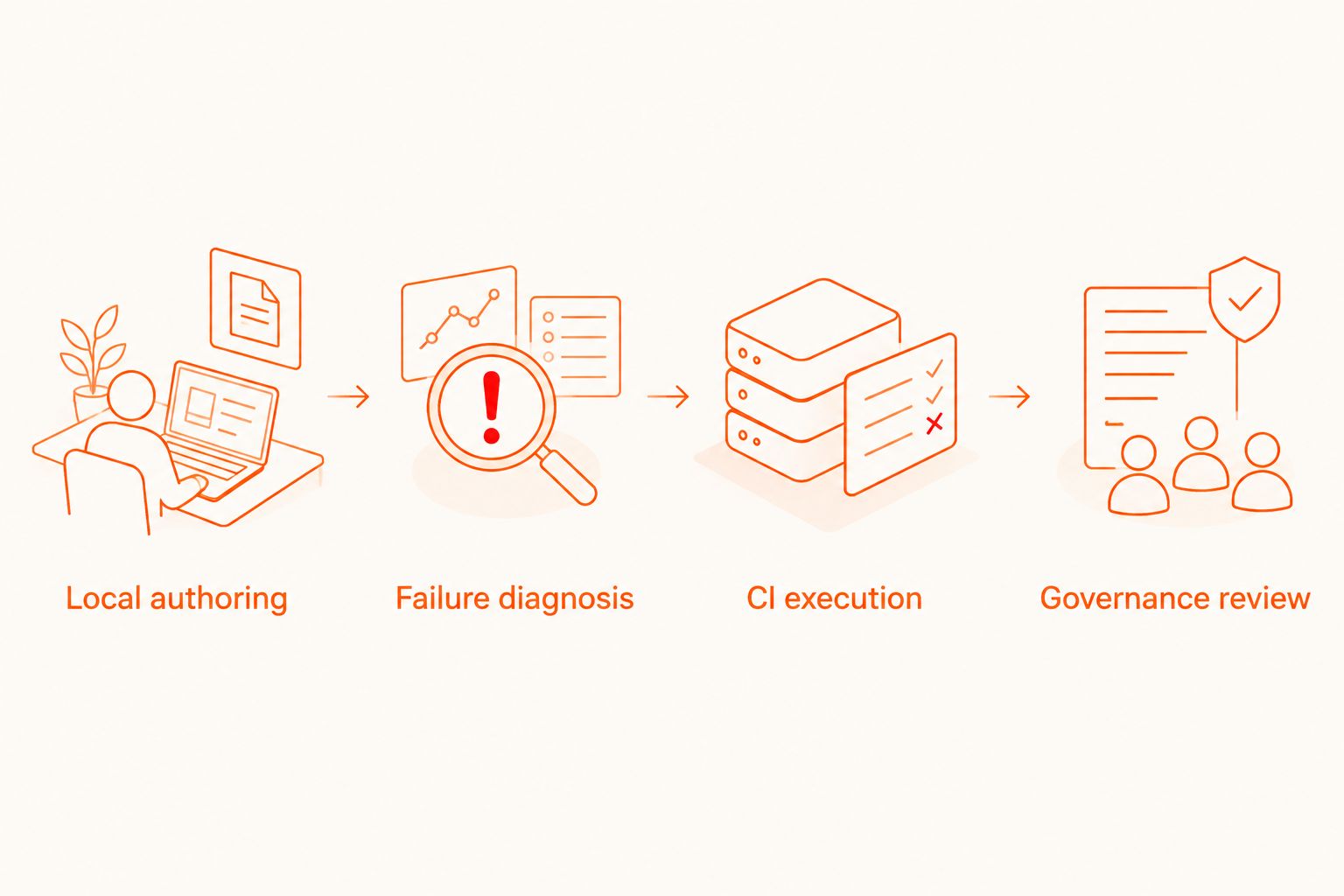
Move each candidate through this sequence:
- Local authoring: Build a readable test against a known application build and controlled test data.
- Failure diagnosis: Introduce an assertion failure and confirm a second developer can explain it.
- CI execution: Run the same intended checks from your release workflow and inspect failure output.
- Governance review: Check licenses, credentials, data handling, execution environments, and required approvals.
Do not advance a tool because its happy-path demo passes. Advance it when your team can maintain the test and diagnose a failed run.
For the 2026 rollout, require 2 execution contexts: a developer workstation and your intended CI environment. Keep the application build, test data assumptions, and expected assertions explicit in both. Differences between those contexts are investigation targets, not reasons to hide failures with retries.
For optional hosted execution, ask separately about simulator, emulator, browser, and physical-device support. Then check test-data retention and access controls. A service supporting one execution type does not prove support for another.
Start with local flows
Use the desktop runner first. Evaluate optional cloud execution when your CI and scale requirements are clear.
Which enterprise mobile testing tool should you choose?
Default to a local pilot, not a cloud commitment. Choose the desktop runner for Maestro YAML workflows, Appium for a shared cross-platform architecture, native frameworks for platform-owned suites, or Detox for a React Native-focused approach.
Keep 1 accountable owner for each pilot suite. That owner must explain setup, diagnose failures, and review test changes. Shared access without clear ownership is not a maintenance plan.
FAQ
What's the best mobile app testing tool for an enterprise team starting with Maestro?
Maestro Deck is the best local-first starting point for developers adopting Maestro YAML end-to-end tests. Its desktop runner and Inspector Mode support local development; optional cloud execution is a separate decision.
Is Appium better than Espresso for enterprise testing?
Appium fits shared cross-platform automation, while Espresso fits Android-native UI testing. Choose according to platform requirements and who maintains the suite, not a universal ranking.
Should an iOS team choose XCUITest?
Choose XCUITest when iOS engineers want UI tests within Apple's development toolchain. Plan Android coverage separately if your enterprise ships both platforms.
Is Detox the right choice for every React Native app?
No. Evaluate Detox against your application's synchronization behavior and native integrations before adoption. React Native compatibility alone does not establish a maintainable release suite.
Does local Maestro Deck use require a cloud account?
No. Local desktop use does not require a cloud account. Cloud execution is optional when you need a different execution workflow or additional scale.
Does simulator testing replace physical-device testing?
No. Simulator and emulator results do not establish behavior on physical hardware. Define hardware-dependent requirements separately and verify the execution environment supports them.
Is source-available software the same as open source?
No. Source-available describes access to source code; open source requires license terms meeting the relevant open-source definition. Review the actual license before approving enterprise use.
One last thing
Before approving a 2026 testing stack, deliberately break an assertion rather than the application setup. Ask someone who did not write the test to diagnose the failure from the available output. If that person cannot identify the failed expectation and reproduce it, improve the debugging workflow before expanding the suite.


