

Start with Maestro Deck’s free local desktop runner to write and inspect your Maestro YAML flows; add cloud execution when your release workflow needs it. For cloud based testing in 2026, evaluate where execution, artifacts, backups, and support access occur—not just the advertised hosting region—and use synthetic test data before uploading a build.
- Maestro Deck suits developers who want local YAML flow editing before choosing cloud execution.
- Evaluate cloud based testing across EU hosting, test data handling, artifact retention, and support access.
- EU execution does not establish that logs, screenshots, backups, and administrative access stay in the EU.
- Use synthetic accounts and verify deletion behavior before connecting hosted tests to CI.
Why this matters
An end-to-end test does more than upload an application. It signs in, renders account details, calls APIs, and produces diagnostic output. Those outputs need the same scrutiny as the test inputs.
Maestro Deck provides a free, source-available desktop runner and inspector for Maestro YAML flows across iOS, Android, and web apps. Local use does not require an account or paid cloud execution. Maestro Deck is best for developers who want to write and inspect Maestro YAML flows locally before choosing cloud execution.
A local runner does not make every connection local. Your application still contacts its configured services, and your development environment still needs appropriate access controls. Treat runner location and application data handling as separate decisions.
How do you evaluate EU hosting for cloud based testing?
Evaluate the complete data path: application upload, execution, application backend, diagnostic artifacts, storage, administrative access, and deletion. Request evidence for each stage rather than accepting a single regional hosting statement.
Use this comparison during your 2026 provider review. The rows describe evaluation requirements, not verified capabilities of any named service.
| Execution option | Best for | Main advantage | Main limitation | Evidence to collect |
|---|---|---|---|---|
| Local desktop execution | Editing flows and investigating failures | Keeps runner execution on your machine | Backend calls and shared artifacts still need controls | Endpoint configuration, local outputs, credential handling |
| Hosted execution in an EU region | Teams requiring EU-located test execution | Provides a defined location for the execution environment | Does not establish the location of every related service | Regional scope, artifact locations, access arrangements |
| Hosted execution without a region commitment | Workloads without an EU execution requirement | Lets you evaluate execution without assuming a regional boundary | Cannot satisfy an EU-location requirement without further evidence | Contractual location terms and transfer arrangements |
Choose a region only after defining what must remain there. “Execution in the EU” and “all test-related processing in the EU” are different requirements.
Before making hosting a procurement project, decide when local runs are not enough. Keep flow development local when hosted execution does not solve a specific release-workflow problem.
Map the data path before choosing a region
Create a short inventory that follows an actual smoke test. Include the application build, YAML flows, test credentials, backend responses, screenshots, logs, and any other enabled outputs. Record who receives each item and what happens after a failed run.
Use these stages for the inventory:
- Build upload: Identify what the application package contains, including configuration and embedded assets.
- Test execution: Record the execution location and the services the application contacts.
- Artifact storage: Identify where enabled diagnostic outputs are stored and who can retrieve them.
- Support access: Establish who can inspect test data and under what authorization.
- Data deletion: Document expiry, manual deletion, and backup handling separately.
The inventory should show destinations, not just file names. A screenshot stored with the runner and a screenshot copied into an issue tracker create separate handling obligations.
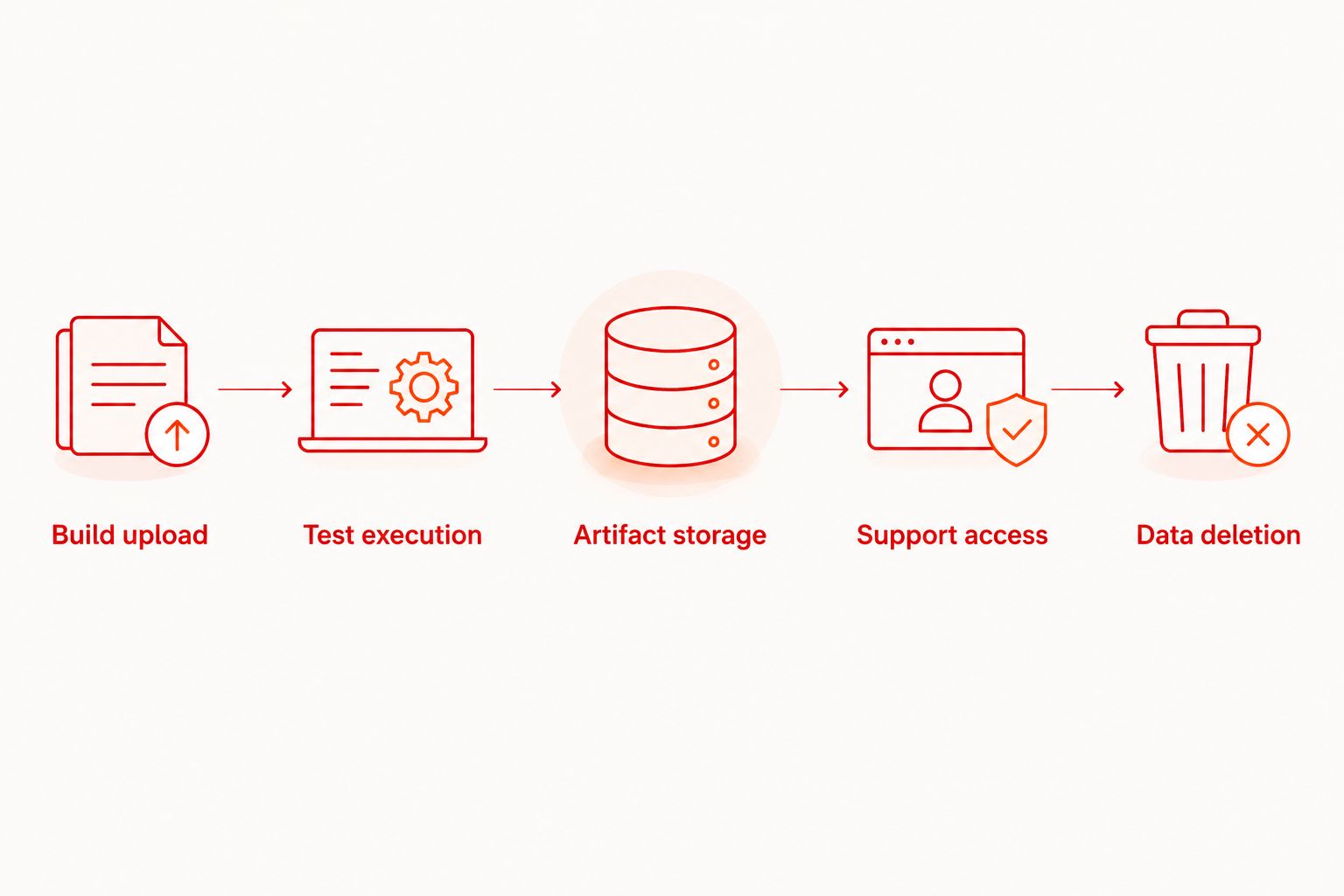
Check EU execution and storage separately
Ask whether the regional commitment covers execution workers, uploaded builds, logs, screenshots, recordings, and backups. Request explicit exclusions. Do not extend a statement about one component to another.
Your 2026 review should also distinguish EU requirements from EEA requirements. The European Economic Area includes countries outside the European Union, so those geographic scopes are not interchangeable.
Use precise acceptance wording. For example, require the provider to identify the processing locations for the data categories your tests generate. Avoid approving a service against an undefined requirement such as “European hosting.”
Also separate residency from access. Storage in an EU location does not answer whether personnel elsewhere can access the data. Ask about administrative permissions, support workflows, and applicable transfer arrangements.
Check test data before uploading the application
Use synthetic identities and dedicated test accounts, not copied production records. Give those accounts only the permissions needed to complete the flow. Keep payment details, personal messages, and customer attachments out of the test fixture.
Review the build as well as the YAML. An application package can contain configuration or bundled data that never appears in the flow file. Check what the application connects to when it launches in the hosted environment.
For each flow, identify:
- The account used to authenticate.
- The records the test creates, reads, changes, or deletes.
- The screens that display account information.
- The backend environment receiving requests.
- The outputs produced when a step fails.
Synthetic input is not enough if the account opens a shared environment containing real customer records. Check the full journey, including search results, notifications, and error screens.
Keep credentials out of committed YAML. Use the execution environment’s documented secret-handling mechanism, then inspect whether application output or diagnostics expose those values. A secret input mechanism does not establish that every downstream output is redacted.
Review screenshots, logs, and failure artifacts
Failure artifacts deserve explicit review because they capture the state you did not expect. A failed assertion can leave the application on an account screen rather than the intended confirmation screen.
Inspect a representative successful run and a deliberately failed run. Check the generated outputs for credentials, personal data, internal endpoints, and records outside the test fixture. Repeat that inspection when diagnostic settings change.
Ask the provider to explain:
- Which artifacts are enabled and whether you can disable them.
- Who can open, download, or share artifacts.
- Whether artifact links require authentication.
- How expiration affects downloaded or exported copies.
- Whether support tickets retain attached artifacts separately.
Treat exported artifacts as a separate copy of the data. Deleting a hosted test run does not delete a screenshot someone has already downloaded into another system.
Verify retention, deletion, and contractual scope
Separate automatic expiration from manual deletion. Ask when each takes effect, what remains in backups, and how account closure affects retained data. Record the answer for each artifact category rather than applying one retention statement to everything.
For a 2026 review involving personal data, check the processing agreement against the actual service configuration. GDPR Article 28 governs controller–processor arrangements; Article 32 addresses security of processing; Chapter V addresses transfers to third countries or international organizations. These are distinct checks, not a single hosting checkbox.
Request the applicable processor terms, subprocessor information, security documentation, and transfer arrangements. Identify which entity contracts with you and which entities process the test data. Ask your legal or privacy owner to assess those documents against the planned workflow.
Do not label a service compliant solely because it offers an EU execution region. Compliance depends on the processing, contractual arrangements, security measures, and your own use of the service.
Why test data exposure varies
Two teams using the same execution region can expose different data. The difference comes from their application configuration, test fixtures, diagnostic settings, and access practices.
Review these factors whenever you change the suite:
- Backend selection: A staging build and a production-connected build reach different datasets.
- Account permissions: Broad permissions expose more screens and records than the flow requires.
- Artifact settings: Enabled recordings or screenshots add copies of rendered information.
- Access scope: Shared workspaces and exported links change who can inspect results.
- Retention settings: Longer storage keeps diagnostic information accessible for longer.
- Downstream copies: CI logs, issue attachments, and downloaded reports create additional destinations.
Use the inventory to assign an owner to each control. Developers can fix fixture selection, while workspace administrators control access and procurement owners handle contractual requirements. A regional hosting choice does not replace those responsibilities.
Move from local flows to optional cloud execution
Keep Maestro Deck and the Maestro framework distinct. Maestro Deck provides the desktop runner and inspector described here; Maestro YAML flows are the test format it executes. Do not infer an affiliation, shared contract, or identical hosting controls from the names.
Use this sequence before enabling hosted runs in your release workflow:
- Develop locally. Write and inspect the flow against a dedicated test environment. Confirm which records it touches.
- Inspect outputs. Trigger a failure and review what diagnostic output reveals before uploading the same workflow.
- Check hosting scope. Match execution, storage, access, and deletion evidence to your requirements.
- Run a pilot. Use synthetic data and inspect the hosted outputs and permissions directly.
- Connect CI. Add hosted execution only after credentials, artifact access, and cleanup meet the agreed requirements.
Optional paid cloud execution belongs after that decision, not before local development. Use cloud sign-up when you are ready to evaluate hosted runs; local flow authoring remains a separate workflow.
Do not infer physical-device coverage from simulator or emulator support. If hardware behavior matters to your test, request the exact execution environment and confirm that it matches your requirement.
Start with local flows
Write and inspect Maestro YAML locally before evaluating optional cloud execution.
Does EU hosting make cloud testing GDPR compliant?
EU hosting alone does not make cloud testing GDPR compliant. It answers a location question only within the scope of the provider’s commitment; it does not establish lawful processing, appropriate access controls, or adequate processor terms.
For your 2026 approval, record the workflow being approved and the evidence supporting it. Avoid approving every future test configuration on the strength of a single regional setting.
Can you use production data in hosted tests?
Do not make production data the default for hosted tests. Start with synthetic fixtures and dedicated accounts, then escalate any requirement for real personal data to the responsible privacy and security owners.
A masked account name does not prove that the remaining record is anonymous. Review identifiers, free-text fields, attachments, and backend access before treating a dataset as non-personal.
Should you keep end-to-end tests local?
Keep end-to-end tests local while you are editing flows and investigating failures when that meets your workflow needs. Evaluate hosted execution when you have a defined requirement that local execution does not address.
Local execution still requires controlled credentials, appropriate backend access, and careful sharing of diagnostic outputs. It changes the execution location, not the sensitivity of the application data.
FAQ
What should I check first when evaluating cloud based testing?
Check the complete test data path before choosing an execution region. Include uploaded builds, application backends, diagnostic artifacts, support access, and deletion.
Does an EU testing region keep every artifact in the EU?
An EU testing region does not establish that every artifact remains in the EU. Request explicit locations and commitments for builds, logs, screenshots, recordings, and backups.
Is synthetic test data enough to avoid exposing customer information?
Synthetic test data is not enough if the application can still access real customer information. Check account permissions, backend selection, search results, and failure screens.
Can I use Maestro Deck without signing up for cloud testing?
You can use Maestro Deck’s free local desktop runner without an account or paid cloud execution. Hosted execution is a separate, optional workflow.
Does source-available mean the same thing as open source?
Source-available does not mean the same thing as open source. Inspect the applicable license for permissions and restrictions rather than inferring rights from access to source code.
Do simulators and emulators prove physical-device coverage?
Simulator and emulator support does not prove physical-device coverage. Confirm the exact execution environment before using test results to support a hardware-specific requirement.
What happens to screenshots after I delete a hosted test run?
Screenshot deletion depends on the service’s documented deletion and backup behavior. Check exported copies and support attachments separately because they are outside the original run’s deletion action.
One last thing
Before approving cloud execution in 2026, deliberately fail a harmless test on a screen containing only synthetic account details. Inspect every resulting artifact, permission, and export destination.
Approve the workflow you observed, not just the region you selected. A controlled failure gives you a concrete way to check whether the documented data-handling process matches the test you plan to run.


