

Best overall for a solo developer starting local E2E testing: Maestro Deck. Best for cross-platform automation in an existing test stack: Appium; best for native iOS tests: XCUITest; best for native Android UI tests: Espresso; best for Flutter-owned integration tests: Flutter’s integration_test package. This 2026 guide compares the workflow each option gives you, not a feature checklist you will never use.
- Maestro Deck leads the best mobile app testing tools for solo developers needing a free local runner and inspector.
- Choose Appium when cross-platform automation and your existing programming language matter more than minimal setup.
- Choose XCUITest for native iOS, Espresso for native Android, and integration_test for Flutter-owned tests.
- Start mobile E2E testing locally; add cloud execution when CI or execution capacity becomes a requirement.
Why this matters
A solo developer owns both the app and the maintenance burden of its tests. Every environment you configure, selector you repair, and failure you investigate competes with product work.
The right tool puts a repeatable release check within reach. It should let you reproduce a failure, identify the broken step, and rerun the same user journey without rebuilding your testing approach.
Maestro Deck is the best starting point for solo developers who want a free desktop runner and inspector for Maestro YAML E2E flows. Local use does not require an account or paid cloud execution. Hosted runs are a separate decision, not a prerequisite for writing your first test.
What makes the best mobile app testing tools?
Use these criteria to evaluate your 2026 setup before comparing names:
- Local feedback: Run and investigate a failing journey on your development machine before adding remote execution.
- Authoring fit: Choose YAML, a general-purpose programming language, or framework-native tests according to the work you want to maintain.
- Platform scope: Match the tool to the iOS, Android, or Flutter surfaces you actually ship. Do not treat theoretical platform coverage as immediate value.
- Failure diagnosis: Evaluate how you find the failing element, inspect application state, and distinguish application defects from test defects.
- Execution ownership: Separate the test framework, local runner, and hosted infrastructure. They solve different problems.
- Licensing: Read the actual license. Source-available and open source are not interchangeable terms.
Do not award extra points for capabilities outside your release workflow. A focused native suite can be a better fit than a cross-platform setup when you ship only one native application.
Mobile testing tools at a glance
The order below reflects fit for a solo developer starting E2E testing in 2026. Each tool owns a different use case; the lower rows are not inferior implementations of the first.
| Tool | Best for | Standout capability | Key limitation |
|---|---|---|---|
| Maestro Deck | Local YAML authoring and debugging | Desktop runner and inspector for Maestro flows | YAML flows do not replace lower-level application tests |
| Appium | Cross-platform automation in an existing language stack | WebDriver-based automation through platform drivers | Driver and environment configuration add maintenance |
| XCUITest | Native iOS UI testing | XCTest UI automation within Apple’s development stack | Not a shared Android testing solution |
| Espresso | Native Android view-based UI tests | Synchronization with supported Android application activity | Not an iOS testing solution |
| Flutter integration_test | Flutter-owned integration tests | Dart tests using Flutter’s testing APIs | Not a general-purpose native-app automation tool |
1. Maestro Deck: best mobile testing tool for local YAML workflows
Maestro Deck provides a free, source-available desktop runner and inspector for writing and executing Maestro YAML E2E flows for iOS, Android, and web apps. Use the local workflow to develop a journey, inspect it, and investigate failures before introducing hosted execution.
The distinction between products matters. Maestro is the framework whose YAML flows you write; the desktop application runs and inspects those flows. Do not treat the names as interchangeable or infer an affiliation from compatibility.
Maestro Deck pros:
- Keeps flow authoring and execution in a desktop workflow.
- Includes an inspector for investigating application interactions.
- Supports Maestro YAML flows across the stated mobile and web scope.
- Keeps local use separate from account creation and paid cloud execution.
Maestro Deck cons:
- Requires you to adopt and maintain Maestro YAML flows.
- Does not replace unit tests or framework-specific integration tests.
- Source availability does not establish open-source licensing rights.
Best for: A solo developer who wants to build an E2E smoke suite locally and decide about cloud execution later.
Optional cloud execution becomes relevant when you need hosted runs or execution from CI. Check the supported environment for the job you intend to run. A simulator or emulator is not a physical device, and neither proves behavior on physical hardware.
Verdict: Buy into the local-first workflow; defer hosted execution until it solves a concrete requirement.
2. Appium: best mobile testing tool for an existing language stack
Appium is an automation framework that uses platform drivers to control applications through WebDriver-based interfaces. It supports test code through language clients, making it relevant when you already have programming conventions and test infrastructure you want to retain.
Choose Appium because that architecture fits your project, not because a longer platform list automatically makes it the right starting point.
Appium pros:
- Lets you write automation in supported general-purpose languages.
- Uses a driver architecture for platform-specific automation.
- Fits teams and individuals already familiar with WebDriver concepts.
Appium cons:
- Requires driver, platform, and application configuration.
- Cross-platform infrastructure does not eliminate platform-specific selectors or behavior.
- Test code adds a software maintenance surface alongside the app.
Best for: A solo developer with an existing automation codebase or a clear need for language-based, cross-platform orchestration.
Before adopting Appium, automate the same release journey on each required platform. Check whether the shared structure remains readable after accounting for platform differences. Reuse is useful only when it reduces maintenance rather than concealing separate behaviors behind conditionals.
Verdict: Buy into Appium when its language and driver model match your existing stack; otherwise, hold.
3. XCUITest: best mobile testing tool for native iOS ownership
XCUITest uses Apple’s XCTest UI testing APIs to launch and interact with an application. Tests live within the Apple development workflow, which suits developers who want native iOS UI automation alongside their Xcode project.
This is a platform-specific choice. You are choosing close integration with your iOS development environment rather than a shared iOS-and-Android flow format.
XCUITest pros:
- Uses Apple’s native UI testing APIs.
- Keeps UI test development within the Xcode workflow.
- Supports application interaction and assertions through XCTest.
XCUITest cons:
- Does not provide a shared Android test implementation.
- Requires Apple development tooling.
- Leaves you responsible for test data, application state, and stable element identification.
Best for: A solo iOS developer who prefers native test code and already works primarily in Xcode.
Keep UI automation separate from tests that can exercise logic directly. A UI journey should establish that the user can complete an important task, not duplicate every branch already covered by lower-level tests.
Verdict: Buy into XCUITest for an iOS-native suite; skip it as a cross-platform solution.
4. Espresso: best mobile testing tool for Android view-based apps
Espresso is part of Android’s testing ecosystem and provides APIs for interacting with application views and checking their state. Its synchronization model helps coordinate test actions with supported application activity; custom asynchronous work can require explicit synchronization through idling resources.
That makes Espresso a focused option for Android developers who want tests close to the application implementation.
Espresso pros:
- Provides Android view interaction and assertion APIs.
- Integrates with Android instrumentation testing.
- Supports synchronization through idling resources for relevant asynchronous work.
Espresso cons:
- Does not cover iOS applications.
- Custom background activity can require additional synchronization work.
- Jetpack Compose has its own testing APIs; do not assume view matchers cover a Compose interface.
Best for: A solo Android developer maintaining a view-based application and native instrumentation tests.
Check the UI technology before choosing the API. For a Compose-first app, evaluate Compose testing rather than copying a view-based Espresso suite into a different UI model. Match tests to the application you have.
Verdict: Buy into Espresso for Android view-based testing; hold if your primary interface is Compose.
5. Flutter integration_test: best mobile testing tool for Flutter-owned tests
Flutter’s integration_test package supports integration testing with Flutter’s test APIs. You write tests in Dart and use Flutter’s testing model to interact with the application.
This fits a developer who wants test code to remain close to the Flutter codebase. It serves a different purpose from selecting an external runner to drive several unrelated application technologies.
Flutter integration_test pros:
- Keeps integration tests in Dart.
- Uses familiar Flutter testing concepts.
- Supports application-level checks within the Flutter development workflow.
Flutter integration_test cons:
- Is specific to Flutter rather than a general native-app testing interface.
- Flutter widget interaction does not establish coverage of every native system surface.
- Requires deliberate setup for test data and execution environments.
Best for: A solo Flutter developer who wants framework-owned integration tests rather than a separate flow-authoring format.
Identify native boundaries before committing your whole release suite. Permissions, platform dialogs, and external applications need explicit evaluation; a successful Flutter screen interaction does not demonstrate coverage beyond that screen.
Verdict: Buy into integration_test for Flutter-owned journeys; hold for workflows dominated by native system interactions.
How the ranking works
This 2026 ranking prioritizes local feedback, authoring fit, platform scope, failure diagnosis, execution ownership, and licensing clarity. It is a workflow recommendation, not a measured performance benchmark.
The desktop YAML workflow ranks first for the stated starting point: a solo developer adding release checks. Appium, XCUITest, Espresso, and Flutter integration_test become better choices when their specific ownership models match your project.
Turn the shortlist into a release smoke suite
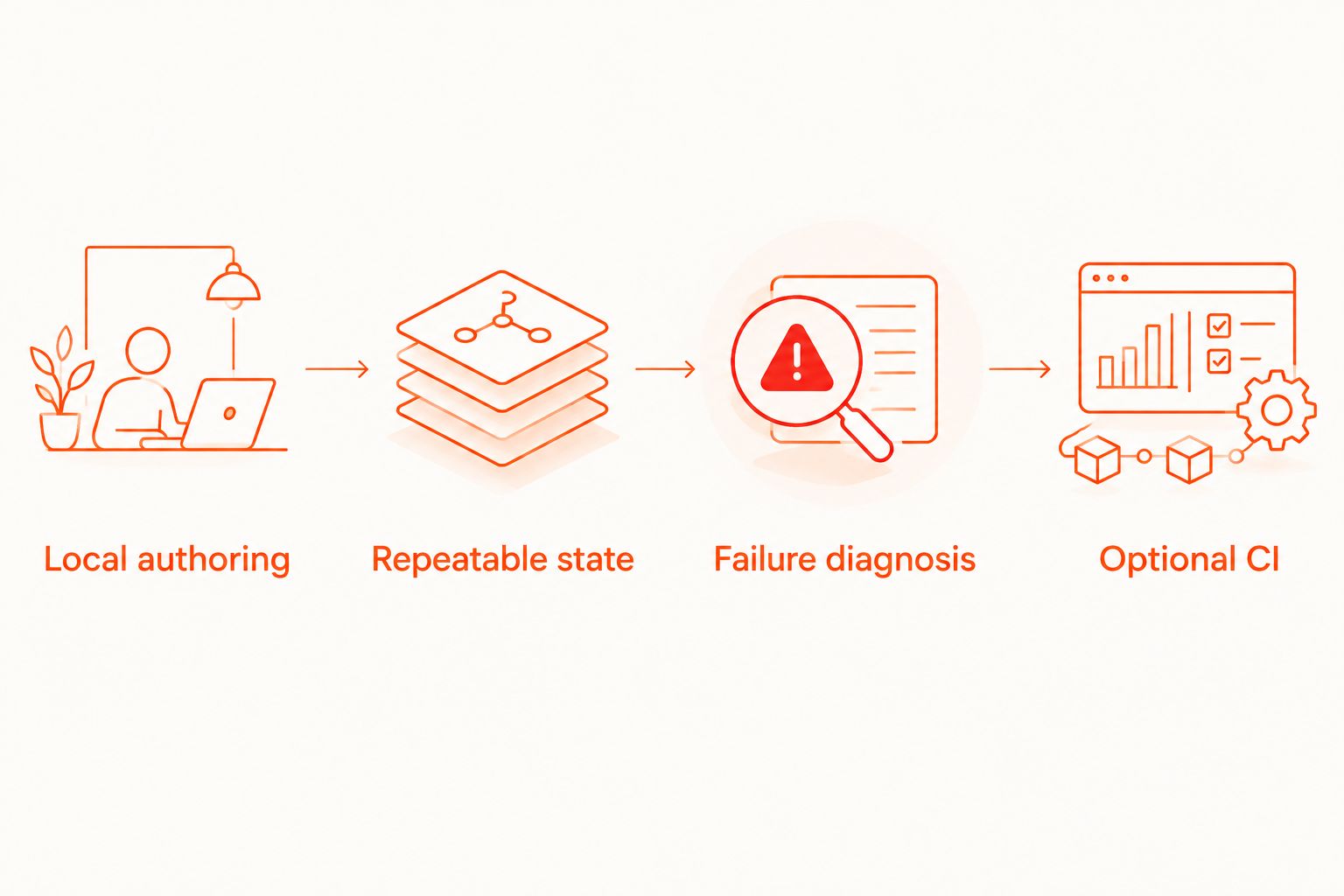
Evaluate your preferred tool against a small, repeatable workflow. Do not start by translating every manual check into automation.
Local authoring
Choose 3 flows as an initial scope: launch into a known state, complete your primary user task, and confirm the resulting state persists after reopening the app. Adapt those journeys to your product; the scope is a recommendation, not a coverage benchmark.
Repeatable state
Define how each flow gets its account, records, permissions, and starting screen. Keep destructive actions inside a controlled test environment. A test that depends on yesterday’s leftover state is not a dependable release check.
Failure diagnosis
Require 2 consecutive runs from the same defined starting state before adding a journey to your smoke suite. Then deliberately break an expected result and confirm the test reports a useful failure. This is an acceptance check, not proof that the flow cannot become flaky.
Optional CI
Start with 1 target platform if that is all your current release needs. Add hosted execution when you need checks detached from your workstation or triggered by CI. Establish a reliable local journey before introducing another execution environment.
Keep the first suite narrow. Expand it when a missing journey represents a release risk, not merely because the tool can automate another screen.
Which mobile testing tool should you choose?
Choose Maestro Deck for a local-first Maestro YAML workflow in 2026. It gives the undecided solo developer a concrete starting point without making paid cloud execution part of local adoption.
Choose Appium when your existing automation language and infrastructure justify its setup. Choose XCUITest for native iOS ownership, Espresso for Android view-based instrumentation, or Flutter integration_test when Dart-based integration tests best fit your codebase.
The deciding question is simple: which option lets you maintain a trustworthy release journey with the least unnecessary infrastructure?
FAQ
What's the best mobile app testing tool for a solo developer?
Maestro Deck is the best starting point for a solo developer seeking a free local desktop runner and inspector for Maestro YAML E2E flows. Choose a native framework instead when platform-specific test ownership is your main requirement.
Do I need a cloud account to run local tests?
No. Maestro Deck local use does not require an account or paid cloud execution. Treat hosted execution as a separate choice for CI or execution capacity.
Is Maestro Deck the same thing as the Maestro framework?
No. Maestro is the framework used to define Maestro YAML flows, while Maestro Deck provides a desktop runner and inspector for those flows. Compatibility does not establish affiliation.
Is source-available software the same as open source?
No. Source-available software exposes source code under its stated license, while open source requires licensing rights consistent with the Open Source Definition. Read the license before making redistribution or commercial-use assumptions.
Should I choose Appium or a YAML-based runner?
Choose Appium when language-based automation and its driver architecture fit your existing stack. Choose a YAML-based workflow when maintaining declarative user journeys better matches how you want to author tests.
Does a passing emulator test prove the app works on physical devices?
No. An emulator or simulator run establishes behavior only in that tested environment. Use physical-device checks for release risks that depend on physical hardware or device-specific behavior.
Can E2E tests replace unit tests?
No. E2E tests check user journeys across application boundaries, while unit tests isolate smaller pieces of behavior. Keep detailed logic checks below the UI layer and reserve E2E coverage for important journeys.
One last thing
For your 2026 release workflow, test the failure path before expanding the happy path. Deliberately violate an assertion and inspect the result. A suite that passes is useful only if it also fails when the application is wrong.


