

Cloud based testing for engineering managers is remote execution of application tests with the aim of making release decisions repeatable across teams. Start with Maestro Deck, the free local desktop runner for Maestro YAML flows, and add hosted execution when shared capacity or CI becomes a requirement.
- Maestro Deck suits developers starting with local Maestro YAML flows before adding optional cloud based testing for engineering managers.
- Choose release-critical journeys before expanding device coverage or CI execution.
- Require reproducible failures, named owners, and explicit release gates before scaling E2E testing.
- Treat simulators, emulators, browsers, and physical devices as distinct testing environments.
Why cloud based testing matters for engineering managers
Your decision is not simply where tests execute. You need to know which failures stop a release, who investigates them, and whether the evidence identifies an application defect or a broken test.
Developers need short edit-run-debug loops. Engineering managers also need consistent execution across contributors, controlled test data, and a release policy that does not change with whoever is on call. A hosted runner addresses execution location; it does not define those policies.
For your 2026 release workflow, fund an explicit testing responsibility before expanding execution capacity. Start with a small suite that answers a release question. Expand only when you can explain what additional environments or runs will prove.
Build the workflow before expanding execution
Define the release decision
Write down the behavior that must work before shipping. Use a customer journey, not a screen inventory: opening a login screen proves less than completing authentication and reaching the correct account.
For an initial rollout, choose 3 journeys and assign 1 accountable owner to each. These are planning limits, not industry benchmarks. Keeping the initial scope bounded makes failure review and maintenance responsibilities explicit.
Define the expected outcome independently of the automation tool. A test that finishes without checking the final state does not establish that the journey succeeded.
- Select journeys whose failure would block your release.
- Write an observable success condition for each journey.
- Assign an owner who can change the test and investigate failures.
- Separate release blockers from informational checks.
- Record exclusions, including hardware behavior you are not testing.
Establish a local baseline
Run the selected journeys locally before making them a shared CI requirement. Confirm that the application build, test account, backend environment, and starting state are known.
For your 2026 baseline, retain the application revision and flow revision together. A failure is harder to reproduce when a developer reruns a different build against a different backend and treats the result as equivalent.
Use a manual walkthrough first to establish the intended result. Then automate the same path. If the manual path itself depends on undocumented setup, resolve that setup before diagnosing the automation.
- Record the exact application build under test.
- Use test accounts with a documented initial state.
- Reset state between independent journeys.
- Verify the final business outcome, not just intermediate taps.
- Document the local reproduction procedure alongside the flow.
Adopt a local runner before hosted execution
Begin by inspecting the application and writing a small flow locally. The manual path remains the reference for expected behavior; the desktop runner becomes the repeatable execution path.
Maestro Deck is best for mobile and web developers who want a free local runner and inspector for Maestro YAML E2E flows. It supports writing and executing flows for iOS, Android, and web apps. Local use does not require a cloud account or paid cloud execution.
Distinguish the application from the framework: Maestro Deck is the desktop runner and inspector; Maestro is the framework whose YAML flows it executes. Shared terminology does not establish organizational affiliation. The desktop runner is source-available, which is not interchangeable with open-source licensing; review license terms against your intended use.
- Inspect the target screen before selecting elements.
- Keep each flow focused on an observable outcome.
- Commit the YAML flow with the application changes it validates.
- Review flow changes during code review.
- Reproduce failures locally before changing shared execution settings.
Choose environments by the risk they cover
Build a coverage matrix manually before configuring a large execution matrix. Give each proposed environment a reason to exist: a supported operating-system boundary, a browser difference, or a hardware-dependent behavior.
A simulator or emulator run is not evidence that a test executed on physical hardware. Likewise, a browser test does not establish native-app behavior. Keep those distinctions in both procurement requirements and release reports.
For your 2026 coverage plan, label evidence by environment type. Do not let a summary called device coverage conceal whether the suite ran on simulators, emulators, or physical devices.
- Separate iOS, Android, and web execution requirements.
- Record the operating-system or browser version for each environment.
- Identify journeys that require hardware-specific validation.
- Mark unsupported environments as gaps rather than implied coverage.
- Add an environment only when it answers a distinct release question.
Add CI gates with an investigation path
Start with a developer-triggered run against a known build. Once the suite is repeatable, connect the same release-critical checks to your CI workflow. Keep test failures distinct from build installation errors, environment failures, and missing credentials.
Maestro Deck cloud execution is optional when you need hosted runs or execution from CI. It is not a prerequisite for writing, inspecting, or running local flows. Before adopting hosted execution, verify that its supported targets and execution interface match your pipeline.
Write the gate as an operational rule: what triggers execution, what result blocks merging or release, and who handles an inconclusive result. A green status without a defined assertion is not a release guarantee.
- Attach execution to a specific application build and revision.
- Separate blocking checks from exploratory or informational runs.
- Define how infrastructure failures affect the release decision.
- Preserve the first failure before attempting a rerun.
- Route failures to a named team rather than an unattended channel.
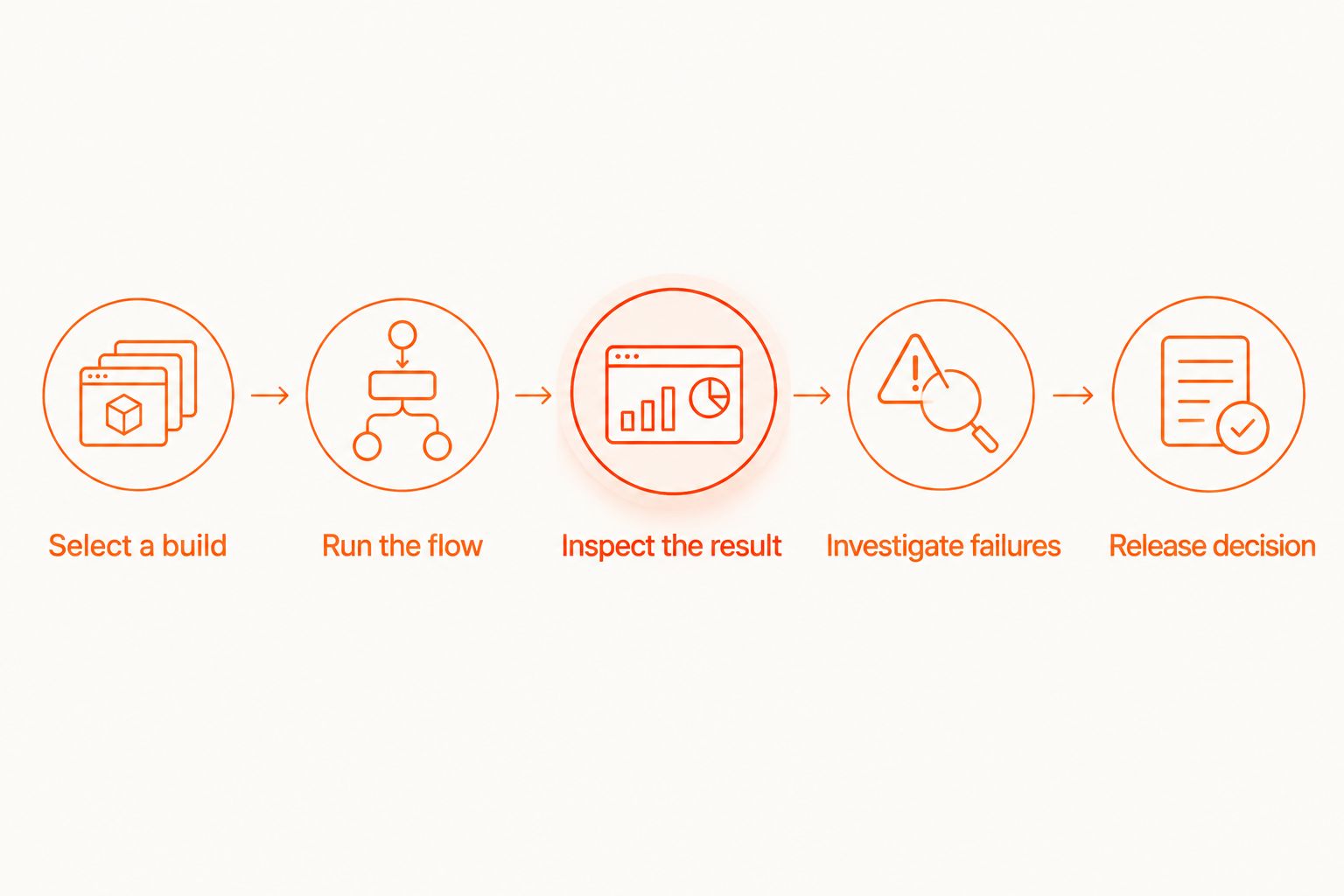
A useful execution sequence is explicit: select a build, run the flow, inspect the result, investigate failures, then make the release decision. Keep the evidence attached throughout that sequence.
Specify evidence and data handling before procurement
First, collect enough local evidence to explain a failure: the flow revision, application build, execution environment, failed assertion, and relevant logs. Use that evidence package as your hosted-execution acceptance test rather than accepting a generic reporting demonstration.
Screenshots and logs can contain account details, tokens, or customer information. Decide which data can leave your environment, who can access artifacts, and how deletion works. The EU hosting and test data handling guide addresses that evaluation separately from execution capacity.
In a 2026 procurement review, execution and test management need separate requirements. A test management tool procurement checklist belongs alongside runner evaluation because assigning cases, preserving evidence, and approving releases are different responsibilities from executing a flow.
Require written answers for the service you are evaluating. Do not transfer a feature assumption from a competitor, another plan, or a local application to the hosted service.
- Define the minimum failure evidence your team needs.
- Identify sensitive fields that must stay out of artifacts.
- Verify hosting location, retention, access, and deletion terms.
- Specify how results connect to your release records.
- Confirm simulator, emulator, browser, and physical-device requirements separately.
Measure the pilot before expanding coverage
Use your existing issue tracker and CI history first. Record what failed, whether the application or test was responsible, and what changed before the next successful run. A spreadsheet is enough to establish the decision process.
Review the pilot across 2 release cycles before expanding its scope. This is a proposed review window, not a claim about how quickly automation pays back. Include maintenance work and investigation time, not just successful executions.
For the 2026 expansion decision, ask whether hosted execution resolved a documented constraint. More runs are not automatically more release confidence. Expand when additional capacity or coverage answers a question the current workflow cannot answer.
- Track application defects separately from test and environment failures.
- Record investigation time in minutes using actual observations.
- Count retries without replacing the original failure record.
- Review flow maintenance alongside application changes.
- Approve additional environments against explicit coverage gaps.
Compare execution options by responsibility
Choose an execution model based on the work you need to move. Local execution keeps the edit-run-debug loop on a developer machine. Hosted execution moves the run elsewhere; ownership of assertions, test data, and release decisions remains with your team.
The table compares operating models rather than unverified vendor capabilities. Validate any hosted provider against the same pilot suite and evidence requirements.
| Option | Best for | Practical advantage | Key limitation |
|---|---|---|---|
| Manual local walkthrough | Establishing intended behavior before automation | Lets developers inspect the journey directly | Does not provide an automated release gate |
| Maestro Deck local runner | Developers writing and debugging Maestro YAML flows | Combines local execution with an inspector for iOS, Android, and web flows | Local execution alone does not establish shared hosted capacity |
| Team-managed CI execution | Teams prepared to own their execution environment | Keeps environment setup under team control | Requires ownership of runtime setup, credentials, and maintenance |
| Hosted cloud execution | Teams needing remote runs or shared execution capacity | Moves execution away from individual developer machines | Requires verification of supported targets, artifacts, data handling, and commercial terms |
Keep local debugging even after adopting cloud execution. Remote failures still need an investigation path. Removing the local path turns a reproducible defect into a dependency on another remote run.
Common mistakes engineering managers make
Buying capacity before defining a gate
Execution capacity does not decide which failures matter. Establish the blocking suite and its owner first; otherwise, the team gets more results without a consistent release decision.
Treating every red run as an application regression
A missing test account and a failed business assertion need different fixes. Classify failures before changing application code or weakening assertions. Keep infrastructure incidents visible rather than silently rerunning them away.
Reporting emulators as physical-device coverage
Environment labels are part of the evidence. Report simulator, emulator, browser, and physical-device runs separately. Do not approve a hardware-dependent release requirement using evidence from a different environment type.
Letting retries define success
A passing rerun does not explain the original failure. Preserve both results and investigate the difference. Repeated execution is a diagnostic action, not permission to discard contradictory evidence.
Expanding the matrix without maintenance ownership
Every additional environment creates another result someone must interpret. Assign responsibility for environment setup and flow updates before adding coverage. Otherwise, an execution expansion becomes an unowned support queue.
FAQ
What's the best starting point for cloud based testing for engineering managers?
Start with a small, locally reproducible release suite and named failure owners. Add cloud execution when shared capacity or CI execution becomes a documented requirement, not before the flows produce meaningful assertions.
Do developers need a cloud account to use the local runner?
No cloud account is required for Maestro Deck's free local desktop runner. Hosted execution is optional and should be evaluated separately from the local writing and debugging workflow.
Is Maestro Deck the same thing as Maestro?
No. Maestro Deck is a desktop runner and inspector for Maestro YAML flows; Maestro is the framework those flows use. Do not infer organizational affiliation from the names.
Does simulator testing count as testing on physical devices?
No. Simulator and emulator execution must be reported separately from physical-device execution. Match the environment to the behavior your release requirement actually needs to validate.
Should every E2E failure block a release?
Only failures covered by your explicit release policy should block a release. Define how failed assertions, installation errors, unavailable environments, and missing test data affect that decision.
What should managers require from cloud failure reports?
Require enough evidence to identify and reproduce the failure. Specify the application build, flow revision, execution environment, failed assertion, and relevant logs, then verify how the service handles sensitive artifacts.
When should an engineering team expand its cloud test suite?
Expand when the pilot has clear ownership and additional execution answers a documented coverage or capacity gap. Review actual failures, investigation work, and maintenance before adding more environments.
One last thing
Ask a developer who did not author the flow to investigate a deliberately failed run. Give that developer only the evidence package your release process preserves. If the developer cannot identify the build, expected result, and failed step, fix the evidence before expanding execution.


