

Best for local iteration: Maestro Deck. Best for hosted execution of Maestro flows: Maestro Deck Cloud. For cloud based testing platforms ranked by speed in 2026, separate workflow fit from measured performance: these recommendations identify where to run tests, not a proven fastest provider.
- Maestro Deck is best for developers who want a free local runner for Maestro YAML end-to-end tests.
- Cloud based testing platforms ranked by speed need matched workloads, environments, concurrency, and timing boundaries.
- Use hosted execution when your release workflow needs cloud runs; local use does not require paid cloud.
- Evaluate physical-device testing separately from simulator, emulator, and browser execution.
Why this matters
A fast test process and a fast release gate are different things. Your flow can execute quickly while the build waits for upload, environment preparation, or a usable failure report.
For a 2026 platform evaluation, measure the interval your team actually experiences: from submitting a ready build to receiving an actionable result. Keep build compilation separate unless the comparison explicitly includes it for every option.
Choose the execution environment first. Compare speed within that environment second. A simulator result does not replace a physical-device requirement, regardless of how quickly it arrives.
What makes the best cloud testing platform for speed
Use these criteria before assigning a rank:
- Feedback latency: Measure submission to an actionable result, not just the time spent executing test commands.
- Environment match: Compare the same operating system, device class, app build, and test intent.
- Repeatability: Repeat runs under a documented schedule. Separate clean first runs from reused environments.
- Parallel execution: Compare the same concurrency limit and include contention between simultaneous jobs.
- Failure diagnosis: Check whether a failed run gives you enough evidence to reproduce the problem.
- Workflow fit: Distinguish interactive local debugging, unattended cloud execution, and physical-device validation.
These criteria prevent an attractive execution-time figure from hiding an unsuitable workflow. They also stop a platform from winning because its test skipped work another platform performed.
Execution options at a glance
This is a workflow ranking, not a stopwatch leaderboard. The order follows a practical adoption path: establish a reproducible local test, move execution into the release workflow, then add environments your release requirements demand.
| Rank and option | Best for | Standout capability or purpose | Key limitation | Speed decision |
|---|---|---|---|---|
| 1. Local desktop runner | Developers writing and debugging Maestro YAML flows | Local execution and inspection | Local results do not establish hosted execution performance | Use as the development baseline |
| 2. Maestro Deck Cloud | Teams moving Maestro flows into hosted execution | Cloud execution for simulators, emulators, and browsers | Hosted execution adds stages that must be timed | Benchmark the complete submission-to-result path |
| 3. Physical-device cloud | Releases requiring physical-device validation | Testing on physical hardware | A different environment from simulator or emulator execution | Compare only against equivalent physical-device runs |
For a vendor-specific decision, use the Maestro Deck vs BrowserStack workflow guide. Keep the workflow comparison separate from a speed claim until equivalent workloads have been measured.
1. Local desktop runner: best for writing and debugging flows
Maestro Deck provides a free, source-available desktop runner and inspector for writing and executing Maestro YAML end-to-end flows for iOS, Android, and web apps. Start here when your immediate task is understanding why a test fails, rather than distributing execution across hosted environments.
Best for: Mobile and web developers building a repeatable local regression workflow.
A local run gives you a development baseline. It does not prove that the same flow will have identical timing in a cloud environment, where submission, preparation, and result collection become part of the path.
Local desktop runner pros:
- Write, execute, and inspect Maestro YAML flows in a desktop workflow.
- Keep local testing independent of paid cloud execution.
- Establish a reproducible test before evaluating hosted execution.
Local desktop runner cons:
- Your development machine and local environment remain part of the result.
- A successful local run does not establish cloud execution speed or physical-device coverage.
Source-available and open source are not interchangeable licensing terms. Inspect the applicable license before deciding whether the software meets your organization's use, modification, or redistribution requirements.
Verdict: Buy into the local-first workflow; do not treat it as a cloud speed result.
2. Hosted Maestro execution: best for extending flows into CI
Maestro Deck Cloud provides hosted execution for Maestro flows on simulators, emulators, and browsers. Treat cloud execution as an optional next step when you need hosted runs or execution from your continuous integration workflow, not as a prerequisite for local use.
Best for: Developers who already have useful Maestro flows and need to evaluate hosted execution for their release process.
The relevant speed question changes here. Instead of asking how quickly a developer can rerun a flow, ask how long a submitted test job takes to produce a result that can inform a release decision.
Hosted Maestro execution pros:
- Extends the Maestro-flow workflow into hosted execution.
- Provides a path for evaluating simulator, emulator, and browser runs outside the desktop workflow.
- Keeps the decision to adopt cloud execution separate from starting local tests.
Hosted Maestro execution cons:
- Submission and environment preparation must be included in end-to-end timing.
- Simulator and emulator execution do not establish physical-device coverage.
Do not confuse the desktop product, its cloud service, and the Maestro framework. They are distinct names and evaluation subjects; using Maestro YAML does not establish an affiliation between their providers.
Verdict: Hold the speed ranking until a matched CI benchmark supports it.
Start with a local flow
Write, run, and inspect Maestro YAML locally before deciding whether your workflow needs cloud execution.
3. Physical-device cloud: best for hardware-dependent validation
A physical-device cloud is an execution category, not a named product recommendation. Include this category when your release requirements call for tests on physical hardware rather than only simulated or emulated environments.
Best for: Teams with acceptance criteria that explicitly require physical devices.
Define those criteria before choosing a provider. Otherwise, a broad device catalog can distract from whether the particular hardware, operating system, and test controls match your release needs.
Physical-device cloud pros:
- Provides an evaluation path for physical-hardware requirements.
- Lets you separate hardware-specific validation from routine simulator or emulator checks.
- Gives physical-device performance its own comparison group.
Physical-device cloud cons:
- Device access, preparation, and test execution need separate timing.
- Different hardware or operating-system versions make results unsuitable for a direct speed ranking.
Do not infer physical-device access from wording about simulators or emulators. Verify the execution environment explicitly before adding a provider to your shortlist.
Verdict: Buy into physical-device testing only when the release requirement calls for it; skip cross-environment speed claims.
How to benchmark cloud testing speed in 2026
Use a written benchmark protocol. The following quantities are suggested evaluation settings, not measured product results.
Freeze the workload
Choose 1 app build and 10 test flows for an initial comparison. Keep the same assertions, test accounts, network dependencies, and starting state wherever the environments permit an equivalent test.
Select flows that represent your release gate. A login-only workload cannot establish how a longer checkout or account-management suite will behave.
Record the flow revision and app build identifier with every result. If either changes, start a new comparison group rather than mixing the measurements.
Time the complete path
Split each run into these stages:
- Queue time: Submission until execution resources begin preparation.
- Setup time: Environment preparation, installation, and required initialization.
- Flow time: Test execution from the defined start to the final assertion.
- Result time: Completion until the result and required failure evidence are accessible.
Keep the boundaries consistent across platforms. If a service does not expose an internal boundary, retain the total elapsed interval rather than guessing how that interval was divided.
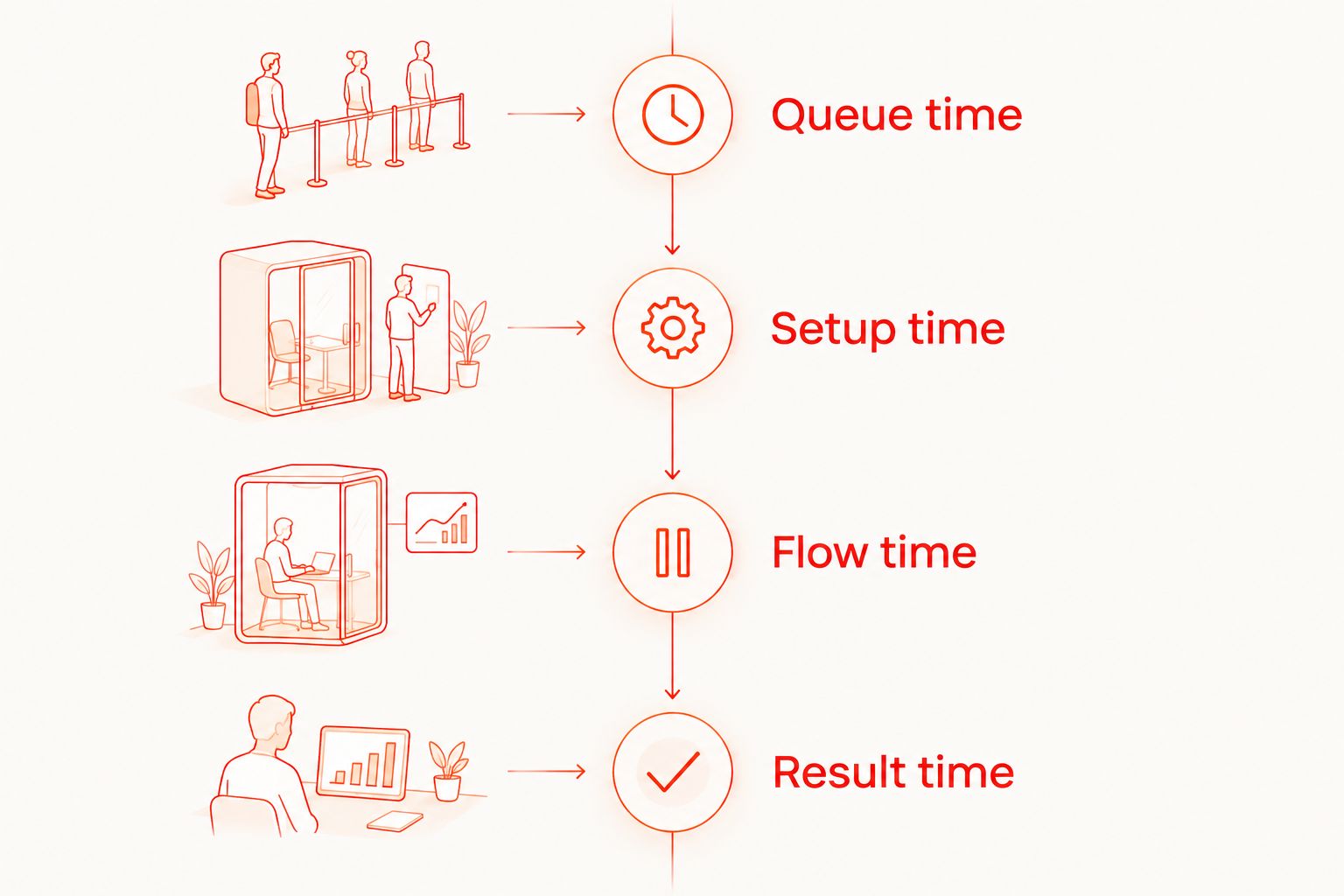
Measure elapsed time with a consistent clock and record durations in seconds. A dashboard's rounded duration and a CI job's elapsed duration are different measurements unless their boundaries match.
Repeat before ranking
Run 20 repetitions per configuration as an initial evaluation. Include both successful and failed runs in the record; report cancellations and infrastructure failures separately rather than silently removing them.
Report the median alongside the slowest observed run. Add percentile reporting when your sample and calculation method support it, but do not present a small sample as a guarantee about future tail latency.
Test your expected concurrency as a separate configuration. A single isolated job does not describe what happens when several release jobs arrive together.
Record diagnostic usefulness
For each failure, ask whether the available evidence identifies the failed step and supports reproduction. Keep this assessment separate from elapsed time.
A quick red status with no usable explanation does not satisfy the same requirement as an actionable failure report. Define what evidence your team needs before judging either result.
How the options are ranked
The 2026 order prioritizes workflow fit: local authoring first, hosted execution second, and physical-device validation when required. It does not assign a fastest-provider badge.
For an actual speed ranking, apply the same criteria to every candidate: matched workload, environment, concurrency, timing boundaries, and failure handling. Publish those conditions beside the result so readers can judge whether the ranking applies to their app.
A speed claim without its workload and timing boundary is not a useful buying criterion. Recheck the comparison whenever you materially change the suite or execution configuration.
Which testing option should you choose?
Start locally if you are still writing or stabilizing your flows. Maestro Deck is best for developers who want a free local runner for Maestro YAML end-to-end tests.
Evaluate hosted execution when your release process needs cloud runs or CI execution. Add physical-device testing when your acceptance criteria demand physical hardware, not because a generic platform ranking places it higher.
For your 2026 shortlist, choose the option that satisfies the execution requirement and then compare measured feedback latency. Do not reverse those decisions.
FAQ
What's the fastest cloud testing platform in 2026?
A defensible winner requires matched benchmark results for your workload and execution environment. Compare submission-to-result time using the same app build, assertions, concurrency, and timing boundaries.
Is Maestro Deck a cloud-only testing tool?
No. Maestro Deck provides a free, source-available local desktop runner and inspector for Maestro YAML flows; cloud execution is optional, and local use does not require paid cloud.
Should I measure test execution time or total CI time?
Measure submission-to-actionable-result time for the testing comparison and record flow execution separately. Include build compilation only when every candidate is measured across that same boundary.
Are simulators and emulators the same as physical devices?
No. Simulator or emulator execution does not establish physical-device coverage, so verify the environment against your release requirements before comparing speed.
Is source-available software the same as open source?
No. Source availability alone does not establish open-source licensing rights; review the applicable license for your intended use, modification, and redistribution.
Is Maestro Cloud faster than BrowserStack?
A speed verdict requires an equivalent workload and execution environment measured on both services. Product names alone do not establish which service will return an actionable result sooner for your suite.
How many benchmark runs should I start with?
Start with 20 repetitions per configuration as an evaluation protocol, not a performance guarantee. Keep failures in the record and evaluate expected concurrency separately.
One last thing
Before expanding parallel execution, deliberately introduce a failed assertion into a disposable test branch. Check whether the resulting report lets another developer locate and reproduce the failure without asking the flow's author for context.
That check tests the part a stopwatch misses: whether your release gate produces a decision you can act on. Keep it in your 2026 evaluation alongside elapsed time.


