

E-commerce cross-browser testing is checking shopping journeys across browsers and screen sizes to catch purchase-blocking defects before release. Start with Maestro Deck's free local desktop runner for Maestro YAML flows, then select cross browser testing tools for e-commerce teams against the browser coverage your storefront actually needs.
- Choose cross browser testing tools for e-commerce teams by checkout coverage, browser support, and reproducible failures.
- Maestro Deck is best for developers writing and debugging Maestro YAML flows locally.
- Local execution does not prove compatibility across every browser engine or physical device.
- Add cloud execution when CI or broader coverage requires it; keep local debugging available.
Why cross-browser testing matters for e-commerce teams
Your storefront has to preserve a purchase journey, not merely render a product page. A customer must be able to select a variant, update a basket, authenticate when required, and complete the checkout path without losing state.
Start your 2026 workflow with a narrow release gate. Choose 3 journeys: guest checkout, returning-customer checkout, and payment recovery. Treat these as your initial test scope, not a claim that three tests cover every store.
Desktop and mobile web also need separate attention. A checkout button can exist in the document while a sticky banner covers it on a smaller screen; an automated assertion that checks only presence will miss that problem.
Maestro Deck provides a source-available desktop runner and inspector for writing and executing Maestro YAML flows for iOS, Android, and web apps. That is a local authoring and execution workflow, not evidence of support for every browser combination.
Choose the runner for how you debug; choose browser coverage for what your customers use. Neither decision replaces the other.
Build a checkout-focused testing workflow
Define the shopping journeys that block release
Walk through your storefront manually before automating it. Write down the starting state, user actions, and expected result for each purchase path; a short checklist is enough to expose ambiguous requirements.
For guest checkout, define what counts as success beyond reaching the payment screen. For returning customers, include the transition from an anonymous basket to an authenticated session. For payment recovery, decide what should happen after a declined or interrupted attempt in your payment provider's test environment.
Keep this first scope deliberately small. A repeatable purchase journey gives you more useful release evidence than a long collection of unrelated page visits.
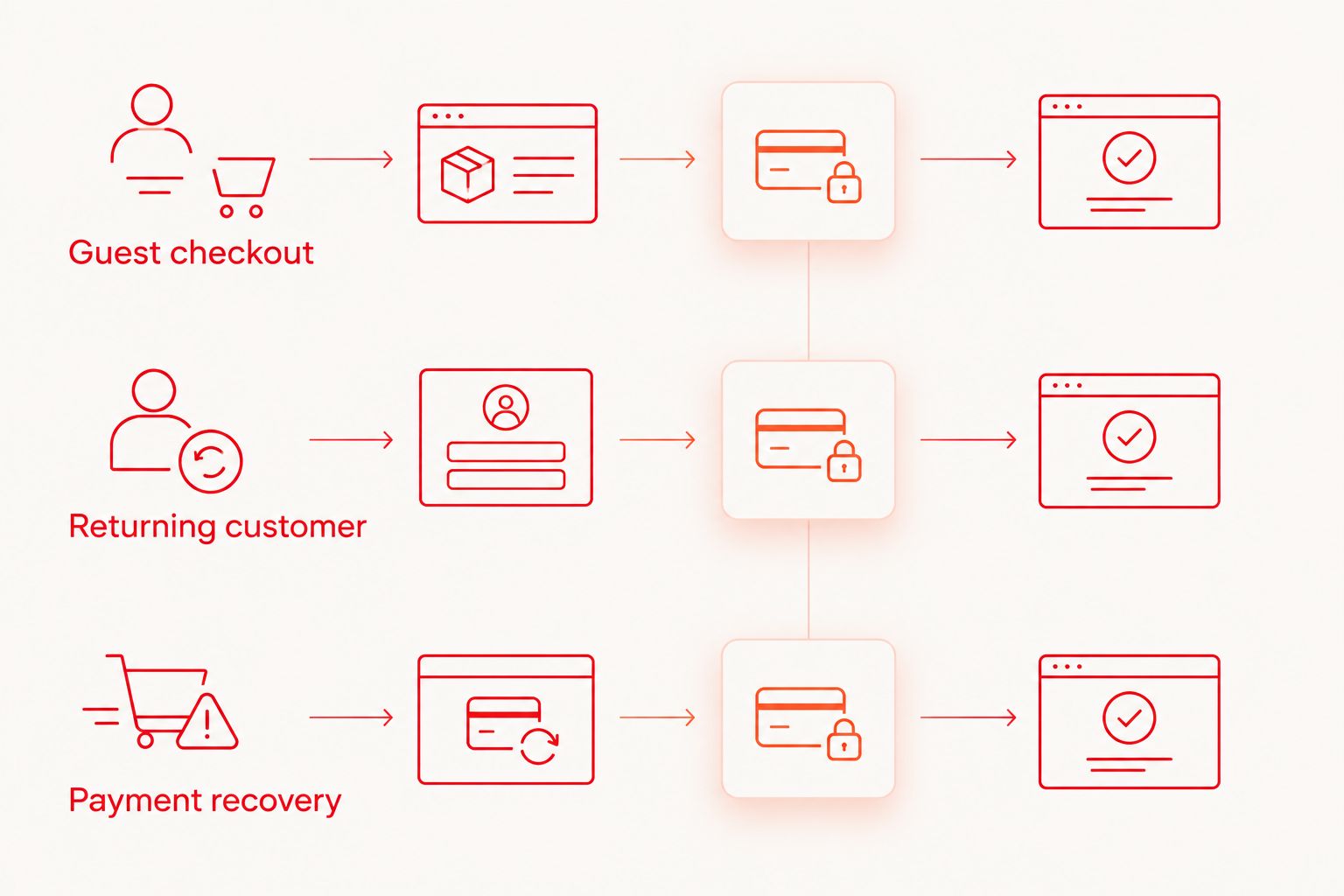
Give every journey an explicit completion condition. A visible confirmation message and the expected test-order state answer different questions; check both when your test environment permits them.
- Guest checkout: select a variant, add it to the basket, and complete a test purchase.
- Returning customer: authenticate and verify the intended basket survives.
- Payment recovery: reject a test payment, correct the input, and retry.
- Record the expected currency, delivery selection, and final order state.
Build the browser matrix from your own evidence
Inspect your storefront analytics and existing defect reports before selecting environments. Use browser, operating-system, and device-category information to make an explicit coverage decision rather than copying another team's matrix.
Keep browser identity separate from viewport size. Resizing a desktop window checks responsive behavior in that browser; it does not turn the session into a different browser engine or a physical phone.
For your 2026 matrix, record an exact browser version for every reproducible failure. A label such as mobile browser is too broad for a developer to investigate.
Use the browser coverage matrix guide to organize that selection. Give each environment a reason for inclusion, whether it represents observed customer usage or reproduces a known defect.
- Record browser, version, operating system, and viewport together.
- Separate desktop web, mobile web, and native-app coverage.
- Mark whether each environment is local, simulated, emulated, or physical.
- Identify the purchase journeys required in each environment.
- Assign an owner to review coverage when customer usage changes.
Write and debug the first flow locally
Run the manual journey until its expected outcome is unambiguous. Then automate that same path, keeping test setup separate from the customer actions you want to verify.
Maestro Deck's local runner and inspector provide a desktop workflow for authoring and executing Maestro YAML flows. Use local inspection to investigate the failing screen before adding more test cases or moving execution elsewhere.
Keep the product boundary clear: Maestro is the framework whose YAML flows you write; the desktop runner described here is a separate tool for working with those flows. Do not infer organizational affiliation from the shared terminology.
Check flow syntax and browser setup against the current documentation for your installed versions. A copied example is not useful if its commands or environment assumptions do not match your project.
- Automate one already-verified shopping journey first.
- Store the flow alongside the application changes it protects.
- Inspect target elements before choosing selectors.
- Assert the outcome after each meaningful state change.
- Reproduce a failure locally before expanding the suite.
Isolate accounts, baskets, and payment data
Write down the reset procedure before scheduling repeated execution. A test that inherits an old basket or an authenticated session can pass without exercising the journey you intended.
Prepare 2 explicit account states: signed out and signed in. Keep these distinct from basket state, which needs its own setup and cleanup rules; logging out does not establish that every relevant piece of shopping state is clean.
Use test accounts and the payment provider's documented testing environment. Avoid real customer records, production credentials, and payment details in flow files or captured artifacts.
Isolation also matters when execution overlaps. If separate runs change the same basket or account settings, investigate shared state before treating the result as a browser defect.
- Create a known starting basket for each journey.
- Separate credentials from version-controlled flow files.
- Use dedicated test identities rather than customer accounts.
- Define cleanup for test orders and account changes.
- Keep sensitive values out of screenshots, logs, and reports.
Assert behavior and inspect responsive layouts
Check the storefront manually at your selected viewport sizes before turning every observation into automation. Look for clipped validation messages, covered controls, and basket totals that become difficult to read.
Then distinguish behavioral assertions from visual checks. A flow that confirms an item was added does not establish that its price label is readable; a screenshot does not establish that the next action works.
Prefer selectors that describe the intended control and remain understandable during debugging. Coordinate-based interactions tie a test to a particular layout, so use them only when the alternative and its limitations are understood.
Keep waiting behavior tied to the state the application must reach. Adding a longer fixed pause does not explain whether the basket update, authentication transition, or payment response actually completed.
- Assert the selected product variant and quantity.
- Verify basket changes before proceeding to checkout.
- Inspect validation messages at the chosen viewport sizes.
- Check controls around sticky headers, banners, and overlays.
- Wait for the expected state rather than an arbitrary delay.
Add cloud execution only where it solves a constraint
Establish a repeatable local run before introducing hosted execution. First identify the constraint: unattended CI runs, access to required environments, or execution that no longer fits the developer's local workflow.
Cloud execution is an optional extension, not a prerequisite for local use. Before adopting a service, verify its documented browser versions, operating systems, artifact handling, and execution requirements against your matrix.
Keep simulators, emulators, browsers, and physical devices distinct in that review. Support for an emulator does not establish physical-device availability, and a browser listing needs more detail than a vendor name.
For a 2026 CI gate, define which failure blocks a merge and who investigates it. Preserve the original failure when rerunning; a later pass does not explain the earlier result.
- Confirm the exact environments needed for your release gate.
- Keep application builds and test revisions identifiable.
- Provide credentials through the CI environment's secret handling.
- Retain enough failure evidence to reproduce the problem.
- Document ownership and the criteria for blocking a release.
Review failures before expanding coverage
Read the failed step and inspect its starting state before rerunning the entire suite. Classify the failure as application behavior, test logic, environment setup, or unresolved evidence; do not automatically label it flaky.
Assign 1 named owner to each release-blocking journey. Ownership means someone can explain the expected behavior, maintain its setup, and decide whether a failure represents a release risk.
Expand coverage after the existing journeys produce understandable results. Add cases for store-specific behavior such as delivery eligibility, regional currency presentation, or account-dependent checkout only when those features exist in your storefront.
A useful test suite makes failures actionable. Adding environments to a suite nobody can diagnose increases investigation work without establishing that a release is safe.
- Preserve the first failing result and its environment details.
- Reproduce the issue using the same application and test revisions.
- Check shared state before changing selectors or waits.
- Record the defect or the test correction separately.
- Remove duplicate tests that assert the same outcome without added coverage.
Compare execution options for your team
Choose an execution approach by the work you need it to perform. Local debugging, repeatable browser automation, and hosted environment coverage solve related but different problems.
The table separates those roles. A convenient authoring workflow does not, by itself, establish cross-browser coverage. Verify the supported environment list before committing your release gate to any runner or service.
| Option | Best for | Main advantage | Key limitation |
|---|---|---|---|
| Manual browser checks | Exploratory checkout and layout investigation | You can investigate unexpected behavior directly | Repetition depends on a person following the same procedure |
| Maestro Deck local runner | Developers writing and debugging Maestro YAML flows | Desktop execution and inspection across the stated app categories | Confirm the exact web environments required by your matrix |
| Browser automation framework | Teams building repeatable web-specific checks | Test logic can express explicit shopping actions and outcomes | Framework selection, environment setup, and maintenance remain your responsibility |
| Maestro Deck Cloud | Teams adding hosted execution or CI runs | Extends the workflow beyond local execution | Verify browser coverage and execution requirements before adoption |
Keep local execution even after adopting hosted runs. It remains useful for investigating a failing journey without making every edit depend on a remote execution cycle.
Evaluate hosted execution
Review cloud execution options after your local checkout flows are repeatable.
Common mistakes e-commerce teams make
Treating responsive previews as browser coverage
A narrow viewport helps reveal layout problems, but it remains the same browser environment. Keep responsive checks and browser compatibility as separate entries in your test plan so neither becomes an accidental substitute for the other.
Stopping at the payment screen
Reaching payment proves that the preceding screens were accessible. It does not prove that validation, rejected-payment recovery, or order confirmation works. Use the provider's documented test environment to exercise the intended completion and recovery paths.
Mixing native-app and mobile-web results
An iOS or Android app result does not establish that the storefront works in a mobile browser. Record the application surface with every result, even when the native app and website share a backend or visual design.
Adding retries before investigating state
Retries can hide a basket collision, expired session, or incorrect waiting condition. Preserve the initial evidence and inspect setup first; otherwise, your release gate can become a record of eventual passes rather than reproducible behavior.
Choosing a cloud service before defining coverage
Start with the environments and journeys your 2026 release process requires. A service is useful when its documented execution model fits those requirements, not because its category label sounds broader than your current setup.
FAQ
What's the best way to choose cross browser testing tools for e-commerce teams?
Choose tools against a written browser matrix and checkout test plan. Verify the required browser versions, local debugging workflow, CI execution, and failure evidence before adopting a service.
Can I start checkout testing without cloud execution?
Yes. Start with manual browser checks and repeatable local flows, then add hosted execution when your CI or environment requirements justify it.
Does testing a mobile app cover the mobile website?
No. A native-app test and a mobile-browser test exercise different application surfaces. Keep their environments and release results separate.
Is a desktop runner the same thing as the Maestro framework?
No. Maestro is the framework whose YAML flows are executed; a desktop runner provides a separate workflow for authoring, running, and inspecting those flows. A shared name does not establish affiliation.
Does emulator support mean a service has physical phones?
No. Emulator, simulator, and physical-device support are distinct capabilities. Verify the documented execution environment rather than inferring hardware availability.
Which checkout journeys should I automate first?
Start with guest checkout, returning-customer checkout, and payment recovery when those paths exist in your store. Give each journey a known starting state and an explicit completion condition.
Does source-available mean open source?
No. Source-available means source code is accessible under its stated license; it does not establish that the license grants open-source permissions. Read the license before redistribution or modification.
One last thing
Add an interruption check to your 2026 release checklist: leave checkout, return, and verify the intended basket and session state. Write down the expected behavior first, because preserving a basket and preserving authentication are separate product decisions.
Keep the result specific. Record what survived, what reset, and whether the customer could continue; that evidence is more useful than a general checkout passed label.


