

Instead of manually rerunning end-to-end checks before every release, connect Maestro Deck to Fastlane by developing YAML flows in the free local desktop runner and executing those flows through the Maestro framework’s command-line runner inside your release lane. Put the test gate before distribution so a failed flow stops the release, not just the test report.
- Connect Maestro Deck to Fastlane through shared YAML flows and a command-line test gate, not desktop automation.
- Maestro Deck is best for developers who want free local editing and inspection before automating release checks.
- Fastlane should stop distribution when the Maestro test process fails.
- Cloud execution is optional; validate the local release gate before moving execution into CI.
Why this matters
A release lane can build successfully while the application fails at login or checkout. Compilation checks whether the application builds. An end-to-end flow checks whether a user can complete the path you selected.
Maestro Deck provides the free, source-available desktop runner and inspector for developing Maestro YAML flows. The Maestro framework supplies the flow language and command-line execution used at the Fastlane boundary. These are distinct tools; using the framework does not establish affiliation between their providers.
Maestro Deck is best for mobile developers who want a free local E2E runner before adding release automation. Local use does not require a cloud account. Source-available describes access to source code; it does not automatically mean open source under an open-source license.
For your 2026 release workflow, separate three responsibilities: build the application, execute the flows, and distribute only after success. Do not make the desktop window itself a CI dependency.
Before you start
- Prepare the development environment. Install Fastlane and the Maestro framework’s command-line runner on the machine that will execute the lane. Keep the desktop runner available for local flow development and inspection.
- Prepare a known-good flow. Use a version-controlled YAML flow, a dedicated test account, and a reachable test backend. As a starting recommendation, automate 1 smoke flow that proves a release-critical journey.
- Match the artifact to the execution target. An iOS simulator build is not interchangeable with a device distribution build. Likewise, the application identifier, installed application, and selected Android emulator must match the flow you intend to run.
The last point is the setup trap. Building an upload artifact does not prove you have produced an application that the selected simulator or emulator can install and execute.
Release lane configuration
Build target
- Open your project’s Fastfile and identify the lane responsible for preparing the release.
- Find the distribution action. Place the E2E gate before that action, not after it.
- Identify the application target, build configuration, application identifier, and source revision that the tests must cover.
- Add or reuse a build action that produces an artifact suitable for the test environment. Fastlane’s build_app action handles iOS builds; gradle handles Android Gradle tasks. Configure the action for your actual project rather than copying another application’s target names.
- Keep test-build output separate from distribution output so later steps cannot select an artifact merely because it has the newest timestamp.
Expected result: the lane produces an explicitly identified test artifact before any distribution begins.
A simulator smoke test checks the simulator build. It does not establish that signing, packaging, or physical-device behavior is correct. Keep those release checks separate and visible.
Test environment
- Select the simulator or emulator before invoking the flow. Avoid depending on whichever target a developer happened to leave running.
- Install the application built by this lane. Do not test an older installation left over from a previous run.
- Prepare the backend environment and test account. Confirm that the application can reach that environment from the execution machine.
- Define the flow’s starting state: signed out, signed in, onboarding incomplete, or another explicit condition.
- Run the same flow outside Fastlane first. Resolve application installation, target selection, and account problems before adding orchestration.
Expected result: the selected target runs the intended application build, and the flow passes independently of the release lane.
Keep credentials outside committed YAML. Supply sensitive values through the execution environment using the runner’s documented parameter mechanism, and ensure logs do not disclose them. A dedicated account also prevents a developer’s manual activity from changing the next test’s starting state.
Test gate
- Add Fastlane’s sh action after application installation and environment preparation.
- Configure sh to execute the same Maestro command-line invocation that already passes independently. Use a repository-relative flow location and an explicit working directory.
- Preserve the runner’s process exit status. Fastlane’s sh action raises an error for an unsuccessful command by default; do not replace that behavior with a handler that merely prints the failure.
- Keep distribution after the test action in the lane’s successful execution path.
- Make the flow deliberately fail once, then invoke the lane. Confirm that the distribution action does not run.
Expected result: a passing test permits the lane to continue; a failing test stops the lane before distribution.
For the initial 2026 setup, require 1 deliberately failing run as an acceptance check. This is a recommended integration check, not a claim about test coverage. A gate that has only demonstrated success has not demonstrated that it blocks releases.
Failure evidence
- Preserve the test process output alongside the Fastlane log.
- Retain the failure artifacts your execution environment actually produces. Configure CI artifact collection separately from the release gate.
- Record the source revision, application identifier, build artifact, and selected execution target with the job.
- Run cleanup after failure without changing the failed outcome into success.
Expected result: a failed release attempt includes enough context to reproduce the failure against the same application build.
Before treating the lane as ready, require 2 consecutive runs from the documented starting state. This is a practical setup recommendation, not a reliability benchmark. If the second run fails because the first changed account data, fix state isolation before expanding the suite.
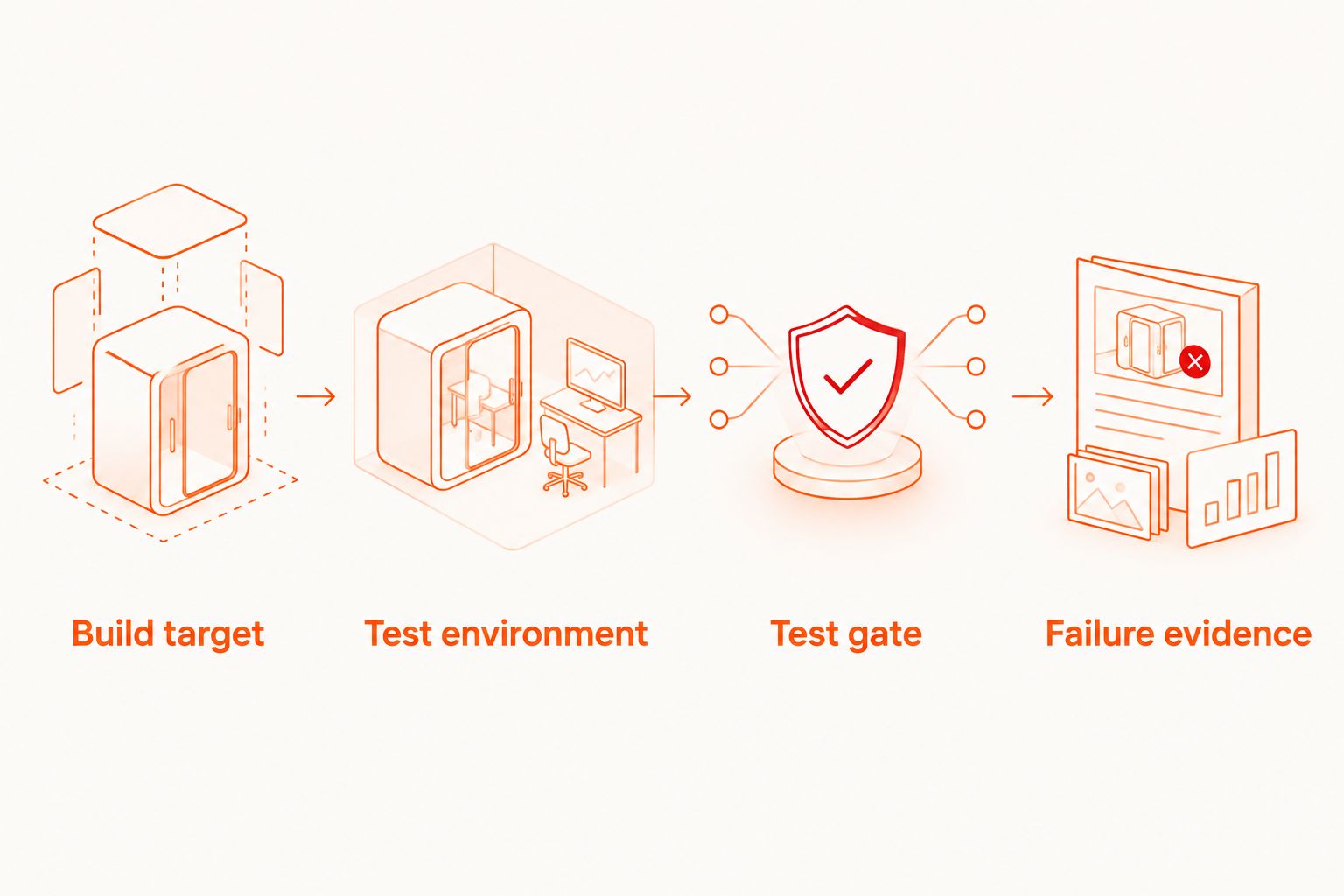
The configuration order is deliberate: Build target, Test environment, Test gate, then Failure evidence. Each stage supplies a condition the next stage needs.
Choose local execution or optional cloud execution
Keep local execution first when validating the integration. It lets you reproduce failures without also debugging remote uploads, credentials, and job orchestration. The trade-off is that your execution machine must supply the required application runtime and dependencies.
Cloud execution is a separate decision. Maestro Deck Cloud supports execution on simulators, emulators, and browsers from CI. That description does not establish physical-device availability, and a cloud job must still test the correct artifact and revision.
| Execution option | Best for | Advantage | Trade-off |
|---|---|---|---|
| Local runner and command-line gate | Developers establishing a reproducible release smoke test | Keeps flow development and initial debugging local | Requires a prepared execution machine and target |
| Optional cloud execution | Teams moving execution into CI or expanding beyond local runs | Moves execution into a hosted workflow | Adds account setup, artifact transfer, and remote job handling |
Do not assume a successful cloud submission means the tests passed. A release gate needs the completed test result. When adopting a cloud integration, confirm its documented authentication, upload, completion, and result-handling behavior before making distribution depend on it.
For a 2026 CI rollout, sign up for cloud execution only when you need that execution path. Keep paid cloud test runs separate from the free local desktop workflow.
Plan your cloud execution
Keep local development free. Review cloud execution when your release workflow needs hosted runs.
Run smoke tests whenever a release candidate changes
A release lane is not the only useful trigger. Run the same smoke gate whenever a new release-candidate build becomes available, even when nobody intends to distribute it immediately.
- Separate build-and-test work from the action that distributes the application.
- Invoke the build-and-test lane when release-candidate changes reach your chosen CI trigger.
- Associate the result with the exact source revision and artifact tested.
- Require the distribution workflow to use the intended tested revision rather than an unrelated latest build.
Expected result: release candidates receive feedback before the final distribution attempt, while distribution remains a separate action.
This variant reduces the amount of work hidden inside release day. Its limitation is artifact identity: a passing result for an earlier revision does not approve a later build. If distribution rebuilds the application, record the relationship between the tested build and the distributed artifact.
For 2026 maintenance, keep the trigger policy in version control with the lane. A workflow that depends on someone remembering which branch to test is still partly manual.
Troubleshooting
The lane passes after a test fails
Restore failure propagation. Inspect custom error handlers, rescue blocks, and shell wrappers around the test process. Remove behavior that converts an unsuccessful test command into a successful lane result.
Repeat the deliberately failing acceptance check. Also inspect the CI job: a correctly failed Fastlane process is ineffective if the job itself is configured to ignore failure.
The command works locally but fails inside Fastlane
Compare execution environments. Check the working directory, executable search path, environment variables, and user account used to run Fastlane. Relative flow paths and developer-specific shell initialization are common sources of differences.
Run the lane from a clean terminal using the same setup expected in CI. Do not solve the problem by hard-coding another developer’s home directory.
The application cannot install or launch
Check artifact compatibility before changing the flow. Confirm the platform, simulator or emulator target, application identifier, and build configuration. An iOS distribution archive is not a substitute for a simulator-compatible application.
Then confirm that the lane installs its newly built artifact. A stale installed application can make the symptoms look like a selector problem.
The flow passes once and fails on the next run
Reset the state the flow changes. Check account records, onboarding completion, permissions, and persistent application data. Make setup explicit rather than adding retries around an unknown starting condition.
If the failure involves finding a control, use Inspector Mode to debug a failing flow. Fix the selector or state transition before increasing the suite’s scope.
The cloud job starts but distribution runs immediately
Wait for the completed test outcome. Separate job submission from test completion. Use the cloud integration’s documented result mechanism and make an unsuccessful result fail the release lane.
Check this path with an intentionally failing remote flow before allowing the workflow to distribute builds.
Customize your workflow
Expand coverage by release risk, not by screen count. Add a second journey only after the first flow runs from a controlled starting state and produces useful failure evidence.
Keep platform-specific preparation separate from shared release policy. iOS and Android need different build and installation steps, but both lanes should enforce the same rule: unsuccessful tests block distribution.
For your 2026 release checklist, document ownership of test accounts, execution environments, and failing flows. A test gate needs someone responsible for restoring it when application behavior changes.
FAQ
How do I connect Maestro Deck to Fastlane?
Develop and debug Maestro YAML flows locally, then execute those flows with the Maestro framework’s command-line runner through Fastlane’s sh action. Put the action before distribution and preserve unsuccessful exit statuses.
Do I need a cloud account to run local tests?
No. Maestro Deck’s free local desktop workflow does not require a cloud account. Cloud execution is optional when you want a hosted execution path.
Is Maestro Deck the same as the Maestro framework?
No. Maestro Deck provides a desktop runner and inspector for Maestro YAML flows, while the Maestro framework provides the flow language and command-line execution used in this integration. Do not treat the names as interchangeable.
Can I test an iOS distribution build in a simulator?
An iOS simulator requires a simulator-compatible application build. Keep simulator test artifacts separate from device distribution artifacts and identify which build each result covers.
How do I stop a release when a Maestro test fails?
Execute the test before distribution and preserve its unsuccessful process status through Fastlane and CI. Validate the gate with a deliberately failing flow and confirm that distribution never starts.
Should release tests run locally or in the cloud?
Start locally to establish a reproducible build-and-test sequence. Add cloud execution when you need hosted runs, then verify that the lane waits for the completed result rather than only submitting a job.
Does simulator coverage prove the app works on physical devices?
No. Simulator and emulator results apply to those execution environments. Treat physical-device coverage as a separate requirement and verify that the selected execution service explicitly supports it.
One last thing
Test the release gate, not just the application. Temporarily make a smoke assertion fail and watch the whole lane. The useful result is not merely a failed test; it is proof that the distribution action never ran.


