

Choose Maestro Deck if you need a free local desktop runner and inspector for Maestro YAML end-to-end tests; choose Bitrise if you need mobile CI to coordinate builds, tests, and release workflows. The distinction in 2026 is test development versus pipeline orchestration—not two interchangeable test runners.
- Maestro Deck vs Bitrise is a local E2E testing versus mobile CI decision, not a direct runner replacement.
- Choose Maestro Deck for writing, inspecting, and executing Maestro YAML flows locally without a cloud account.
- Choose Bitrise when your immediate problem is coordinating mobile builds, tests, and release workflows.
- Use optional cloud execution when your test workflow needs hosted runs; keep local debugging separate.
Why this matters
A CI service does not replace the place where you develop a reliable test. A desktop test runner does not replace the pipeline that builds and delivers your app. Buying one to solve the other problem leaves the original bottleneck intact.
Maestro Deck is the local E2E testing choice for developers who need to write, inspect, and run Maestro YAML flows. Bitrise addresses the broader mobile delivery workflow. You can evaluate them together without treating either as a complete substitute for the other.
For a 2026 release workflow, separate three stages: build the app, validate its behavior, and decide whether it can proceed. Assign each stage to a tool deliberately. Do not make a cloud purchase the prerequisite for your first local test.
At a glance
| Dimension | Maestro Deck | Bitrise |
|---|---|---|
| Best for | Developers and QA engineers developing Maestro E2E flows | Mobile teams coordinating CI builds, tests, and delivery |
| Local test authoring | Desktop runner for Maestro YAML flows | CI workflows rather than a local flow editor |
| Standout feature | Inspector for developing and debugging flows | Mobile-focused workflow orchestration |
| Build and release coordination | Not a substitute for a build-and-release pipeline | The stronger fit for coordinating pipeline stages |
| Hosted execution | Optional cloud execution alongside local use | Hosted CI execution as part of the pipeline |
| Platform scope | iOS, Android, and web E2E testing | Mobile CI with test coverage determined by the configured tools |
| Licensing decision | Source-available desktop tool; review the license for intended use | Evaluate the service terms for your CI setup |
| Pricing model | Free local runner; optional paid cloud execution | Evaluate CI execution charges and plan terms against pipeline usage |
The table compares roles, not measured speed or reliability. Neither workflow wins because its dashboard looks simpler. The useful question is which part of your release process needs an owner.
The desktop runner wins on local flow authoring
Start locally when you do not yet trust the test. You need to inspect the app, identify the interaction, write the assertion, and rerun the flow while you change it. That is a test-development loop, not a release pipeline.
The desktop runner supports writing and executing Maestro YAML flows for iOS, Android, and web apps. Local use does not require a cloud account. Keep that distinction explicit when you introduce the tool to another developer.
Bitrise is the better fit after you have work that a pipeline should execute. A successful CI configuration does not establish that your selectors, assertions, or test data are correct. It establishes that the configured tasks can run in the configured environment.
Choose local authoring before pipeline automation when the flow itself is unfinished. The trade-off is clear: a local runner gives you a place to develop the test, but it does not take responsibility for building and releasing your application.
Inspector Mode wins when the flow needs debugging
A failed UI test can reflect an application defect or a test that does not describe the intended behavior correctly. Before you change the pipeline, inspect the screen and the interaction that failed. Fix the smallest reproducible problem.
Inspector Mode belongs in this loop. Use the guide to debugging a failing flow with Inspector Mode when you need to connect a YAML action to the app state you are observing.
Bitrise addresses a different debugging question: where did the pipeline fail? That matters when the build, test invocation, or another configured stage fails. It is not the same question as which UI element your flow should interact with.
Keep two outcomes separate:
- Flow failure: the app behavior or test logic needs investigation.
- Pipeline failure: the execution setup or another delivery stage needs investigation.
The local inspector wins for developing the flow. CI context wins for investigating a failure that only appears inside the pipeline. Neither view should erase the other.
Bitrise wins on build and release coordination
Choose Bitrise when your problem spans more than executing a YAML file. Mobile CI needs to coordinate tasks around the test: preparing the build environment, producing an application artifact, invoking checks, and controlling what happens next.
Bitrise organizes mobile CI/CD work through configured workflows and steps. That makes it the stronger choice for pipeline ownership. A local E2E runner should not be presented as an equivalent replacement for that role.
The limitation runs in the other direction, too. A workflow can invoke a test without helping you design a useful assertion. Moving an unreliable test into CI does not make the test reliable.
For a 2026 evaluation, define the required handoffs before comparing products:
- What produces the application artifact?
- What invokes the behavioral checks?
- What result blocks the next delivery stage?
- Who investigates a failed run?
Bitrise wins when the missing capability is coordination across those handoffs. Keep test authoring in a tool built for that work rather than asking the CI configuration to become your development environment.
Both support automated execution, but own different boundaries
Both options can participate in automated testing. The tie ends there: hosted test execution and a complete CI workflow are different responsibilities.
Optional cloud execution extends the local testing workflow when you need hosted runs or execution from CI. Bitrise provides the pipeline context in which build and test tasks are coordinated. Do not assume that choosing hosted tests also gives you the rest of a release pipeline.
Use this sequence to define the boundary:
- Local authoring: develop the flow against a known app state.
- Repeatable check: confirm that the flow tests the intended behavior.
- CI decision: specify how the result affects the pipeline.
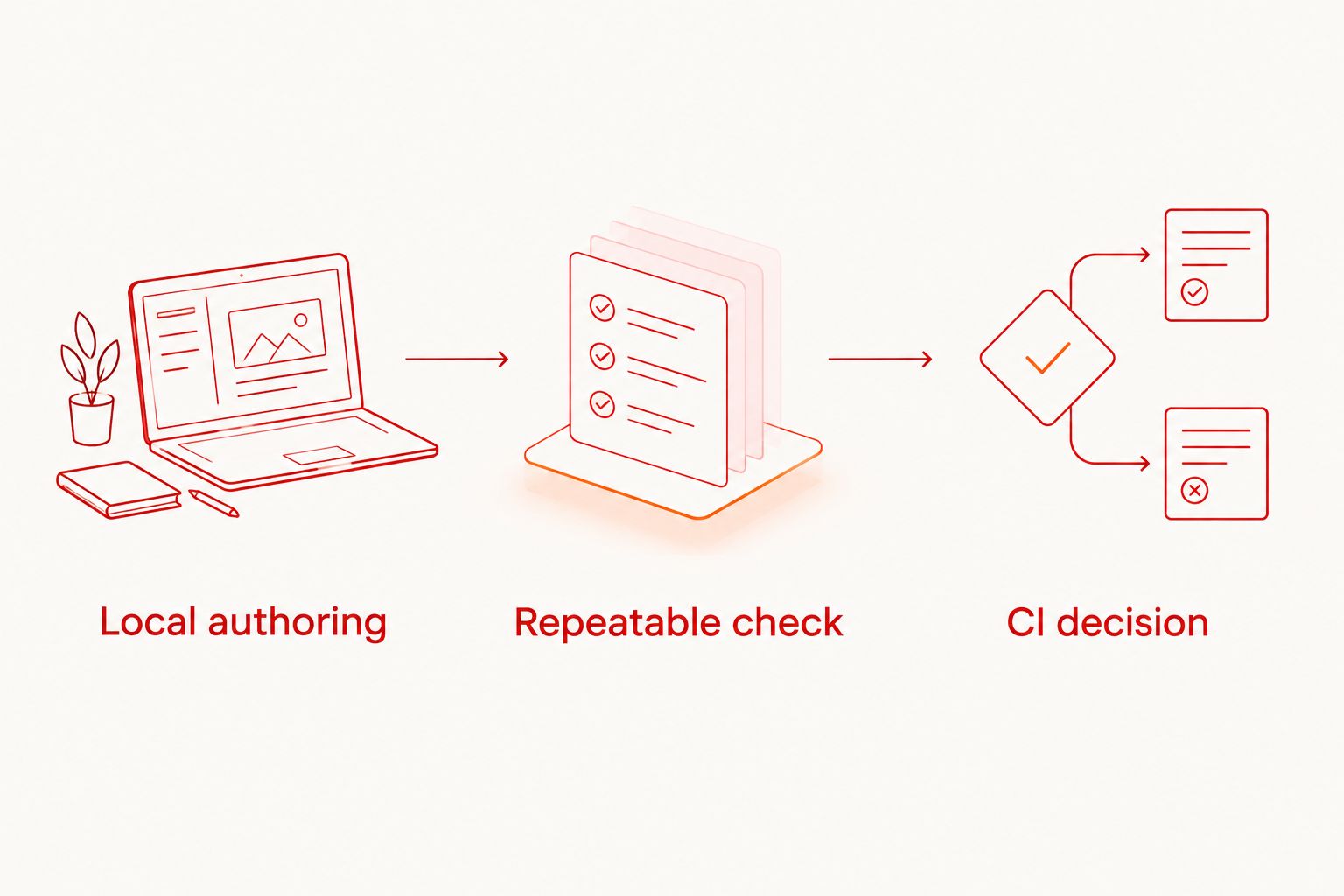
These are workflow responsibilities, not a claim of a preconfigured integration. Confirm the supported invocation, authentication, application artifact, and result handling before committing to an implementation.
Treat automated execution as a tie at the category level, not proof of interchangeable features. A hosted run answers whether the configured test passed. Your pipeline must still decide what that result means for delivery.
Both need an explicit platform and device scope
Platform names alone do not establish equivalent coverage. The desktop runner targets iOS, Android, and web E2E flows. Bitrise coordinates mobile CI, while the selected testing tools and execution environment determine the actual behavioral coverage.
Write down the environment for each required check. Distinguish an iOS simulator, an Android emulator, a browser, and a physical device. Do not turn a statement about simulator or emulator support into a claim about physical-device availability.
For a 2026 coverage plan, use a small scope sheet:
- Application: the build or web deployment under test.
- Environment: simulator, emulator, browser, or physical device.
- Behavior: the user journey and expected outcome.
- Gate: whether a failure blocks delivery or triggers investigation.
Neither product name completes this sheet for you. This is an honest tie: both require an explicit coverage decision, and neither should receive credit for an environment you have not confirmed.
Avoid calling every remote run device testing. Name the actual execution target. That makes failures easier to interpret and prevents your release checklist from promising coverage it does not contain.
Source-available code answers a different question than CI terms
Maestro Deck is source-available, not automatically open source. Those terms are not interchangeable: access to source code does not establish permission for every modification, redistribution, or commercial use.
Review the applicable license against your intended deployment. If you plan to modify the runner, distribute it internally, or include it in another offering, check those specific uses rather than relying on the word source.
Bitrise presents a service-selection question for the CI workflow discussed here. Evaluate the terms, execution environment, access controls, and operational requirements that apply to your team. Source visibility in a separate desktop tool does not answer those questions.
The desktop runner wins when source availability is a selection criterion. That is not a claim that its license permits every use, or that source availability alone makes a testing setup suitable for your organization.
Also distinguish the desktop product from the Maestro framework. The runner works with Maestro YAML flows; that does not establish affiliation with the framework or make every Maestro-related service the same product.
Pricing: separate local use from hosted execution
Start the budget with the workflow you actually need. Local use is free; optional paid cloud execution is a separate decision. You do not need to create a cloud account to justify developing your first flow.
For Bitrise, evaluate the current CI plan and execution terms against the pipeline you intend to run. Compare the work being charged for, not a headline plan label. Building the app, executing tests, and coordinating delivery are different scopes of work.
A useful 2026 budget review separates local development, hosted test execution, and CI orchestration. Check what triggers a run, how execution is accounted for, and which limits affect your workflow. Do not assume either service's billing unit matches the other's.
The practical trade-off is local independence versus hosted capacity and pipeline operation. Keep tests local while you develop them. Add hosted execution when you have a defined operational reason, such as running checks from CI rather than a developer workstation.
Evaluate optional cloud execution
Keep local development separate. Review cloud terms when your workflow needs hosted test runs.
Final verdict: pick the missing workflow layer
Choose Maestro Deck if you develop the E2E flows
Named winner for the mobile developer or QA engineer: Maestro Deck. Choose it when you need a local desktop environment for writing, inspecting, and executing Maestro YAML tests across the supported app platforms.
Its limitation is scope. The runner does not replace the broader build-and-release coordination you would select a CI service to handle. Keep cloud execution optional rather than turning it into a requirement for local development.
Choose Bitrise if you own the delivery pipeline
Named winner for the mobile release engineer: Bitrise. Choose it when your immediate task is to coordinate application builds, test invocation, and the stages that follow a successful check.
Its limitation in this comparison is equally specific: pipeline orchestration does not replace local flow authoring or UI inspection. Keep a local debugging path even after tests become release gates.
| Dimension | Winner |
|---|---|
| Local flow authoring | Maestro Deck |
| UI inspection during flow development | Maestro Deck |
| Build and release coordination | Bitrise |
| Pipeline-stage investigation | Bitrise |
| Participation in automated testing | Tie; different responsibilities |
| Coverage planning | Tie; explicit environment selection required |
| Source availability as a requirement | Maestro Deck; license review still required |
| Budget fit | Local runner for local work; evaluate hosted and CI costs separately |
FAQ
Is Maestro Deck better than Bitrise for E2E testing?
Maestro Deck is the better fit for locally writing, inspecting, and executing Maestro YAML E2E flows. Bitrise is the better fit for coordinating mobile CI workflows around builds, tests, and delivery.
Does Bitrise replace a local test runner?
Bitrise does not replace the local flow-development role described in this comparison. A CI workflow coordinates execution; you still need a way to develop and debug the behavioral checks it invokes.
Do I need a cloud account to run tests locally?
You do not need a cloud account for Maestro Deck's local desktop runner. Optional cloud execution is a separate choice when you need hosted runs or execution from CI.
Can I use a local runner alongside mobile CI?
Yes, local test development and mobile CI serve complementary roles. Confirm the supported test invocation, application artifact, authentication, and result handling before implementing a particular pipeline connection.
Is source-available the same as open source?
No, source-available and open source are different licensing descriptions. Review the actual license for your intended modification, redistribution, and commercial use rather than inferring permissions from source access.
Does cloud testing mean the tests run on physical devices?
No, cloud testing does not establish physical-device execution. Identify whether each run uses a simulator, emulator, browser, or physical device, and confirm support for that target.
What should I compare before paying for hosted tests or CI?
Compare the scope of work, execution accounting, run triggers, and operational limits. Keep local development, hosted test execution, and pipeline orchestration separate so you do not compare unlike services.
One last thing
Do not start with the pipeline configuration. Start with one flow that checks a release-critical behavior and can fail for the right reason. Introduce a controlled failure, confirm that the check detects it, and restore the expected behavior.
Then define how CI reacts to that result. A green pipeline is useful only when its checks can distinguish working behavior from a regression.


