
Instead of manually rerunning Maestro flows before every merge, configure CircleCI to build your pull request, execute a smoke suite, and fail the required check when an assertion fails. Start with the free Maestro Deck desktop runner to write and inspect flows locally; add hosted execution only when your CI workflow needs it.
- For maestro testing circleci workflows, build the pull-request revision and make test failures fail the required check.
- Maestro Deck is best for developers who want to write and debug Maestro YAML flows locally before CI execution.
- Self-managed execution requires a working device environment; hosted execution requires completion tracking, not just successful submission.
- Prove the integration with a deliberate assertion failure before making the CircleCI check mandatory.
Why this matters
A green pipeline proves little if it tests yesterday's build or finishes before the device run. Your 2026 release workflow needs a chain of evidence: the pull-request revision, its installable build, the flows executed against that build, and the final result.
A successful upload is not a successful end-to-end test. Keep that distinction explicit when connecting a hosted runner to CircleCI.
Maestro is the testing framework that executes YAML flows. Maestro Deck provides a source-available desktop runner and inspector for working with those flows; the names do not establish affiliation. Source-available and open-source licensing are different terms, so inspect the license before adopting or redistributing the software.
Before you start
- Prepare repository and CircleCI access. You need permission to edit
.circleci/config.yml, configure protected environment variables, and change required checks in your repository host. Keep your Maestro flows under version control alongside the application. - Prove one flow locally. Use a dedicated test account, a reachable test backend, and an app build for the intended execution environment. Start with 1 smoke flow that launches the app and asserts a meaningful result.
- Choose the execution environment before configuring jobs. An iOS simulator build is not interchangeable with a physical-device build. Android execution also needs a compatible package and device environment. A generic container does not become a mobile test runner merely because the framework is installed.
Do not introduce CI while you are still diagnosing a broken local flow. First separate application failures, test-data problems, and device setup errors.
Pull-request trigger
The trigger must connect the revision under review to the build being tested. Configure that relationship before adding device execution.
- Connect the repository through CircleCI's Projects area and confirm that a commit starts a pipeline. Check the revision recorded for that pipeline against the revision in your repository.
- Add the application build job to
.circleci/config.yml. Use the executor appropriate for your build toolchain rather than copying an unrelated container configuration. - Define the build and end-to-end jobs under workflows. Give the end-to-end job a requires dependency on the build job so it cannot begin before the package exists.
- Configure pull-request behavior using the integration active for your repository. CircleCI trigger controls differ between integration types; branch filters alone are not proof that only pull requests run.
- Push a test change and confirm that CircleCI tests the expected revision. Decide whether your policy tests the source branch revision or a generated merge revision, then keep that choice consistent.
Expected result: a pull-request update starts the intended workflow, and the test job depends on a successful build of the intended revision.
For a 2026 setup, verify trigger behavior in the connected project rather than relying on an older configuration copied from another repository. Include forked contributions in that check if your project accepts them.
Build and device configuration
Choose where the flows execute. Local development, self-managed CI, and hosted CI solve different parts of the workflow.
| Execution option | Best for | Advantage | Trade-off |
|---|---|---|---|
| Maestro Deck desktop runner | Developers writing and debugging flows | Free local execution and inspection | Does not replace a configured CircleCI execution environment |
| Self-managed CI execution | Teams that need control over the runner | You control the toolchain and device setup | You maintain device startup, installation, dependencies, and cleanup |
| Hosted CI execution | Teams moving device execution outside the build job | Separates app building from device execution | Requires credentials, compatible uploads, and final-result tracking |
- Build an installable package from the checked-out revision. Record the revision with the build output so a failed test can be traced to its source.
- Transfer the package to the test job. For separate CircleCI jobs in the same workflow, persist_to_workspace and attach_workspace provide a standard file-transfer mechanism. Do not assume one job's filesystem exists in another.
- For self-managed execution, provision the required environment. iOS simulator execution needs a suitable macOS environment; Android emulator execution needs an executor capable of running the emulator configuration you select.
- Start the device environment, wait for readiness, and install the package before starting flows. Treat device readiness and application installation as separate checks.
- For hosted execution, use the provider's current documented authentication and submission procedure. Confirm that the selected target supports your package format and platform before wiring it into a required check.
Expected result: the execution environment contains the build associated with the pull-request revision, and the app can launch before the suite starts.
Do not describe simulator or emulator coverage as physical-device coverage. For your 2026 coverage record, name the environment actually used and retain its platform details with the result.
Flow execution and merge gate
Connect execution to a result that CircleCI can enforce. This is the part that turns an automated run into a release check.
- Select a small smoke suite from the repository. Prefer one critical user journey over a collection of unrelated screen taps. Make the final assertion prove the intended application outcome.
- Supply test configuration through protected environment variables or a CircleCI context. Use the Environment Variables settings for project-level values; keep credentials out of committed YAML and printed shell output.
- Run the suite against the installed build using the execution method documented for your selected runner. Use the same flow revision as the application change unless your repository structure explicitly requires another relationship.
- Preserve the test process's failure status. Do not suppress it with shell constructs that force success or place another successful command after a failed test in a way that hides the result.
- For hosted execution, wait for the final test status. Successful submission only proves that the request was accepted. Make a failed, canceled, or incomplete execution prevent the required check from passing.
- Retain available logs and failure evidence. CircleCI's store_artifacts can retain files produced by the job; store_test_results is for supported test-result data, not arbitrary screenshots or raw logs.
Expected result: a failing assertion produces a failing CircleCI check, while the job retains enough evidence to identify the failed flow and build.
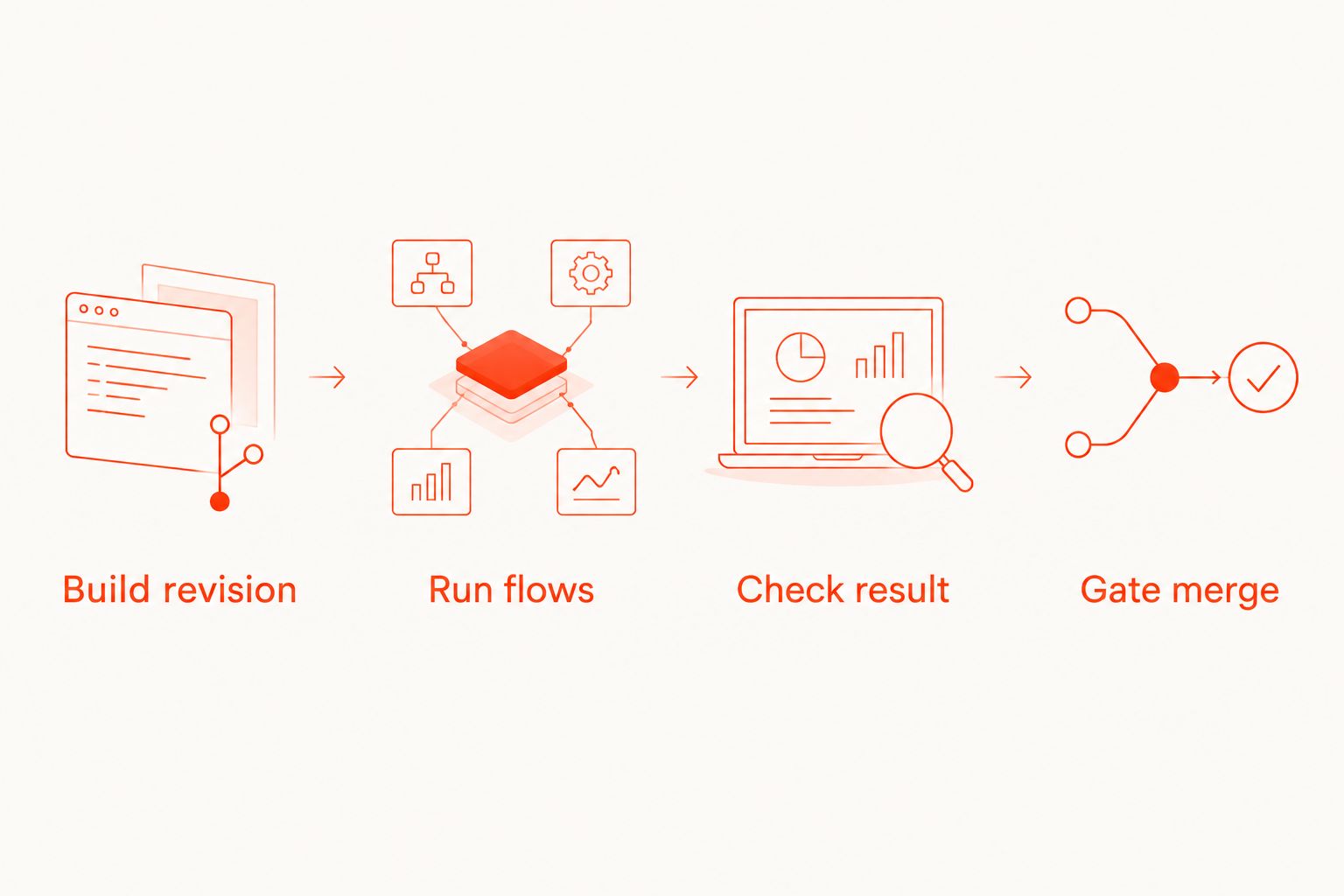
The control path should remain simple:
- Build revision
- Run flows
- Check result
- Gate merge
Retain evidence even when execution fails. A cleanup or artifact step that runs only after success leaves the failed run without evidence when developers need it most.
Failure verification
Test the integration itself before requiring it for merges. In 2026, a required check should demonstrate that it can reject a known regression, not just display a successful run.
- Run the unchanged smoke flow and confirm it passes against the intended build.
- Introduce 1 deliberate assertion failure on a temporary branch. Choose a change that fails deterministically rather than depending on network timing.
- Confirm that the flow fails, the CircleCI job fails, and the repository reports the failed check on the correct pull request.
- Revert the deliberate failure and rerun. These 2 verification runs establish both the passing and failing paths of the integration.
- Configure the resulting check as required in your repository host. Repeat the verification if you rename the workflow or job, because the required-check identity must still match.
Expected result: the repository blocks the known-failing change and accepts the restored flow without manual interpretation of the job log.
Also test interrupted execution. A canceled hosted run must not leave a successful merge check simply because the initial upload completed.
Run broader coverage after a merge
Use pull requests for the release smoke suite and the default branch for broader coverage. This gives you an adjacent workflow without making every edit depend on every environment.
Keep the same build-to-result relationship. Trigger the broader workflow after a merge, build that revision, and run the additional flows against that package. If you add scheduled coverage, identify the revision selected by the schedule rather than labeling it as a pull-request result.
Best for pull requests: short, deterministic journeys that catch release-blocking regressions. The trade-off is narrower coverage.
Best for post-merge runs: additional environments and longer journeys. The trade-off is later feedback, so this workflow cannot replace the required pull-request check.
Use separate test accounts or isolated records when workflows overlap. Follow the guide to isolate accounts and test data before adding concurrency; shared mutable data can make otherwise valid flows interfere with each other.
Troubleshooting
The pipeline passes after a flow fails
Check the shell exit status and hosted completion handling. Remove failure suppression, preserve the runner's result, and confirm that the job waits for completion rather than stopping after submission.
Repeat the deliberate-failure test. Reading configuration is not a substitute for observing a failed required check.
The flow passes locally but cannot launch in CI
Inspect the package type, device readiness, application identifier, and installation output. Verify that the package was built for the selected simulator, emulator, or physical device.
Do not debug selectors until the app installs and launches successfully in the CI environment.
The app opens but login fails
Check backend reachability from the execution environment, test-account state, and credential injection. An address that points to a service on your laptop does not automatically point to that service from CI.
Confirm the account is not being changed by another run. Never print passwords or tokens while inspecting environment setup.
Pull requests do not receive the expected check
Inspect the repository integration, workflow filters, and required-check name. Verify whether the pipeline ran against the source branch or a merge revision.
For forked pull requests, examine the security policy before enabling credentials. Untrusted application code must not gain access to production secrets.
Failure evidence is missing
Check whether artifact collection runs after failure and whether the configured path exists. Keep raw logs separate from structured test results, and remove secrets from any retained evidence.
For hosted runs, retain the available run reference with the build revision so developers can locate the matching execution.
Customize your workflow
Keep Maestro Deck as the local E2E testing workspace for authoring and inspection. Its free local runner does not require you to adopt paid cloud execution; hosted execution is an optional next step when you need CI-driven runs or additional execution capacity.
For your 2026 workflow, expand only after the failure gate works. Add reusable flows, isolate test state, and broaden environment coverage independently so each change has an identifiable effect.
Start cloud evaluation with the actual package and smoke suite you already use. Confirm supported targets, authentication, completion reporting, and failure evidence before making hosted execution a required dependency.
Start with local flows
Write and inspect Maestro YAML flows locally before connecting execution to CircleCI.
FAQ
How do I run Maestro testing in CircleCI on every pull request?
Build the pull-request revision, make the test job depend on that build, and execute your version-controlled Maestro flows against it. Preserve the final test status and require the resulting CircleCI check before merging.
Do I need paid cloud execution to use Maestro Deck locally?
No. Maestro Deck provides a free local desktop runner and inspector; paid cloud execution is optional when your workflow needs hosted runs or CI execution.
Can I run iOS Maestro flows in a Linux container?
A Linux container does not provide an iOS simulator. Use a suitable macOS execution environment or a hosted service that explicitly supports the required iOS target and package format.
Should CircleCI pass as soon as a hosted run is uploaded?
No. Successful submission is not a completed test result. Wait for the final execution status and make unsuccessful or incomplete runs prevent the required check from passing.
Why does a Maestro flow pass locally but fail in CircleCI?
Compare the build, execution environment, backend access, account state, and injected configuration. First prove that the app installs and launches, then investigate assertions and selectors.
Should every Maestro flow run on every pull request?
Use a focused smoke suite for the required pull-request check and broader coverage after merging or on a schedule. Keep release-blocking journeys in the pull-request suite so later coverage does not become your first regression signal.
Is Maestro Deck the same as the Maestro framework?
No. Maestro is the YAML-based testing framework; Maestro Deck provides a desktop runner and inspector for working with Maestro flows. The similar names do not establish affiliation.
One last thing
Break the assertion before you trust the badge. A green check becomes useful only after you have watched the same integration reject a known-failing flow on the correct pull request.
Keep that verification branch available for future pipeline changes. It gives you a direct way to test whether the release gate still enforces the result.


