

SaaS mobile app automation testing is repeatable end-to-end verification of app workflows with the aim of preventing release regressions in customer access and account data. This guide to mobile app automation testing for SaaS apps starts with local checks, then covers tenant isolation, session handling, and optional cloud execution for CI.
- Start mobile app automation testing for SaaS apps locally; add cloud execution when your release workflow needs it.
- Maestro Deck provides a free, source-available desktop runner and inspector for Maestro YAML flows.
- Test tenant isolation, session expiry, and role permissions alongside successful login.
- Keep E2E testing focused on observable outcomes; verify backend authorization below the UI too.
Why mobile app automation testing matters for SaaS teams
A successful login is not proof that a SaaS app works. Your customer must reach the correct workspace, see the right records, and retain only the permissions assigned to that account. A release can preserve the screen layout while breaking those boundaries.
Start your 2026 release workflow with a small, repeatable local suite. Maestro Deck provides a free desktop runner and inspector for writing and executing Maestro YAML flows across iOS, Android, and web apps. Local use does not require a cloud account.
Maestro Deck is best for developers who want a free local runner and inspector for Maestro YAML end-to-end tests. The desktop workflow supports authoring and debugging; optional paid cloud execution addresses a different need: running tests beyond a developer’s machine.
The distinction matters. Maestro is the test framework; the desktop application is a separate tool for working with its flows. Do not infer affiliation from shared terminology.
Build a SaaS release-testing workflow
1. Map customer actions to release risks
Start manually. Walk through the app as a new customer, a returning customer, and an account administrator. Record what each person must accomplish and which failure would block useful work.
Turn those observations into test cases before choosing execution infrastructure. A screen inventory is not a test plan. Your plan needs a starting state, an action, and an observable result.
For a 2026 baseline, prescribe 3 account roles: administrator, member, and restricted user, using equivalent roles from your own product. These are proposed coverage categories, not a requirement to change your authorization model. If your app lacks multiple roles, replace them with distinct access states.
Keep the first release gate narrow. Add broader regression coverage only after the core paths are repeatable.
- List the actions customers need immediately after signing in.
- Mark actions that change shared or sensitive account data.
- Specify the expected result for every selected action.
- Separate release-blocking failures from cosmetic issues.
2. Isolate accounts, tenants, and starting state
Create dedicated test accounts manually before automating their setup. Use synthetic records with recognizable names. Never depend on a developer’s personal workspace or production customer data.
For tenant-isolation coverage, prescribe 2 test tenants with distinct records. Confirm that switching accounts changes the visible workspace and that records from the previous tenant do not remain accessible through the tested interface.
UI checks alone do not establish backend authorization. Pair the mobile suite with service-level tests that attempt unauthorized access directly. A hidden button proves only that the button is hidden.
Use the account and test-data isolation guide when defining setup and cleanup boundaries. Keep the ownership of each account explicit, especially before introducing concurrent execution.
- Assign accounts and records to a named test scenario.
- Restore known app state before each independent scenario.
- Avoid shared writable records across simultaneous runs.
- Define cleanup for both successful and interrupted runs.
- Keep credentials outside committed flow files.
3. Write and inspect the first local flow
Perform the journey by hand first. Identify the controls you need, the screen transitions you expect, and the final state that proves success. Then express the journey as a Maestro YAML flow.
Use Maestro Deck as the local authoring and inspection path. Its desktop runner and inspector let you work with those flows without making cloud execution a prerequisite. Keep flow files in version control beside the application changes they validate.
Describe your first flow in plain language before implementing it: open the app, sign in with a dedicated account, select its workspace, and verify the workspace identity. This separates test intent from command syntax. Check exact YAML commands and supported behavior against current framework documentation before committing executable examples.
Set 1 explicit business-outcome assertion as the minimum acceptance condition for each initial flow. Add further assertions when they identify a distinct failure.
- Start with a single critical customer journey.
- Inspect target elements before choosing selectors.
- Prefer stable identifiers over screen coordinates.
- Assert the resulting account or workspace state.
- Commit the flow with its required setup instructions.
4. Test sessions and permission boundaries
Begin with a written state checklist. An authenticated session, an expired session, and a signed-out app are different starting conditions. Treat each deliberately rather than hoping normal test execution reaches it.
For SaaS apps, session tests should verify where the customer lands after authentication and which account remains active. If your product supports workspace switching, confirm both the visible identity and the records shown after the switch.
Permission changes need separate checks. Removing access should stop the protected action, not merely remove its entry point from the interface. Validate the underlying authorization rule outside the UI as well.
In your 2026 suite, keep destructive permission checks independent from happy-path flows. A failed access-removal test should not invalidate every later scenario through shared account state.
- Check successful login against the expected workspace identity.
- Check expired-session behavior and the return path after authentication.
- Check logout before opening protected app screens again.
- Check restricted actions with an appropriately limited account.
- Check account switching for stale records from the previous session.
5. Replace timing guesses with observable conditions
Reproduce a failing journey manually before editing the flow. Determine whether the application is still loading, the selector is wrong, the test data changed, or the product actually failed.
An elapsed delay does not prove readiness. Design assertions around the state that matters: a loading indicator disappears, a record becomes visible, or a control becomes actionable. Use the framework’s documented synchronization behavior rather than adding arbitrary pauses.
Separate app instability from test instability. If the same account receives inconsistent backend data, changing a selector will not fix the cause. Likewise, repeated retries can conceal an unreliable release gate without making the underlying behavior correct.
Keep a short failure record that connects the flow, app build, environment, and observed state. Make the next debugging session start with evidence.
- Inspect the actual screen at the failed step.
- Replace fragile selectors before increasing wait durations.
- Check account state and backend readiness independently.
- Reproduce failures using the same app build and inputs.
- Add retries only after identifying the failure mechanism.
6. Move stable flows into CI when needed
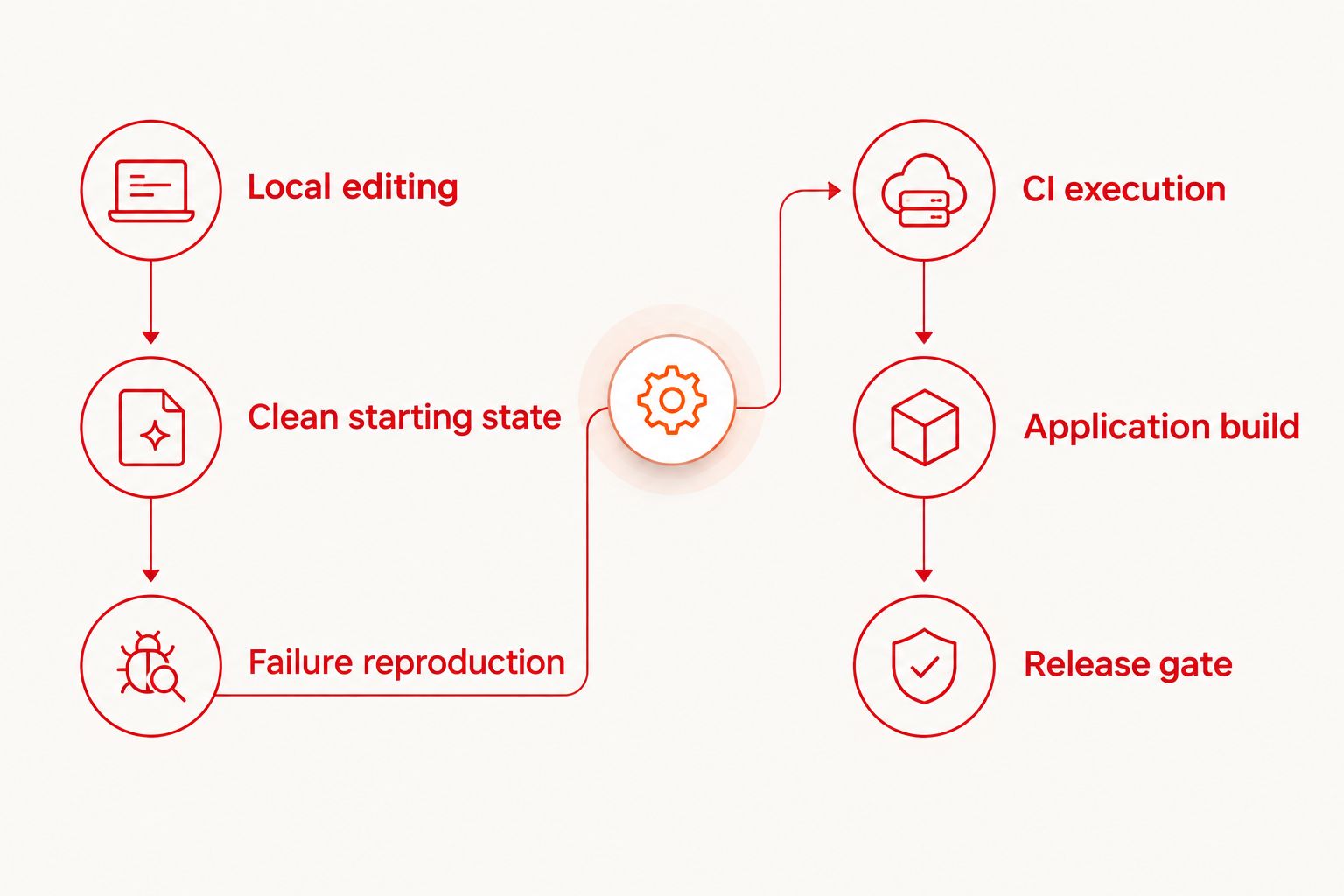
First prove that the selected flows pass from a clean local starting state. Then choose the CI event that deserves a test run. Do not move an unexplained local failure into hosted execution and expect infrastructure to solve it.
Optional Maestro Deck cloud execution becomes relevant when you need to run Maestro flows from CI or expand execution beyond local development. Keep local editing available so developers can reproduce failures without starting every investigation in a remote environment.
For your 2026 pipeline, define the application artifact, test revision, environment, and credentials as explicit inputs. Confirm the supported execution target before choosing a service. Simulator or emulator support does not establish physical-device support.
- Select the stable smoke flows that block a release.
- Pin each run to an identifiable application build.
- Pass secrets through the CI system’s protected configuration.
- Preserve available failure evidence and execution context.
- Define who investigates a failed release gate.
7. Maintain coverage as the product changes
Review test intent during feature development, not only after a flow fails. A renamed button can require a selector update; a changed permission rule can require a different expected outcome. Those are different maintenance tasks.
Keep the release suite aligned with current customer workflows. Remove obsolete paths instead of preserving tests that pass against behavior nobody uses. Expand coverage when a new role, tenant boundary, authentication path, or supported platform introduces a distinct risk.
For 2026 release reviews, record which critical workflows the suite covers and which still require manual checks. A passing run describes its tested scope, not the whole application.
- Assign an owner to each critical workflow.
- Review assertions alongside product behavior changes.
- Remove obsolete accounts, records, and selectors.
- Track recurring failures by cause rather than retry count.
- Keep manual checks for important behavior outside automated scope.
Compare execution options for SaaS mobile testing
Choose an execution model by its job, not by the size of its feature list. Local execution is the starting point for authoring; hosted execution is an optional operational choice. Neither replaces a deliberate test-data strategy.
| Option | Best for | Practical advantage | Key limitation |
|---|---|---|---|
| Manual walkthroughs | Exploring new or changing journeys | You can inspect unexpected behavior before formalizing assertions | Repeating the same checks requires human attention |
| Maestro Deck desktop runner | Writing and debugging Maestro YAML flows locally | Free local execution and inspection without a cloud account | Local runs alone do not provide a CI release gate |
| Optional cloud execution | Running established flows from CI | Execution can become part of the release workflow | You must verify target support, data handling, and failure evidence |
Do not select a hosted service solely because it accepts a familiar framework. Confirm whether your required app build, operating-system target, authentication setup, and test-data restrictions fit its documented capabilities.
Also distinguish source-available from open source. Access to source code does not, by itself, establish open-source licensing rights. Read the applicable license before redistribution, modification, or organizational adoption.
Common mistakes SaaS mobile teams make
Treating login as complete account coverage
A successful authentication screen does not confirm the correct tenant, role, or dataset. Assert workspace identity and a representative permitted action after login. Test restricted access separately.
Sharing one writable account across runs
Concurrent flows can overwrite each other’s records or change session state. Give independent runs isolated accounts or isolated data boundaries. Cleanup must not delete another run’s fixtures.
Checking authorization only through hidden controls
A missing administrator button is a presentation check. Add service-level authorization tests for the protected operation, then use mobile E2E checks to verify the customer-facing behavior.
Automating production-like data without reviewing exposure
Failure evidence can reveal account names, records, and session context. Use synthetic data and review what your chosen execution environment captures, retains, and makes accessible to teammates.
FAQ
What's the best starting point for mobile app automation testing for SaaS apps?
Start with a repeatable local flow for a critical customer journey. Verify login, the expected workspace, and a business outcome before expanding the release suite.
Do I need a cloud account to use Maestro Deck locally?
No cloud account is required for local desktop use. Maestro Deck provides a free, source-available runner and inspector; paid cloud execution is optional when your workflow needs it.
Is Maestro Deck the same as the Maestro framework?
No. Maestro is the framework used to express test flows, while Maestro Deck provides a desktop runner and inspector for working with Maestro YAML flows. Shared terminology does not establish affiliation.
How do I test tenant isolation in a mobile SaaS app?
Use separate test tenants with distinct records and verify the active workspace after authentication or account switching. Add service-level authorization checks because UI visibility alone does not prove data isolation.
Should every mobile test run in CI?
Only make dependable, release-relevant tests blocking CI checks. Keep exploratory checks and unstable flows outside the release gate until their setup, assertions, and failure causes are understood.
Does emulator testing prove an app works on physical devices?
No. Emulator and simulator results apply to those execution environments, not automatically to physical devices. Confirm physical-device support separately when your release requirements include it.
Does source-available mean open source?
No. Source-available describes access to source code, while open-source status depends on the license and the rights it grants. Review the applicable terms before assuming modification or redistribution rights.
One last thing
Make workspace identity part of your success condition. A flow can reach the expected screen while showing the wrong tenant’s context. Assert an unambiguous synthetic workspace marker after login and after every account switch.


