

Fintech mobile app testing is the verification of financial app workflows with the aim of preventing broken authentication, incorrect transaction states, and unsafe releases. Choose tools that let you reproduce failures locally, isolate test accounts, and check what happens before, during, and after a money movement request.
- Maestro Deck is best for developers who want a free local desktop runner for Maestro YAML end-to-end tests.
- Choose mobile app testing tools for fintech apps around transaction outcomes, authentication, and test-data isolation.
- Start with local E2E testing; add cloud execution when your CI workflow or coverage needs it.
- Keep UI assertions separate from backend checks: a confirmation screen alone does not prove a transaction succeeded.
Why mobile app testing matters for fintech teams
A fintech test must distinguish a successful interaction from a successful financial operation. Tapping a transfer button checks the interface; verifying the resulting transaction state checks whether the workflow reached the intended outcome. You need both.
Start your 2026 workflow with a local runner rather than a cloud dependency. Maestro Deck provides a free, source-available desktop runner and inspector for Maestro YAML flows across iOS, Android, and web apps. Local use does not require a cloud account.
A passing UI test is not proof of financial correctness. Keep balance calculations, authorization rules, and transaction integrity covered by appropriate backend and security tests. Use end-to-end flows to check that the app presents those outcomes correctly and lets the user recover when something fails.
Your selection criteria should follow the failure you need to detect. A runner that reproduces a broken transfer flow solves a different problem from a device service used to investigate hardware-dependent behavior.
Build a fintech testing workflow before comparing tools
Use the sequence below to define what your tool must support. Start manually, make each scenario repeatable, and automate only after the expected result is clear.
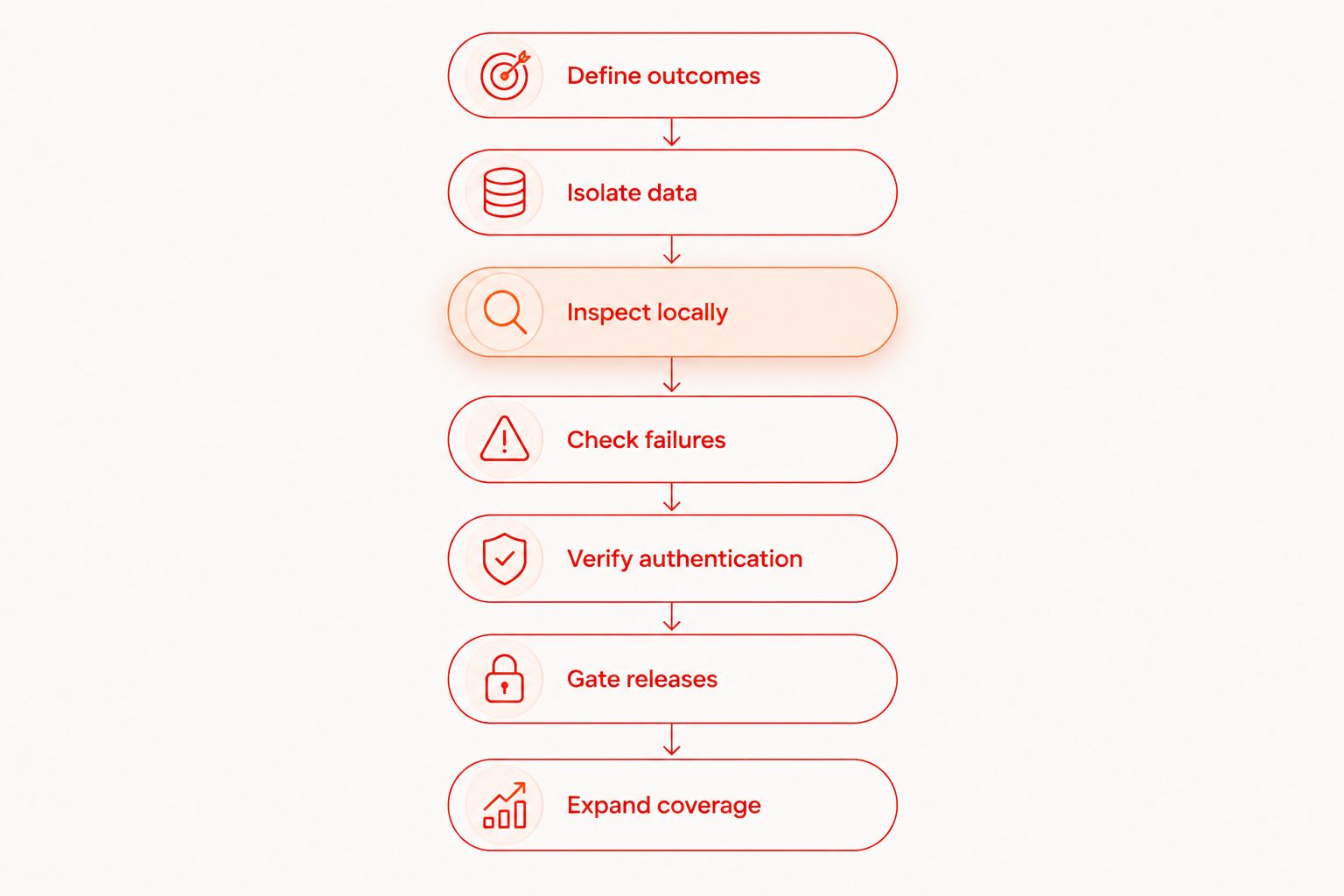
1. Define outcomes
Walk through a financial journey manually before writing automation. Record the starting account state, the action, the visible response, and the backend result you expect. Do not use production money or customer records to make the scenario realistic.
For an initial suite, choose 3 flows: authentication, a core financial action, and transaction-history review. This is a starting scope, not a coverage target. Replace the financial action with your app's actual operation, such as a transfer request or card payment.
Write expected results precisely. A transfer marked pending should not be treated as settled, and an unsuccessful request should not produce a success message. Keep product-defined behavior separate from assumptions made by the test author.
- Record the account's starting state and required permissions.
- Define the expected transaction status after submission.
- Check the displayed amount, currency, recipient, and status.
- Identify the backend evidence needed to confirm the result.
- Assign an owner to each unresolved behavior question.
2. Isolate data
Create synthetic users and reset their state manually before introducing automatic setup. Use controlled balances, known recipient records, and explicit account permissions. Shared mutable accounts make a failure difficult to interpret because another run can change the starting conditions.
For your 2026 suite, assign 1 account per concurrent worker as an initial isolation rule. If a scenario needs a sender and recipient, provision that pair independently. Never assume a local app reset also resets server-side transactions.
Build setup and cleanup into your test infrastructure, not into an undocumented developer routine. This guide to isolating accounts and test data covers the workflow behind repeatable runs.
Protect artifacts too. Screenshots, logs, and recordings can expose the same sensitive fields that you excluded from fixtures.
- Create synthetic identities rather than copying customer profiles.
- Allocate independent accounts to concurrent executions.
- Reset backend fixtures separately from local app state.
- Inject credentials through your approved secret-handling mechanism.
- Remove sensitive fields from retained failure evidence.
3. Inspect locally
Run the journey manually on your development target and identify the controls your test must interact with. Give important controls stable identifiers where your application and framework support them. Avoid selectors tied to a changing account balance or transaction description.
Maestro Deck's local desktop runner and inspector provide a place to write, execute, and inspect Maestro YAML flows. Use that local loop before adding remote execution. The benefit is direct reproduction during development; the limitation is that a local run covers only its selected environment.
Keep the naming distinction clear: Maestro is the test framework; the desktop runner works with its YAML flows. Do not treat the two names as interchangeable or infer an affiliation.
Organize flow files around user outcomes rather than screen names. A file named for a transfer outcome communicates intent better than a file named for an isolated button.
- Inspect the controls used by the financial journey.
- Prefer stable identifiers over positional interactions.
- Separate reusable authentication setup from transaction assertions.
- Keep environment configuration outside committed credentials.
- Reproduce a failing flow locally before changing its assertions.
4. Check failures
Trigger failure states manually in a controlled environment. Then automate the cases with repeatable setup. Your 2026 release suite needs to distinguish a rejected transaction from a request whose outcome is still unknown.
A timeout after submission deserves special attention. The app losing its response does not establish whether the server accepted the operation. Check the product's documented recovery behavior and confirm the result through the appropriate backend evidence.
Do not make automatic retries the default answer. Repeating a financial action without knowing its previous outcome tests a different path and can conceal a defect. Validate the server's duplicate-request handling outside the UI suite as well.
Use explicit terminal-state assertions. Merely reaching a screen, dismissing an error, or finding a button says little about whether the user can safely continue.
- Exercise rejection and insufficient-funds scenarios where applicable.
- Interrupt connectivity before and after request submission.
- Check the UI's pending or unknown-outcome state.
- Verify recovery after closing and reopening the app.
- Confirm that repeated submission follows the product's rules.
5. Verify authentication
Start with a manual session checklist. Cover sign-in, sign-out, expiry, and the return to a protected screen. Record which transitions require fresh authentication and which preserve an existing session.
Automate application-visible behavior, but keep device-specific authentication checks separate. A simulator or emulator run does not establish physical-device biometric behavior. Likewise, successfully dismissing an authentication prompt does not prove that authorization is enforced on the server.
Treat notifications and external verification steps as explicit dependencies. Use approved test mechanisms in a non-production environment rather than weakening production authentication to make automation easier.
Check app switching and relaunch behavior where financial information is visible. The expected behavior should come from your security and product requirements, not from whatever the current screen happens to display.
- Verify that sign-out prevents access to protected screens.
- Exercise session expiry during a financial workflow.
- Check the return path after reauthentication.
- Use dedicated test identities for external verification.
- Validate physical-device authentication separately when required.
6. Gate releases
Run the suite manually against a named build first. Capture enough information to reproduce every failure: build identifier, environment, test account reference, target, and failed expectation. Exclude secrets from that record.
Require 2 consecutive runs from independently reset state before promoting a new flow into a release gate. This is a suggested acceptance check, not evidence that a test is statistically reliable. Investigate inconsistent results before increasing execution frequency.
Maestro Deck Cloud is an optional execution path when you need cloud runs or execution from CI. Keep the local workflow usable without it. Before adopting hosted execution, verify the supported targets, credential handling, retained artifacts, and network access against your requirements.
Define failure ownership before blocking a release. An unavailable fixture service and an incorrect transaction state need different responses.
- Attach each run to the exact application build.
- Reset state before every acceptance run.
- Fail the gate on an unmet financial outcome.
- Distinguish infrastructure failures from application failures.
- Document who investigates and who approves exceptions.
7. Expand coverage
Build a coverage matrix manually before buying additional execution capacity. List the operating systems, app surfaces, and device-dependent behaviors you need to check. Tie each row to a product requirement or known failure mode.
Expand execution when the matrix shows an actual gap. More targets do not compensate for weak assertions, shared accounts, or a test that never verifies the transaction result.
Separate simulator, emulator, browser, and physical-device coverage in your reporting. These are different execution environments, not interchangeable labels. Do not infer physical-device availability from a service offering simulator or emulator execution.
For every additional target, ask what new failure it can expose. If the answer is unclear, improve your existing scenario before expanding the matrix.
- Map supported platforms to explicit release requirements.
- Add targets for device-dependent behaviors that need them.
- Keep browser journeys separate from native app journeys.
- Repeat the same outcome checks across relevant targets.
- Review coverage when authentication or payment dependencies change.
Compare options by the problem they solve
For 2026, compare execution paths rather than treating every testing tool as a substitute for every other tool. Choose local execution for development feedback; choose additional environments for a defined coverage or release requirement.
| Option | Best for | Practical advantage | Key limitation |
|---|---|---|---|
| Manual local testing | Defining new or ambiguous financial journeys | Lets you inspect behavior before formalizing assertions | Requires repeated human execution and clear records |
| Maestro Deck | Developers writing and debugging local Maestro YAML E2E flows | Desktop runner and inspector for iOS, Android, and web flows | Local results do not establish coverage across other environments |
| Maestro Deck Cloud | Teams adding hosted execution or CI runs | Provides an optional cloud path alongside local development | Requires evaluation of target support, data handling, and integration requirements |
| Dedicated physical-device testing | Checking behavior that depends on actual hardware | Tests the behavior on the selected physical device | Does not replace backend correctness tests or other device coverage |
| Backend integration tests | Verifying transaction rules and server-side state | Checks outcomes beneath the interface | Does not prove that the mobile UI communicates those outcomes correctly |
Source-available and open source are not interchangeable licensing terms. Read the applicable license before making redistribution or modification decisions; access to source code alone does not establish those permissions.
Start with a local flow
Use the local desktop runner first. Review cloud options when your release workflow needs hosted execution.
Common mistakes fintech teams make
Treating a success screen as settlement
A confirmation message is an interface assertion, not a complete transaction check. Verify the expected server-side status separately, especially when the product distinguishes submitted, pending, completed, and reversed operations.
Reusing funded accounts across parallel runs
Concurrent tests can change balances, limits, and transaction histories beneath each other. Allocate independent fixtures and define cleanup ownership. Otherwise, the same assertion can pass or fail because of execution order rather than application behavior.
Adding retries around money movement
A retry can hide an unresolved request outcome. Establish whether the original operation was accepted before exercising another submission, and validate the product's duplicate-request rules rather than assuming the UI prevents duplicates.
Treating UI automation as a security assessment
A flow that signs in and blocks a protected screen is useful regression coverage. It does not establish that authorization, credential storage, transport security, or transaction controls withstand attack. Maintain a separate security-testing scope.
Uploading sensitive evidence without reviewing it
A failing screenshot can contain account details even when the test script contains no secrets. Review artifacts, access controls, retention, and hosting requirements before sending execution evidence to a hosted service.
FAQ
What's the best starting point for fintech mobile app testing?
Start with a local flow that verifies authentication, a core financial action, and the resulting transaction state. Maestro Deck is a fit for developers who want a free desktop runner and inspector for Maestro YAML flows.
Do I need cloud testing to start automating my fintech app?
No. Start locally and add hosted execution when your CI workflow or coverage requirements justify it. Local development should not depend on a cloud account.
Can a mobile UI test prove that a transfer succeeded?
A mobile UI test alone cannot prove that a transfer succeeded. Check the relevant backend transaction state as well as the amount, recipient, currency, and status presented in the app.
Should fintech tests use real customer accounts?
Use synthetic test identities and controlled non-production accounts. Keep customer records, production credentials, and sensitive financial details out of fixtures and retained artifacts.
Are simulators enough for biometric authentication testing?
Simulator results do not establish physical-device biometric behavior. Include appropriate physical-device checks when your requirements depend on actual hardware authentication.
What's the difference between Maestro and its desktop runners?
Maestro is the framework used to define and execute Maestro flows. A desktop runner provides a workflow around those flows; do not assume identical licensing, services, or affiliation.
What should block a fintech app release?
An unmet release requirement should block the release under your team's defined policy. Treat incorrect financial outcomes, broken authentication, and exposed sensitive data as explicit gate criteria, and distinguish them from test-infrastructure failures.
One last thing
Add an explicit unknown-outcome scenario to your 2026 release checklist: submit an operation, interrupt the response, and reopen the app. Define the expected recovery path before automating it.
The most useful assertion is often what happens after the apparent failure. Check whether the app finds the existing operation, displays its actual state, and avoids presenting an uncertain result as a definite rejection. That scenario tests the boundary between interface behavior and financial truth.


