

Maestro Deck provides a free local desktop runner for investigating flaky Maestro YAML flows before you add retries. Use UI testing tools to identify the first incorrect state, distinguish an application failure from a test or environment failure, and fix that cause; a passing rerun does not explain the original failure.
- Maestro Deck is best for developers who want a free local runner and inspector for Maestro YAML flows.
- Choose UI testing tools that expose failed state, not just a final pass or fail.
- Investigate selectors, asynchronous screens, shared data, and environment differences before adding retries.
- Keep the initial failure visible even when a later attempt passes.
How do UI testing tools help diagnose flaky tests?
UI testing tools help diagnose flaky tests by making the failed interaction and its surrounding application state inspectable. The useful question is not whether another run passes. It is whether you can explain why the original run failed.
Start with Maestro Deck for local execution and inspection of Maestro YAML flows. Keep the failing flow small enough to understand, preserve the original failure evidence, and change one suspected cause at a time.
Use this sequence before changing the retry policy:
- Preserve the failure. Record the application build, flow revision, execution target, and failed action.
- Find the first divergence. Identify where the application stopped matching the flow's assumptions.
- Inspect the target. Check that the selector identifies the intended element in the failed state.
- Check readiness. Determine whether the previous operation actually completed before the next interaction.
- Reset prerequisites. Recreate the account, permissions, session, and data required by the flow.
- Retest the correction. Run the unchanged scenario after fixing the suspected cause, then examine any remaining failures.
These are diagnostic steps, not a promise that every failure has the same cause. Stop at the first unsupported assumption and investigate it before changing downstream assertions.
Why this matters
A release check needs a clear interpretation. If an unchanged test can fail and then pass, its final result alone does not tell you whether the application is ready to ship.
For your 2026 release workflow, separate the observed outcome from the diagnosis. Record that a run failed, record whether a subsequent attempt passed, and record the cause only after you have evidence for it.
A retry is another observation, not a repair. It repeats execution without necessarily changing the condition that caused the failure. Treat that distinction as part of your release policy, not as an implementation detail hidden in the runner configuration.
Preserve evidence before you rerun
Keep enough context to reconstruct the failure. A screenshot taken after a later successful attempt cannot show the state that blocked the original interaction.
Capture these details when your execution environment exposes them:
- The exact application build and test revision.
- The failed action and the expected result.
- The visible screen and relevant element properties.
- The execution target and operating system configuration.
- Application logs and service responses associated with the failure.
- The account and data prerequisites, excluding secrets and sensitive values.
Do not assume every runner captures every artifact automatically. Check the actual output of your selected tool and define what your workflow must retain.
Keep evidence from the initial attempt separate from evidence produced by a rerun. Otherwise, a successful screenshot or overwritten log can erase the context you needed to diagnose the failure.
Find the first incorrect state
The final failed assertion is not necessarily where the problem began. A checkout assertion can fail because an earlier sign-in never completed, because the wrong item was selected, or because the expected screen was not ready.
Work backward from the failure until you find the first observable mismatch. Then inspect that transition directly rather than adding waits throughout the entire flow.
Inspect the selector
Ask whether the selector identifies the intended element uniquely in the failing state. Check for repeated labels, changing text, localization, hidden elements, and differences between the expected screen and the actual screen.
Do not replace a failing selector with a broader match just to make the test pass. A broader match can accept the wrong element and remove the protection the test was meant to provide.
For Maestro YAML flows, use Inspector Mode to debug a failing flow as the next investigation step. Compare the inspected target with the assumption expressed in the flow.
Check readiness
A visible screen is not proof that every interaction on it is ready. Determine the observable condition that makes the next action valid: the expected content appears, a blocking overlay disappears, or the intended control becomes usable.
A fixed delay measures elapsed time, not application readiness. Prefer a supported condition-based synchronization mechanism, and verify its syntax and behavior in the current framework documentation before editing the flow.
Check prerequisites
Write down the state the scenario expects before its first meaningful action. Include authentication, permissions, account contents, server-side records, and any state left by an earlier run.
Reset only what the scenario requires. Clearing local application data does not establish that remote account data has also been reset.
Choose a diagnostic method, not just a rerun button
Different interventions answer different questions. In your 2026 tool evaluation, distinguish the ability to investigate a failure from the ability to repeat execution.
| Method | Best for | What it helps establish | Limitation |
|---|---|---|---|
| Local inspection | Examining an unexpected screen or selector | What the application exposes at the failing interaction | Does not reproduce every CI environment condition |
| Controlled rerun | Testing a specific hypothesis | Whether the result changes after one deliberate correction | A passing attempt alone does not establish the cause |
| Isolated execution | Investigating order or shared-state dependence | Whether the scenario behaves differently without neighboring tests | Does not identify which shared resource caused interference |
| CI reproduction | Investigating failures tied to the release environment | Whether the failure persists under recorded CI conditions | Requires matching relevant configuration and prerequisites |
| Automatic retry | Preserving visibility while handling an explicitly accepted transient condition | Whether another attempt passes | Does not explain or fix the original failure |
Use local inspection when the question is about application state. Use isolated execution when the question is about interference. Use a controlled rerun after you have named the hypothesis you are testing.
The trade-off matters: local feedback keeps the investigation close to your edits, while environment-specific failures still require investigation in the environment where they occur. Neither result replaces the other.
Why flaky test behavior varies
Flaky behavior depends on the assumptions a flow makes about its target and surroundings. Investigate these factors rather than assigning every intermittent failure to timing:
- Element identity. Repeated or changing labels can make an interaction ambiguous. Inspect the actual target before changing the selector.
- Asynchronous work. Navigation, network responses, and background processing can finish after the flow expects them to. Identify an observable readiness condition.
- Persistent state. A previous session, permission choice, or account record can change the starting screen. Make prerequisites explicit.
- Shared resources. Concurrent scenarios can affect the same account or record. Compare isolated execution with the shared execution pattern.
- Environment differences. Application builds, execution targets, configuration, and service endpoints can differ between local runs and CI. Compare recorded settings rather than relying on memory.
- External dependencies. A flow that depends on another service includes that service in its execution conditions. Preserve the response or error that accompanied the failure.
These are investigation categories, not diagnoses. Label a failure as a selector problem, state problem, or service problem only when the recorded evidence supports that label.
Use a controlled investigation loop
A useful investigation changes one relevant condition and checks the same scenario again. Changing the selector, adding a delay, resetting the account, and enabling retries together leaves you unable to explain which change mattered.
Use this loop:
- Capture failure. Preserve the failed action and its context.
- Inspect state. Find the earliest mismatch with the expected flow.
- Change cause. Correct one evidence-backed assumption or defect.
- Repeat scenario. Execute the same scenario and inspect the result.
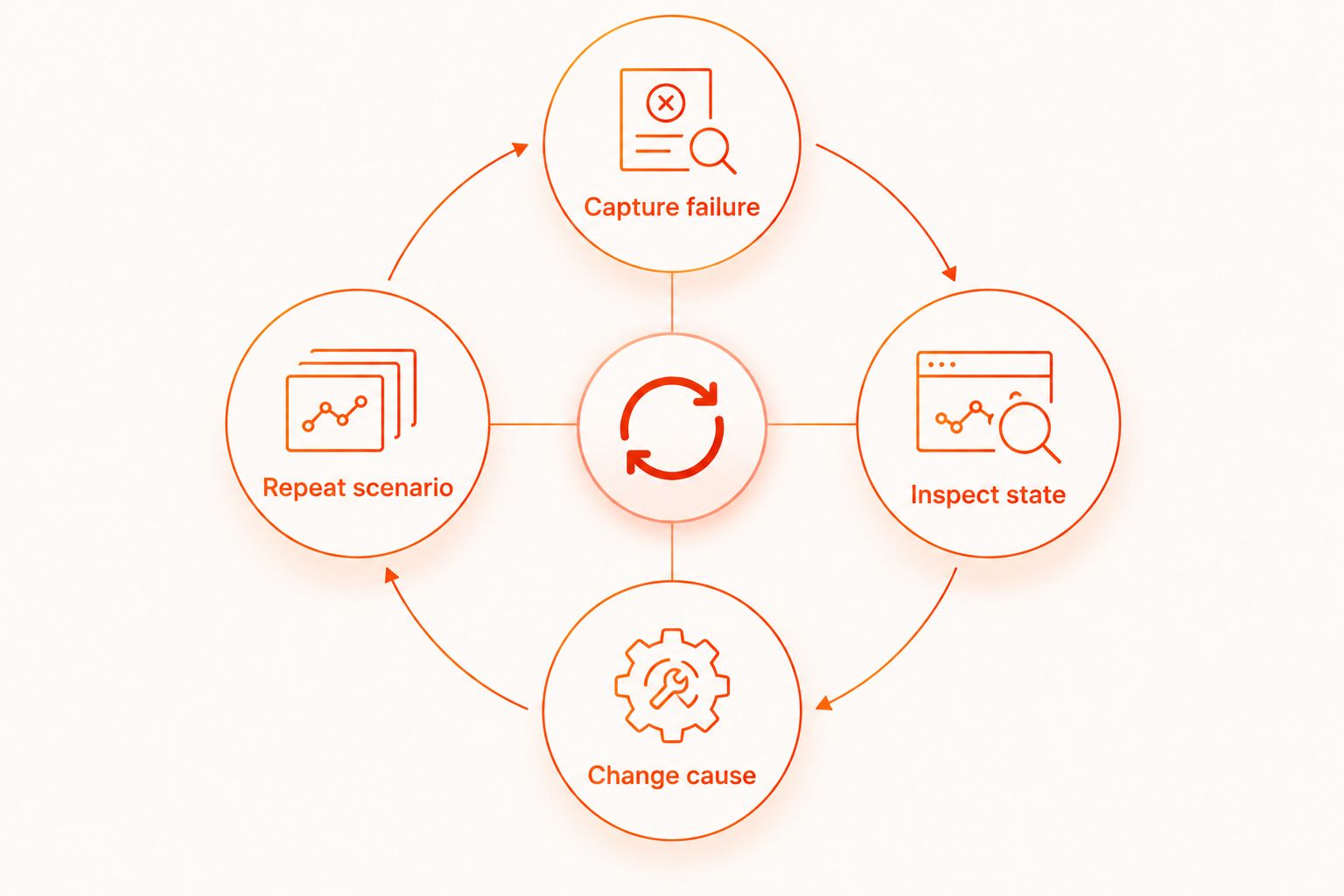
Keep a short investigation note beside the fix. State the failed assumption, the evidence that exposed it, and the correction. That note is more useful than a commit message that only says the test is now stable.
For a 2026 release checklist, require an explanation of the change rather than a claim that the latest run passed. A clean result is evidence about that execution; it is not a guarantee about every future execution.
When should you add retries to flaky UI tests?
Add retries only after you define the condition they are intended to handle and decide how the initial failure remains visible. Do not make retries the default response to an unexplained failure.
A retry policy should answer these questions:
- Which failures qualify for another attempt?
- What state is reset before that attempt?
- Where are the original artifacts retained?
- How is a pass after failure reported?
- Who investigates recurring failures?
Keep a pass after retry distinguishable from a clean pass. Otherwise, the release result hides information your team needs to maintain the suite.
For your 2026 workflow, make the treatment of intermittent failures explicit. If you temporarily remove a scenario from release blocking, assign an owner and a condition for restoring it. Do not let quarantine become an untracked deletion of coverage.
Do you need cloud execution to diagnose flaky tests?
Cloud execution is optional for local flow development. Maestro Deck's free local desktop runner and inspector support writing and executing Maestro YAML flows; paid cloud execution is a separate choice when you need to scale execution or run tests from CI.
Maestro Deck is best for developers who want a free local runner and inspector for Maestro YAML flows. Local execution does not require a paid cloud plan. Its limit is scope: investigating locally does not establish that the same flow behaves identically under different execution conditions.
Keep the product distinction clear. Maestro Deck provides a runner and inspector for flows written for the Maestro framework; the product and framework names are not interchangeable. Maestro Deck is source-available, which is not the same licensing claim as open source.
Before adding cloud execution in 2026, define the execution targets, required artifacts, test-data handling, and CI outcome you need. Simulator or emulator support does not establish physical-device availability.
Evaluate optional cloud execution
Keep local debugging free. Review cloud plans when you need CI execution or additional execution capacity.
FAQ
What's the best way to diagnose a flaky UI test?
Preserve the initial failure and find the first state that differs from the flow's expectations. Inspect the target, readiness condition, and prerequisites before changing the retry policy.
Should I add retries before investigating a flaky test?
No. Investigate the original failure first, because a passing rerun does not explain why the earlier attempt failed. Keep both outcomes visible if retries are enabled.
Why does my UI test pass locally but fail in CI?
The cause must be established by comparing the failing CI execution with the local execution. Check the application build, target configuration, prerequisites, concurrency, and service responses rather than assuming the failure is a timing problem.
Do fixed waits fix asynchronous UI tests?
Fixed waits measure elapsed time rather than application readiness. Use a supported condition-based synchronization mechanism when the next action depends on an observable application state.
Do I need paid cloud execution to use the local runner?
No. The local desktop runner is free, and paid cloud execution is optional. Choose cloud execution when its documented capabilities match your CI or execution requirements.
Is a test stable if it passes after a retry?
A pass after a retry does not establish stability or identify the original cause. Retain the failed attempt and investigate recurring intermittent behavior.
Does simulator support mean I can test on physical devices?
No. Simulator and emulator support do not establish physical-device availability. Confirm the execution target explicitly before selecting a testing service.
One last thing
A useful regression test must also fail for the right reason. After correcting an unreliable assertion, deliberately introduce the relevant incorrect state in a safe test environment and confirm that the assertion catches it.
Do not stop at making the flow green. Confirm that the test still protects the behavior you intended to check.


