

Multilingual mobile app UI testing is the practice of checking translated screens and user journeys with the aim of shipping working releases across supported languages. Maestro Deck’s free, source-available local desktop runner lets you write, execute, and inspect Maestro YAML flows; this guide explains how to choose UI testing tools and build a multilingual release workflow in 2026.
- Maestro Deck is best for developers who want a free local runner for Maestro YAML flows.
- Choose UI testing tools that separate stable interaction selectors from localized text assertions.
- Multilingual mobile testing needs functional checks, translation checks, and visual review—not automation alone.
- Start locally; add cloud execution when CI or execution capacity becomes a requirement.
Why UI testing matters for multilingual mobile apps
A translated screen can display the right words and still block a purchase, hide a confirmation button, or send the user back to the wrong language. Your tests need to check both the journey and its localized presentation.
Multilingual teams also have two different assertions to maintain: whether an action works and whether its wording is correct. Combining them makes a copy edit look like a functional regression. Keep interaction targets stable; assert translations separately.
Maestro Deck provides a local desktop runner and inspector for iOS, Android, and web flows. Its source-available licensing is distinct from open-source licensing; assess the license terms against your intended use rather than treating those labels as interchangeable.
For your 2026 release checklist, define what automation must prove and what still needs a person. A passing flow proves only the conditions it actually checks, not that every translation or layout is correct.
Build a multilingual testing workflow
Define your language coverage
Start manually. List supported languages, critical journeys, and the screens where a language change affects behavior. Use a spreadsheet or a version-controlled document before choosing an execution service.
Treat language, region, and text direction as separate inputs. A language selection does not by itself specify date formatting, currency presentation, or the expected reading direction of every piece of content.
For an initial check, compare 2 supported locales on the same journey: your default locale and a contrasting locale from your actual support list. This is a starting scope, not a claim of sufficient coverage. Expand it to match what you ship.
- Record the app language and device locale separately.
- Identify journeys that block sign-in, purchasing, or account access.
- Include right-to-left layouts if your app supports them.
- Record region-sensitive dates, amounts, and addresses.
- Assign an owner to approve expected translations.
Separate selectors from translated copy
Inspect the app’s accessibility information manually before writing a flow. Find out which identifiers remain stable when the language changes. Agree on those identifiers with the developers who own the screens.
Prefer a stable identifier for an interaction when your application exposes one. Then add a separate assertion for the expected localized label. This lets a translation change fail the copy check without changing how the flow finds the control.
The desktop inspector gives you a local way to examine the screen while working on Maestro YAML flows. Keep the distinction clear: Maestro is the testing framework; Maestro Deck is a desktop runner and inspector for its flows. Do not assume the projects are affiliated.
Use the guide to selectors that survive layout changes when defining the contract between your app and its tests.
- Give critical controls stable accessibility identifiers where supported.
- Avoid coordinates as the default way to find translated controls.
- Assert visible wording separately from navigation behavior.
- Check that repeated labels do not select the wrong element.
- Review identifiers when screens or accessibility structures change.
Control language and app state
First, reproduce the setup by hand: choose the language, clear or prepare the account, launch the app, and follow the journey. Write down every dependency. If the manual setup is ambiguous, the automated result will be ambiguous too.
Use 1 explicit starting state per flow. A test that inherits yesterday’s selected language can pass without exercising the language setup you intended to verify. Likewise, a returning account can bypass onboarding entirely.
Keep locale-specific test data deliberate. A translated screen populated with unsuitable names, addresses, or dates does not exercise the same conditions as representative content. Use synthetic data instead of copying production customer records into a fixture.
- Declare the intended app language before the journey begins.
- Set the device locale separately when the scenario requires it.
- Prepare account state so the required screens actually appear.
- Use synthetic names and addresses appropriate to the scenario.
- Record the app build and environment with the result.
Check behavior, wording, and layout separately
Run the journey manually before automating it. Confirm the intended outcome, read the translated content, and inspect the screen at the display settings your app supports. These checks answer different questions.
Organize coverage into 3 layers: behavior, wording, and layout. Behavior checks prove that a user can finish a task. Wording checks compare visible content with approved expectations. Layout review catches problems such as clipping, overlap, and incorrect visual ordering.
A successful tap does not prove that the button’s complete label was readable. Likewise, a screenshot does not prove that the control opened the correct destination. Use each check for the evidence it supplies.
- Assert a meaningful destination or state after each critical action.
- Check important labels against approved localized wording.
- Review long labels, validation messages, and empty states.
- Inspect supported text-size settings for clipped controls.
- Review mixed-direction content where your app supports it.
Debug locally before adding CI
Reproduce a failing journey locally before distributing it across an execution service. Keep the app build, language, account state, and flow constant. Change one input at a time so you can identify the cause.
For local development, Maestro Deck supports writing, executing, and inspecting Maestro YAML flows. The benefit is a local editing and debugging workflow. The limitation is scope: local execution does not establish coverage across every device or environment your users have.
For your 2026 workflow, add paid cloud execution when you need CI runs or more execution capacity—not as a prerequisite for authoring tests locally. Confirm the execution environment before treating a cloud result as device coverage. A simulator or emulator is not a physical device.
- Reproduce the failure with the same build and locale.
- Inspect the failing screen before changing the flow.
- Separate application defects from selector or fixture defects.
- Remove dependencies on state left by an earlier run.
- Confirm the cloud environment matches the coverage you need.
Gate releases on meaningful evidence
Start with a manual release checklist that names the required journeys and languages. Then automate the checks that have explicit setup, observable outcomes, and an owner who can investigate failures.
A release gate needs a decision rule, not just a green status. Define which failures block shipping and which require review. A missing payment confirmation and a punctuation disagreement should not enter the same triage queue without context.
Keep the 2026 release matrix readable. Record locale coverage against journeys rather than reporting only a total test count. A large suite can still leave an entire translated onboarding path unchecked.
- Name the journeys and locales required for release approval.
- Define blocking outcomes before a failure occurs.
- Attach the locale, build, environment, and failed assertion.
- Assign translation and application failures to different owners where appropriate.
- Review coverage when adding a language or changing a critical screen.
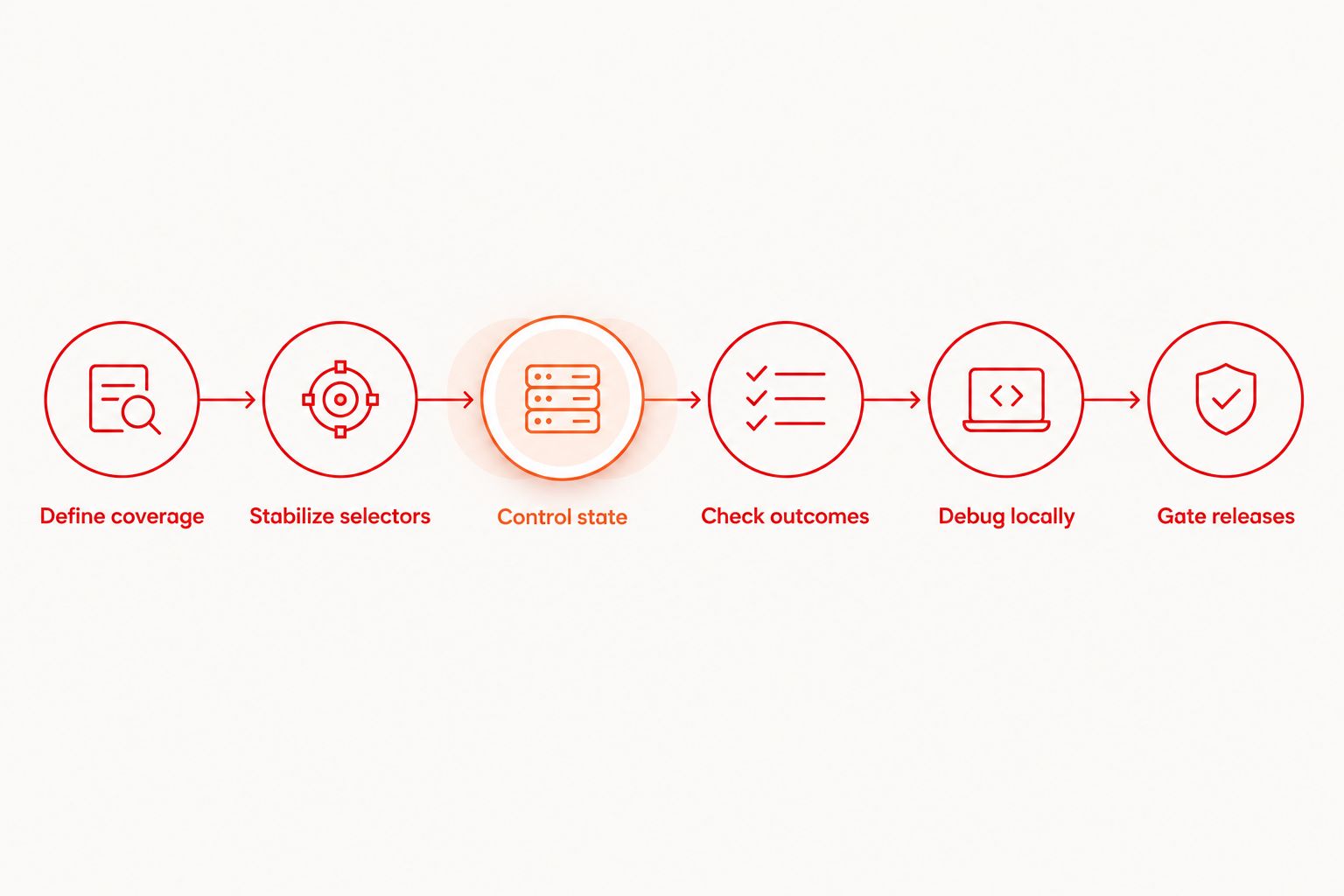
The workflow has a simple sequence: define coverage, stabilize selectors, control state, check outcomes, debug locally, then gate releases. Cloud execution belongs after you have a flow whose result you can explain.
Compare testing options for your team
Choose the option that answers your next release question. Manual review, a local runner, and cloud execution serve different purposes; none removes the need to define expected behavior and approved translations.
For a 2026 evaluation, use your own difficult screen and critical journey as the acceptance test. Do not choose from a generic feature count. Confirm supported environments and integration requirements before committing your release workflow.
| Option | Best for | Main benefit | Key limitation |
|---|---|---|---|
| Manual localized review | Translation meaning and visual judgment | Lets reviewers examine wording in its screen context | Depends on reviewer availability and repeatable instructions |
| Maestro Deck local runner | Developers writing and debugging Maestro YAML flows | Provides a free local runner and inspector for iOS, Android, and web testing | Local runs do not establish coverage across all target environments |
| Cloud execution | Teams needing CI execution or additional run capacity | Moves execution beyond an individual developer’s local session | Requires checking environment coverage, data handling, and service terms |
Best for local flow development: Maestro Deck. Best for translation approval: a reviewer working from explicit expectations. Add cloud execution for an execution requirement, not to compensate for unclear assertions.
Before choosing a hosted service, ask where test artifacts go, which environments execute the flow, and how credentials enter the run. Keep those answers separate from claims about the local runner.
Evaluate cloud execution
Keep local development separate. Review cloud execution when CI or run capacity becomes a requirement.
Common mistakes multilingual mobile teams make
Using translated text as every selector
A copy change then changes the interaction mechanism as well as the expected result. Use stable identifiers for actions where available, and keep targeted text assertions for the wording you need to verify. Text-based interaction still has a place when the wording itself is the test subject.
Treating translated screenshots as functional coverage
A screen can look correct while its primary action opens the wrong destination. Pair visual review with assertions about the completed task. Conversely, do not treat a completed task as proof that labels are readable or translations are appropriate.
Testing language changes only from a clean install
Returning users can have saved preferences, existing sessions, and content created under another locale. Include both initial language selection and an in-app language change when your app supports those journeys. Check what happens after relaunch instead of assuming persistence works.
Calling emulator coverage physical-device coverage
These are different execution environments. Label results accurately and make any physical-device requirement explicit. Buying cloud execution does not, by itself, prove that a flow ran on physical hardware or covered your required device configuration.
Asking automation to approve translation meaning
An assertion can compare displayed content with an expected string; it does not establish that the expected translation is appropriate. Have a qualified reviewer approve the wording. Then use automation to detect deviations from that approved expectation.
FAQ
What are the best UI testing tools for multilingual mobile apps?
Choose tools that let you target controls consistently and check localized outcomes separately. Maestro Deck is a fit for developers who want a free local runner and inspector for Maestro YAML flows; retain human review for translation meaning and visual judgment.
Can I test different languages with the same flow?
Reuse a flow when the journey and interaction targets remain the same across languages. Keep locale setup and expected wording explicit, and create separate scenarios when behavior genuinely differs.
Should I use translated text or accessibility identifiers for selectors?
Prefer stable accessibility identifiers for interactions when your app exposes them. Use separate text assertions to verify translations, and use text-based interaction deliberately when the wording itself is under test.
Does a passing UI test prove the translation is correct?
No. A passing UI test proves only the conditions it checks. Translation meaning needs approved expectations and contextual review; layout also needs checks beyond successful navigation.
Do I need paid cloud execution to start testing?
No. You can start with the free local desktop runner and develop your flows locally. Treat paid cloud execution as an optional next step when CI execution or run capacity becomes a requirement.
Is Maestro Deck the same as the Maestro framework?
No. Maestro Deck is a desktop runner and inspector for writing and executing Maestro YAML flows, while Maestro is the testing framework. Do not infer affiliation from compatible flow formats.
How should I test right-to-left mobile layouts?
Use a supported right-to-left locale and check navigation, alignment, mixed-direction content, and critical actions. Combine functional assertions with visual review rather than assuming a successful tap proves the layout is correct.
One last thing
Test a language change halfway through a real journey. If your app supports changing language during a session, check the next screen, the back path, and the result after relaunch. That scenario tests state continuity, not just translated labels—and deserves an explicit place in your 2026 release checklist.


